Page 92 of 442

90 Controls in detailLocking and unlocking
The SmartKey will then function as
follows:
Unlocking driver’s door and fuel filler
flap
�
Press buttonΠonce.
All turn signal lamps flash once. The
locking knob in the driver's door moves
up. The anti-theft alarm system* is
switched off.
Global unlocking
�
Press buttonΠtwice.
All turn signal lamps flash once. The
locking knobs in the doors move up.
The anti-theft alarm system* is
switched off.Global locking
�
Press button‹.
All turn signal lamps flash three times.
The locking knobs in the doors move
down. The anti-theft alarm system* is
activated.
Restoring to factory setting
�
Press and hold buttonsŒ and‹
simultaneously for about six seconds
until battery check lamp5 flashes
twice.
!If you can no longer lock or unlock the
vehicle with the SmartKey, then either
the batteries in the SmartKey are dis-
charged, the SmartKey is malfunction-
ing or the vehicle battery is drained.�
Check the batteries in the
SmartKey (
�page 91) and replace
them if necessary (
�page 343).
�
Use the mechanical key to unlock
the driver’s door (
�page 337) and
the trunk lid (
�page 338).
�
Use the mechanical key to lock the
driver’s door (
�page 338).
�
Have the vehicle battery and the
battery connections checked
(�page 360).
If the SmartKey is malfunctioning,
contact an authorized Mercedes-Benz
Center.
��
Page 96 of 442

94 Controls in detailLocking and unlockingClosing the trunk
1Handle�
Lower trunk lid using handle1.
�
Close trunk lid with hands placed flat
on it.
Warning!
G
To prevent possible personal injury, always
keep hands and fingers away from the trunk
opening when closing the trunk. Be espe-
cially careful when small children are
around.
When leaving the vehicle, always remove the
SmartKey from the starter switch, take it
with you and lock your vehicle. Do not leave
children unattended in the vehicle, or with
access to an unlocked vehicle. Unsuper-
vised use of vehicle equipment may cause
an accident and/or serious personal injury.
Warning!
G
Only drive with the trunk closed as, among
other dangers such as visibility blockage,
exhaust fumes may enter the vehicle
interior.iDo not place the SmartKey in the open
trunk. You may lock yourself out.iIf the vehicle was previously centrally
locked, the trunk lid will lock automati-
cally after closing it. The turn signals
will flash three times to confirm lock-
ing.
Page 111 of 442
109 Controls in detail
Lighting
�Lighting
For information on how to switch on the
headlamps and use the turn signals, see
“Switching on headlamps” (
�page 49)
and “Turn signals” (
�page 50).
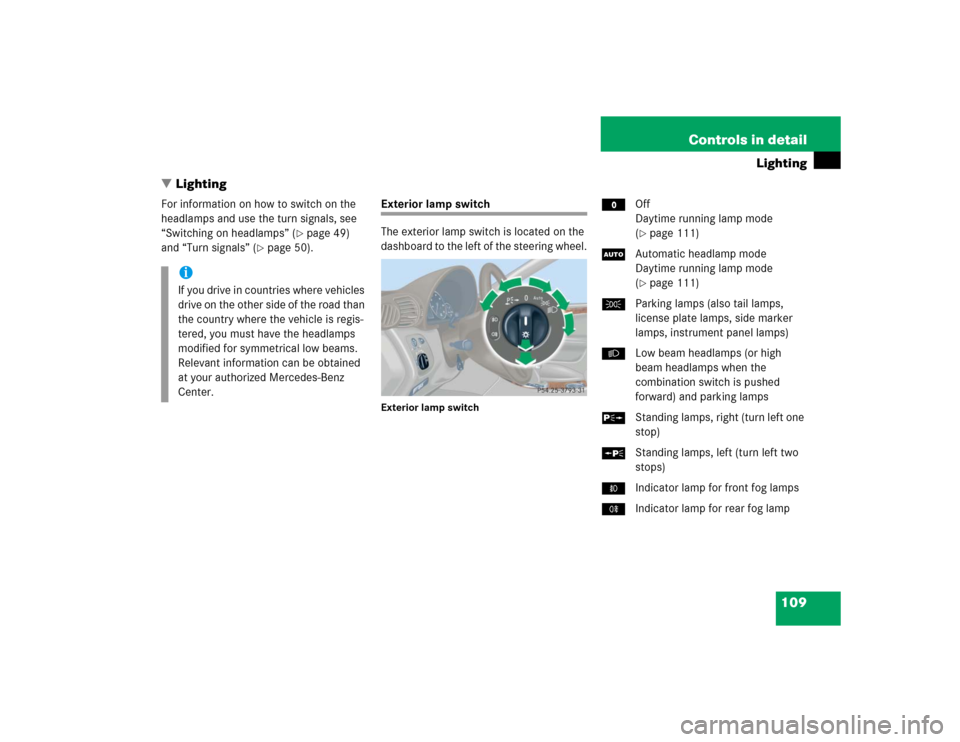
Exterior lamp switch
The exterior lamp switch is located on the
dashboard to the left of the steering wheel.Exterior lamp switch
MOff
Daytime running lamp mode
(
�page 111)
UAutomatic headlamp mode
Daytime running lamp mode
(�page 111)
CParking lamps (also tail lamps,
license plate lamps, side marker
lamps, instrument panel lamps)
BLow beam headlamps (or high
beam headlamps when the
combination switch is pushed
forward) and parking lamps
ˆStanding lamps, right (turn left one
stop)
‚Standing lamps, left (turn left two
stops)
‡Indicator lamp for front fog lamps
†Indicator lamp for rear fog lamp
iIf you drive in countries where vehicles
drive on the other side of the road than
the country where the vehicle is regis-
tered, you must have the headlamps
modified for symmetrical low beams.
Relevant information can be obtained
at your authorized Mercedes-Benz
Center.
Page 116 of 442
114 Controls in detailLightingHazard warning flasher
The hazard warning flasher can be
switched on at all times, even with the
SmartKey removed from the starter
switch.
The hazard warning flasher switches on
automatically when an air bag deploys.
The hazard warning flasher switch is
located on the upper part of the center
console.
1Hazard warning flasher switchSwitching on hazard warning flasher
�
Press hazard warning flasher
switch1.
All turn signals are flashing.Switching off hazard warning flasher
�
Press hazard warning flasher switch1
again.
iWith the hazard warning flasher
activated and the combination switch
set for either left or right turn, only the
respective turn signals will operate
when the ignition is switched on.
iIf the hazard warning flasher has been
activated automatically, press hazard
warning flasher switch1 once to
switch it off.
Page 202 of 442

200 Controls in detailAudio systemTuning via scan search
Scan search is characterized as follows:�
Scan search plays a channel for
approx. eight seconds and then skips
to the next channel within the current
category.
�
Scan search can be terminated
manually.
�
Press
SC soft key.
The search starts. SC appears in the
display.
�
Press
SC soft key again.
The search stops.Obtaining additional text information
Additional text information (artist, title)
related to the current channel can be
displayed.
�
Press
INF
soft key.
The title being played is displayed.
�
Press
INF
soft key again.
The name of the artist performing the
title being played is displayed.Storing stations
�
Tune in desired station.
�
Press and hold desired station
button1 to R until a brief signal
tone is heard.
The frequency is stored on the selected
station button.
The radio saves the current station at
the memory preset selected. The
memory preset selected appears in the
status line, e.g. S3.
iIf a button is not pressed within
four seconds, the radio will return to
the standard display.
iThere are ten presets available.
An existing entry is overwritten in the
memory list when a new entry is given.
Page 261 of 442

259 Controls in detail
Useful features
Step 7:�
To program the remaining two buttons,
repeat the steps above starting with
step 3.Rolling code programming
To train a garage door opener (or other
rolling code devices) with the rolling code
feature, follow these instructions after
completing the “Programming” portion
(steps 1 through 6) of this text. (A second
person may make the following training
procedures quicker and easier.)
Step 8:
�
Locate “training” button on the garage
door opener motor head unit.
Exact location and color of the button
may vary by garage door opener brand.
Depending on manufacturer, the
“training” button may also be referred
to as “learn”or “smart” button. If there
is difficulty locating the transmitting
button, refer to the garage door opener
operator’s manual. Step 9:
�
Press “training” button on the garage
door opener motor head unit.
The “training light” is activated.
You have 30 seconds to initiate the
following step.
Step 10:
�
Firmly press, hold for two seconds and
release the programmed integrated
signal transmitter button (2, 3
or4).
Step 11:
�
Press, hold for two seconds and
release same button a second time to
complete the training process.
Some garage door openers (or other rolling
code equipped devices) may require you to
perform this procedure a third time to
complete the training.
iIf the indicator lamp1 flashes rapidly
for about two seconds and then turns
to a constant light, continue with
programming steps 8 through 12 as
your garage door opener may be
equipped with the “rolling code”
feature.
��
Page 299 of 442

297 Operation
Vehicle care
Engine cleaning
Prior to cleaning the engine compartment,
make sure to protect electrical compo-
nents and connectors from the intrusion of
water and cleaning agents.
Corrosion protection, such as MB Anticor-
rosion Wax, should be applied to the
engine compartment after every engine
cleaning. Before applying, all control
linkage bushings and joints should be
lubricated. The poly-V-belt and all pulleys
should be protected from any wax.Vehicle washing
Do not use hot water or wash your vehicle
in direct sunlight. Only use a mild car wash
detergent, such as Mercedes-Benz
approved Car Shampoo.
Thoroughly spray the vehicle with a dif-
fused jet of water. Direct only a very weak
spray towards the ventilation intake. Use
plenty of water and rinse the sponge and
chamois frequently.
Rinse with clear water and thoroughly dry
with a chamois. Do not allow cleaning
agents to dry on the finish.
Due to the width of the vehicle, fold in
exterior rear view mirrors prior to running
the vehicle through an automatic car wash
to prevent damage to the mirrors.
In the winter, thoroughly remove all traces
of road salt as soon as possible.
When washing the underbody, do not
forget to clean the inner sides of the
wheels.Ornamental moldings
For regular cleaning and care of very dirty
chrome-plated parts, use a chrome
cleaner.
Headlamps, tail lamps, side markers,
turn signal lenses
Use a mild car wash detergent, such as
Mercedes-Benz approved Car Shampoo,
with plenty of water.
To prevent scratches, never apply strong
force and only use a soft, non-scratchy
cloth when cleaning the lenses. Do not
attempt to wipe dirty lenses with a dry
cloth or sponge.
Page 328 of 442

326 Practical hintsWhat to do if …Display symbol
Display message
Possible cause
Possible solution
.
Turn signal
left front
The left front turn signal lamp is
malfunctioning.
�
Replace the bulb as soon as possible.
Turn signal
right front
The right front turn signal lamp is
malfunctioning.
�
Replace the bulb as soon as possible.
Turn signal
left mirror
The left turn signal in the side mirror is
malfunctioning. This message will only
appear if all light emitting diodes have
stopped working.
�
Visit an authorized Mercedes-Benz
Center as soon as possible.
Turn signal
right mirror
The right turn signal in the side mirror is
malfunctioning. This message will only
appear if all light emitting diodes have
stopped working.
�
Visit an authorized Mercedes-Benz
Center as soon as possible.
Turn signal
left rear
Substitute bulb on
The left rear turn signal lamp is
malfunctioning.
A substitute bulb is being used.
�
Replace the bulb as soon as possible.
Turn signal
right rear
Substitute bulb on
The right rear turn signal lamp is
malfunctioning.
A substitute bulb is being used.
�
Replace the bulb as soon as possible.
