2005 LINCOLN LS reset
[x] Cancel search: resetPage 4 of 320
CALIFORNIA Proposition 65 Warning
WARNING:Engine exhaust, some of its constituents, and
certain vehicle components contain or emit chemicals known to
the State of California to cause cancer and birth defects or other
reproductive harm. In addition, certain fluids contained in vehicles and
certain products of component wear contain or emit chemicals known
to the State of California to cause cancer and birth defects or other
reproductive harm.
CONGRATULATIONS
Congratulations on acquiring your new Lincoln. Please take the time to
get well acquainted with your vehicle by reading this handbook. The
more you know and understand about your vehicle, the greater the
safety and pleasure you will derive from driving it.
For more information on Ford Motor Company and its products visit the
following website:
•In the United States: www.ford.com
•In Canada: www.ford.ca
•In Mexico: www.ford.com.mx
•In Australia: www.ford.com.au
Additional owner information is given in separate publications.
ThisOwner’s Guidedescribes every option and model variant available
and therefore some of the items covered may not apply to your
particular vehicle. Furthermore, due to printing cycles it may describe
options before they are generally available.
Remember to pass on theOwner’s Guidewhen reselling the vehicle. It
is an integral part of the vehicle.
Fuel pump shut-off switch:In the event of an accident the
safety switch will automatically cut off the fuel supply to the
engine. The switch can also be activated through sudden vibration (e.g.
collision when parking). To reset the switch, refer to theFuel pump
shut-off switchin theRoadside Emergencieschapter.
REVIEW COPY
2005 Lincoln LS(dew), Owners Guide (post-2002-fmt)(own2002),
Market:USA_English(fus)
Introduction
Introduction
4
Page 8 of 320

These are some of the symbols you may see on your vehicle.
Vehicle Symbol Glossary
Safety Alert
See Owner’s Guide
Fasten Safety BeltAir Bag-Front
Air Bag-SideChild Seat
Child Seat Installation
WarningChild Seat Lower
Anchor
Child Seat Tether
AnchorBrake System
Anti-Lock Brake SystemBrake Fluid -
Non-Petroleum Based
Powertrain MalfunctionSpeed Control
Master Lighting SwitchHazard Warning Flasher
Fog Lamps-FrontFuse Compartment
Fuel Pump ResetWindshield Wash/Wipe
Windshield
Defrost/DemistRear Window
Defrost/Demist
REVIEW COPY
2005 Lincoln LS(dew), Owners Guide (post-2002-fmt)(own2002),
Market:USA_English(fus)
Introduction
8
Page 14 of 320

WARNING CENTER
The instrument cluster is equipped with a warning center that will
provide the following warning messages:
Bulb warning:Displays when one
of the exterior front turn/park lamps
or rear brake/turn/tail lamps bulb
has burned out. Depress the RESET
control to return to the Trip odometer display.
Park brake ON:Displayed when
the park brake is ON. If the warning
stays on after the park brake is off,
contact your dealer as soon as
possible.
Park brake ON & needs service:
Displayed when the park brake is
ON and malfunctioning. If the
warning stays on or continues to
come on, contact your dealer as soon as possible.
Service park brake:Displayed
when the park brake needs
servicing. If the warning stays on or
continues to come on, contact your
dealer as soon as possible.
Apply park brake:Displayed when
the park brake needs to be applied.
If the warning stays on or continues
to come on, contact your dealer as
soon as possible.
Foot on brake:Displayed when the
foot brake needs to be applied. If
the warning stays on or continues to
come on, contact your dealer as
soon as possible.
Key-in-ignition warning chime:Sounds when the key is left in the
ignition in the OFF/LOCK or ACCESSORY position and the driver’s door
is opened.
Headlamps on warning chime:Sounds when the headlamps or parking
lamps are on, the ignition is off (the key is not in the ignition) and the
driver’s door is opened.
REVIEW COPY
2005 Lincoln LS(dew), Owners Guide (post-2002-fmt)(own2002),
Market:USA_English(fus)
Instrument Cluster
14
Page 16 of 320

•Optional instrument cluster
Trip odometer:Registers the miles (kilometers) of individual journeys.
To reset, depress the RESET control. To switch the display from Trip A
to the Trip B, depress the A/B control.
•Standard instrument cluster
•Optional instrument cluster
Tachometer:Indicates the engine
speed in revolutions per minute.
Driving with your tachometer
pointer continuously at the top of
the scale may damage the engine.
Fuel gauge:Indicates
approximately how much fuel is left
in the fuel tank (when the ignition
is in the ON position). The fuel
gauge may vary slightly when the
vehicle is in motion or on a grade.
Refer toFilling the tankin the
Maintenance and Specificationschapter for more information.
REVIEW COPY
2005 Lincoln LS(dew), Owners Guide (post-2002-fmt)(own2002),
Market:USA_English(fus)
Instrument Cluster
16
Page 19 of 320

Traffic:In FM mode with RDS ON, this feature allows you to hear traffic
broadcasts. With the feature ON, press SEEK or SCAN to find a station
broadcasting a traffic report (if it is broadcasting RDS data).Traffic
information is not available in most U.S. markets.
FIND Program type:In FM mode and with RDS ON, this feature allows
you to search RDS-equipped stations for a certain category of music
format: Classic, Country, Info, Jazz, Oldies, R&B, Religious, Rock, Soft,
Top 40. Select type them press SEEK or SCAN.
Show TYPE:In FM mode with RDS ON, this feature displays the
station’s call letters and format.
Shuffle:With a CD playing, press to play tracks in a random order.
Press MENU until SHUF appears in the display. Use SEL to select SHUF
DISC, SHUF TRAC or SHUF OFF.
Compression:With a CD playing, this feature brings soft and loud CD
passages together for a more consistent listening level. Press MENU until
compression status is displayed. Press the SEL control to enable the
compression feature when COMP OFF is displayed. Press the SEL
control again to disable the feature when COMP ON is displayed.
Setting the clock:Press MENU until SELECT HOUR or SELECT MINS
is displayed. Use SEL to manually increase (
) or decrease () the
hours/minutes. Press MENU again to disengage clock mode.
10.Memory presets:To set a
station: Select frequency band
AM/FM1/FM2; tune to a station,
press and hold a preset button until
sound returns.
11.SAT (if equipped):Your
Audiophile radio comes equipped
with Satellite Ready capability. The
kit to enable the Satellite reception is available through your Lincoln
dealer. Detailed satellite instructions are included with the dealer
installed kit.Dealer installed satellite kit available only in the
continental United States.
12.AM/FM:Press to select
AM/FM1/FM2 frequency band.
Autoset:Allows you to set the
strongest local radio stations without losing your original manually set
preset stations for AM/FM1/FM2 . Press and momentarily hold AM/FM.
AUTOSET will flash on the display. When the six strongest stations are
REVIEW COPY
2005 Lincoln LS(dew), Owners Guide (post-2002-fmt)(own2002),
Market:USA_English(fus)
Entertainment Systems
19
Page 20 of 320

filled, the station stored in preset 1 will begin playing. If there are less
than six strong stations, the system will store the last one in the
remaining presets. Press again to disengage.
13.Power/volume:Press to turn
ON/OFF; turn to increase or
decrease volume levels.
Speed sensitive volume:Radio
volume changes automatically and
slightly with vehicle speed to
compensate for road and wind noise. Recommended level is 1–3. Level 0
turns the feature off and level 7 is the maximum setting.
Press and hold the volume control for five seconds. Then press SEL to
increase (
) or decrease () the volume setting. The level will
appear in the display.
14.Load:Press to load a CD. Press
and hold to load up to six discs.
15.CD AUX:Press to access CD or
AUX mode.
CD units are designed to play
commercially pressed 4.75 in (12 cm) audio compact discs only.
Due to technical incompatibility, certain recordable and
re-recordable compact discs may not function correctly when
used in Ford CD players. Irregular shaped CDs, CDs with a
scratch protection film attached, and CDs with homemade paper
(adhesive) labels should not be inserted into the CD player. The
label may peel and cause the CD to become jammed. It is
recommended that homemade CDs be identified with permanent
felt tip marker rather than adhesive labels. Ballpoint pens may
damage CDs. Please contact your dealer for further information.
16.Scan:Press SCAN to hear a
brief sampling of radio stations or
CD tracks. Press again to stop.
17.Disc/Tune:Press
orto
manually tune down/up the radio
frequency band, or to listen to the
previous/next track on the CD.
CAT:CAT is only available when equipped with Satellite Radio. Your
Audiophile radio comes equipped with Satellite ready capability. The kit
REVIEW COPY
2005 Lincoln LS(dew), Owners Guide (post-2002-fmt)(own2002),
Market:USA_English(fus)
Entertainment Systems
20
Page 36 of 320

Volume/power control
Press knob to turn the audio system
on/off. Turn to raise or lower
volume. The levels will be displayed
on the screen.
To activate the navigation mode,
press MAP or DEST.
To adjust the navigation voice output level, select the NAV MENU button
via the map screen.
Speed compensated volume (SCV)
With this feature, radio volume changes automatically with vehicle speed
to compensate for road and wind noise. To engage the SCV feature:
1. Press AUDIO.
2. Press SOUND.
SOUND
AM
FM1
FM2
CDSEEK
TUNE
PRESET SCANAUTO SET
SCAN
RDS
TRAFFIC
INFO PTYSET PTY
87.9
89.9 98.1
98.5 106.3 107.9
REVIEW COPY
2005 Lincoln LS(dew), Owners Guide (post-2002-fmt)(own2002),
Market:USA_English(fus)
Entertainment Systems
36
Page 37 of 320
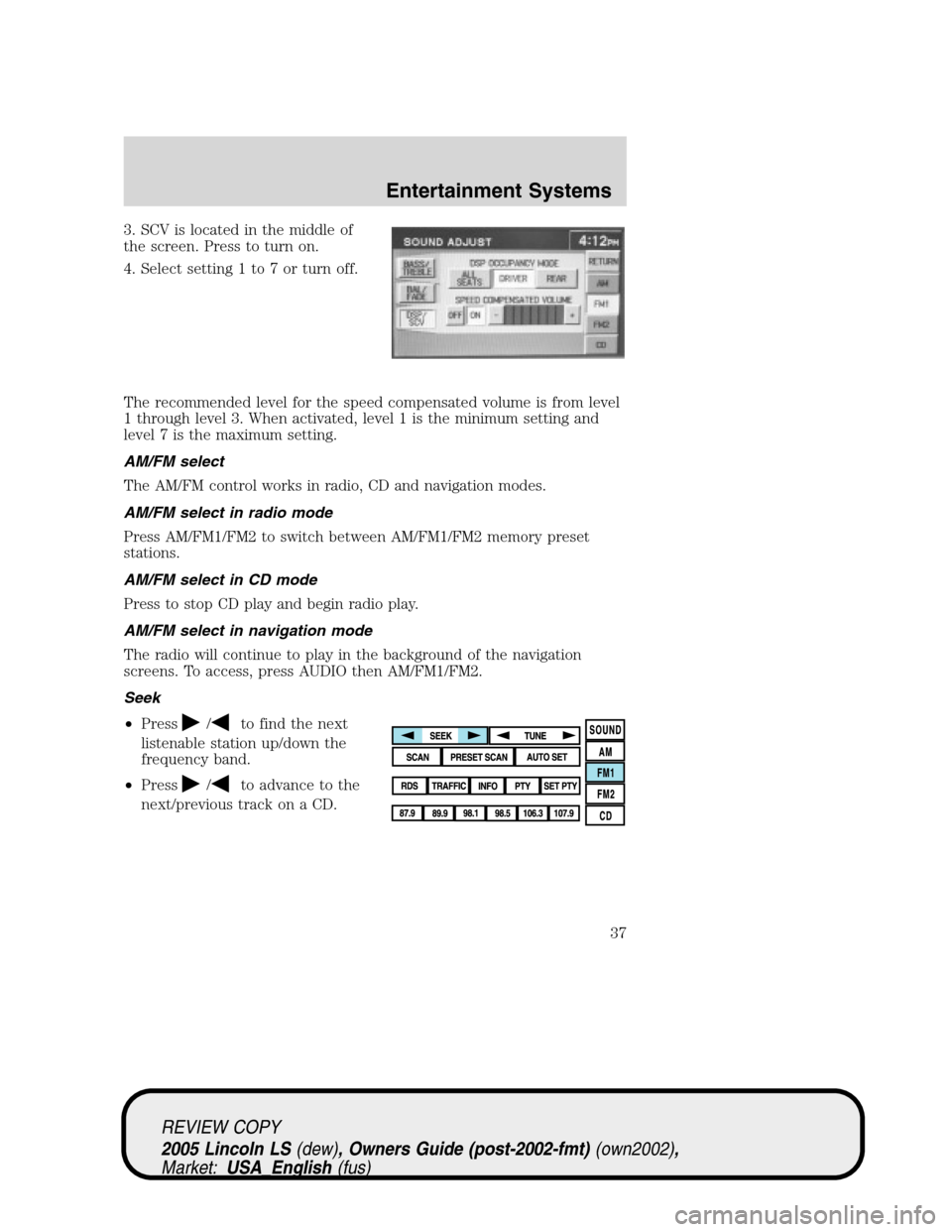
3. SCV is located in the middle of
the screen. Press to turn on.
4. Select setting 1 to 7 or turn off.
The recommended level for the speed compensated volume is from level
1 through level 3. When activated, level 1 is the minimum setting and
level 7 is the maximum setting.
AM/FM select
The AM/FM control works in radio, CD and navigation modes.
AM/FM select in radio mode
Press AM/FM1/FM2 to switch between AM/FM1/FM2 memory preset
stations.
AM/FM select in CD mode
Press to stop CD play and begin radio play.
AM/FM select in navigation mode
The radio will continue to play in the background of the navigation
screens. To access, press AUDIO then AM/FM1/FM2.
Seek
•Press
/to find the next
listenable station up/down the
frequency band.
•Press
/to advance to the
next/previous track on a CD.
REVIEW COPY
2005 Lincoln LS(dew), Owners Guide (post-2002-fmt)(own2002),
Market:USA_English(fus)
Entertainment Systems
37