Page 38 of 320
Tune adjust
Press TUNE to manually move
down/up (
/) the frequency
band.
In CD mode, press TRACK to select
the previous/next (
/).
Scan
Press SCAN for a brief sampling of
all listenable stations and CD tracks.
Press again to disable and remain on
the current selection.
Preset scan
Press PRESET SCAN to scan the
stations stored in the memory
presets.
Autoset memory preset
Autoset allows you to set strong radio stations without losing your
original manually set preset stations. This feature is helpful on trips
when you travel between cities with different radio stations.
SOUND
AM
FM1
FM2
CDSEEK
TUNE
PRESET SCANAUTO SET
SCAN
RDS
TRAFFIC
INFO PTYSET PTY
87.9
89.9 98.1
98.5 106.3 107.9
SOUND
AM
FM1
FM2
CDSEEK
TUNE
PRESET SCANAUTO SET
SCAN
RDS
TRAFFIC
INFO PTYSET PTY
87.9
89.9 98.1
98.5 106.3 107.9
REVIEW COPY
2005 Lincoln LS(dew), Owners Guide (post-2002-fmt)(own2002),
Market:USA_English(fus)
Entertainment Systems
38
Page 39 of 320
Starting autoset memory preset
1. Select a frequency band using
AM/FM1/FM2.
2. Press AUTO SET.
3. When the first six strong stations
are filled, the station stored in
memory preset control 1 will start
playing.
If there are less than six strong
stations available on the frequency
band, the remaining memory preset
controls will all store the last strong station available.
To deactivate autoset and return to your audio system’s manually set
memory stations, press the AUTO SET again.
Radio data system (RDS) feature
This feature allows your audio
system to receive text information
from RDS-equipped FM radio
stations such as station call letters,
program type, etc. When in FM
mode, press RDS to
activate/deactivate.
SOUND
AM
FM1
FM2
CDSEEK
TUNE
PRESET SCANAUTO SET
SCAN
RDS
TRAFFIC
INFO PTYSET PTY
87.9
89.9 98.1
98.5 106.3 107.9
REVIEW COPY
2005 Lincoln LS(dew), Owners Guide (post-2002-fmt)(own2002),
Market:USA_English(fus)
Entertainment Systems
39
Page 40 of 320
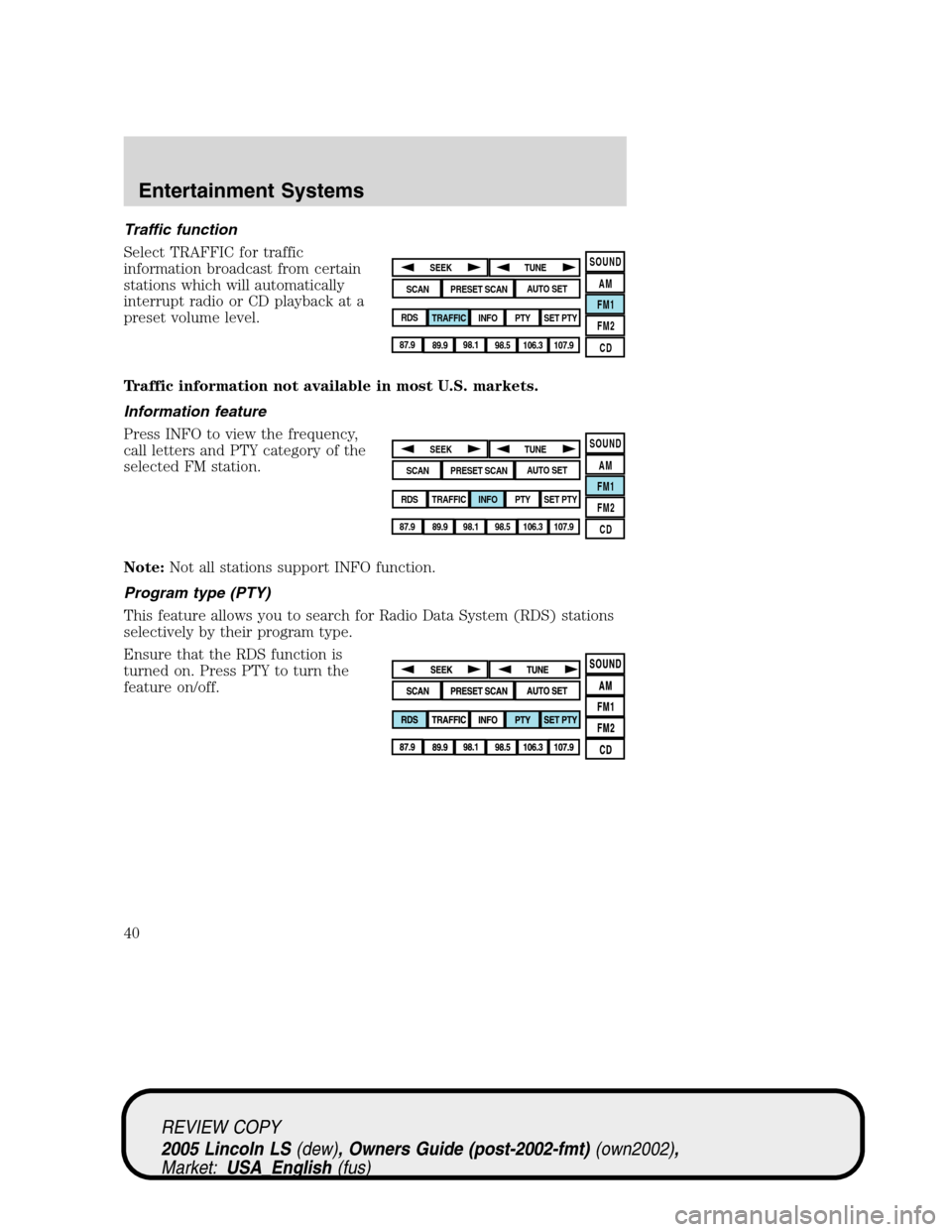
Traffic function
Select TRAFFIC for traffic
information broadcast from certain
stations which will automatically
interrupt radio or CD playback at a
preset volume level.
Traffic information not available in most U.S. markets.
Information feature
Press INFO to view the frequency,
call letters and PTY category of the
selected FM station.
Note:Not all stations support INFO function.
Program type (PTY)
This feature allows you to search for Radio Data System (RDS) stations
selectively by their program type.
Ensure that the RDS function is
turned on. Press PTY to turn the
feature on/off.
SOUND
AM
FM1
FM2
CDSEEK
TUNE
PRESET SCANAUTO SET
SCAN
RDS
TRAFFIC
INFO PTYSET PTY
87.9
89.9 98.1
98.5 106.3 107.9
SOUND
AM
FM1
FM2
CDSEEK
TUNE
PRESET SCANAUTO SET
SCAN
RDS
TRAFFIC
INFO PTYSET PTY
87.9
89.9 98.1
98.5 106.3 107.9
REVIEW COPY
2005 Lincoln LS(dew), Owners Guide (post-2002-fmt)(own2002),
Market:USA_English(fus)
Entertainment Systems
40
Page 43 of 320
Fade: Allows you to adjust the
amount of sound emitted from the
front and rear speakers.
Balance: Allows you to adjust the
sound distribution between the right
and left speakers.
SCV(Speed Compensated Volume):
Automatically compensates for road
wind and noise. Refer toSpeed
compensated volumeearlier in this
chapter.
DSP Occupancy mode: Use to
optimize the sound based upon the
occupants in the vehicle. Select
from ALL SEATS, REAR SEATS or
DRIVER SEAT.
Setting memory preset stations
The radio is equipped with six station memory preset controls. These
controls can be used to select up to six preset AM stations and twelve
FM stations (six in FM1 and six in FM2).
1. Select the frequency band with the AM/FM1/FM2 touch controls.
2. Select a station.
3. Press and hold a memory preset until the sound returns. The
frequency will appear in the preset.
CNTR
REVIEW COPY
2005 Lincoln LS(dew), Owners Guide (post-2002-fmt)(own2002),
Market:USA_English(fus)
Entertainment Systems
43
Page 86 of 320

Do not disassemble or modify the system as this may lead to damage and
void your warranty. If a problem occurs, stop using the system
immediately and contact your Ford or Lincoln Dealer.
Federal Communication Commission (FCC) Compliance
Changes or modifications not approved by Ford Lincoln Mercury could
void user’s authority to operate the equipment. This equipment has been
tested and found to comply with the limits for a Class B digital device,
pursuant to Part 15 of the FCC Rules. These limits are designed to
provide reasonable protection against harmful interference in a
residential installation. This equipment generates, uses and can radiate
radio frequency energy and, if not installed and used in accordance with
the instructions, may cause harmful interference to radio
communications.
However, there is no guarantee that interference will not occur in a
particular installation. If this equipment does cause harmful interference
to radio or television reception, which can be determined by turning the
equipment off and on, the user is encouraged to consult the dealer or an
experienced radio/TV technician for help.
The database reflects reality as existing before you received the
database and it comprises data and information from government
and other sources, which may contain errors and omissions.
Accordingly, the database may contain inaccurate or incomplete
information due to the passage of time, changing circumstances,
and due to the nature of the sources used. The database does not
include or reflect information on neighborhood safety, law
enforcement, emergency assistance, construction work, road or
lane closures, vehicle or speed restrictions, road slope or grade,
bridge height, weight or other limits, road or traffic conditions,
special events, traffic congestion, or travel time.
Radio reception factors
There are certain factors that may effect your radio reception.
•Distance/strength.The further an FM signal travels, the weaker it is.
The listenable range of the average FM station is approximately 40 km
(24 miles). This range can be affected by“signal modulation.”Signal
modulation is a process radio stations use to increase their
strength/volume relative to other stations.
•Terrain.Hills, mountains and tall buildings between your vehicle’s
antenna and the radio station signal can cause FM reception problems.
Static can be caused on AM stations by power lines, electric fences,
REVIEW COPY
2005 Lincoln LS(dew), Owners Guide (post-2002-fmt)(own2002),
Market:USA_English(fus)
Entertainment Systems
86
Page 120 of 320
In AM, FM1, or FM2 mode:
•Press�or�to select preset
stations within the selected radio
band.
In Tape mode:
•Press�or�to select the next
selection on the tape.
In CD mode:
•Press�or�to select the next
selection on the CD.
In any mode:
•Press VOL + or to adjust
volume.
Press the PHONE/MUTE control to
mute the playing media. Press again
to return to the playing media.
MUTE
VOL
MEDIA
MUTE
VOL
MEDIA
MUTE
VOL
MEDIA
REVIEW COPY
2005 Lincoln LS(dew), Owners Guide (post-2002-fmt)(own2002),
Market:USA_English(fus)
Driver Controls
120
Page 121 of 320
Navigation steering wheel controls (if equipped)
These controls allow you to operate some audio and navigation control
features when the vehicle is equipped with the navigation feature.
Audio control features
Press MEDIA to select:
•AM, FM1, FM2, or
•CD.
In AM, FM1, or FM2 mode:
•Press NEXT to select preset
stations within the selected radio
band.
In CD mode:
•Press NEXT to select the next
selection on the CD.
In any mode:
•Press VOL�or�to adjust
volume.
REVIEW COPY
2005 Lincoln LS(dew), Owners Guide (post-2002-fmt)(own2002),
Market:USA_English(fus)
Driver Controls
121
Page 123 of 320

•To close from the vent, intermediate and full open positions, push the
rear portion of the control forward.
Do not let children play with the moon roof or leave children
unattended in the vehicle. They may seriously hurt themselves.
When closing the moon roof, you should verify it is free of
obstructions and ensure that children and/or pets are not in the
proximity of the window openings.
Bounce Back
When an obstacle has been detected in the moon roof opening as the
moon roof is closing, the moon roof will automatically open and stop at a
prescribed position.
Bounce Back Override
To override Bounce Back, within 2 seconds after reaching Bounce Back
position, if the switch is moved from the Neutral to the auto close
positionthe moon roof will close with no bounce back protection.
If the switch is released before the moon roof reaches fully closed
position, the moon roof will stop. For example: Bounce Back Override
can be used to overcome the resistance of ice on the moon roof or seals.
HOMELINK�WIRELESS CONTROL SYSTEM (IF EQUIPPED)
The HomeLink�Wireless Control System, located on the driver’s visor,
provides a convenient way to replace up to three hand-held transmitters
with a single built-in device. This feature will learn the radio frequency
codes of most transmitters to operate garage doors, entry gate operators,
security systems, entry door locks, and home or office lighting.
When programming your HomeLink�Wireless Control System to
a garage door or gate, be sure that people and objects are out of
the way to prevent potential harm or damage.
Do not use the HomeLink�Wireless Control System with any garage
door opener that lacks safety stop and reverse features as required by
U.S. federal safety standards (this includes any garage door opener
model manufactured before April 1, 1982). A garage door which cannot
detect an object, signaling the door to stop and reverse, does not meet
current U.S. federal safety standards. For more information, contact
HomeLink�at:www.homelink.comor1–800–355–3515.
REVIEW COPY
2005 Lincoln LS(dew), Owners Guide (post-2002-fmt)(own2002),
Market:USA_English(fus)
Driver Controls
123