Page 115 of 320
![LINCOLN LS 2005 Owners Manual 1. Start the vehicle.
2. Press and hold the COMP side of the control until“C”appears in the
mirror display.
3. Drive the vehicle slowly (less than 5 km/h [3 mph]) in circles until the
display read](/manual-img/15/6895/w960_6895-114.png "LINCOLN LS 2005 Owners Manual 1. Start the vehicle.
2. Press and hold the COMP side of the control until“C”appears in the
mirror display.
3. Drive the vehicle slowly (less than 5 km/h [3 mph]) in circles until the
display read")
1. Start the vehicle.
2. Press and hold the COMP side of the control until“C”appears in the
mirror display.
3. Drive the vehicle slowly (less than 5 km/h [3 mph]) in circles until the
display reads a direction.
4. The compass is now calibrated.
Power side view mirrors
To adjust your mirrors:
1. Select
to adjust the left
mirror or
to adjust the right
mirror.
2. Move the disk control in the
direction you wish to tilt the mirror.
3. Return to the center position to
disable the adjust function.
Memory feature
The power side view mirror positions are saved when doing a memory
set function and can be recalled along with the vehicle personality
features when a memory position is selected through the remote entry
transmitter, keyless entry keypad or memory switch on the driver’s door
(if equipped with memory feature). Refer toMemory seats/steering
column/mirrors/adjustable pedalsin theSeating and Safety
Restraintschapter.
Heated outside mirrors
Both mirrors are heated
automatically to remove ice, mist
and fog when the rear window
defrost is activated.
Do not remove ice from the
mirrors with a scraper or
attempt to readjust the mirror
glass if it is frozen in place.
These actions could cause damage to the glass and mirrors.
REVIEW COPY
2005 Lincoln LS(dew), Owners Guide (post-2002-fmt)(own2002),
Market:USA_English(fus)
Driver Controls
115
Page 116 of 320

Fold-away mirrors (if equipped)
Pull the side mirrors in carefully
when driving through a narrow
space, like an automatic car wash.
POWER ADJUSTABLE FOOT PEDALS (IF EQUIPPED)
The accelerator and brake pedal
should only be adjusted when the
vehicle is stopped and the gearshift
lever is in the P (Park) position.
Press and hold the rocker control
(located on the instrument panel) to
adjust accelerator and brake pedal.
•Press the top of the control to
adjust the pedals away from you.
•Press the bottom of the control to adjust the pedals towards you.
Memory feature
The accelerator and brake pedal positions are saved when doing a
memory set function and can be recalled along with the vehicle
personality features when a memory position is selected through the
remote entry transmitter, keyless entry keypad or memory switch on the
driver’s door (if equipped with memory feature). Refer toMemory
seats/steering column/mirrors/adjustable pedalsin theSeating and
Safety Restraintschapter.
Never adjust the accelerator and brake pedal with feet on the
pedals while the vehicle is moving.
REVIEW COPY
2005 Lincoln LS(dew), Owners Guide (post-2002-fmt)(own2002),
Market:USA_English(fus)
Driver Controls
116
Page 117 of 320

SPEED CONTROL
With speed control set, you can maintain a speed of 30 mph (48 km/h)
or more without keeping your foot on the accelerator pedal. Speed
control does not work at speeds below 30 mph (48 km/h).
Do not use the speed control in heavy traffic or on roads that
are winding, slippery or unpaved.
Setting speed control
The controls for using your speed
control are located on the steering
wheel for your convenience.
1. Press the ON control and release
it.
2. Accelerate to the desired speed.
3. Press the SET + control and
release it.
4. Take your foot off the accelerator
pedal.
5. The indicator
light on the
instrument cluster will turn on.
Note:
•Vehicle speed may vary momentarily when driving up and down a
steep hill.
•If the vehicle speed increases above the set speed on a downhill, you
may want to apply the brakes to reduce the speed.
•If the vehicle speed decreases more than 10 mph (16 km/h) below
your set speed on an uphill, your speed control will disengage.
REVIEW COPY
2005 Lincoln LS(dew), Owners Guide (post-2002-fmt)(own2002),
Market:USA_English(fus)
Driver Controls
117
Page 119 of 320
•Depress the brake pedal until the
desired vehicle speed is reached,
press the SET + control.
Turning off speed control
There are two ways to turn off the speed control:
•Depress the brake pedal . This
will not erase your vehicle’s
previously set speed.
•Press the speed control OFF
control.
Note:When you turn off the speed
control or the ignition, your speed
control set speed memory is erased.
STEERING WHEEL CONTROLS
These controls allow you to operate some audio control features.
Audio control features
Press MEDIA to select AM, FM1,
FM2, CD, or TAPE (if equipped).
O
N
O
F
F
RES
SET
CANCEL
MUTE
VOL
MEDIA
REVIEW COPY
2005 Lincoln LS(dew), Owners Guide (post-2002-fmt)(own2002),
Market:USA_English(fus)
Driver Controls
119
Page 121 of 320
Navigation steering wheel controls (if equipped)
These controls allow you to operate some audio and navigation control
features when the vehicle is equipped with the navigation feature.
Audio control features
Press MEDIA to select:
•AM, FM1, FM2, or
•CD.
In AM, FM1, or FM2 mode:
•Press NEXT to select preset
stations within the selected radio
band.
In CD mode:
•Press NEXT to select the next
selection on the CD.
In any mode:
•Press VOL�or�to adjust
volume.
REVIEW COPY
2005 Lincoln LS(dew), Owners Guide (post-2002-fmt)(own2002),
Market:USA_English(fus)
Driver Controls
121
Page 146 of 320

The remote entry system allows you to perform the following tasks using
the remote entry transmitter:
•unlock the vehicle doors.
•lock all the vehicle doors.
•open the trunk.
•activate the personal alarm.
•open all windows and moonroof
(if equipped).
•arm and disarm the perimeter
anti-theft system.
•operate the illuminated entry
feature.
•operate the memory seat/mirror/steering column/adjustable pedals
feature (if equipped).
•enable/disable the two-stage unlocking feature.
When the vehicle is armed, the interior power door lock controls and
remote interior trunk release control are disabled. These features will not
work until the vehicle is disarmed. Refer toCentral locking/Two-stage
unlockinginformation in this chapter.
If there is any potential remote keyless entry problem with your vehicle,
ensureALL remote entry transmittersare taken to the dealership to
aid in troubleshooting.
Unlocking the doors
1. Pressand release to:
•unlock the driver’s door only, if the two-stage unlocking feature is
enabled.
•unlock all doors, if the two-stage unlocking feature is disabled.
•deactivate the perimeter alarm (if activated).Note:The interior lamps
will illuminate and the turn signal lamps will display two short flashes
to indicate the deactivation of the perimeter alarm. Additionally, if the
memory seat/mirror/steering column/adjustable pedals feature (if
equipped) is activated, the corresponding seat/mirror/steering
column/adjustable pedals positions will be recalled. The memory
seat/mirror/steering column/adjustable pedals feature (if equipped) will
not return to the memory position until the key is inserted into the
ignition when the easy entry/exit feature is activated.
REVIEW COPY
2005 Lincoln LS(dew), Owners Guide (post-2002-fmt)(own2002),
Market:USA_English(fus)
Locks and Security
146
Page 151 of 320

Autolock
The autolock feature will lock the vehicle’s doors when:
•all the doors are closed,
•the ignition is in the 4 (RUN) position,
•you shift into forward or reverse, and
•the vehicle speed is greater than 3 mph (5 km/h).
Relock
The autolock feature repeats when:
•either door is opened then closed while the ignition is in the 4 (RUN)
position, and
•you shift into forward or reverse, and
•the vehicle speed is greater than 3 mph (5 km/h).
Deactivating/activating autolock
Your vehicle comes with the autolock feature activated; in order to
deactivate the feature, take your vehicle to an authorized dealer, or use
the message center (if equipped). Refer toMessage centerin theDriver
Controlschapter for more information.
Memory seat feature
The remote entry system allows you to recall the memory
seat/mirror/steering column/adjustable pedals feature.
Press
to automatically move the seat/mirror/steering
column/adjustable pedals to the desired memory position.Note:The
seat and steering column will not travel to their final position if the key
is not in the ignition and the easy entry feature is enabled.
Activating the memory feature
To activate this feature:
1. Position the seat, mirrors, steering column and adjustable pedals to
the positions you desire.
REVIEW COPY
2005 Lincoln LS(dew), Owners Guide (post-2002-fmt)(own2002),
Market:USA_English(fus)
Locks and Security
151
Page 152 of 320
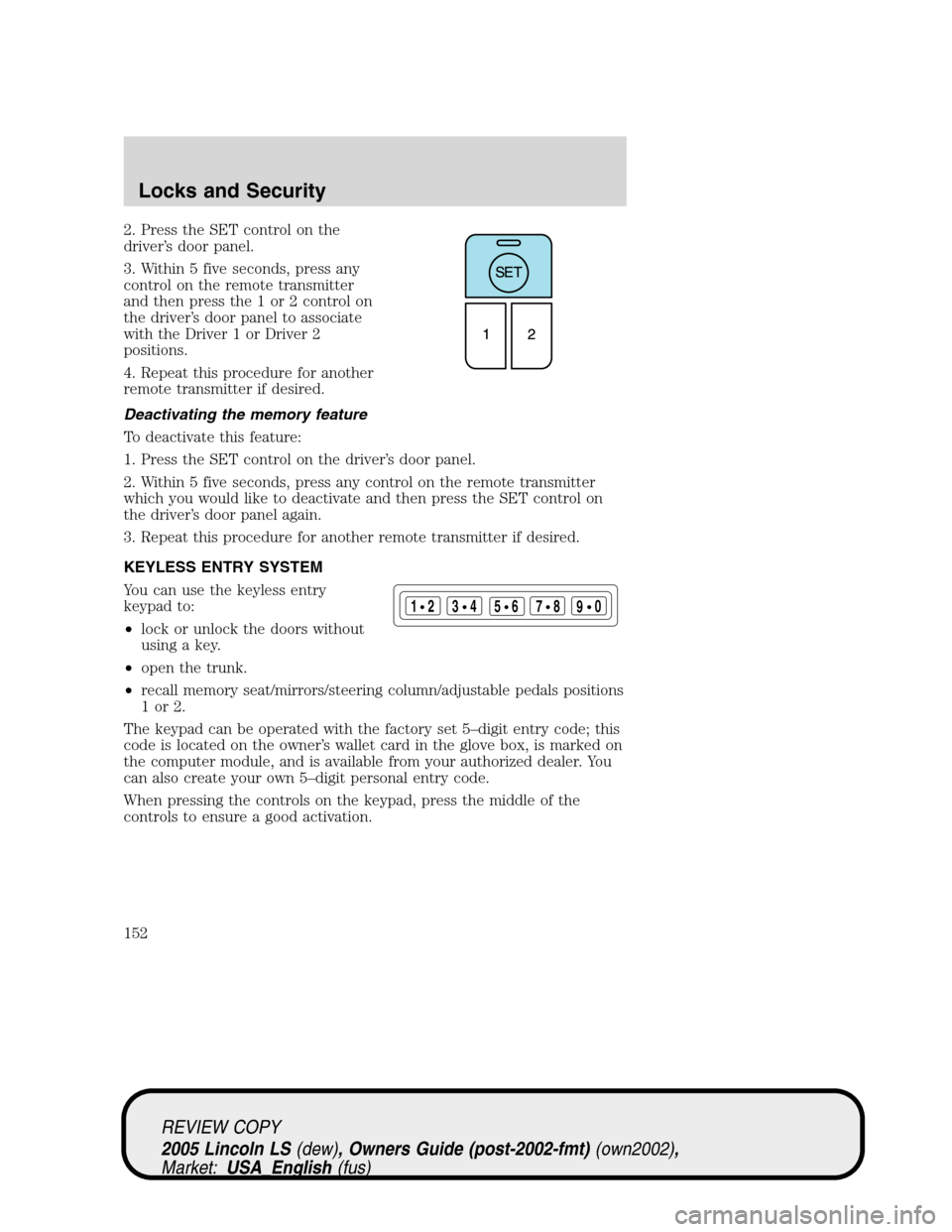
2. Press the SET control on the
driver’s door panel.
3. Within 5 five seconds, press any
control on the remote transmitter
and then press the 1 or 2 control on
the driver’s door panel to associate
with the Driver 1 or Driver 2
positions.
4. Repeat this procedure for another
remote transmitter if desired.
Deactivating the memory feature
To deactivate this feature:
1. Press the SET control on the driver’s door panel.
2. Within 5 five seconds, press any control on the remote transmitter
which you would like to deactivate and then press the SET control on
the driver’s door panel again.
3. Repeat this procedure for another remote transmitter if desired.
KEYLESS ENTRY SYSTEM
You can use the keyless entry
keypad to:
•lock or unlock the doors without
using a key.
•open the trunk.
•recall memory seat/mirrors/steering column/adjustable pedals positions
1or2.
The keypad can be operated with the factory set 5–digit entry code; this
code is located on the owner’s wallet card in the glove box, is marked on
the computer module, and is available from your authorized dealer. You
can also create your own 5–digit personal entry code.
When pressing the controls on the keypad, press the middle of the
controls to ensure a good activation.
123
45678
90
REVIEW COPY
2005 Lincoln LS(dew), Owners Guide (post-2002-fmt)(own2002),
Market:USA_English(fus)
Locks and Security
152

