2005 LINCOLN AVIATOR belt
[x] Cancel search: beltPage 221 of 368

NOTICE TO UTILITY VEHICLE AND TRUCK OWNERS
Utility vehicles and trucks handle
differently than passenger cars in
the various driving conditions that
are encountered on streets,
highways and off-road. Utility
vehicles and trucks are not designed
for cornering at speeds as high as
passenger cars any more than
low-slung sports cars are designed
to perform satisfactorily under
off-road conditions.
Utility vehicles have a significantly higher rollover rate than
other types of vehicles. To reduce the risk of serious injury or
death from a rollover or other crash you must:
•Avoid sharp turns and abrupt maneuvers;
•Drive at safe speeds for the conditions;
•Keep tires properly inflated;
•Never overload or improperly load your vehicle; and
•Make sure every passenger is properly restrained.
In a rollover crash, an unbelted person is significantly more likely
to die than a person wearing a seat belt. All occupants must
wear safety belts and children/infants must use appropriate restraints
to minimize the risk of injury or ejection.
Study yourOwner’s Guideand any supplements for specific information
about equipment features, instructions for safe driving and additional
precautions to reduce the risk of an accident or serious injury.
VEHICLE CHARACTERISTICS
4WD and AWD Systems (if equipped)
A vehicle equipped with AWD or 4WD (when you select the 4WD mode)
has the ability to use all four wheels to power itself. This increases
traction which may enable you to safely drive over terrain and road
conditions that a conventional two-wheel drive vehicle cannot.
REVIEW COPY
2005 Aviator f/k/a Navigator LS(231), Owners Guide (post-2002-fmt)(own2002),
Market:USA_English(fus)
Tires, Wheels and Loading
Tires, Wheels and Loading
221
Page 266 of 368

If you smell exhaust fumes inside your vehicle, have your dealer
inspect your vehicle immediately. Do not drive if you smell
exhaust fumes.
Important safety precautions
A computer system controls the engine’s idle revolutions per minute
(RPM). When the engine starts, the idle RPM runs higher than normal in
order to warm the engine. If the engine idle speed does not slow down
automatically, have the vehicle checked.
Before starting the vehicle:
1. Make sure all vehicle occupants have buckled their safety belts. For
more information on safety belts and their proper usage, refer to the
Seating and Safety Restraintschapter.
2. Make sure vehicle accessories are off.
•Make sure the parking brake is
set.
•Make sure the gearshift lever is in
P (Park).
O
D
REVIEW COPY
2005 Aviator f/k/a Navigator LS(231), Owners Guide (post-2002-fmt)(own2002),
Market:USA_English(fus)
Driving
266
Page 267 of 368

3. Turn the key to 3 (ON) without
turning the key to 4 (START).
Make sure the corresponding lights illuminate or illuminate briefly. If a
light fails to illuminate, have the vehicle serviced.
•If the driver’s safety belt is fastened, the
light may not illuminate.
Starting the engine
1. Turn the key to 3 (ON) without
turning the key to 4 (START).
2. Turn the key to 4 (START), then
release the key as soon as the
engine starts. Excessive cranking
could damage the starter.
Note:If the engine does not start within five seconds on the first try,
turn the key to OFF, wait 10 seconds and try again. If the engine still
fails to start, press the accelerator to the floor and try again; this will
allow the engine to crank with the fuel shut off in case the engine is
flooded with fuel.
REVIEW COPY
2005 Aviator f/k/a Navigator LS(231), Owners Guide (post-2002-fmt)(own2002),
Market:USA_English(fus)
Driving
267
Page 275 of 368
•Some noise is normal during operation. If the noise is excessive, check
for low power steering pump fluid level before seeking service by your
dealer.
•Heavy or uneven steering efforts may be caused by low power steering
pump fluid level. Check for low power steering pump fluid level before
seeking service by your dealer.
•Do not fill the power steering pump reservoir above the MAX mark on
the reservoir, as this may result in leaks from the reservoir.
If the power steering system breaks down (or if the engine is turned
off), you can steer the vehicle manually, but it takes more effort.
If the steering wanders or pulls, check for:
•an improperly inflated tire
•uneven tire wear
•loose or worn suspension components
•loose or worn steering components
•improper steering alignment
Speed sensitive steering
Your vehicle is equipped with speed sensitive, variable assist power
steering. At low speeds, steering assist will adjust to reduce efforts and
improve low speed maneuverability and at high speeds, the assist will
adjust to improve steering feel.
If the amount of effort required to steer your vehicle changes while
driving at a constant vehicle speed, have the power steering system
checked by your dealer or a qualified service technician.
PREPARING TO DRIVE YOUR VEHICLE
Utility vehicles have a significantly higher rollover rate than
other types of vehicles.
In a rollover crash, an unbelted person is significantly more likely
to die than a person wearing a seat belt.
REVIEW COPY
2005 Aviator f/k/a Navigator LS(231), Owners Guide (post-2002-fmt)(own2002),
Market:USA_English(fus)
Driving
275
Page 306 of 368

3. Connect the negative (-) cable to the negative (-) terminal of the
assisting battery.
4. Make the final connection of the negative (-) cable to an exposed
metal part of the stalled vehicle’s engine, away from the battery and the
carburetor/fuel injection system.Do notuse fuel lines, engine rocker
covers or the intake manifold asgroundingpoints.
Do not connect the end of the second cable to the negative (-)
terminal of the battery to be jumped. A spark may cause an
explosion of the gases that surround the battery.
5. Ensure that the cables are clear of fan blades, belts, moving parts of
both engines, or any fuel delivery system parts.
Jump starting
1. Start the engine of the booster vehicle and run the engine at
moderately increased speed.
2. Start the engine of the disabled vehicle.
+–+–
+–+–
REVIEW COPY
2005 Aviator f/k/a Navigator LS(231), Owners Guide (post-2002-fmt)(own2002),
Market:USA_English(fus)
Roadside Emergencies
306
Page 309 of 368
WRECKER TOWING
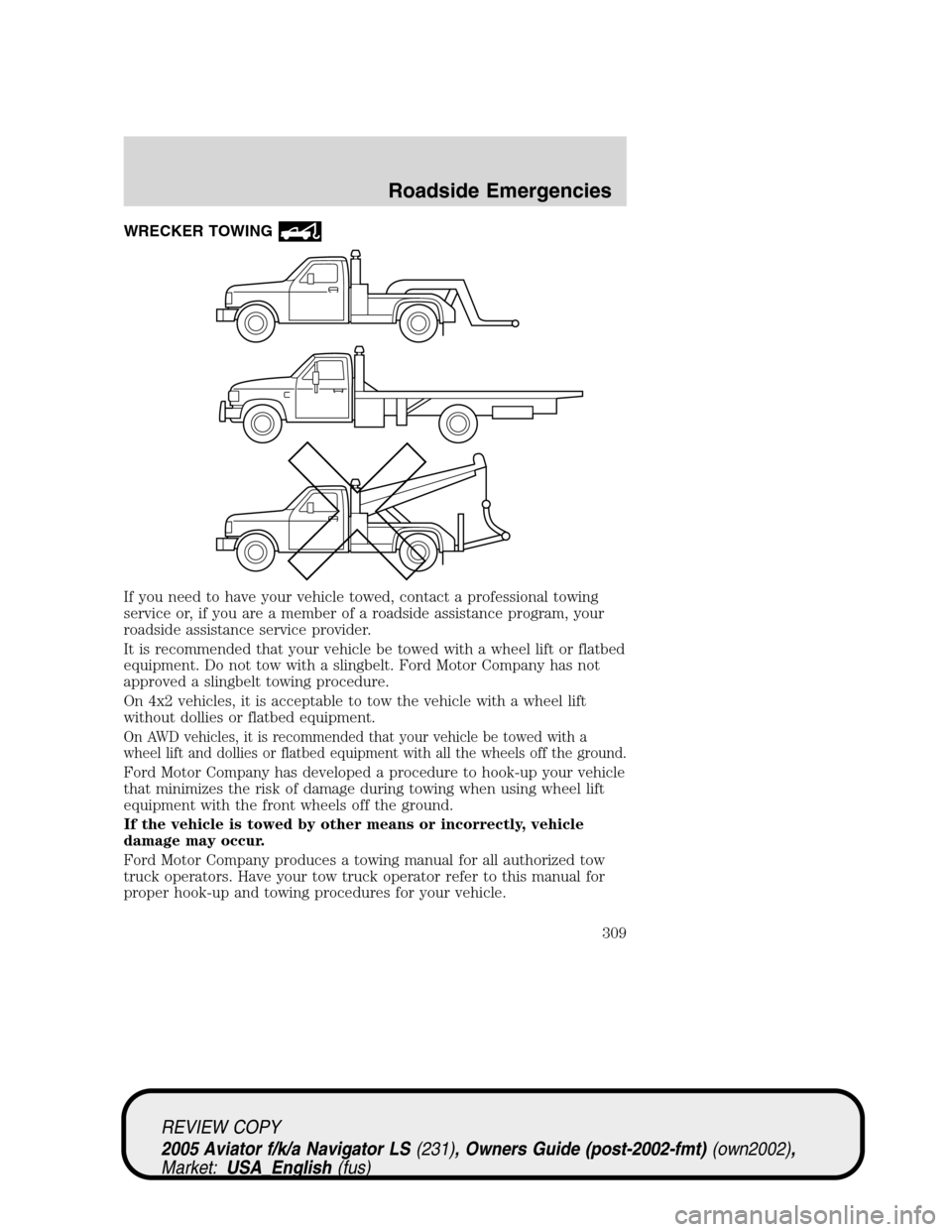
If you need to have your vehicle towed, contact a professional towing
service or, if you are a member of a roadside assistance program, your
roadside assistance service provider.
It is recommended that your vehicle be towed with a wheel lift or flatbed
equipment. Do not tow with a slingbelt. Ford Motor Company has not
approved a slingbelt towing procedure.
On 4x2 vehicles, it is acceptable to tow the vehicle with a wheel lift
without dollies or flatbed equipment.
On AWD vehicles, it is recommended that your vehicle be towed with a
wheel lift and dollies or flatbed equipment with all the wheels off the ground.
Ford Motor Company has developed a procedure to hook-up your vehicle
that minimizes the risk of damage during towing when using wheel lift
equipment with the front wheels off the ground.
If the vehicle is towed by other means or incorrectly, vehicle
damage may occur.
Ford Motor Company produces a towing manual for all authorized tow
truck operators. Have your tow truck operator refer to this manual for
proper hook-up and towing procedures for your vehicle.
REVIEW COPY
2005 Aviator f/k/a Navigator LS(231), Owners Guide (post-2002-fmt)(own2002),
Market:USA_English(fus)
Roadside Emergencies
309
Page 322 of 368
Do not use sharp objects, such as a razor blade, to clean the
inside of the rear window or to remove decals, as it may cause
damage to the rear window defroster’s heated grid lines.
INSTRUMENT PANEL AND CLUSTER LENS
Clean the instrument panel with a damp cloth, then dry with a dry cloth.
•Avoid cleaners or polish that increase the gloss of the upper portion of
the instrument panel. The dull finish in this area helps protect the
driver from undesirable windshield reflection.
Do not use chemical solvents or strong detergents when cleaning
the steering wheel or instrument panel to avoid contamination of
the air bag system.
•Be certain to wash or wipe your hands clean if you have been in
contact with certain products such as insect repellent and suntan
lotion in order to avoid possible damage to the interior painted
surfaces.
INTERIOR
For fabric, carpets, cloth seats, safety belts and seats equipped with side
air bags:
•Remove dust and loose dirt with a vacuum cleaner.
•Remove light stains and soil with Motorcraft Extra Strength
Upholstery Cleaner (ZC-41).
•If grease or tar is present on the material, spot-clean the area first
with Motorcraft Spot and Stain Remover (ZC-14).
•Never saturate the seat covers with cleaning solution.
•Do not use household cleaning products or glass cleaners, which can
stain and discolor the fabric and affect the flame retardant abilities of
the seat materials.
Do not use cleaning solvents, bleach or dye on the vehicle’s
safety belts, as these actions may weaken the belt webbing.
Do not use chemical solvents or strong detergents when cleaning
the seat-mounted side air bag. Such products could contaminate
the side air bag system and affect performance of the side air bag in a
collision.
REVIEW COPY
2005 Aviator f/k/a Navigator LS(231), Owners Guide (post-2002-fmt)(own2002),
Market:USA_English(fus)
Cleaning
322
Page 362 of 368

A
ABS (see Brakes) .....................269
Accessory delay ........................128
AdvanceTrac ..............................271
Air bag supplemental restraint
system ................................201, 205
and child safety seats ............203
description ......................201, 205
disposal ....................................208
driver air bag ..................203, 206
indicator light .........................207
operation .........................203, 206
passenger air bag ...........203, 206
Air cleaner filter ...............350–351
All Wheel Drive (AWD),
driving off road .........................282
Ambulance packages ....................7
Antifreeze
(see Engine coolant) ................334
Anti-lock brake system
(see Brakes) ......................269–270
Anti-theft system ......................172
arming the system ..................172
disarming a triggered
system .....................................173
Audio system
(see Radio) ................16, 20, 25, 30
Automatic transmission
driving an automatic
overdrive .................................278
fluid, adding ............................350
fluid, checking ........................350
fluid, refill capacities ..............352
fluid, specification ..................356
Auxiliary power point ...............124
Axle
lubricant specifications ..354, 356refill capacities ........................352
B
Battery .......................................332
acid, treating emergencies .....332
jumping a disabled battery ....304
maintenance-free ....................332
replacement, specifications ...351
servicing ..................................332
BeltMinder .................................197
Brakes ........................................268
anti-lock ...........................269–270
anti-lock brake system (ABS)
warning light ...........................270
fluid, checking and adding ....349
fluid, refill capacities ..............352
fluid, specifications .........354, 356
lubricant specifications ..354, 356
parking ....................................270
shift interlock ..........................276
Bulbs ..........................................111
C
Capacities for refilling fluids ....352
Cargo cover ...............................157
CD-single premium .....................25
Cell phone use ..........................153
Certification Label ....................358
Changing a tire .........................229
Child safety restraints ..............209
child safety belts ....................209
Child safety seats ......................211
attaching with tether straps ..215
in front seat ............................213
in rear seat ..............................213
Cleaning your vehicle
engine compartment ..............320
instrument panel ....................322
REVIEW COPY
2005 Aviator f/k/a Navigator LS(231), Owners Guide (post-2002-fmt)(own2002),
Market:USA_English(fus)
Index
Index
362