Page 158 of 368

KEYS
One key operates all the locks and starts the vehicle. Always carry a
spare key with you in case of an emergency.
Your keys are programmed to your vehicle; using a non-programmed key
will not permit your vehicle to start. If you lose your dealer supplied
keys, replacement keys are available through your authorized dealer.
Refer to theSecuriLock�passive anti-theft systemsection later in this
chapter for more information.
POWER DOOR LOCKS
If the door does not unlock when the control is pressed, refer to the
Power door lock disable featuresection in this chapter.
Press control to unlock all doors.
Press control to lock all doors.
Liftgate
An additional power door lock can be accessed by opening the liftgate.
The button is located either on the top of the left-hand quarter trim
panel underneath the rear window, or on the bottom of the left-hand
quarter trim panel. Press this button to lock or unlock all the doors.
Smart unlocking feature
The smart unlocking feature prevents you from locking yourself out of
the vehicle by unlocking the doors if the key is in the ignition and the
driver’s door is open/ajar when the vehicle doors were locked using the
power lock/unlock control.
The smart unlocking feature operates independent of the position of the
ignition.
Autolocking feature
The autolocking feature locks all vehicle doors when the following
conditions are met:
•All doors, including the liftgate, are closed.
REVIEW COPY
2005 Aviator f/k/a Navigator LS(231), Owners Guide (post-2002-fmt)(own2002),
Market:USA_English(fus)
Locks and Security
Locks and Security
158
Page 159 of 368

•The brake is pressed while the ignition is in the 3 (ON) position.
•The transmission is in either a forward or reverse gear.
•The vehicle has a speed of 5 mph (8 km/h) or greater.
This feature relocks all doors if any door is opened, the brake is pressed
after all doors are closed again and the vehicle has a speed of 5 mph (8
km/h) or greater.
Deactivating/activating the autolock feature
The autolock feature may be deactivated/activated by selecting the
autolock function (accessed by pressing the SETUP control). Press the
RESET control to turn the autolock function on or off. Refer toMessage
centerin theDriver Controlschapter for additional information.
The autolock feature may also be deactivated/activated using the keyless
entry keypad. For additional information, refer toKeyless entry system
in this chapter.
Childproof door locks
When these locks are set, the rear
doors cannot be opened from the
inside. The rear doors can be
opened from the outside when the
doors are unlocked.
The childproof locks are located on
rear edge of each rear door and
must be set separately for each
door. Setting the lock for one door
will not automatically set the lock
for both doors.
Move lock control up to engage the childproof lock. Move control down
to disengage childproof locks.
REMOTE ENTRY SYSTEM
This device complies with part 15 of the FCC rules and with RS-210 of
Industry Canada. Operation is subject to the following two conditions:
(1) This device may not cause harmful interference, and (2) This device
must accept any interference received, including interference that may
cause undesired operation.
Changes or modifications not expressly approved by the party
responsible for compliance could void the user’s authority to
operate the equipment.
REVIEW COPY
2005 Aviator f/k/a Navigator LS(231), Owners Guide (post-2002-fmt)(own2002),
Market:USA_English(fus)
Locks and Security
159
Page 160 of 368
The remote entry system allows you
to lock or unlock all vehicle doors
and liftgate and open the liftgate
window without a key.
The remote entry lock/unlock feature operates in any ignition position.
The liftgate glass features operate as long as the vehicle is in P (Park).
The panic feature operates with the key in the 1 (OFF/LOCK) or 2
(ACC) position.
If there is any potential remote keyless entry problem with your vehicle,
ensureALLremote entry transmitters are brought to the dealership, to
aid in troubleshooting.
Unlocking the doors/liftgate
Press this control to unlock the
driver’s door. The interior lamps will
illuminate with the ignition is in the
1 (OFF/LOCK) position.
Press the control a second time
within three seconds to unlock all
doors and liftgate.
REVIEW COPY
2005 Aviator f/k/a Navigator LS(231), Owners Guide (post-2002-fmt)(own2002),
Market:USA_English(fus)
Locks and Security
160
Page 161 of 368
Locking the doors/liftgate
Press this control to lock all doors
and liftgate. The park/turn signal
lamps will flash once.
To confirm all doors are closed and
locked, press the control a second
time within three seconds; the
park/turn signal lamps will flash
once and the horn will chirp.
If any of the doors or liftgate are
ajar, the horn will make two quick
chirps, reminding you to properly close all doors.
Opening the liftgate window
Press the control to unlatch the
liftgate window.
Sounding a panic alarm
Press this control to activate the
alarm.
The personal panic alarm will cycle
the horn and parking lamps on/off.
To deactivate the alarm, press the
control again or turn the ignition to
the 2 (ACCESSORY) or 3 (ON)
position.
REVIEW COPY
2005 Aviator f/k/a Navigator LS(231), Owners Guide (post-2002-fmt)(own2002),
Market:USA_English(fus)
Locks and Security
161
Page 162 of 368
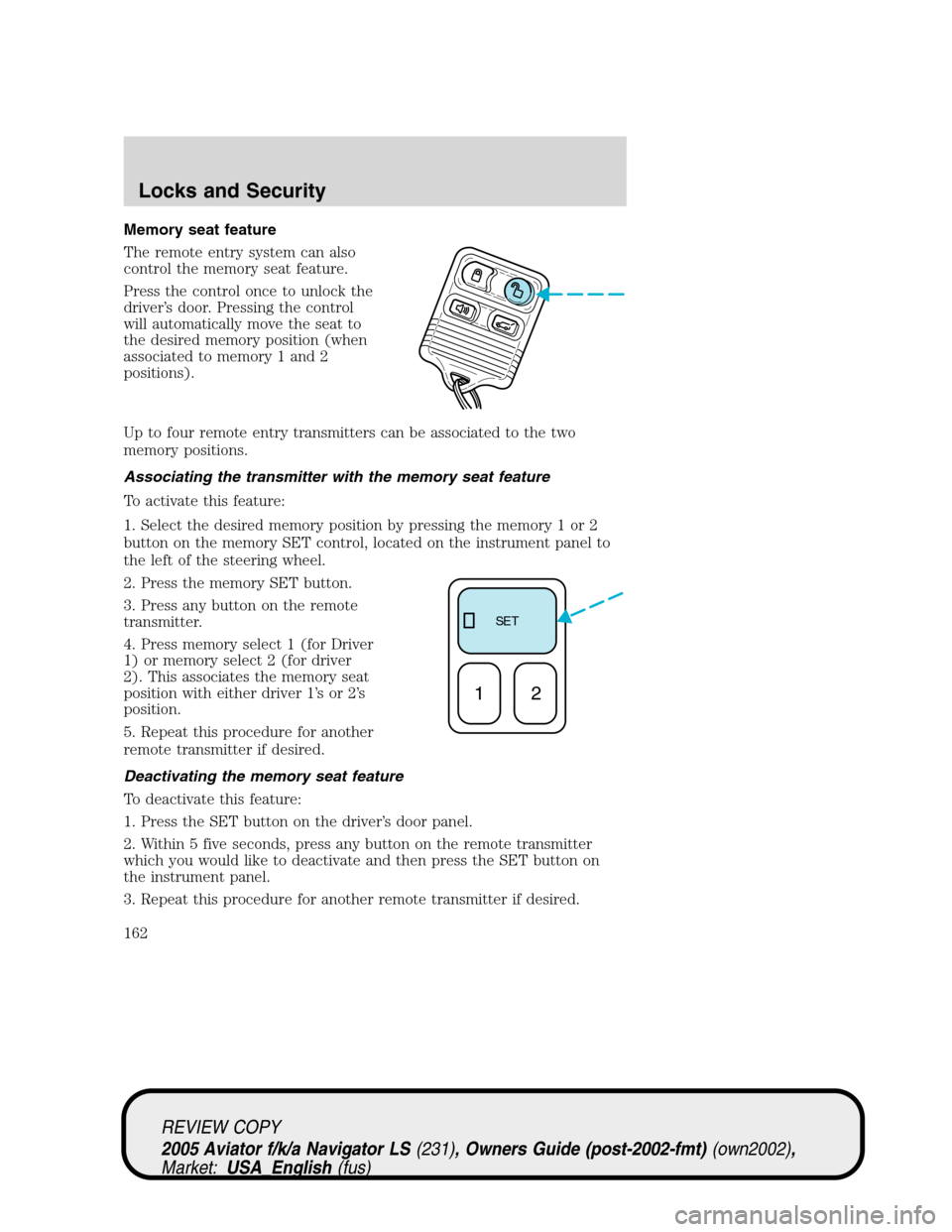
Memory seat feature
The remote entry system can also
control the memory seat feature.
Press the control once to unlock the
driver’s door. Pressing the control
will automatically move the seat to
the desired memory position (when
associated to memory 1 and 2
positions).
Up to four remote entry transmitters can be associated to the two
memory positions.
Associating the transmitter with the memory seat feature
To activate this feature:
1. Select the desired memory position by pressing the memory 1 or 2
button on the memory SET control, located on the instrument panel to
the left of the steering wheel.
2. Press the memory SET button.
3. Press any button on the remote
transmitter.
4. Press memory select 1 (for Driver
1) or memory select 2 (for driver
2). This associates the memory seat
position with either driver 1’sor2’s
position.
5. Repeat this procedure for another
remote transmitter if desired.
Deactivating the memory seat feature
To deactivate this feature:
1. Press the SET button on the driver’s door panel.
2. Within 5 five seconds, press any button on the remote transmitter
which you would like to deactivate and then press the SET button on
the instrument panel.
3. Repeat this procedure for another remote transmitter if desired.
SE T
12
REVIEW COPY
2005 Aviator f/k/a Navigator LS(231), Owners Guide (post-2002-fmt)(own2002),
Market:USA_English(fus)
Locks and Security
162
Page 164 of 368

Replacing lost transmitters
If a remote transmitter has been lost
and you would like to remove it
from the vehicle’s memory, or you
would like to purchase additional
remote transmitters and have them
programmed to your vehicle:
•Takeallyour vehicle’s
transmitters to your dealer for
programming, or
•Perform the programming
procedure yourself.
Programming remote transmitters
It is necessary to haveall(maximum of four—original and/or new) of
your remote transmitters available prior to beginning this procedure.
To program the transmitters yourself:
1. Ensure the vehicle is
electronically unlocked.
2. Put the key in the ignition.
3. Turn the key from the 1
(OFF/LOCK) position to 3 (ON).
4. Cycle, eight times, rapidly (within
10 seconds) between the 1
(OFF/LOCK) position and 3 (ON).
Note:The eighth turn must end in
the 3 (ON) position.
5. The doors will lock, then unlock, to confirm that the programming
mode has been activated.
6. Within 20 seconds press any button on the remote entry transmitter.
Note:If more than 20 seconds have passed you will need to start the
procedure over again.
7. The doors will lock, then unlock, to confirm that this remote entry
transmitter has been programmed.
8. Repeat the previous steps to program each additional remote entry
transmitter.
9. Turn the ignition to the 1 (OFF/LOCK) position after you have
finished programming all of the remote entry transmitters.
4
3
2
1
REVIEW COPY
2005 Aviator f/k/a Navigator LS(231), Owners Guide (post-2002-fmt)(own2002),
Market:USA_English(fus)
Locks and Security
164
Page 165 of 368

10. The doors will lock, then unlock, to confirm that the programming
has been completed.
Illuminated entry
The interior lamps illuminate when the remote entry system is used to
unlock the door(s).
The system automatically turns off after 25 seconds or when the ignition
is turned to the 2 (ACC) or 3 (ON) position. The dome lamp control (if
equipped) mustnotbe set to the 1 (OFF/LOCK) position for the
illuminated entry system to operate.
The inside lights will not turn off if:
•they have been turned on with the dimmer control, or
•any door is open.
The battery saver will shut off the interior lamps 10 minutes after the
ignition has been turned to the 1 (OFF/LOCK) position.
KEYLESS ENTRY SYSTEM
With the keyless entry keypad, you can:
•lock or unlock the vehicle doors without using the key.
Your vehicle has a factory set 5–digit code that operates the keyless
entry system. You can also program your own 5–digit personal entry
code. The factory-set code is located:
•on the owner’s wallet card in the glove compartment
•or at your dealer.
When pressing the controls on the keyless entry keypad, press the
middle of the controls to ensure a good activation.
This system will disable the interior power door lock controls (if
activated). For information about this feature, refer toInterior power
door lock disable featurein theRemote entrysection of this chapter.
Programming your own personal entry code
To program your own code:
1. Enter factory set code (keypad will illuminate when pressed).
REVIEW COPY
2005 Aviator f/k/a Navigator LS(231), Owners Guide (post-2002-fmt)(own2002),
Market:USA_English(fus)
Locks and Security
165
Page 167 of 368

Anti-scan feature
The anti-scan feature prevents
repeated attempts at arriving at a
valid key code.
If an incorrect code has been
entered 7 times (35 consecutive
button presses), the keypad will go
into an anti-scan mode. This mode
disables the keypad for one minute
and the keypad lamp will flash
during this time. The keypad will
flash during this 1 minute mode.
However, pressing the 7•8 and the
9•0 controls simultaneously will
still lock the vehicle.
Anti-scan will be turned off after
one minute of keypad inactivity.
Unlocking the doors with the keyless entry system
To unlock the driver door, enter
either the factory set code or the
personal code (each digit must be
pressed within five seconds of the
prior digit). The interior lamps will
also illuminate.
•To unlock all doors, enter the
factory set code or personal code
(driver door unlocks) and press
the 3•4 control within five
seconds.
REVIEW COPY
2005 Aviator f/k/a Navigator LS(231), Owners Guide (post-2002-fmt)(own2002),
Market:USA_English(fus)
Locks and Security
167

