Page 300 of 318
Maintenance
56
7
1 23456789
Interior lights bulb replace- ment
1. Using a flat-blade screwdriver,
gently pry the lens from the interi- or light housing.
2. Remove the bulb by pulling it straight out.
3. Install a new bulb in the socket.
4. Align the lens tabs with the interior light housing notches and snap
the lens into place.
CAUTION
Prior to working on the Interior
Lights, ensure that the “OFF”button is depressed to avoidburning your fingers or receiv- ing an electric shock.
1LDA5044
1LDA5042
1LDE5041
Door courtesy lamp
Glove box lamp
Luggage room lamp (5 Door)
1LDA5039
1LDA5040
1LDA5041
Front map lamp
Centre dome lamp
Trunk room lamp (4 Door)
Page 301 of 318
757
Maintenance
1 23456789
License plate lights bulb replacement
1. Loosen the lens retaining screwswith a cross-tip screwdriver.
2. Remove the lens.
3. Remove the bulb by pulling it straight out.
4. Install a new bulb.
5. Reinstall the lens securely with the lens retaining screws. Rear combination light bulb replacement
1. Open the trunk lid or rear hatch.
2. Remove the service cover by turn-
ing the plastic screw counterclock-
wise and removing the cover.
1LDA50431LDA5035
➀Rear fog light (if equipped)
➁ Rear turn signal light
➂ Back-up light
④ Stop and tail light
1LDE5034/1LDA5034
Type A Type B
Page 302 of 318
Maintenance
58
7
1 23456789
3. Remove the socket from the
assembly by turning the socket
counterclockwise until the tabs on
the socket align with the slots on
the assembly. 4. Remove the bulb from the socket
by pressing it in and rotating it until
the tabs on the bulb align with the
slots in the socket. Pull the bulb
out of the socket.
5. Insert a new bulb by inserting it into the socket and rotating it until
it locks into place.
6. Install the socket in the assembly by aligning the tabs on the socket
with the slots in the assembly.
Push the socket into the assembly
and turn the socket clockwise.
7. Replace the service cover and tighten the screws. High mounted stop light bulb replacement
Ty p e A
If the light bulb is not operating, have
the vehicle checked by an authorized
Kia Dealer.
Ty p e B
1. Open the trunk lid.
1LDA50371LDE5036
Type A
Page 303 of 318
759
Maintenance
1 23456789
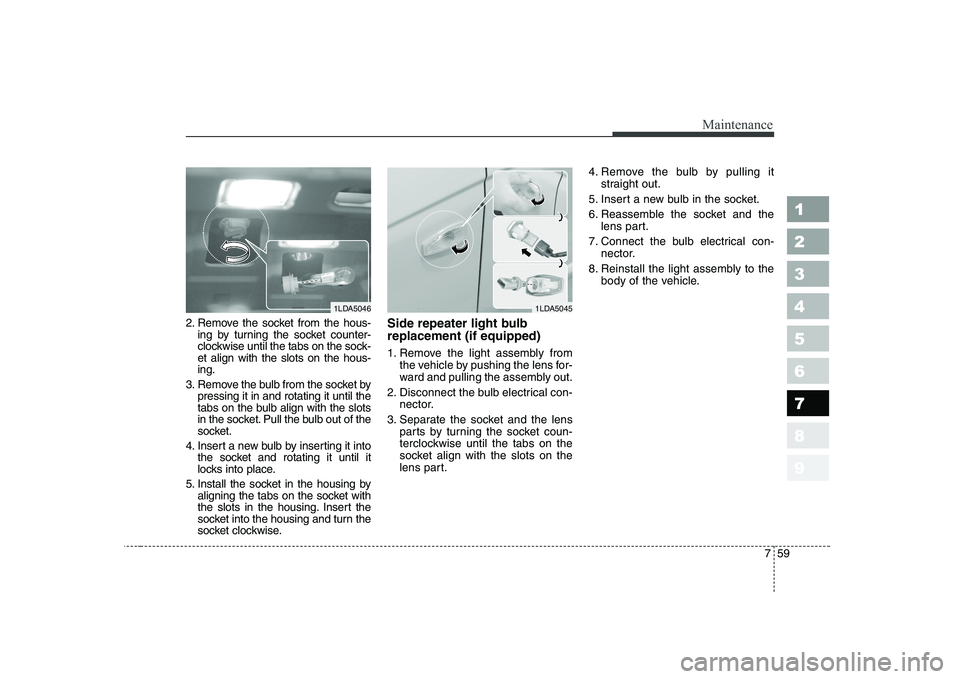
2. Remove the socket from the hous-ing by turning the socket counter-
clockwise until the tabs on the sock-et align with the slots on the hous-ing.
3. Remove the bulb from the socket by pressing it in and rotating it until the
tabs on the bulb align with the slots
in the socket. Pull the bulb out of the
socket.
4. Insert a new bulb by inserting it into the socket and rotating it until it
locks into place.
5. Install the socket in the housing by aligning the tabs on the socket with
the slots in the housing. Insert the
socket into the housing and turn the
socket clockwise. Side repeater light bulb replacement (if equipped)
1. Remove the light assembly from
the vehicle by pushing the lens for-
ward and pulling the assembly out.
2. Disconnect the bulb electrical con- nector.
3. Separate the socket and the lens parts by turning the socket coun-
terclockwise until the tabs on the
socket align with the slots on the
lens part. 4. Remove the bulb by pulling it
straight out.
5. Insert a new bulb in the socket.
6. Reassemble the socket and the lens part.
7. Connect the bulb electrical con- nector.
8. Reinstall the light assembly to the body of the vehicle.
1LDA50461LDA5045
Page 314 of 318
Specifications
4
8
1 23456789
Light Bulb 4 Door 5 Door
Headlights (Low/High) 55/60 55/60
Front turn signal lights 21 21
Position lights 5 5
Side repeater lights (if equipped) 5 5
Front fog lights Gasoline Engine 27 51
(if equipped) Diesel Engine 51 Stop and tail lights For Europe
21/5 21/5
Except Europe28/8 28/8
Rear turn signal lights 21 21
Back-up lights 16 16
Rear fog lights (if equipped) 21 21
High mounted stop light 21 or LED* 1
LED*1
License plate lights 5 5
Front map lamp 10 10
Centre dome lamp 10 10
Door courtesy lamps 5 5
Trunk room lamp 5 5
Glove box lamp 5 5
Light bulbs
Wattage
*¹ LED : Light-emitting diode
Page 316 of 318
Index
2
9
1 23456789
Air cleaner ····································································7-37
Air conditioner air filter··············································7-39
Airbags-supplemental restraint system ·····················3-56
Antenna ·······································································3-100
Automatic climate control system ······························4-66
Automatic transaxle ·············································4-8, 7-32
Battery···········································································7-43
Before driving·································································5-5
Brake system ································································4-15
Brakes and clutch ························································7-25
Bulb replacement ·························································7-53
Cruise control system ··················································4-25
Defroster ·······································································4-55
Door locks ·······································································3-8
Drive belts ·····································································7-27
Electrical circuit protection ··········································6-7
Emergency starting························································6-4 Emission control system ················································5-3
Engine compartment ···················································7-16
Engine cooling system ·················································7-22
Engine oil and oil filter················································7-19
Exterior care·································································7-62
Exterior overview···························································2-2
Fuel filler lid ·································································3-79
Fuel filter ······································································7-36
Fuel requirements ··························································5-2
Gauges ···········································································4-34
Hazard warning flasher ··············································4-56
Hood ··············································································3-77
How to use this manual ·················································1-2
If you have a flat tyre ··················································6-19
Ignition switch ································································4-2
Immobilizer system ························································3-7
Instrument cluster ·······················································4-33
Instrument panel overview ···········································2-5
Interior care··································································7-66
A
B
C
D
E
F
G
H
I


