Page 198 of 424
General Information
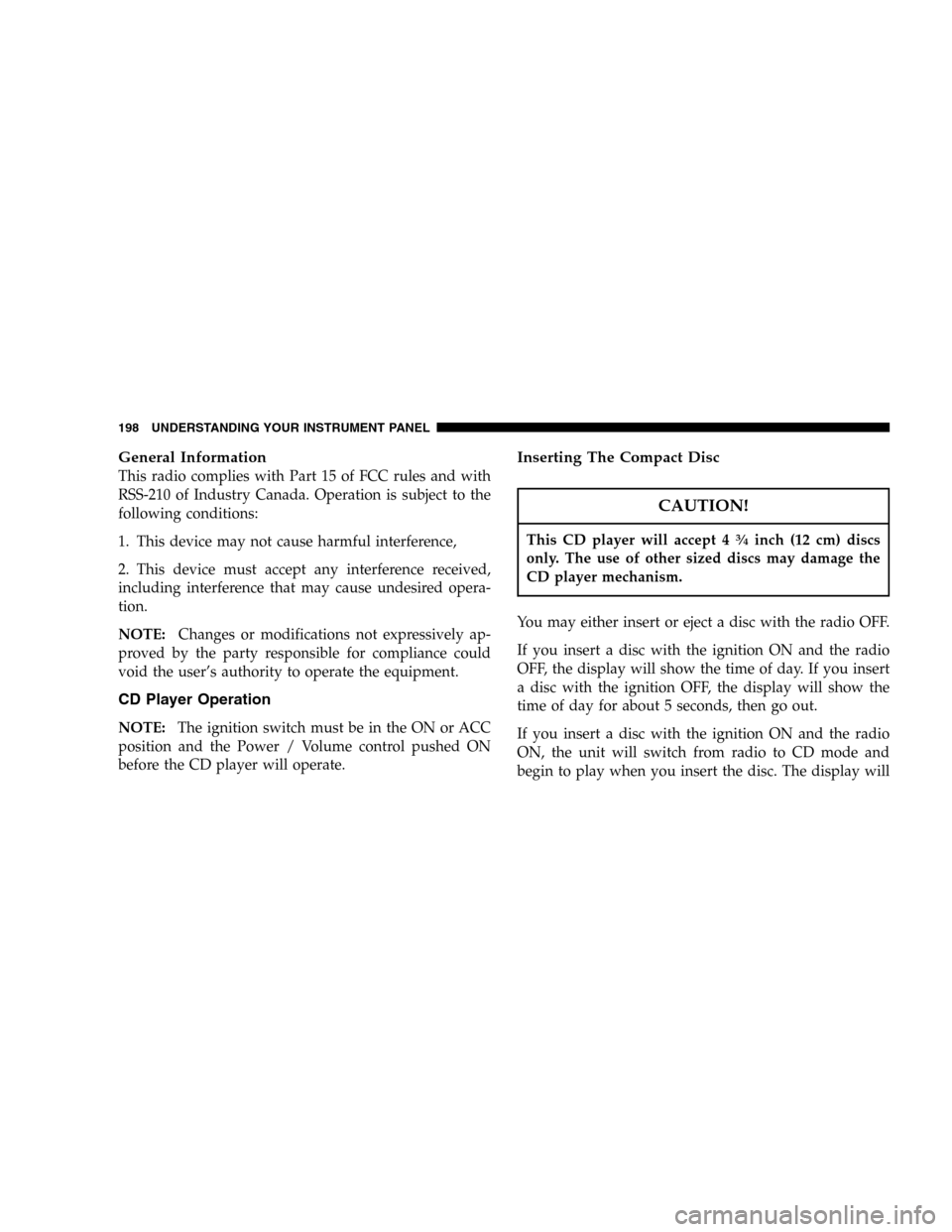
This radio complies with Part 15 of FCC rules and with
RSS-210 of Industry Canada. Operation is subject to the
following conditions:
1. This device may not cause harmful interference,
2. This device must accept any interference received,
including interference that may cause undesired opera-
tion.
NOTE:Changes or modifications not expressively ap-
proved by the party responsible for compliance could
void the user’s authority to operate the equipment.
CD Player Operation
NOTE:The ignition switch must be in the ON or ACC
position and the Power / Volume control pushed ON
before the CD player will operate.
Inserting The Compact Disc
CAUTION!
This CD player will accept 434inch (12 cm) discs
only. The use of other sized discs may damage the
CD player mechanism.
You may either insert or eject a disc with the radio OFF.
If you insert a disc with the ignition ON and the radio
OFF, the display will show the time of day. If you insert
a disc with the ignition OFF, the display will show the
time of day for about 5 seconds, then go out.
If you insert a disc with the ignition ON and the radio
ON, the unit will switch from radio to CD mode and
begin to play when you insert the disc. The display will
198 UNDERSTANDING YOUR INSTRUMENT PANEL
Page 204 of 424
System Activation
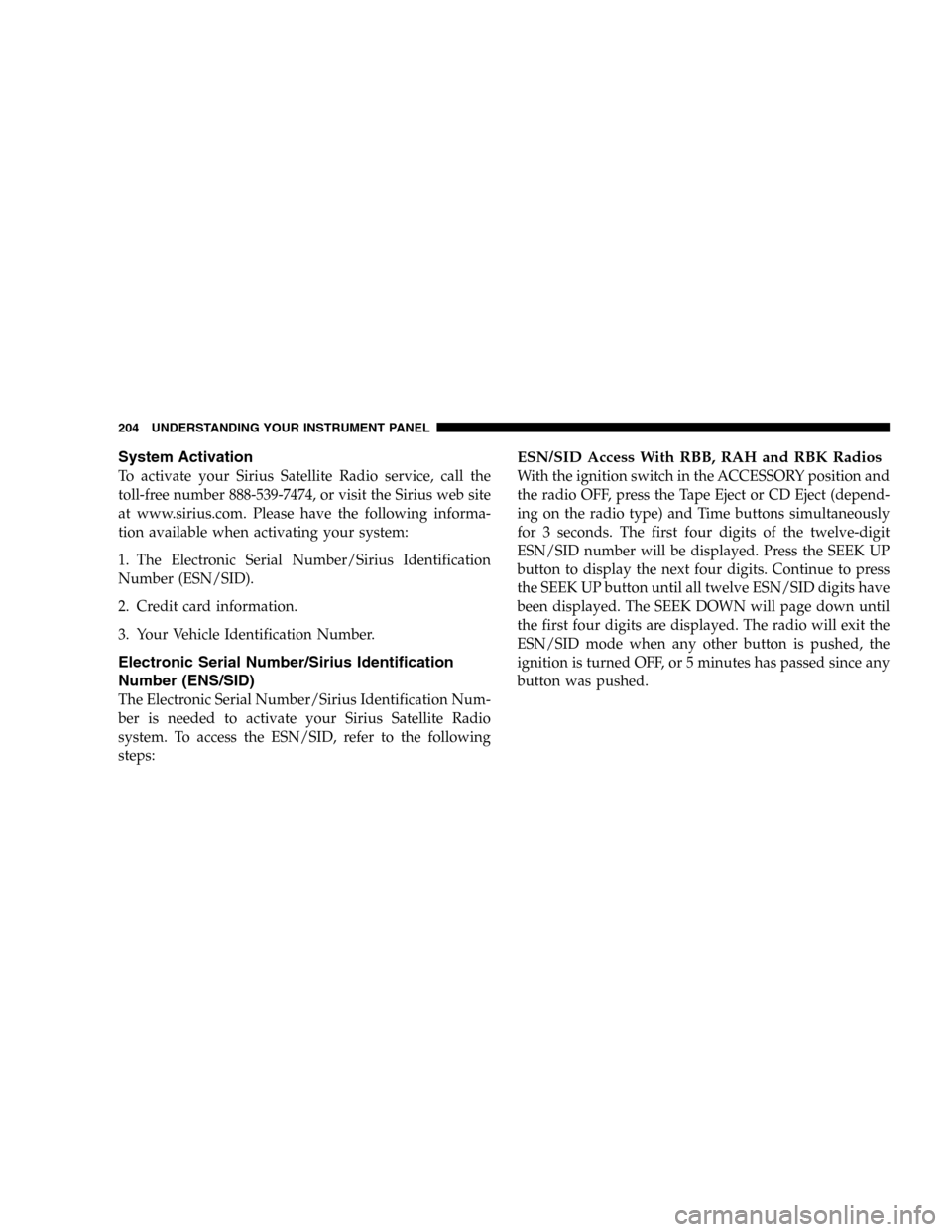
To activate your Sirius Satellite Radio service, call the
toll-free number 888-539-7474, or visit the Sirius web site
at www.sirius.com. Please have the following informa-
tion available when activating your system:
1. The Electronic Serial Number/Sirius Identification
Number (ESN/SID).
2. Credit card information.
3. Your Vehicle Identification Number.
Electronic Serial Number/Sirius Identification
Number (ENS/SID)
The Electronic Serial Number/Sirius Identification Num-
ber is needed to activate your Sirius Satellite Radio
system. To access the ESN/SID, refer to the following
steps:
ESN/SID Access With RBB, RAH and RBK Radios
With the ignition switch in the ACCESSORY position and
the radio OFF, press the Tape Eject or CD Eject (depend-
ing on the radio type) and Time buttons simultaneously
for 3 seconds. The first four digits of the twelve-digit
ESN/SID number will be displayed. Press the SEEK UP
button to display the next four digits. Continue to press
the SEEK UP button until all twelve ESN/SID digits have
been displayed. The SEEK DOWN will page down until
the first four digits are displayed. The radio will exit the
ESN/SID mode when any other button is pushed, the
ignition is turned OFF, or 5 minutes has passed since any
button was pushed.
204 UNDERSTANDING YOUR INSTRUMENT PANEL
Page 205 of 424
ESN/SID Access With RBP, RBU, RAZ, RB1 and
RBQ Radios
With the ignition switch in the ACCESSORY position and
the radio OFF, press the CD Eject and TIME buttons
simultaneously for 3 seconds. All twelve ESN/SID num-
bers will be displayed. The radio will exit the ESN/SID
mode when any other button is pushed, the ignition is
turned OFF, or 5 minutes has passed since any button
was pushed.
Selecting Satellite Mode in RBB, RAH and RBK
Radios
Press the MODE button repeatedly until�SA�appears in
the display. A CD or tape may remain in the radio while
in the Satellite radio mode.
Selecting Satellite Mode in RBP, RBU, RAZ, RB1
and RBQ Radios
Press the MODE button repeatedly until the word
�SIRIUS�appears in the display. These radios will also
display the following:
•After 3 seconds, the current channel name and channel
number will be displayed for 5 seconds.
•The current program type and channel number will
then be displayed for 5 seconds.
•The current channel number will then be displayed
until an action occurs.
A CD or tape may remain in the radio while in the
Satellite radio mode.
UNDERSTANDING YOUR INSTRUMENT PANEL 205
4
Page 230 of 424
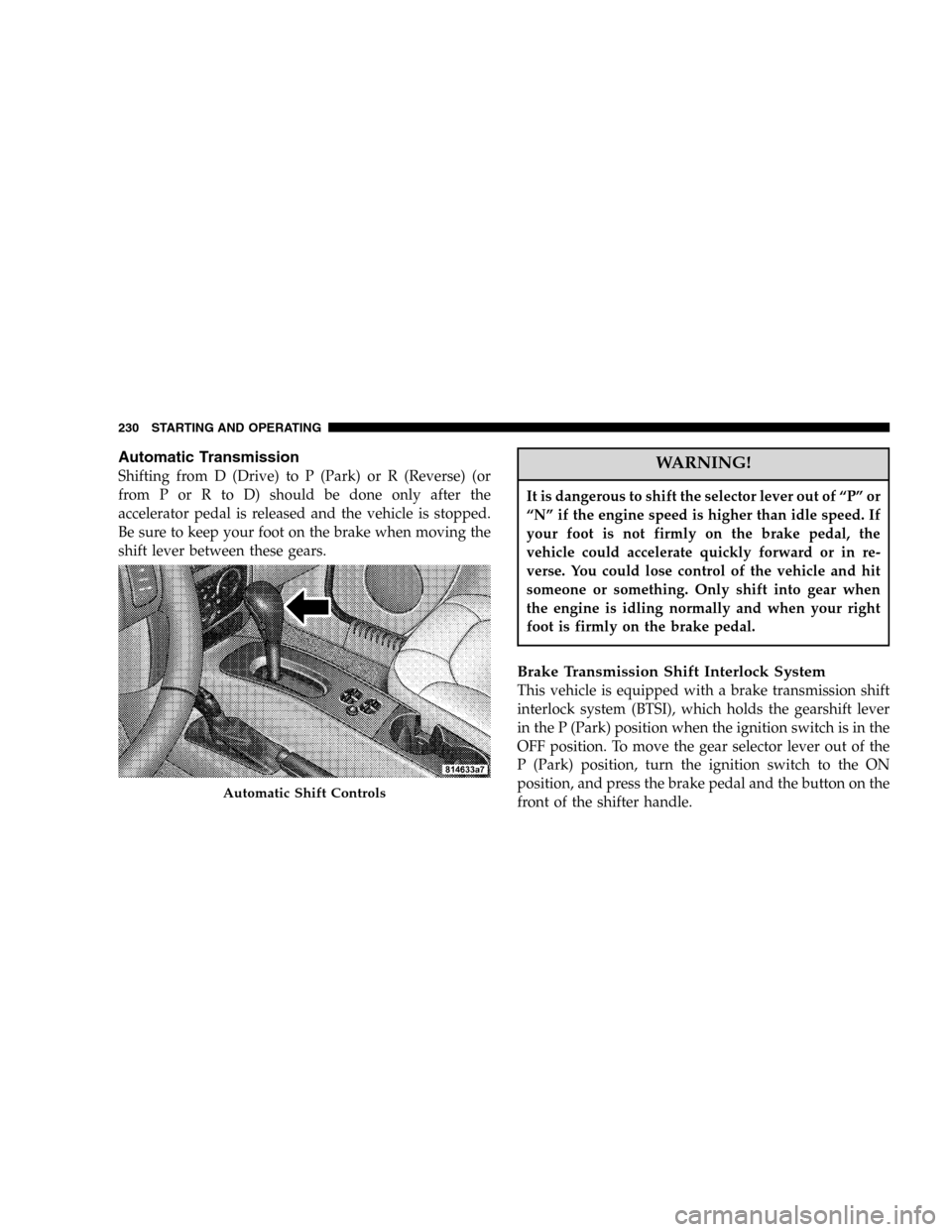
Automatic Transmission
Shifting from D (Drive) to P (Park) or R (Reverse) (or
from P or R to D) should be done only after the
accelerator pedal is released and the vehicle is stopped.
Be sure to keep your foot on the brake when moving the
shift lever between these gears.WARNING!
It is dangerous to shift the selector lever out of “P” or
“N” if the engine speed is higher than idle speed. If
your foot is not firmly on the brake pedal, the
vehicle could accelerate quickly forward or in re-
verse. You could lose control of the vehicle and hit
someone or something. Only shift into gear when
the engine is idling normally and when your right
foot is firmly on the brake pedal.
Brake Transmission Shift Interlock System
This vehicle is equipped with a brake transmission shift
interlock system (BTSI), which holds the gearshift lever
in the P (Park) position when the ignition switch is in the
OFF position. To move the gear selector lever out of the
P (Park) position, turn the ignition switch to the ON
position, and press the brake pedal and the button on the
front of the shifter handle.
Automatic Shift Controls
230 STARTING AND OPERATING
Page 310 of 424
that the gas cap is properly tightened. Press the odometer
reset button to turn the message off. If the problem
persists, the message will appear the next time the
vehicle is started. This might indicate a damaged cap. If
the problem is detected twice in a row, the system will
turn on the Malfunction Indicator Light (MIL). Resolving
the problem will turn the MIL light off.
EMISSIONS INSPECTION AND MAINTENANCE
PROGRAMS
In some localities, it may be a legal requirement to pass
an inspection of your vehicle’s emissions control system.
Failure to pass could prevent vehicle registration.
For states which have an I/M (Inspection and
Maintenance) requirement, this check verifies the
following: the MIL (Malfunction Indicator Lamp)
is functioning and is not on when the engine is running,
and that the OBD (On Board Diagnostic) system is ready
for testing.Normally, the OBD system will be ready. The OBD
system maynotbe ready if your vehicle was recently
serviced, if you recently had a dead battery, or a battery
replacement. If the OBD system should be determined
not ready for the I/M test, your vehicle may fail the test.
Your vehicle has a simple ignition key actuated test
which you can use prior to going to the test station. To
check if your vehicle’s OBD system is ready, you must do
the following:
1. Insert your ignition key into the ignition switch.
2. Turn the ignition to the ON position, but do not crank
or start the engine.
3. If you crank or start the engine, you will have to start
this test over.
4. As soon as you turn your key to the ON position, you
will see your MIL symbol come on as part of a normal
bulb check.
310 MAINTAINING YOUR VEHICLE
Page 346 of 424
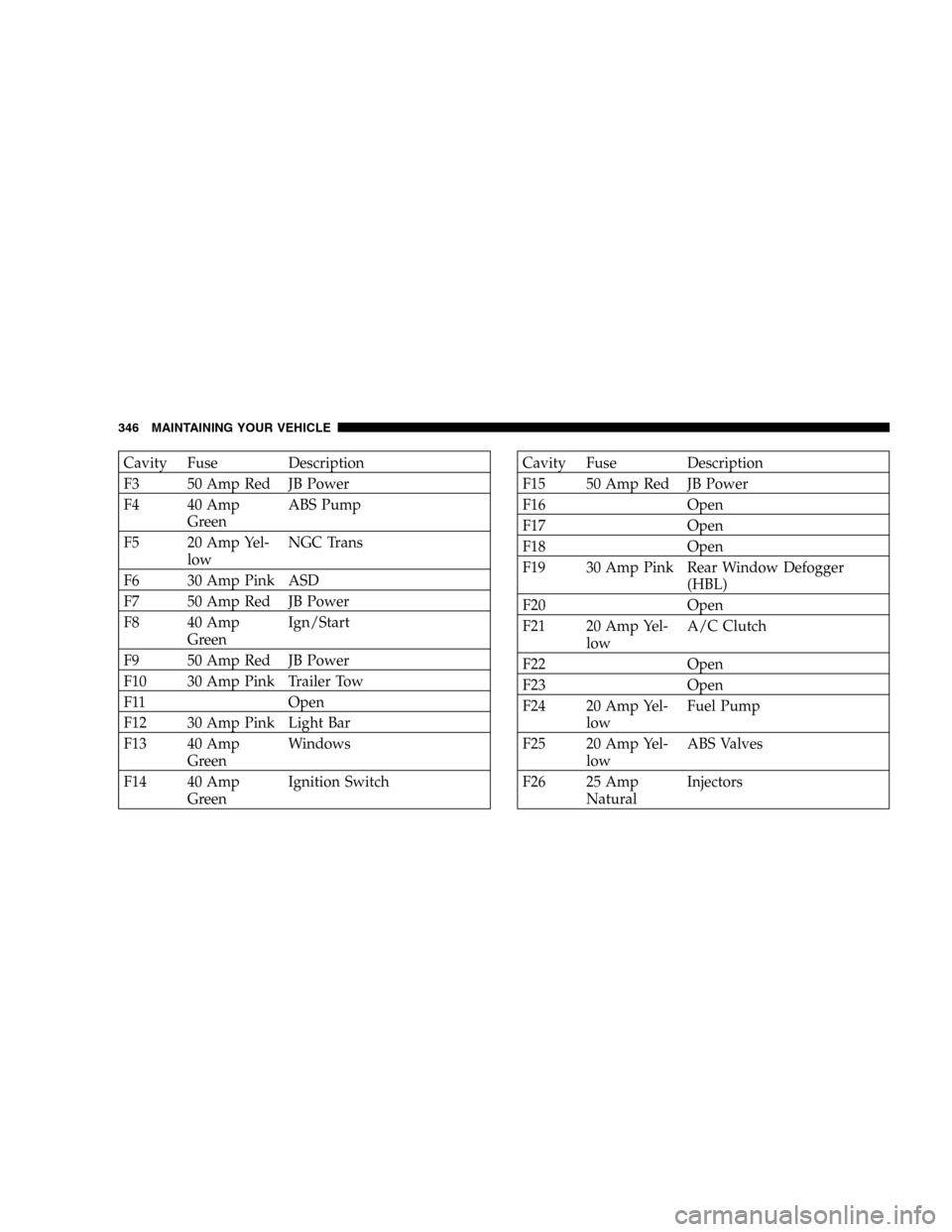
Cavity Fuse Description
F3 50 Amp Red JB Power
F4 40 Amp
GreenABS Pump
F5 20 Amp Yel-
lowNGC Trans
F6 30 Amp Pink ASD
F7 50 Amp Red JB Power
F8 40 Amp
GreenIgn/Start
F9 50 Amp Red JB Power
F10 30 Amp Pink Trailer Tow
F11 Open
F12 30 Amp Pink Light Bar
F13 40 Amp
GreenWindows
F14 40 Amp
GreenIgnition SwitchCavity Fuse Description
F15 50 Amp Red JB Power
F16 Open
F17 Open
F18 Open
F19 30 Amp Pink Rear Window Defogger
(HBL)
F20 Open
F21 20 Amp Yel-
lowA/C Clutch
F22 Open
F23 Open
F24 20 Amp Yel-
lowFuel Pump
F25 20 Amp Yel-
lowABS Valves
F26 25 Amp
NaturalInjectors
346 MAINTAINING YOUR VEHICLE
Page 348 of 424
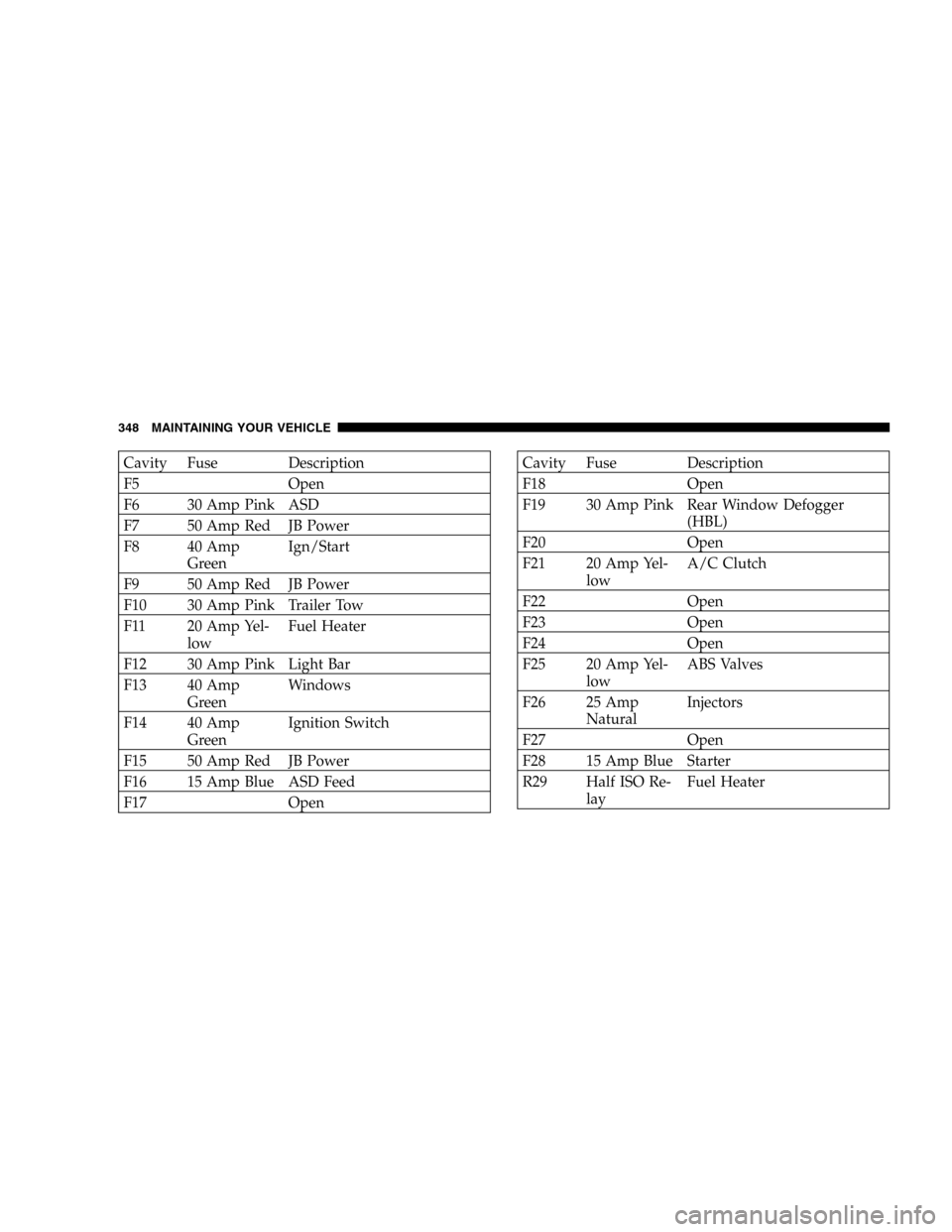
Cavity Fuse Description
F5 Open
F6 30 Amp Pink ASD
F7 50 Amp Red JB Power
F8 40 Amp
GreenIgn/Start
F9 50 Amp Red JB Power
F10 30 Amp Pink Trailer Tow
F11 20 Amp Yel-
lowFuel Heater
F12 30 Amp Pink Light Bar
F13 40 Amp
GreenWindows
F14 40 Amp
GreenIgnition Switch
F15 50 Amp Red JB Power
F16 15 Amp Blue ASD Feed
F17 OpenCavity Fuse Description
F18 Open
F19 30 Amp Pink Rear Window Defogger
(HBL)
F20 Open
F21 20 Amp Yel-
lowA/C Clutch
F22 Open
F23 Open
F24 Open
F25 20 Amp Yel-
lowABS Valves
F26 25 Amp
NaturalInjectors
F27 Open
F28 15 Amp Blue Starter
R29 Half ISO Re-
layFuel Heater
348 MAINTAINING YOUR VEHICLE