Page 122 of 424
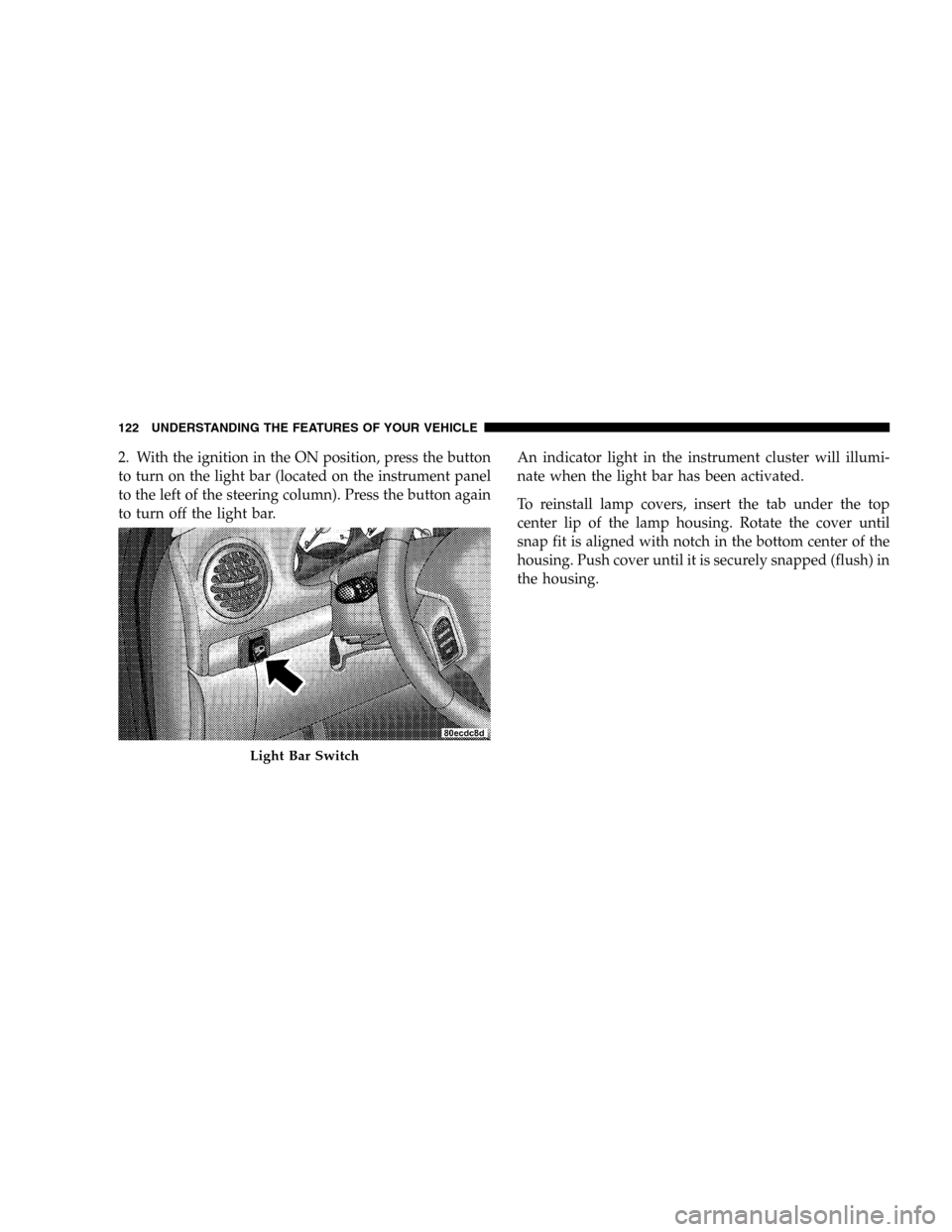
2. With the ignition in the ON position, press the button
to turn on the light bar (located on the instrument panel
to the left of the steering column). Press the button again
to turn off the light bar.An indicator light in the instrument cluster will illumi-
nate when the light bar has been activated.
To reinstall lamp covers, insert the tab under the top
center lip of the lamp housing. Rotate the cover until
snap fit is aligned with notch in the bottom center of the
housing. Push cover until it is securely snapped (flush) in
the housing.
Light Bar Switch
122 UNDERSTANDING THE FEATURES OF YOUR VEHICLE
Page 124 of 424
Windshield Washers
To use the washer, pull the lever toward you and hold
while spray is desired. If the lever is pulled while in the
delay range, the wiper will operate for two wipe cycles
after the lever is released, and then resume the intermit-
tent interval previously selected.
NOTE:If vehicle is equipped with the optional Elec-
tronic Vehicle Information Center (EVIC) in the overhead
console, all warnings including “door”, “GATE”,
“GLASS”, and “LOWASH” will only be displayed in the
EVIC display (not in the instrument cluster). For addi-
tional information, refer to “Overhead Console — If
Equipped” in Section 3.
The vacuum fluorescent (VF) display located in the
odometer area displays the word “LOWASH” when the
washer solvent needs to be refilled. If the vehicle is not
moving, when a low washer fluid condition is detected,
the VF display will show the word “LOWASH” and thenshow the odometer/trip odometer mileage (each for 2
seconds). The display will continue to cycle.
If any other active warnings including “door”, “GATE”,
or “GLASS” are present, they will be shown in the VF
display and will continue to cycle. If the vehicle starts
moving, two single chimes will occur (one chime for each
complete display cycle). After this, the display will
continue to sequence. After fifteen “LOWASH” se-
quences, the VF display will no longer provide this
warning.
If the trip/reset button is pressed while the VF warnings
are being displayed, the VF display will revert back to
only displaying the odometer/trip odometer mileage.
Once the warning is removed from the display, it will not
return for the duration of the ignition cycle.
If the lever is pulled while in the OFF position, the wipers
will operate for several wipe cycles, then turn off.
124 UNDERSTANDING THE FEATURES OF YOUR VEHICLE
Page 128 of 424
To Set At A Desired Speed
When the vehicle has reached the desired speed, press
and release the SET button. Release the accelerator and
the vehicle will operate at the selected speed.
To Deactivate
A soft tap on the brake pedal, normal braking, or pressing
the CANCEL button will deactivate the Speed Control
without erasing the memory. Pressing the ON·OFF but-
ton or turning off the ignition erases the memory.
To Resume Speed
To resume a previously set speed, press and release the
RES·ACCEL button. Resume can be used at any speed
beginning at approximately 30 mph (48 km/h).
To Vary The Speed Setting
When the Speed Control is on and set, speed can be
increased by pressing and holding the RES·ACCEL but-
ton. When the button is released, a new set speed will be
established.
Tapping the RES·ACCEL button once will result in a 2
mph (3 km/h) speed increase. Each time the button is
tapped, speed increases, so tapping the button three
times will increase speed by 6 mph (9 km/h), etc.
To decrease speed while speed control is on and set, press
and hold the DECEL button. Release the button when the
desired speed is reached, and the new speed will be set.
Tapping the DECEL button once will result in a 1 mph (2
km/h) speed decrease. Each time the button is tapped,
speed decreases.
128 UNDERSTANDING THE FEATURES OF YOUR VEHICLE
Page 136 of 424
WARNING!
Even if the display still reads a few degrees above
32°F (0°C), the road surface may be icy, particularly
in woods or on bridges. Drive carefully under such
conditions to prevent an accident and possible per-
sonal injury or property damage.
Step Button
Press the STEP button to cycle through all of the displays.
The displays are: Average Miles/GAL, Miles To Empty,
Trip Miles, Time Elapsed, Miles To Service, Tire PSI, and
Blank Screen.
Average Miles/GAL
Shows the average fuel economy in miles per gallon
(MPG), or liters per 100 km (L/100 km) since the last
reset.Miles To Empty
Shows the estimated distance that can be traveled before
the fuel gauge shows E (Empty). The distance is calcu-
lated by multiplying the amount of fuel remaining by the
projected fuel economy. The distance predicted will
change every few seconds to a higher or lower number as
these factors change. This display cannot be reset.
Trip Miles
Shows the distance traveled since the last reset.
Time Elapsed
Shows the accumulated ignition ON time since the last
reset.
Miles To Service
Shows the amount of miles remaining until service is
required (owner selected).
136 UNDERSTANDING THE FEATURES OF YOUR VEHICLE
Page 137 of 424
Tire PSI
Shows the pressure and location of each tire, except for
the spare tire. The tire location will blink when under
pressure.
Blank Screen
Shows a blank screen. Pressing the C/T button returns to
the Compass and Temperature display. Pressing the STEP
button returns you to the Average Miles per Gallon
display.
Automatic Compass Calibration
This compass is self-calibrating which eliminates the
need to manually set the compass. When the vehicle is
new, the compass may appear erratic and the CAL
symbol will be displayed.
After completing three 360 degree turns in an area free
from large metal or metallic objects, the CAL symbol will
turn off and the compass will function normally.
Manual Compass Calibration
If the compass appears erratic and the CAL symbol does
not appear, you must manually put the compass into the
“Calibration” mode.
To Put Into a Calibration Mode
Turn on the ignition and set the display to “Compass/
Temperature.” Press and hold the RESET button (more
than 10 seconds) to change the display between VARI-
ANCE (compass variance) and CAL (compass calibra-
tion) modes. When the CAL symbol is displayed com-
plete three 360 degree turns in an area free from large
metal objects or power lines. The CAL symbol will turn
off and the compass will function normally.
UNDERSTANDING THE FEATURES OF YOUR VEHICLE 137
3
Page 138 of 424
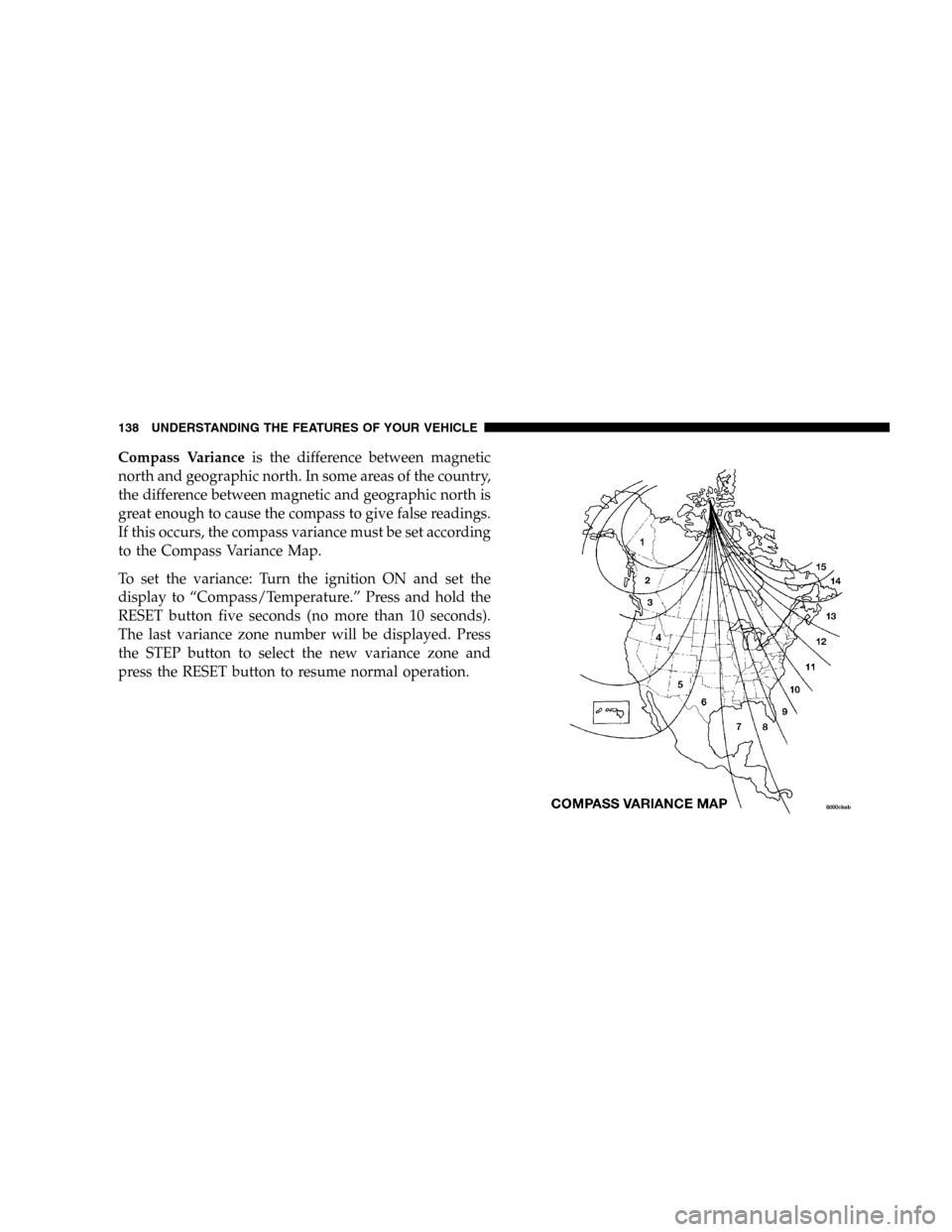
Compass Varianceis the difference between magnetic
north and geographic north. In some areas of the country,
the difference between magnetic and geographic north is
great enough to cause the compass to give false readings.
If this occurs, the compass variance must be set according
to the Compass Variance Map.
To set the variance: Turn the ignition ON and set the
display to “Compass/Temperature.” Press and hold the
RESET button five seconds (no more than 10 seconds).
The last variance zone number will be displayed. Press
the STEP button to select the new variance zone and
press the RESET button to resume normal operation.
138 UNDERSTANDING THE FEATURES OF YOUR VEHICLE
Page 149 of 424
The rear power outlet is a direct feed from the battery so
it receives power whether the ignition is in the ON or
OFF position.
All accessories connected to this outlet should be re-
moved or turned off when the vehicle is not in use.CAUTION!
Electrical Outlet Use With Engine Off
•Many accessories that can be plugged in draw
power from the vehicle’s battery, even when not
in use (i.e., cellular phones, etc.). Eventually, if
plugged in long enough, the vehicle’s battery will
discharge sufficiently to degrade battery life
and/or prevent engine starting.
•Accessories that draw higher power (i.e., coolers,
vacuum cleaners, lights, etc.) will degrade the
battery even more quickly. Only use these inter-
mittently and with greater caution.
•After the use of high power draw accessories, or
long periods of the vehicle not being started (with
accessories still plugged in), the vehicle must be
driven a sufficient length of time to allow the
alternator to recharge the vehicle’s battery.
UNDERSTANDING THE FEATURES OF YOUR VEHICLE 149
3
Page 157 of 424

If the rear wiper is operating when the ignition is turned
OFF, the wiper will automatically return to the “Park”
position. When the vehicle is restarted, the wiper will
resume function at whichever position the switch is set
at.
If the swing gate flip-up window is open or the swing
gate is open, connection to the rear window wiper is
interrupted preventing activation of the rear wiper blade.
When the swing gate flip-up window or the swing gate is
closed, the rear wiper switch or the ignition switch needs
to be turned OFF, and then to ON to restart the rear
wiper.NOTE: The rear swing gate will lock while the rear
wiper is operating. The gate will stay locked until the
wiper is turned off and the gate is unlocked (by key,
lock switch, or key fob).
Adding Washer Fluid
The fluid reservoir for the windshield washers and the
rear window washer is shared. It is located in the front of
the engine compartment on the passenger side and
should be checked for fluid level at regular intervals. Fill
the reservoir with windshield washer solvent (not radia-
tor antifreeze) and operate the system for a few seconds
to flush out the residual water.
UNDERSTANDING THE FEATURES OF YOUR VEHICLE 157
3