Page 167 of 424
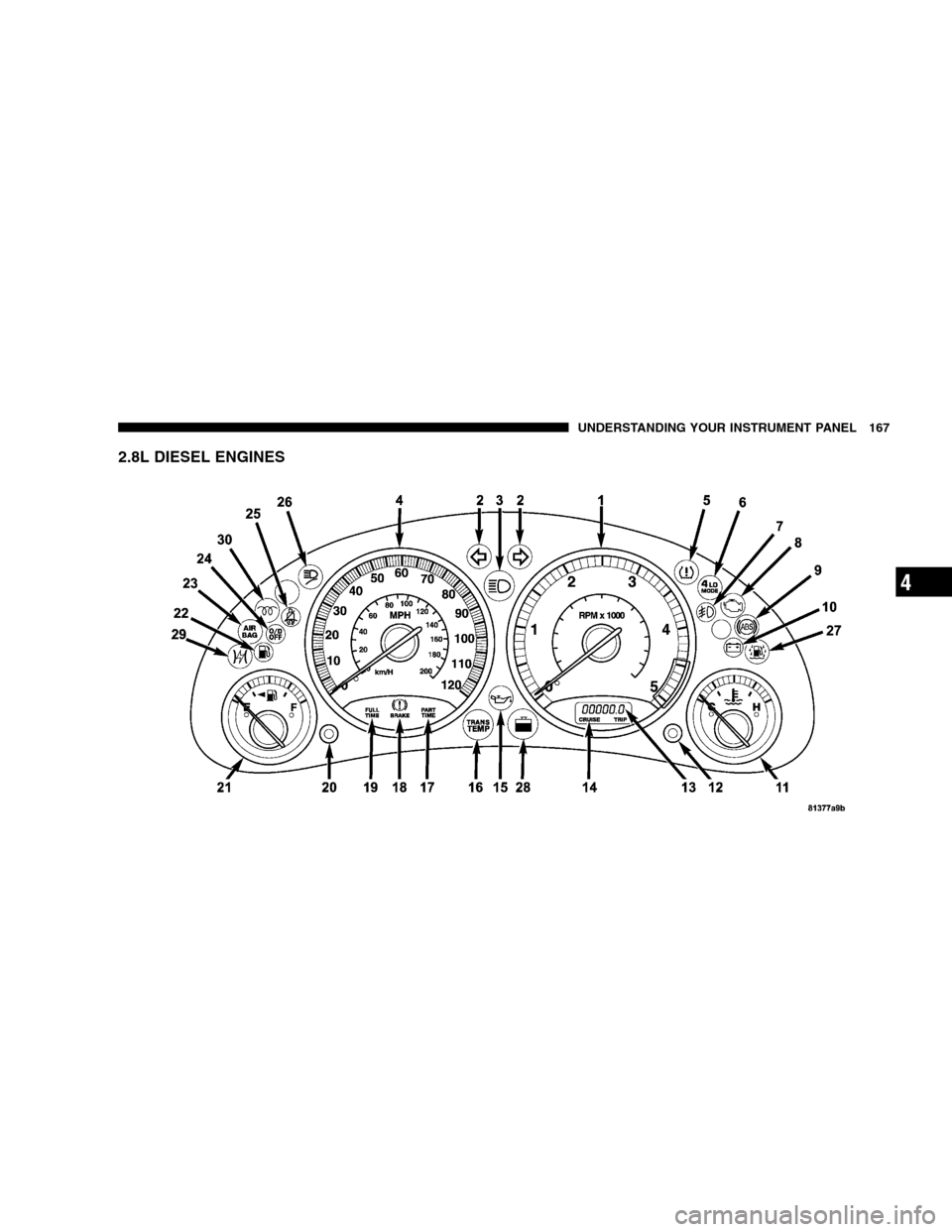
2.8L DIESEL ENGINES
UNDERSTANDING YOUR INSTRUMENT PANEL 167
4
Page 168 of 424

INSTRUMENT CLUSTER DESCRIPTION
1. Tachometer
Indicates the permissible engine revolutions-per-minute
for each gear range. Before reaching the red area, ease up
on the accelerator to prevent engine damage.
2. Turn Signal Indicator Light
The arrows will flash in unison with the exterior
turn signals, when using the multi-function control
lever. A chime will sound if the turn signals are left on
continuously for 2 miles (3 km) until they are deacti-
vated.
3. High Beam Indicator Light
This light shows that the headlights are on high
beam. Pull the multi-function control lever to-
wards the steering wheel to switch the headlights from
high to low beam.4. Speedometer
Indicates vehicle speed.
5. Tire Pressure Monitor Warning Light — If Equipped
This light will turn on when there is a low tire
pressure condition. The light will also turn on
if a problem exist with any tire sensor. The light
will remain on until the tire pressure is prop-
erly set or the problem with the sensor is corrected.
This light will turn on momentarily as a bulb check when
the engine is started.
When the “Tire Pressure Monitor Warning Light” is lit,
one or more of your tires is significantly under-inflated.
You should stop and check your tires as soon as possible,
and inflate them to the proper pressure as indicated on
the vehicle’s tire information placard. Driving on a
significantly under-inflated tire causes the tire to over-
heat and can lead to tire failure. Under-inflation also
reduces fuel efficiency and tire tread life, and may affect
168 UNDERSTANDING YOUR INSTRUMENT PANEL
Page 169 of 424

the vehicle’s handling and stopping ability. Each tire,
including the spare, should be checked monthly when
cold and set to the recommended inflation pressure as
specified on the vehicle placard. (See page 268 for more
information.)
6. 4LO Mode Indicator Light — If Equipped
This light alerts the driver that the vehicle is in
the 4 LO four–wheel drive mode. The front and
rear driveshafts are mechanically locked to-
gether forcing the front and rear wheels to
rotate at the same speed. (See page 236 for more infor-
mation.)
7. Fog Light Indicator Light — If Equipped
This light shows when the front fog lights are on.8. Malfunction Indicator Light
This light is part of an onboard diagnostic system
called OBD II which monitors engine and auto-
matic transmission control systems. This light
will illuminate when the ignition is in the ON position
before engine start. If the bulb does not come on when
turning the ignition key from OFF to ON, have the
condition checked promptly.
Certain conditions such has a loose or missing gas cap,
poor fuel quality, etc. may illuminate the light after
engine start. The vehicle should be serviced if the light
stays on through several typical driving cycles. In most
situations, the vehicle will drive normally and will not
require towing.
When the engine is running, the “Malfunction Indicator
Light” may flash to alert of serious conditions that could
lead to immediate loss of power or severe catalytic
UNDERSTANDING YOUR INSTRUMENT PANEL 169
4
Page 171 of 424

11. Temperature Gage
Indicates engine coolant temperature. Any read-
ing within the normal range indicates that the
cooling system is operating satisfactorily.
The gage pointer will likely indicate a higher temperature
(above center scale) when driving in hot weather, up
mountain grades, in heavy stop and go traffic, or when
towing a trailer. It should not be allowed to exceed the
upper limits of the normal operating range.
If the pointer rises to the red zone (five chimes will
occur), pull over and stop the vehicle. Do not turn the
engine off. Idle the vehicle with the air conditioning
turned off, until the pointer drops back into the normal
range. If the engine remains in the high range, turn the
engine off and call for service.12. Reset Button
Press this button to toggle between the odometer and trip
odometer display. When in the trip odometer mode,
holding the button in resets the trip odometer. Also,
pressing the “Reset” button will clear out any warning
messages in the odometer display.
13. Odometer/Trip Odometer
A vacuum fluorescent display indicates the total distance
the vehicle has been driven. Also, the cluster will display,
replacing the odometer/trip odometer, vehicle warning
messages such as: door/gate/glass ajar and low washer
fluid. See appropriate sections for more information.
NOTE:If vehicle is equipped with the optional Elec-
tronic Vehicle Information Center (EVIC) in the overhead
console, all warnings including “door”, “GATE”,
“GLASS”, and “LOWASH” will only be displayed in the
UNDERSTANDING YOUR INSTRUMENT PANEL 171
4
Page 172 of 424

EVIC display (not in the instrument cluster). For addi-
tional information, refer to “Overhead Console — If
Equipped” in Section 3.
U.S. federal regulations require that upon transfer of
vehicle ownership, the seller certify to the purchaser the
correct mileage that the vehicle has been driven. There-
fore, if the odometer reading is changed during repair or
replacement, be sure to keep a record of the reading
before and after the service so that the correct mileage can
be determined.
14. Cruise Indicator Light
This indicator lights when the speed control
system is turned ON.
15. Oil Pressure Warning Light
Shows low engine oil pressure. The light will come
on and remain on when the ignition switch is
turned from the OFF to the ON position, and the lightwill turn off after the engine is started. If the bulb does
not come on, have the system checked by your autho-
rized dealer.
If the warning light comes on and remains on while
driving, stop the vehicle and shut off the engine. DO
NOT OPERATE THE VEHICLE UNTIL THE CAUSE IS
CORRECTED. Also, a single chime will sound.
16. Transmission Temperature Warning Light
This light indicates that there is excessive trans-
mission fluid temperature that might occur with
severe usage such as trailer towing or snow plowing. If
this light comes on, stop the vehicle and run the engine at
idle or faster, with the transmission in N (Neutral) until
the light goes off.
172 UNDERSTANDING YOUR INSTRUMENT PANEL
Page 175 of 424

24. O/D (Overdrive) Off Indicator Light
This light will illuminate when the O/D OFF
button has been selected. The O/D OFF button is
located on the gear shift lever.
25. Seat Belt Indicator Light
When the ignition switch is first turned ON, this
light will turn on for 5 to 8 seconds as a bulb check.
During the bulb check, if the driver’s seat belt is
unbuckled, a chime will sound. After the bulb check or
when driving, if the driver seat belt remains unbuckled,
the Seat Belt Warning Light will flash or remain on
continuously. Refer to�Enhanced Driver Seat Belt Re-
minder System (BeltAlert)�in the Occupant Restraints
section for more information.
26. Light Bar Indicator Light — If Equipped
This light indicates when the light bar lamps
are on.27. Water In Fuel Warning Light — If Equipped
This light indicates water has collected in the
fuel filter and should be drained immediately.
See your authorized dealer for service. (See
page 220 for more information.)
28. Low Coolant Warning Light — If Equipped
This light comes on if the coolant level is low.
This light will come on for 3 seconds as a bulb
check when the ignition switch is first turned
to the ON position.
29. Electronic Throttle Control (ETC) Warning Light —
If Equipped
This light informs you of a problem with the
Electronic Throttle Control system. If a problem
is detected the light will come on while the
engine is running. Cycle the ignition key when
the vehicle has completely stopped and the gear selector
is placed in the P (Park) position. The light should turn
UNDERSTANDING YOUR INSTRUMENT PANEL 175
4
Page 176 of 424

off. If the light remains lit with the engine running your
vehicle will usually be drivable, however, see your dealer
for service as soon as possible. If the light is flashing
when the engine is running, immediate service is re-
quired and you may experience reduced performance, an
elevated/rough idle or engine stall and your vehicle may
require towing. The light will come on when the ignition
is first turned on and remain on briefly as a bulb check.
If the light does not come on during starting, have the
system checked by an authorized dealer.
30. Glow Plug Indicator Light — If Equipped
This light will illuminate when the ignition
switch is first turned to the ON position. Wait
until the light turns off before starting the
vehicle. Refer to “Starting Procedures” in Sec-
tion 5 of this manual. (See page 220 for more
information.)ELECTRONIC DIGITAL CLOCK
The clock and radio each use the display panel built into
the radio. A digital readout shows the time in hours and
minutes whenever the ignition switch is in the ON or
ACC position and the time button is pressed.
When the ignition switch is in the OFF position, or when
the radio frequency is being displayed, time keeping is
accurately maintained.
Clock Setting Procedure
1. Turn the ignition switch to the ON or ACC position
and press the time button. Using the tip of a ballpoint pen
or similar object, press either the hour (H) or minute (M)
buttons on the radio.
2. Press the H button to set hours or the M button to set
minutes. The time setting will increase each time you
press a button.
176 UNDERSTANDING YOUR INSTRUMENT PANEL
Page 215 of 424
Summer Operation
Air conditioned equipped vehicle’s cooling systems must
be protected with a high quality engine coolant during
summer to provide proper corrosion protection and to
raise the boiling point of the coolant for protection
against overheating. A 50% concentration is recom-
mended.
Winter Operation
When operating the system during the winter months,
make sure the air intake, located directly in front of the
windshield, is free of ice, slush, snow, or other obstruc-
tions.
UNDERSTANDING YOUR INSTRUMENT PANEL 215
4