2005 HYUNDAI TUCSON fuse
[x] Cancel search: fusePage 46 of 273
1
FEATURES OF YOUR HYUNDAI
35
!
o The SRS can function only when the
ignition key is in the "ON" position. If the
SRS SRI does not illuminate or contin-
uously remains on after illuminating for
about 6 seconds when the ignition key
is turned to the "ON" position, or after
the engine is started, illuminates while
driving, the SRS is not working properly.
If this occurs, have your vehicle immedi-
ately inspected by your Hyundai dealer.
o Before you replace a fuse or disconnect
a battery terminal, turn the ignition key
to the "LOCK" position or remove the
ignition key. Never remove or replace the
air bag related fuse(s) when the ignition
key is in the "ON" position. Failure to
heed this warning will cause the SRS SRI
to illuminate.
WARNING:
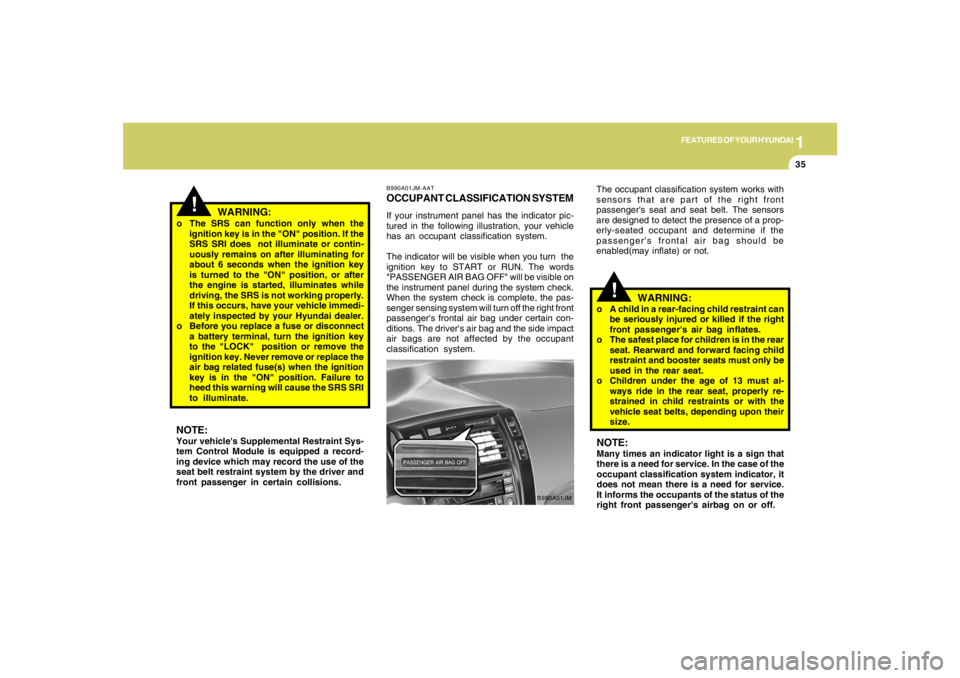
B990A01JM-AATOCCUPANT CLASSIFICATION SYSTEMIf your instrument panel has the indicator pic-
tured in the following illustration, your vehicle
has an occupant classification system.
The indicator will be visible when you turn the
ignition key to START or RUN. The words
"PASSENGER AIR BAG OFF" will be visible on
the instrument panel during the system check.
When the system check is complete, the pas-
senger sensing system will turn off the right front
passenger's frontal air bag under certain con-
ditions. The driver's air bag and the side impact
air bags are not affected by the occupant
classification system.
B990A01JM
NOTE:Your vehicle's Supplemental Restraint Sys-
tem Control Module is equipped a record-
ing device which may record the use of the
seat belt restraint system by the driver and
front passenger in certain collisions.The occupant classification system works with
sensors that are part of the right front
passenger's seat and seat belt. The sensors
are designed to detect the presence of a prop-
erly-seated occupant and determine if the
passenger's frontal air bag should be
enabled(may inflate) or not.
!
WARNING:
o A child in a rear-facing child restraint can
be seriously injured or killed if the right
front passenger's air bag inflates.
o The safest place for children is in the rear
seat. Rearward and forward facing child
restraint and booster seats must only be
used in the rear seat.
o Children under the age of 13 must al-
ways ride in the rear seat, properly re-
strained in child restraints or with the
vehicle seat belts, depending upon their
size.NOTE:Many times an indicator light is a sign that
there is a need for service. In the case of the
occupant classification system indicator, it
does not mean there is a need for service.
It informs the occupants of the status of the
right front passenger's airbag on or off.
Page 63 of 273
1FEATURES OF YOUR HYUNDAI52
MULTI-FUNCTION LIGHT SWITCHB340A01A-AATCOMBINATION TURN SIGNAL,
HEADLIGHT AND HIGH-BEAM
SWITCH
Turn Signal OperationPulling down on the lever causes the turn
signals on the left side of the car to blink. Pushing
upwards on the lever causes the turn signals on
the right side of the car to blink. As the turn is
completed, the lever will automatically return to
the center position and turn off the turn signals
at the same time. If either turn signal indicator
light blinks more rapidly than usual, goes on but
does not blink, or does not go on at all, there is
a malfunction in the system. Check for a burned-
out fuse or bulb or see your Hyundai dealer.
B400B02JM-A
NOTE:o The distance to empty can differ from
the actual tripmeter according to driving
condition habits.
o The distance to empty can vary accord-
ing to the driving conditions, driving
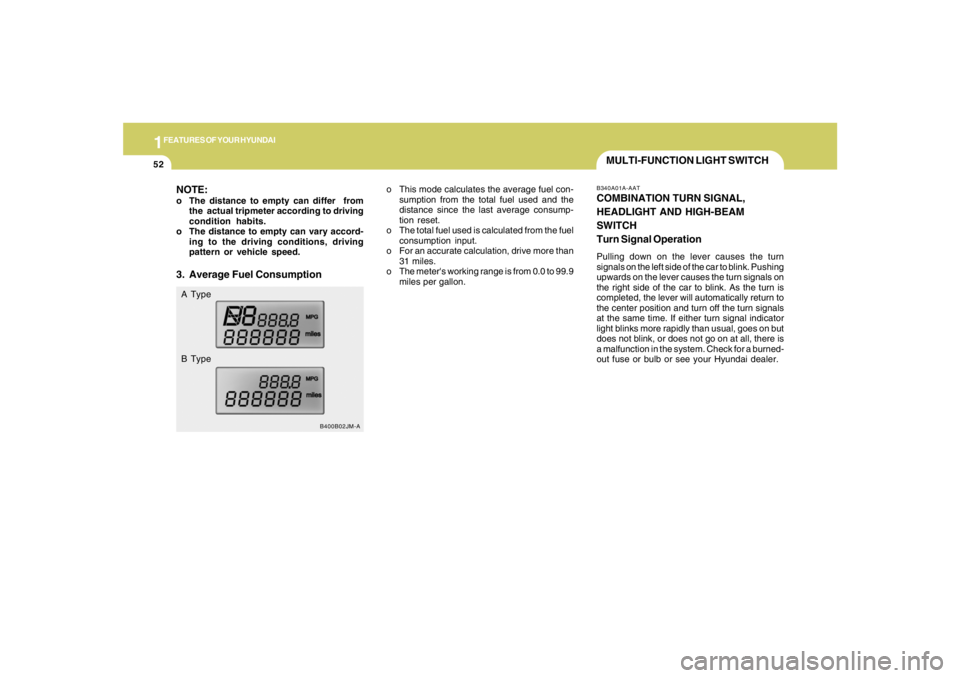
pattern or vehicle speed.3. Average Fuel ConsumptionA Type
B Typeo This mode calculates the average fuel con-
sumption from the total fuel used and the
distance since the last average consump-
tion reset.
o The total fuel used is calculated from the fuel
consumption input.
o For an accurate calculation, drive more than
31 miles.
o The meter's working range is from 0.0 to 99.9
miles per gallon.
Page 118 of 273
1
FEATURES OF YOUR HYUNDAI
107
B260D02O-AAT1. Playing CDo Insert the CD with the label facing upward.
o Insert the CD to start CD playback, during
radio operation.
o When a disc is in the CD deck, if you press
the play button, the CD player will begin
playing even if the radio is being used.
o The CD player can be used when the ignition
switch is in either the "ON" or "ACC" position.2. TRACK UP/DOWNo The desired track on the disc currently being
played can be selected using the track
number.
o Press once to skip forward to the beginning
of the next track. Press
once to skip back to the beginning of the
track.3. FF/REW ( / )If you want to fast forward or reverse through
the compact disc track, push and hold the FF
( ) or REW ( ) button. When you release
the button, the compact disc player will resume
playing.
4. REPEAT Buttono To repeat the track you are currently listen-
ing to, press the RPT button. To cancel ,
press again.
o If you do not release RPT operation when the
track ends, it will automatically be replayed.
This process will be continued until you push
the button again.5. SCAN Buttono Press the SCAN button to playback the first
10 seconds of each track.
o Press the SCAN button again within 10 sec.
when you have reached the desired track.6. EJECT ButtonWhen the EJECT button is pressed with
a CD loaded, the CD will eject.
NOTE:
o If the CD does not operate properly or if
the ER2 fault code is displayed, use one
of two methods to reset the CD deck
function.
- Remove the audio fuse for 5 minutes.
Then, reinstall the audio fuse.
- Diconnect the negative terminal of the
battery and wait 5 minutes. Then re-
connect the negative battery terminal.o To assure proper operation of the unit,
keep the vehicle interior temperature
within a normal range by using the
vehicle's air conditioning or heating
system.
o When replacing the fuse, replace it with
a fuse having the correct capacity.
o The preset station frequencies are all
erased when the car battery is discon-
nected. Therefore, all data will have to be
set again if this should occur.
o Do not add any oil to the rotating parts.
Keep magnets, screwdrivers and other
metallic objects away from the tape
mechanism and head.
o This equipment is designed to be used
only in a 12 volt DC battery system with
negative ground.
o This unit is made of precision parts. Do
not attempt to disassemble or adjust
any parts.
o When driving your vehicle, be sure to
keep the volume of the unit set low
enough to allow you to hear sounds
coming from the outside.
o Do not expose this equipment (includ-
ing the speakers) to water or excessive
moisture.
Page 124 of 273
1
FEATURES OF YOUR HYUNDAI
113
H290D01O-GAT1. FF/REWo Fast forward tape winding starts when the
FF ( ) button is pressed during PLAY or
REW mode.
o Tape PLAY starts when the FF ( ) button
is pressed again during FF mode.
o Tape rewinding starts when the REW ( )
button is pressed during PLAY or FF mode.
o Tape PLAY starts when the REW ( ) button
pressed again during REW mode.2. AUTO MUSIC SelectPress the button to find the starting point of each
song in a prerecorded music tape. The quiet
space between songs (must have at least 4
sec. gap) can be accepted by the AUTO MUSIC
Select button.
o Pressing the button will play the beginning
of the next music segment.
o Pressing the button will start replay at
the beginning of the music just listened to.
3. TAPE PROGRAM Buttono This allows you to play the reverse side of the
tape by merely depressing the program
button. An arrow will appear in the display to
show tape direction.
o Push the TAPE button to turn on that function
without pushing power ON
ˆOFF control knob.
4. REPEATo To repeat the track you are currently listen-
ing to, press the RPT button. To cancel,
press again.
o If you do not release RPT operation when the
track ends, it will automatically be replayed.
This process will be continued until you push
the button again.5. Equalizer (EQ)Press the EQ button to select the CLASSIC,
JAZZ, ROCK and DEFEAT MODE for the
desired tone quality. Each press of the button
changes the display as follows;
6. DOLBYIf you get background noise during tape PLAY,
you can reduce this considerably by merely
pressing the DOLBY button. If you want to
cancel the DOLBY feature, press the button
again.7. TAPE EJECTo When the button is pressed with a cassette
loaded, the cassette will eject.
o When the button is pressed during FF/
REW mode, the cassette will eject.NOTE:o To assure proper operation of the unit,
keep the vehicle interior temperature
within a normal range by using the
vehicle's air conditioning or heating
system.
o When replacing the fuse, replace it with
a fuse having the correct capacity.
o The preset station frequencies are all
erased when the car battery is discon-
nected. Therefore, all data will have to be
set again if this should occur.
o Do not add any oil to the rotating parts.
Keep magnets, screwdrivers and other
metallic objects away from the tape
mechanism and head.
CLASSIC → JAZZ → ROCK → DEFEAT
Page 128 of 273
1
FEATURES OF YOUR HYUNDAI
117
8. SCANo Press the SCAN button to playback the first
10 seconds of each track.
o To playback the first 10 seconds of each
track in the selected folder, press the SCAN
button for 2 seconds or longer. (MP3 CD
only)
o Press the SCAN button again within 10 sec.
When you have reached the desired track.9. BOOKMARK (MARK)When the CD player unit is operating, the de-
sired track on the disc can be bookmarked by
using the MARK button.
o Press the MARK button to bookmark the
desired track for more than 2 seconds.
This will display the "
√ " symbol on the LCD
with beep sound.
To play the bookmarked tracks, press the
MARK button within a second.
o Press the MARK button to erase the
bookmarked tracks for more than 2 sec-
onds.
This will erase the bookmark and "
√" symbol
on the LCD with beep sound.
10. JOY STICK (ENT)o You can skip the track by pushing the JOY
STICK to the left or right.
After selecting the desired track, press the
JOY STICK to playback the track.
If you do not press the JOY STICK within 5
seconds, the previous track will playback
again.
o You can move through the folder by pushing
the JOYSTICK to up and down.
After moving the desired folder, press the
JOYSTICK to playback the selected track.
If you do not press the JOYSTICK within 5
seconds, the previous track will playback
again. (MP3 CD only)NOTE:o To assure proper operation of the unit,
keep the vehicle interior temperature
within a normal range by using the
vehicle's air conditioning or heating
system.
o When replacing the fuse, replace it with
a fuse having the correct capacity.
o The bookmarks are all erased when the
car battery is disconnected or power off.
Therefore, all data will have to be set
again if this should occur.o This equipment is designed to be used
only in a 12 volt DC battery system with
negative ground.
o This unit is made of precision parts. Do
not attempt to disassemble or adjust
any parts.
o When driving your vehicle, be sure to
keep the volume of the unit set low
enough to allow you to hear sounds
coming from the outside.
o Do not expose this equipment (includ-
ing the speakers and tape) to water or
excessive moisture.
Page 131 of 273
1FEATURES OF YOUR HYUNDAI
120
B290H02JM-GAT1. DISC Select Knob
(JOY STICK)To select the CD you want push the DISC select
knob (JOY STICK) to up and down. After select-
ing the desired CD, push the change the disc
number.2. FF/REW ( / )If you want to fast forward or reverse through
the compact disc track, push and hold in the FF
( ) or REW ( ) button.
When you release the button, the compact disc
player will resume playing.3. TRACK UP/DOWNo The desired track on the disc currently being
played can be selected using the track
number.
o Press once to skip forward to the
beginning of the next track. Press once to
skip back to the beginning of the track.
4. JOYSTICKYou can skip the track by pushing the JOY
STICK to the left or right.
After selecting the desired track, press the JOY
STICK to playback the track.
If you do not press the JOY STICK within 5
seconds, the previous track will playback again.5. REPEAT(RPT)o To repeat the track you are listening to,
press the RPT button. To cancel, press
again.
o If you do not release RPT operation when the
track ends, it will automatically be replayed.
This process will be continued until you push
the button again.6. RANDOM (RDM)Press the RDM button to listen the tracks in
random, rather than sequential, order. Press it
again to cancel random play.7. SCANo Press the SCAN button to playback the first
10 seconds of each track.
o Press the SCAN button again within 10 sec.
for the desired track.
8. EQUALIZER (EQ)Press the EQ button to select the CLASSIC,
JAZZ, ROCK and DEFEAT MODE for the
desired tone quality. Each press of the button
changes the display as follows;
CLASSIC → JAZZ → ROCK → DEFEATNOTE:o When replacing the fuse, replace it with
a fuse having the correct capacity.
o This equipment is designed to be used
only in a 12 volt DC battery system with
negative ground.
o This unit is made of precision parts. Do
not attempt to disassemble or adjust
any parts.
o When driving your vehicle, be sure to
keep the volume of the unit set low
enough to allow you to hear sounds
coming from the outside.
Page 141 of 273
1FEATURES OF YOUR HYUNDAI
130
5. RANDOM ButtonWith random, you can listen to the tracks in
random, rather than sequential order, on all of
the discs or on one disc.
To use random, do the following:
o Press and release the RDM button to play
the tracks on all of the discs or on one disc
that are loaded, in random order. RDM will
appear in the display. Press RDM to turn if
off.6. REPEAT Buttono To repeat the track you are currently listen-
ing to, press the RPT button. To cancel,
press again.
o If you do not release RPT operation after all
the tracks are played back, the unit will play
back again from the first track.7. TRACK UP/DOWNo The desired track on the disc currently being
played can be selected using the track
number.
o Press once to skip forward to the begin-
ning of the next track.
o Press once to skip back to the beginning
of the track.
8. FF/REW ButtonWhile the disc is playing, if you hold down the FF
button continuously, the selected track is ad-
vanced. Holding down the REW button continu-
ously moves the selected track back.9. SCAN Buttono Press the SCAN button to playback the first
10 seconds of each track.
o Press the SCAN button again within 10 sec.
when you have reached the desired track.10. EQ ButtonPress the EQ button to select the CLASSIC,
JAZZ, ROCK and DEFEAT MODE for the
desired tone quality. Each press of the button
changes the display as follows;
CLASSIC → JAZZ → ROCK → DEFEAT
NOTE:o To assure proper operation of the unit,
keep the vehicle interior temperature
within a normal range by using the
vehicle's air conditioning or heating sys-
tem.
o When replacing the fuse, replace it with
a fuse having the correct capacity.
o The preset station frequencies are all
erased when the car battery is discon-
nected. Therefore, all data will have to be
set again if this should occur.
o Do not add any oil to the rotating parts.
Keep magnets, screwdrivers and other
metallic objects away from the tape
mechanism and head.
o This equipment is designed to be used
only in a 12 volt DC battery system with
negative ground.
o This unit is made of precision parts. Do
not attempt to disassemble or adjust
any parts.
o When driving your vehicle, be sure to
keep the volume of the unit set low
enough to allow you to hear sounds
coming from the outside.
o Do not expose this equipment (includ-
ing the speakers and tape) to water or
excessive moisture.
Page 207 of 273
6
Engine Compartment .................................................... 6-2
General Checks ............................................................ 6-4
Checking the Engine Oil ............................................... 6-5
Changing the Oil and Filter ............................................ 6-6
Checking and Changing the Engine Coolant ................ 6-8
Spark Plugs................................................................6-10
Changing the Air Cleaner Filter ...................................6-11
Checking the Transaxle Oil (Manual) .........................6-13
Checking the Transaxle Fluid (Automatic)..................6-14
Checking the Brakes ..................................................6-15
Checking the Clutch Fluid...........................................6-16
Air Conditioning Care..................................................6-17
Changing the Air Conditioner Filter .............................6-18
Checking the Free-play...............................................6-19
Checking Drive Belts ..................................................6-21
Checking and Replacing Fuses..................................6-21
Checking the Battery..................................................6-23
Power Steering Fluid Level .........................................6-24
Replacement of Light Bulbs ........................................6-26
Bulb Wattage ...............................................................6-34
Fuse Panel Description...............................................6-35
6
DO-IT-YOURSELF MAINTENANCE