2005 HYUNDAI TUCSON radio
[x] Cancel search: radioPage 127 of 273
1FEATURES OF YOUR HYUNDAI
116
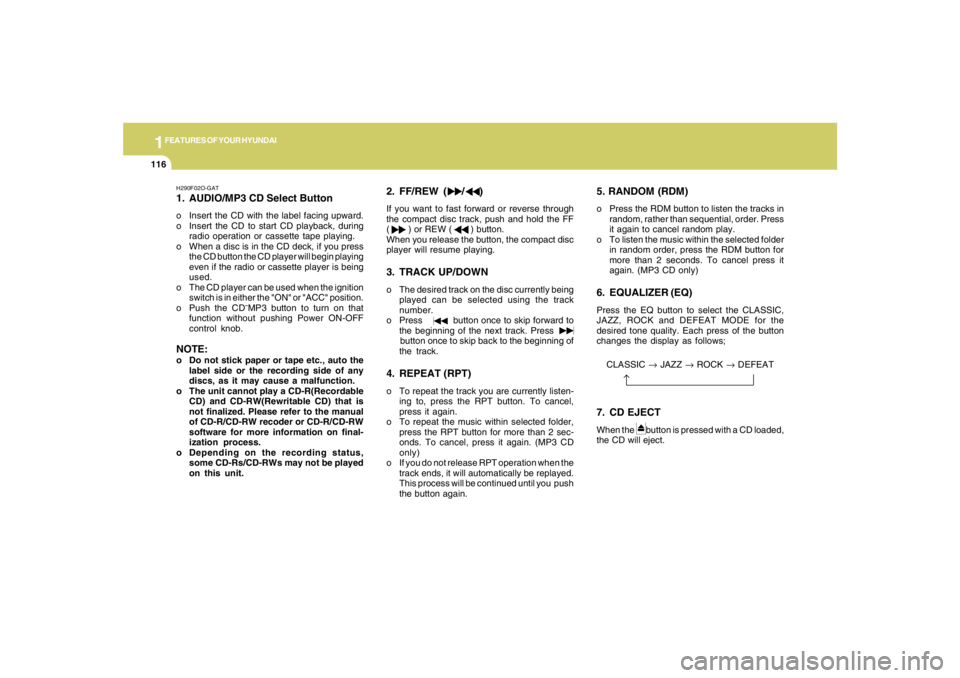
H290F02O-GAT1. AUDIO/MP3 CD Select Buttono Insert the CD with the label facing upward.
o Insert the CD to start CD playback, during
radio operation or cassette tape playing.
o When a disc is in the CD deck, if you press
the CD button the CD player will begin playing
even if the radio or cassette player is being
used.
o The CD player can be used when the ignition
switch is in either the "ON" or "ACC" position.
o Push the CD
˜MP3 button to turn on that
function without pushing Power ON-OFF
control knob.
NOTE:o Do not stick paper or tape etc., auto the
label side or the recording side of any
discs, as it may cause a malfunction.
o The unit cannot play a CD-R(Recordable
CD) and CD-RW(Rewritable CD) that is
not finalized. Please refer to the manual
of CD-R/CD-RW recoder or CD-R/CD-RW
software for more information on final-
ization process.
o Depending on the recording status,
some CD-Rs/CD-RWs may not be played
on this unit.
2. FF/REW ( / )If you want to fast forward or reverse through
the compact disc track, push and hold the FF
( ) or REW ( ) button.
When you release the button, the compact disc
player will resume playing.3. TRACK UP/DOWNo The desired track on the disc currently being
played can be selected using the track
number.
o Press button once to skip forward to
the beginning of the next track. Press
button once to skip back to the beginning of
the track.4. REPEAT (RPT)o To repeat the track you are currently listen-
ing to, press the RPT button. To cancel,
press it again.
o To repeat the music within selected folder,
press the RPT button for more than 2 sec-
onds. To cancel, press it again. (MP3 CD
only)
o If you do not release RPT operation when the
track ends, it will automatically be replayed.
This process will be continued until you push
the button again.
5. RANDOM (RDM)o Press the RDM button to listen the tracks in
random, rather than sequential, order. Press
it again to cancel random play.
o To listen the music within the selected folder
in random order, press the RDM button for
more than 2 seconds. To cancel press it
again. (MP3 CD only)6. EQUALIZER (EQ)Press the EQ button to select the CLASSIC,
JAZZ, ROCK and DEFEAT MODE for the
desired tone quality. Each press of the button
changes the display as follows;CLASSIC → JAZZ → ROCK → DEFEAT7. CD EJECTWhen the button is pressed with a CD loaded,
the CD will eject.
Page 134 of 273
1
FEATURES OF YOUR HYUNDAI
123
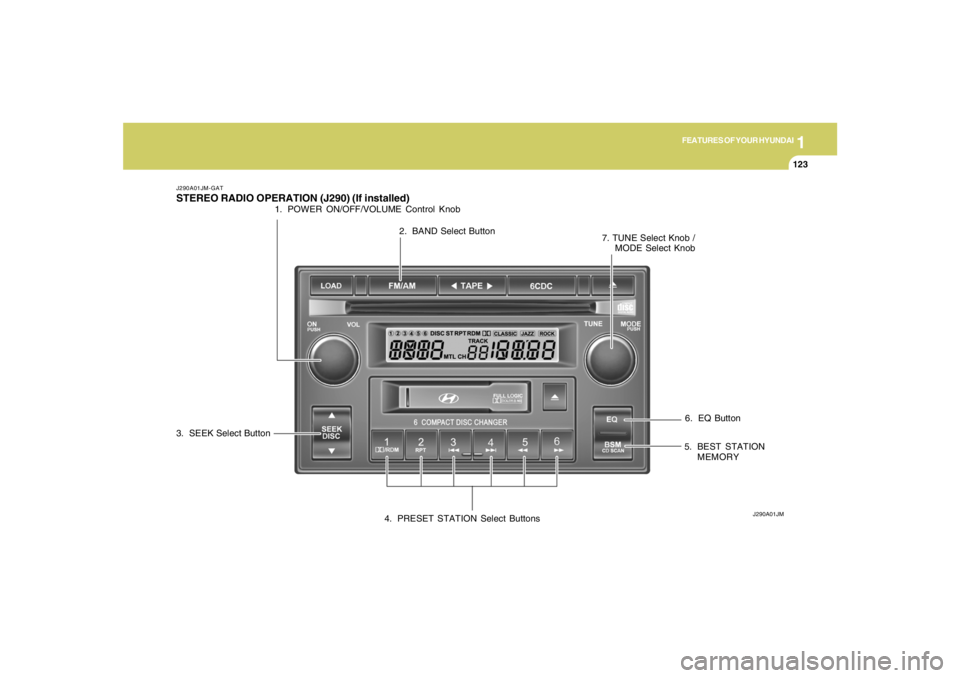
6. EQ Button
J290A01JM-GATSTEREO RADIO OPERATION (J290) (If installed)
J290A01JM
1. POWER ON/OFF/VOLUME Control Knob
2. BAND Select Button
3. SEEK Select Button
4. PRESET STATION Select Buttons5. BEST STATION
MEMORY 7. TUNE Select Knob /
MODE Select Knob
Page 135 of 273
1FEATURES OF YOUR HYUNDAI
124
CLASSIC → JAZZ → ROCK → DEFEAT
J290B01JM-GAT1. POWER ON-OFF/VOLUME
Control KnobThe radio unit may be operated when the ignition
key is in the "ACC" or "ON" position. Press the
button to switch the power on. The display
shows the radio frequency in the radio mode,
the tape direction indicator in the tape mode, or
CD track in the CD AUTO CHANGER mode. To
switch the power off, press the button again.VOLUME ControlRotate the knob clockwise to increase the
volume and turn the knob counterclockwise to
reduce the volume.2. BAND SelectorPressing the button changes the AM, FM1 and
FM2 bands. The mode selected is shown on the
display.3. SEEK Select Button
(Automatic Channel Selection)Press the SEEK select button 1 sec. or more.
When the ( ) side is pressed, the unit will
automatically tune to the next higher frequency
and when the ( ) side is pressed, it will
automatically tune to the next lower frequency.o When completed, any preset station may be
recalled by selecting AM, FM1 or FM2 band
and the appropriate station button.
5. Best Station Memory Button
(BSM)When the BSM button is pressed for two sec-
onds or longer, the six channels from the high-
est field intensity are selected next and stored
in memory. The stations selected are stored in
the sequence frequency from the first preset
key.6. EQ ButtonPress the EQ button to select the CLASSIC,
JAZZ, ROCK and DEFEAT MODE for the
desired tone quality. Each press of the button
changes the display as follows;
4. PRESET STATION Select
ButtonsSix (6) stations for AM, FM and FM2 respec-
tively can be preset in the electronic memory
circuit.HOW TO PRESET STATIONSSix AM and twelve FM stations may be pro-
grammed into the memory of the radio. Then, by
simply pressing the AM / FM select button and/
or one of the six station select buttons, you may
recall any of these stations instantly. To pro-
gram the stations, follow these steps:
o Press AM/FM selector to set the band for
AM, FM1 and FM2.
o Select the desired station to be stored by
seek, scan or manual tuning.
o Determine the preset station select button
you wish to use to access that station.
o Press the station select button for more than
two seconds. A select button indicator will
show in the display indicating which select
button you have depressed. The frequency
display will flash after it has been stored into
the memory. You should then release the
button, and proceed to program the next
desired station. A total of 18 stations can be
programmed by selecting one AM and two
FM station per button.
7. TUNE (Manual) Select KnobRotate the knob clockwise to increase the
frequency and turn the knob counterclockwise
to reduce the frequency.
Page 140 of 273

1
FEATURES OF YOUR HYUNDAI
129
J290F02JM-GAT1. LOAD ButtonThis compact disc playing will accommodate up
to six discs.
To insert one disc do the following:
1. Press and release the LOAD Button.
2. Green light on both sides of the slot will be
illuminated and the will blink ten times on
the display.
3. Load a disc while the is blinking. Insert a
disc partway into the slot, label side up. The
player will pull the disc in.NOTE:o The disc can be only inserted while the
light is blinking.
o This CD player is suitable only for 12 cm
discs, do not use irregular shaped CDs.
When the disc is inserted, the disc will begin to
play automatically.
To insert multiple discs do the followings:
1. Press and hold the LOAD button for two
seconds or more.
You will then hear two beeps and the green
light on the both sides of the slot will be
illuminated.2. Load a disc while the is blinking. Insert
a disc partway into the slot, label side up. The
player will pull the disc in.
Once the disc is loaded, the numbers of the
vacant disc will blink on the display continu-
ously. If the next "DISC NO." is appeared on
the display with the both side of the slot
illuminated, you can then load another disc.
3. Load the remaining disc by following the same
procedures 1 and 2.
When you finished loading 6 discs, the CD
player will begin to play the last CD loaded.
4. To load more than one disc but less than six,
complete Steps 1 and 2. When you have
finished loading discs, press LOAD button to
cancel the loading function or wait for 10
seconds. The CD player will begin to play the
last CD loaded.
As each CD starts to play, the DISC number will
appear on the display.
NOTE:The disc player takes up to six discs. Do not
try to load more than six.
2. Playing CDo Press the 6CDC to start CD playback,
during radio operation or cassette tape play-
ing.
o When discs are in the CD deck, if you press
the 6CDC button the CD player will begin
playing even if the radio or cassette player
is being used.
o The CD player can be used when the ignition
switch is in either the "ON" or "ACC" position.3. EJECT Buttono When the EJECT button is pressed with
a CD loaded, the CD will eject.
o To eject all of the discs, press this button for
2 seconds or more.4.DISC Select ButtonTo select the CD you want, push "DISC
" or "DISC " to change the disc number.
Page 151 of 273
2
DRIVING YOUR HYUNDAI
5
NOTE:Do not hold the key in the "START" position
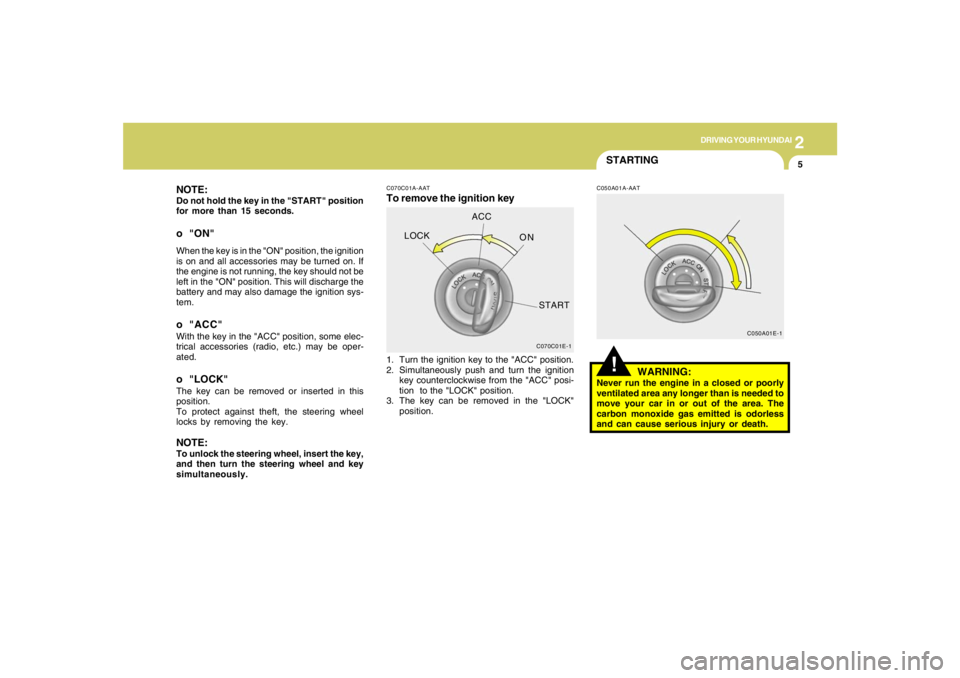
for more than 15 seconds.o "ON"When the key is in the "ON" position, the ignition
is on and all accessories may be turned on. If
the engine is not running, the key should not be
left in the "ON" position. This will discharge the
battery and may also damage the ignition sys-
tem.o "ACC"With the key in the "ACC" position, some elec-
trical accessories (radio, etc.) may be oper-
ated.o "LOCK"The key can be removed or inserted in this
position.
To protect against theft, the steering wheel
locks by removing the key.NOTE:To unlock the steering wheel, insert the key,
and then turn the steering wheel and key
simultaneously.
C070C01E-1
LOCKACC
ON
START
C050A01E-1
STARTING!
C070C01A-AATTo remove the ignition key
C050A01A-AAT
1. Turn the ignition key to the "ACC" position.
2. Simultaneously push and turn the ignition
key counterclockwise from the "ACC" posi-
tion to the "LOCK" position.
3. The key can be removed in the "LOCK"
position.
WARNING:
Never run the engine in a closed or poorly
ventilated area any longer than is needed to
move your car in or out of the area. The
carbon monoxide gas emitted is odorless
and can cause serious injury or death.
Page 216 of 273
6
DO-IT-YOURSELF MAINTENANCE
10
SPARK PLUGSG060B01JM-AATReplacing the Spark PlugsThe spark plugs should be changed at the
intervals specified in the vehicle maintenance
schedule in Section 5 or whenever engine
performance indicates they should be changed.
Symptoms that suggest poor spark plug perfor-
mance include engine misfiring under load, loss
of fuel economy, poor acceleration, etc. When
spark plugs are replaced, always use spark
plugs recommended by Hyundai. The use of
other spark plugs can result in loss of perfor-
mance, radio interference or engine damage.NOTE:o When replacing the spark plug, genuine
Hyundai replacement parts are recom-
mended.
o It is recommended that the spark plug
should be changed by an authorized
Hyundai dealer. (2.7 L)
o Do not clean or regap spark plugs.
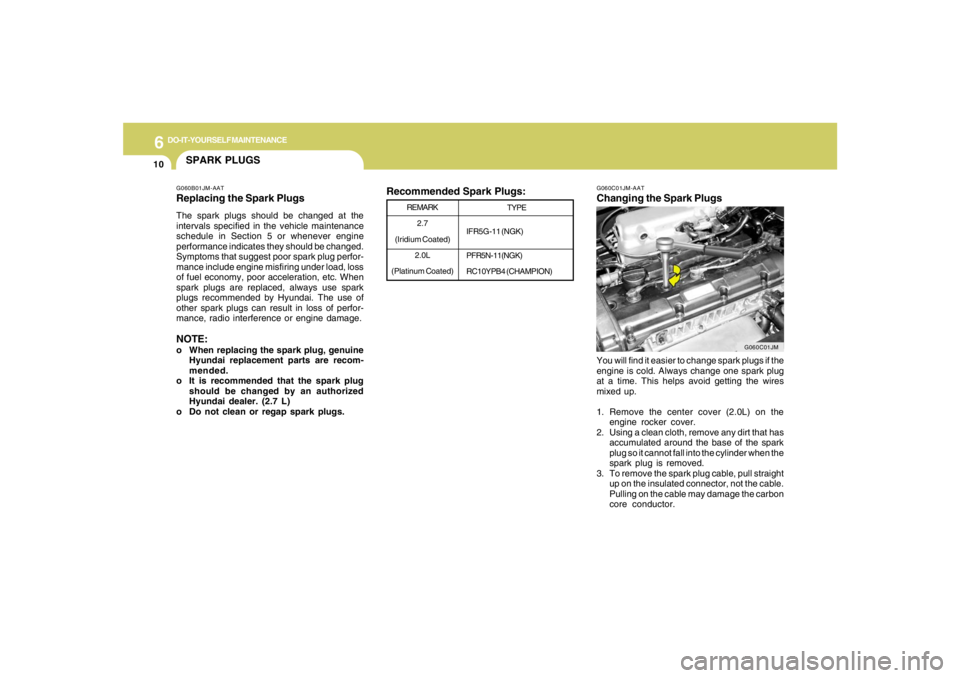
G060C01JM-AATChanging the Spark PlugsYou will find it easier to change spark plugs if the
engine is cold. Always change one spark plug
at a time. This helps avoid getting the wires
mixed up.
1. Remove the center cover (2.0L) on the
engine rocker cover.
2. Using a clean cloth, remove any dirt that has
accumulated around the base of the spark
plug so it cannot fall into the cylinder when the
spark plug is removed.
3. To remove the spark plug cable, pull straight
up on the insulated connector, not the cable.
Pulling on the cable may damage the carbon
core conductor.
TYPE
IFR5G-11 (NGK)
PFR5N-11(NGK)
RC10YPB4 (CHAMPION) REMARK
2.7
(Iridium Coated)
2.0L
(Platinum Coated)
G060C01JM
Recommended Spark Plugs:
Page 228 of 273
6
DO-IT-YOURSELF MAINTENANCE
22
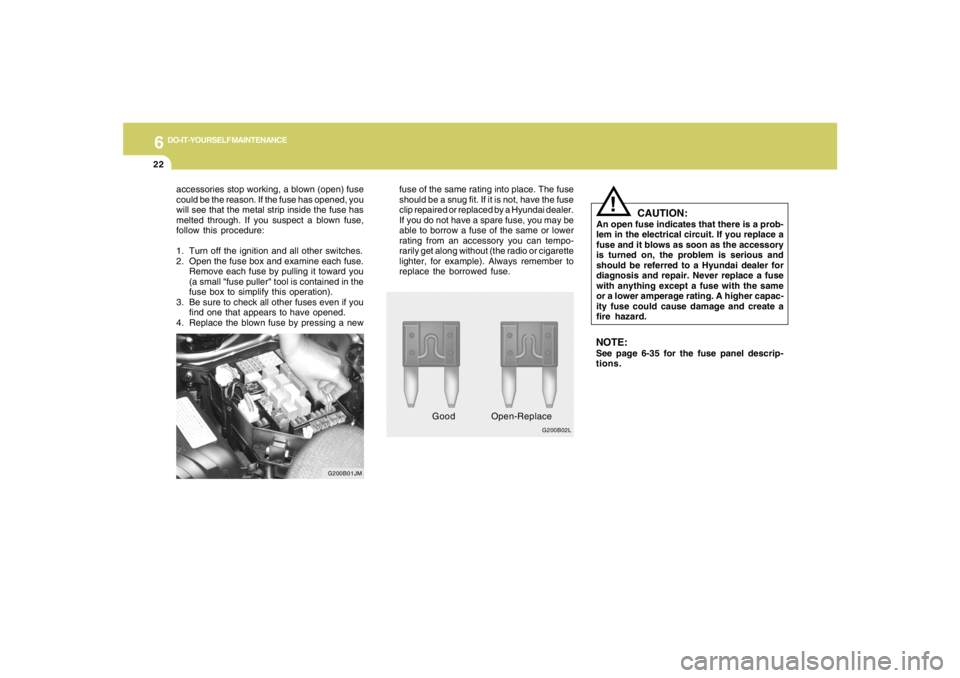
G200B02L
!
fuse of the same rating into place. The fuse
should be a snug fit. If it is not, have the fuse
clip repaired or replaced by a Hyundai dealer.
If you do not have a spare fuse, you may be
able to borrow a fuse of the same or lower
rating from an accessory you can tempo-
rarily get along without (the radio or cigarette
lighter, for example). Always remember to
replace the borrowed fuse.
CAUTION:
An open fuse indicates that there is a prob-
lem in the electrical circuit. If you replace a
fuse and it blows as soon as the accessory
is turned on, the problem is serious and
should be referred to a Hyundai dealer for
diagnosis and repair. Never replace a fuse
with anything except a fuse with the same
or a lower amperage rating. A higher capac-
ity fuse could cause damage and create a
fire hazard.
GoodOpen-ReplaceNOTE:See page 6-35 for the fuse panel descrip-
tions. accessories stop working, a blown (open) fuse
could be the reason. If the fuse has opened, you
will see that the metal strip inside the fuse has
melted through. If you suspect a blown fuse,
follow this procedure:
1. Turn off the ignition and all other switches.
2. Open the fuse box and examine each fuse.
Remove each fuse by pulling it toward you
(a small "fuse puller" tool is contained in the
fuse box to simplify this operation).
3. Be sure to check all other fuses even if you
find one that appears to have opened.
4. Replace the blown fuse by pressing a new
G200B01JM
Page 267 of 273
10
INDEX
2
A
Air bag ...............................................................................................1-30
Air Cleaner Filter ...............................................................................6-11
Air Conditioning
Care..............................................................................................6-17
Operation............................................................................ 1-92, 6-17
Switch...........................................................................................1-92
Antenna..........................................................................................1-135
Ashtray..............................................................................................1-60
Audio System
Cassette Tape player operation (J290)...................................1-126
Cassete tape player operation (M280)....................................1-112
Compact disc player operation (K260)....................................1-106
Compact disc player operation (M280)....................................1-115
CD changer operation (M280) ..................................................1-119
Compact disc player / CD Auto changer operation (J290) .....1-128
Stereo radio operation (J290) ...................................................1-123
Stereo radio operation (K260)..................................................1-103
Stereo radio operation (M280) ..................................................1-109
B
Battery..................................................................................... 2-20, 6-23
Brake
Anti-lock brake system ................................................................2-12
Traction control system (TCS) ...................................................2-12
Checking the brakes ....................................................................6-15Electronic Stability Program (ESP) ...................................................2-14
Fluid ..............................................................................................6-13
Pedal clearance...........................................................................6-20
Pedal free-play.............................................................................6-20
Practices......................................................................................2-18
Breaking-In your New Hyundai .......................................................... 1-3
Bulb Replacement.............................................................................6-26
C
Care of Cassette Tapes ................................................................1-133
Care of Disc ...................................................................................1-133
Catalytic Converter............................................................................. 7-3
Child-Protector Rear Door Lock ......................................................... 1-7
Child Restraint System.....................................................................1-23
Installing a Child Restraint Seat with the
"Tether Anchorage" System .....................................................1-25
Securing the Child Restraint Seat with the "ISOFIX" System ....1-26
Cigarette Lighter................................................................................1-58
Clock.................................................................................................1-58
Clutch
Checking fluid...............................................................................6-16
Pedal free-play.............................................................................6-20
Combination Light
Auto light.......................................................................................1-54
Headlight flasher..........................................................................1-53
Headlight switch...........................................................................1-53
High-beam switch........................................................................1-53
Lane change signal ......................................................................1-53
Parking light auto off .....................................................................1-53
Turn signal operation...................................................................1-52