2005 HYUNDAI TUCSON program
[x] Cancel search: programPage 135 of 273
1FEATURES OF YOUR HYUNDAI
124
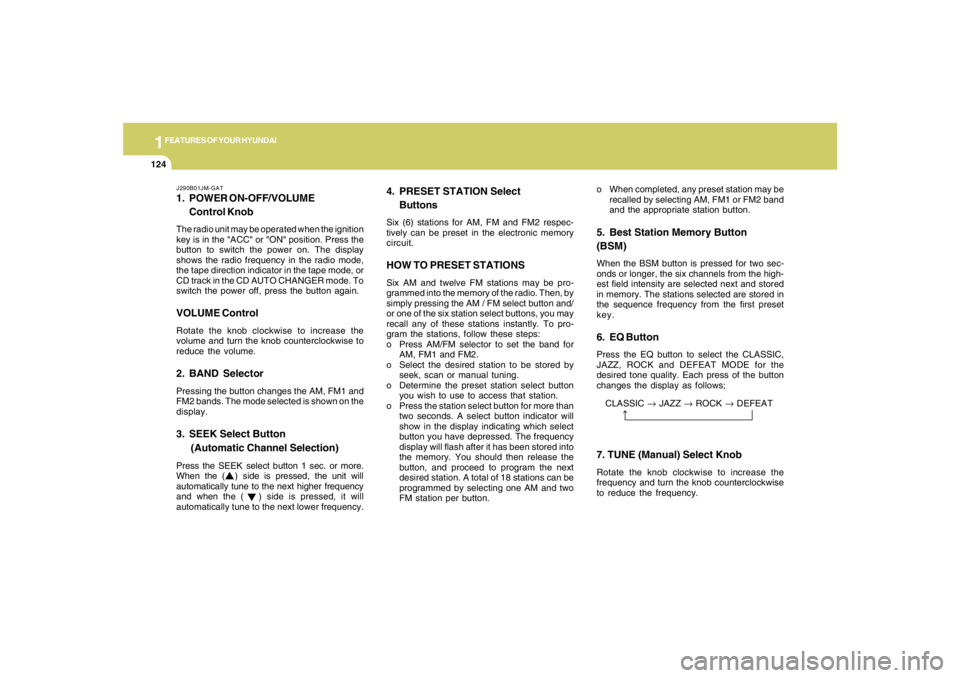
CLASSIC → JAZZ → ROCK → DEFEAT
J290B01JM-GAT1. POWER ON-OFF/VOLUME
Control KnobThe radio unit may be operated when the ignition
key is in the "ACC" or "ON" position. Press the
button to switch the power on. The display
shows the radio frequency in the radio mode,
the tape direction indicator in the tape mode, or
CD track in the CD AUTO CHANGER mode. To
switch the power off, press the button again.VOLUME ControlRotate the knob clockwise to increase the
volume and turn the knob counterclockwise to
reduce the volume.2. BAND SelectorPressing the button changes the AM, FM1 and
FM2 bands. The mode selected is shown on the
display.3. SEEK Select Button
(Automatic Channel Selection)Press the SEEK select button 1 sec. or more.
When the ( ) side is pressed, the unit will
automatically tune to the next higher frequency
and when the ( ) side is pressed, it will
automatically tune to the next lower frequency.o When completed, any preset station may be
recalled by selecting AM, FM1 or FM2 band
and the appropriate station button.
5. Best Station Memory Button
(BSM)When the BSM button is pressed for two sec-
onds or longer, the six channels from the high-
est field intensity are selected next and stored
in memory. The stations selected are stored in
the sequence frequency from the first preset
key.6. EQ ButtonPress the EQ button to select the CLASSIC,
JAZZ, ROCK and DEFEAT MODE for the
desired tone quality. Each press of the button
changes the display as follows;
4. PRESET STATION Select
ButtonsSix (6) stations for AM, FM and FM2 respec-
tively can be preset in the electronic memory
circuit.HOW TO PRESET STATIONSSix AM and twelve FM stations may be pro-
grammed into the memory of the radio. Then, by
simply pressing the AM / FM select button and/
or one of the six station select buttons, you may
recall any of these stations instantly. To pro-
gram the stations, follow these steps:
o Press AM/FM selector to set the band for
AM, FM1 and FM2.
o Select the desired station to be stored by
seek, scan or manual tuning.
o Determine the preset station select button
you wish to use to access that station.
o Press the station select button for more than
two seconds. A select button indicator will
show in the display indicating which select
button you have depressed. The frequency
display will flash after it has been stored into
the memory. You should then release the
button, and proceed to program the next
desired station. A total of 18 stations can be
programmed by selecting one AM and two
FM station per button.
7. TUNE (Manual) Select KnobRotate the knob clockwise to increase the
frequency and turn the knob counterclockwise
to reduce the frequency.
Page 137 of 273
1FEATURES OF YOUR HYUNDAI
126
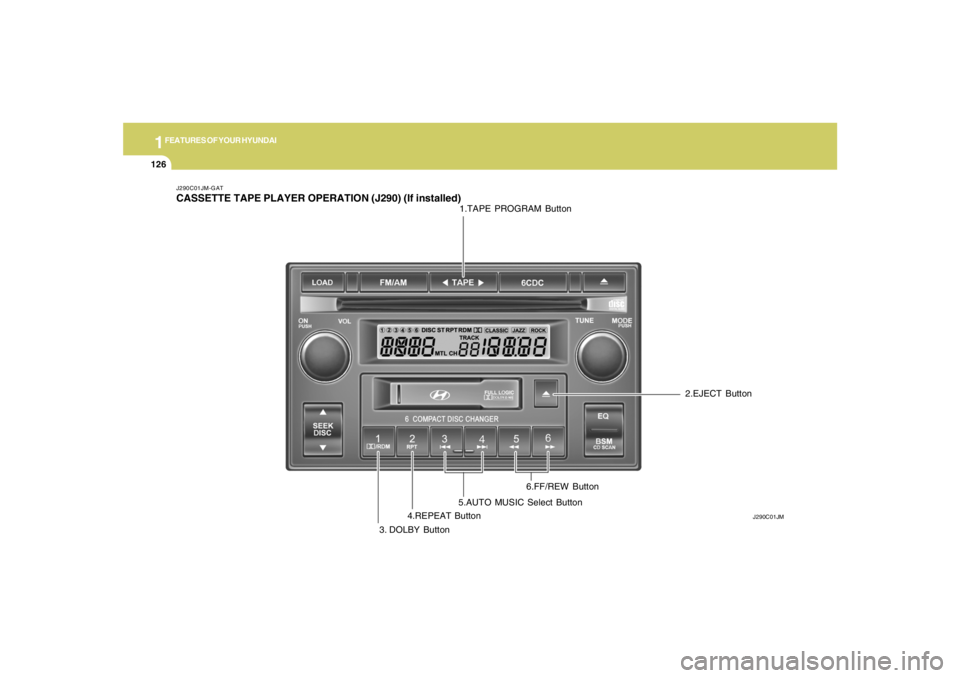
J290C01JM-GATCASSETTE TAPE PLAYER OPERATION (J290) (If installed)
J290C01JM
1.TAPE PROGRAM Button
3. DOLBY Button4.REPEAT Button5.AUTO MUSIC Select Button6.FF/REW Button2.EJECT Button
Page 138 of 273
1
FEATURES OF YOUR HYUNDAI
127
J290D01JM-GAT1. TAPE PROGRAM ButtonThis allows you to play the reverse side of the
tape by merely pressing the program button.
The PLAY and an arrow will appear in the display
to show tape direction.2. EJECT Buttono When the EJECT button is pressed with a
cassette loaded, the cassette will eject.
o When the EJECT button is pressed during
FF/REW mode, the cassette will eject.3. DOLBY ButtonIf you get background noise during tape PLAY,
you can reduce this considerably by merely
pressing the DOLBY button. If you want to
cancel the DOLBY feature, press the button
again.4. REPEAT Buttono To repeat the track you are currently listen-
ing to, press the RPT button. To cancel,
press again.
o If you do not release RPT operation when the
track ends, it will automatically be replayed.
This process will be continued until you push
the button again.
5. AUTO MUSIC Select ButtonPress the button to find the starting point of each
song in a prerecorded music tape. The quiet
space between songs (must have at least a 4
sec. gap) can be identified by the AUTO MUSIC
Select button.
o Pressing the will play the begin-ning of
the next music segment.
o Pressing the will start replay at the
beginning of the music just listened to.
o To stop FF or REW action, press the button
again.6. FF/REW Buttono Fast forward tape winding starts when the
FF button is pressed during PLAY or REW
mode.
o PLAY starts when the FF button is pressed
again during FF mode.
o Tape rewinding starts when the REW button
is pressed during PLAY or FF mode.
o PLAY starts when the REW button pressed
again during REW mode.
CAUTION:
o Do not insert anything like coins into the
player slot as damage to the unit may
occur.
o Do not place beverages close to the
audio system. The playback mechanism
may be damaged if you spill them.
o Do not impact on the audio system, or
the playback mechanism could be dam-
aged.
!
Page 147 of 273
DRIVING YOUR HYUNDAI
2
Engine Exhaust Can Be Dangerous! ............................ 2-2
Before Starting the Engine ............................................ 2-4
Key Positions ................................................................ 2-4
Starting ..........................................................................2-5
Manual Transaxle ......................................................... 2-6
Automatic Transaxle ..................................................... 2-8
Anti-Lock Brake System (ABS) ..................................2-12
Traction Control System (TCS) ..................................2-12
Electronic Stability Program (ESP) .............................2-14
Full-Time 4WD Operation...........................................2-15
4WD Lock System......................................................2-18
Good Braking Practices..............................................2-18
Driving for Economy...................................................2-19
Winter Driving.............................................................2-21
Trailer or Vehicle Towing ............................................2-23
Vehicle Load Limit.......................................................2-27
2
Page 160 of 273
2
DRIVING YOUR HYUNDAI
14
!
CAUTION:
Driving with varying tire or wheel size may
cause the ESP system to malfunction. When
replacing tires, make sure they are the same
size as your original tires.
!
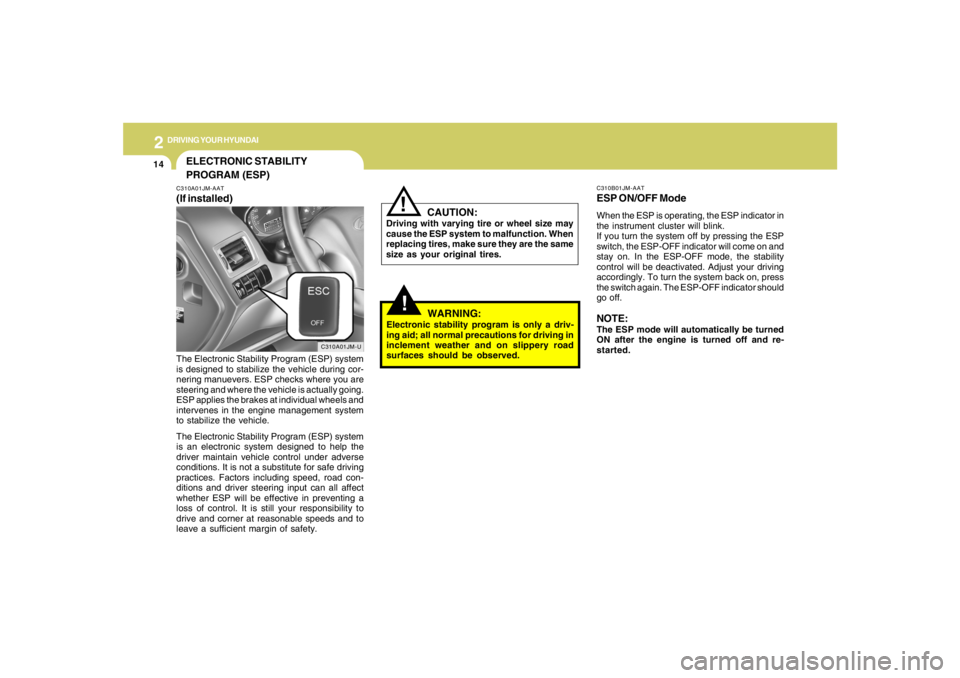
C310B01JM-AATESP ON/OFF ModeWhen the ESP is operating, the ESP indicator in
the instrument cluster will blink.
If you turn the system off by pressing the ESP
switch, the ESP-OFF indicator will come on and
stay on. In the ESP-OFF mode, the stability
control will be deactivated. Adjust your driving
accordingly. To turn the system back on, press
the switch again. The ESP-OFF indicator should
go off.NOTE:The ESP mode will automatically be turned
ON after the engine is turned off and re-
started.
WARNING:
Electronic stability program is only a driv-
ing aid; all normal precautions for driving in
inclement weather and on slippery road
surfaces should be observed.
ELECTRONIC STABILITY
PROGRAM (ESP)C310A01JM-AAT(If installed)
C310A01JM-U
The Electronic Stability Program (ESP) system
is designed to stabilize the vehicle during cor-
nering manuevers. ESP checks where you are
steering and where the vehicle is actually going.
ESP applies the brakes at individual wheels and
intervenes in the engine management system
to stabilize the vehicle.
The Electronic Stability Program (ESP) system
is an electronic system designed to help the
driver maintain vehicle control under adverse
conditions. It is not a substitute for safe driving
practices. Factors including speed, road con-
ditions and driver steering input can all affect
whether ESP will be effective in preventing a
loss of control. It is still your responsibility to
drive and corner at reasonable speeds and to
leave a sufficient margin of safety.
Page 162 of 273
2
DRIVING YOUR HYUNDAI
16
HJM1029
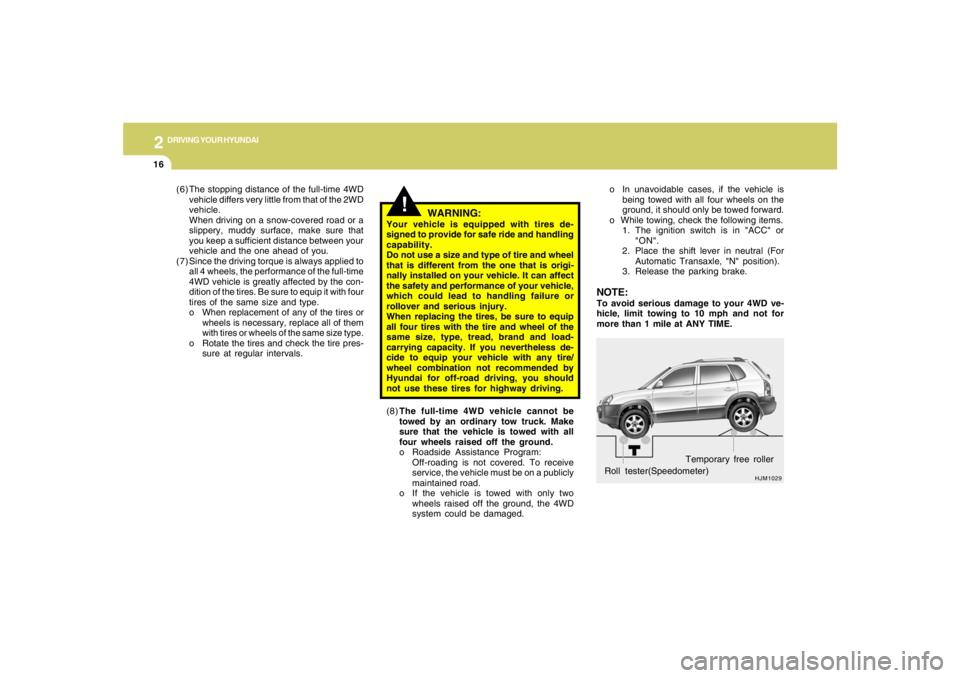
Roll tester(Speedometer)Temporary free roller o In unavoidable cases, if the vehicle is
being towed with all four wheels on the
ground, it should only be towed forward.
o While towing, check the following items.
1. The ignition switch is in "ACC" or
"ON".
2. Place the shift lever in neutral (For
Automatic Transaxle, "N" position).
3. Release the parking brake.NOTE:To avoid serious damage to your 4WD ve-
hicle, limit towing to 10 mph and not for
more than 1 mile at ANY TIME.
(8)The full-time 4WD vehicle cannot be
towed by an ordinary tow truck. Make
sure that the vehicle is towed with all
four wheels raised off the ground.
o Roadside Assistance Program:
Off-roading is not covered. To receive
service, the vehicle must be on a publicly
maintained road.
o If the vehicle is towed with only two
wheels raised off the ground, the 4WD
system could be damaged. (6) The stopping distance of the full-time 4WD
vehicle differs very little from that of the 2WD
vehicle.
When driving on a snow-covered road or a
slippery, muddy surface, make sure that
you keep a sufficient distance between your
vehicle and the one ahead of you.
(7) Since the driving torque is always applied to
all 4 wheels, the performance of the full-time
4WD vehicle is greatly affected by the con-
dition of the tires. Be sure to equip it with four
tires of the same size and type.
o When replacement of any of the tires or
wheels is necessary, replace all of them
with tires or wheels of the same size type.
o Rotate the tires and check the tire pres-
sure at regular intervals.
!
WARNING:
Your vehicle is equipped with tires de-
signed to provide for safe ride and handling
capability.
Do not use a size and type of tire and wheel
that is different from the one that is origi-
nally installed on your vehicle. It can affect
the safety and performance of your vehicle,
which could lead to handling failure or
rollover and serious injury.
When replacing the tires, be sure to equip
all four tires with the tire and wheel of the
same size, type, tread, brand and load-
carrying capacity. If you nevertheless de-
cide to equip your vehicle with any tire/
wheel combination not recommended by
Hyundai for off-road driving, you should
not use these tires for highway driving.
Page 163 of 273
2
DRIVING YOUR HYUNDAI
17
!
CAUTION:
o While the full-time 4WD vehicle is being
raised on a jack, never start the engine or
cause the tires to rotate.
There is danger that rotating tires touch-
ing the ground could cause the vehicle
to go off the jack and to jump forward.
o If one of the front or rear wheels begins
to spin in mud, snow, etc., the vehicle
can sometimes be driven out by de-
pressing the accelerator pedal further;
however, avoid running the engine con-
tinuously at high rpm because doing so
could damage the 4WD system. (10)When using tire chains, always attach them
to the front wheels.
(11)If the front or rear wheels get stuck in the
mud, do not spin them recklessly. The 4WD
system could be damaged.
o In rare cases when it's unavoidable that
a 4WD vehicle is to be inspected on a
2WD roll tester, strictly follow the proce-
dures.
1. Check the tire pressures recom-
mended for your vehicle.
2. Place the front wheels on the roll
tester as shown in the illustration.
3. Release the parking brake.
4. Place the rear wheels on the tempo-
rary free roller as shown in the illustra-
tion.
!!
WARNING:
Keep away from the front of the vehicle
while inspecting. This is very dangerous as
the vehicle can jump forward and cause
serious injury or death.
!
WARNING:
o Avoid high cornering speeds.
o Do not make quick steering wheel move-
ments, such as sharp lane charges or
fast, sharp turns.
o The risk of rollover is greatly increased if
you lose control of your vehicle at high-
way speeds.
o In a collision, an unbelted person is
signicantly more likely to be seriously
injured or killed than a person wearing a
seat belt.
o Loss of control may occurs if two or
more wheels drop off the roadway and
the driver oversteers to reenter the road-
way.
o In the event your vehicle leaves the road-
way, do not steer sharply. Instead, slow
down before pulling back into the travel
lanes. (9)For a speedometer test or inspection/main-
tenance (I/M) program of a Tucson 4WD
vehicle, use a four wheel chassis dynamom-
eter.
CAUTION:
Never engage the parking brake while per-
forming these tests.
Page 267 of 273
10
INDEX
2
A
Air bag ...............................................................................................1-30
Air Cleaner Filter ...............................................................................6-11
Air Conditioning
Care..............................................................................................6-17
Operation............................................................................ 1-92, 6-17
Switch...........................................................................................1-92
Antenna..........................................................................................1-135
Ashtray..............................................................................................1-60
Audio System
Cassette Tape player operation (J290)...................................1-126
Cassete tape player operation (M280)....................................1-112
Compact disc player operation (K260)....................................1-106
Compact disc player operation (M280)....................................1-115
CD changer operation (M280) ..................................................1-119
Compact disc player / CD Auto changer operation (J290) .....1-128
Stereo radio operation (J290) ...................................................1-123
Stereo radio operation (K260)..................................................1-103
Stereo radio operation (M280) ..................................................1-109
B
Battery..................................................................................... 2-20, 6-23
Brake
Anti-lock brake system ................................................................2-12
Traction control system (TCS) ...................................................2-12
Checking the brakes ....................................................................6-15Electronic Stability Program (ESP) ...................................................2-14
Fluid ..............................................................................................6-13
Pedal clearance...........................................................................6-20
Pedal free-play.............................................................................6-20
Practices......................................................................................2-18
Breaking-In your New Hyundai .......................................................... 1-3
Bulb Replacement.............................................................................6-26
C
Care of Cassette Tapes ................................................................1-133
Care of Disc ...................................................................................1-133
Catalytic Converter............................................................................. 7-3
Child-Protector Rear Door Lock ......................................................... 1-7
Child Restraint System.....................................................................1-23
Installing a Child Restraint Seat with the
"Tether Anchorage" System .....................................................1-25
Securing the Child Restraint Seat with the "ISOFIX" System ....1-26
Cigarette Lighter................................................................................1-58
Clock.................................................................................................1-58
Clutch
Checking fluid...............................................................................6-16
Pedal free-play.............................................................................6-20
Combination Light
Auto light.......................................................................................1-54
Headlight flasher..........................................................................1-53
Headlight switch...........................................................................1-53
High-beam switch........................................................................1-53
Lane change signal ......................................................................1-53
Parking light auto off .....................................................................1-53
Turn signal operation...................................................................1-52