Page 105 of 539
1
FEATURES OF YOUR HYUNDAI
91PARKING BRAKEDAY/NIGHT INSIDE REAR- VIEW MIRROR
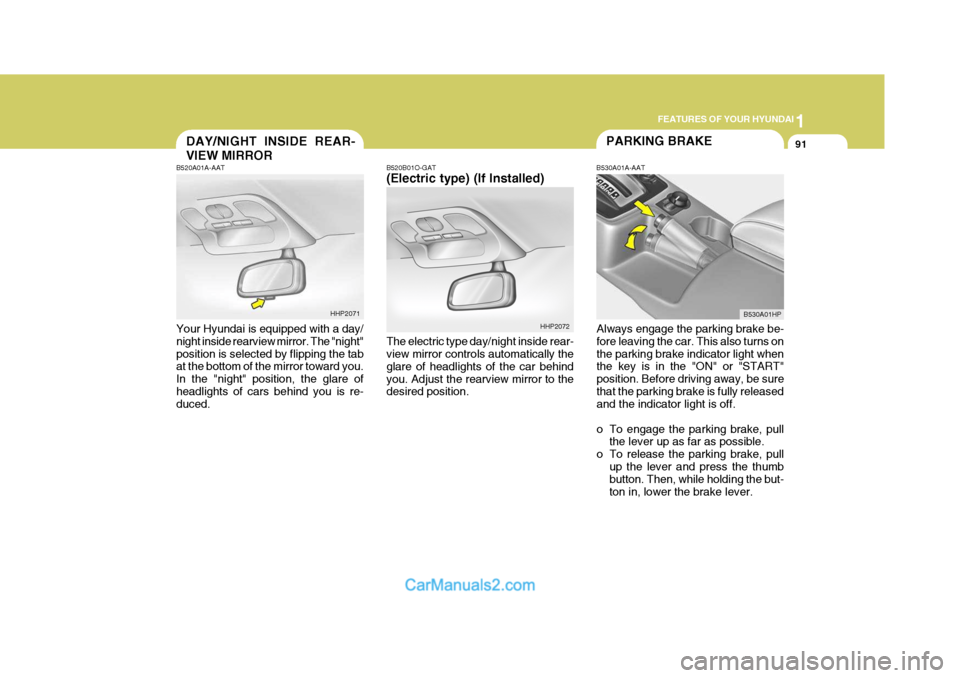
B520B01O-GAT (Electric type) (If Installed) The electric type day/night inside rear- view mirror controls automatically the glare of headlights of the car behindyou. Adjust the rearview mirror to the desired position. B530A01A-AAT
Always engage the parking brake be-fore leaving the car. This also turns on the parking brake indicator light when the key is in the "ON" or "START" position. Before driving away, be surethat the parking brake is fully released and the indicator light is off.
o To engage the parking brake, pull the lever up as far as possible.
o To release the parking brake, pull up the lever and press the thumb button. Then, while holding the but- ton in, lower the brake lever.
B520A01A-AAT Your Hyundai is equipped with a day/ night inside rearview mirror. The "night" position is selected by flipping the tab at the bottom of the mirror toward you. In the "night" position, the glare ofheadlights of cars behind you is re- duced.
HHP2071
HHP2072B530A01HP
Page 108 of 539
1FEATURES OF YOUR HYUNDAI
94ROOF RACK
B650A01S-AAT Stowage Precautions
1. Do not place objects on the cargo security screen. Such objects may be thrown about inside the vehicle and possibly injure vehicle occu- pants during an accident or whenbraking.
2. For better fuel economy, do not
carry unnecessary weight.
3. Never allow anyone to ride in the luggage compartment. It is designedfor luggage only.
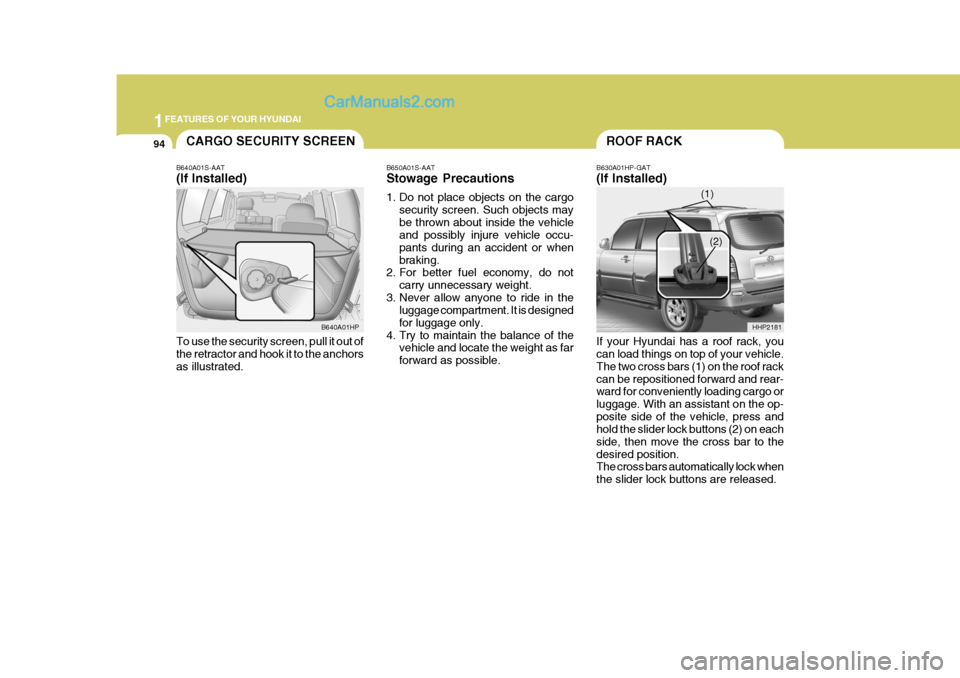
4. Try to maintain the balance of the vehicle and locate the weight as farforward as possible. B630A01HP-GAT (If Installed) If your Hyundai has a roof rack, you can load things on top of your vehicle. The two cross bars (1) on the roof rackcan be repositioned forward and rear- ward for conveniently loading cargo or luggage. With an assistant on the op-posite side of the vehicle, press and hold the slider lock buttons (2) on each side, then move the cross bar to thedesired position. The cross bars automatically lock when the slider lock buttons are released.
HHP2181CARGO SECURITY SCREEN
B640A01S-AAT (If Installed) To use the security screen, pull it out of the retractor and hook it to the anchors as illustrated. B640A01HP
(1)
(2)
Page 114 of 539
1FEATURES OF YOUR HYUNDAI
100
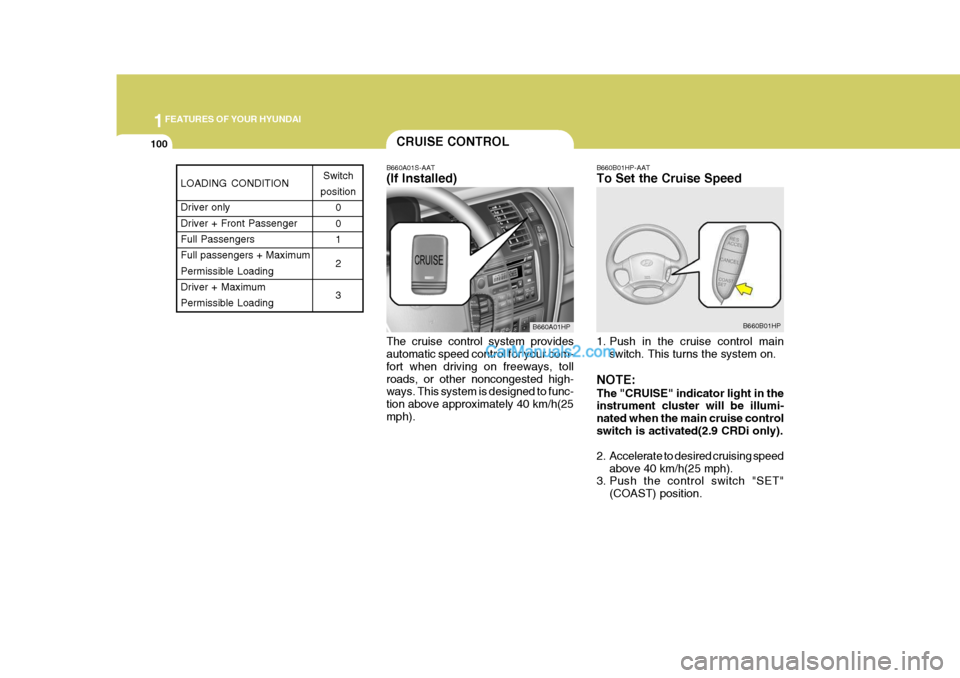
B660A01S-AAT (If Installed) The cruise control system provides automatic speed control for your com- fort when driving on freeways, tollroads, or other noncongested high- ways. This system is designed to func- tion above approximately 40 km/h(25mph). B660B01HP-AAT To Set the Cruise Speed
1. Push in the cruise control main
switch. This turns the system on.
NOTE: The "CRUISE" indicator light in the instrument cluster will be illumi- nated when the main cruise controlswitch is activated(2.9 CRDi only).
2. Accelerate to desired cruising speed above 40 km/h(25 mph).
3. Push the control switch "SET"
(COAST) position.
CRUISE CONTROL
B660A01HP B660B01HP
LOADING CONDITION Driver only Driver + Front PassengerFull Passengers Full passengers + Maximum Permissible LoadingDriver + Maximum Permissible LoadingSwitch
position 0 01 2 3
Page 115 of 539
1
FEATURES OF YOUR HYUNDAI
101
NOTE: The "CRUISE" indicator light in the instrument cluster will illuminate after you have set the vehicle speedat the desired speed (Gasoline En- gine Only).
4. Remove your foot from the accel-
erator pedal and the desired speed will automatically be maintained.
5. To increase speed, depress the accelerator pedal enough for thevehicle to exceed the preset speed.When you remove your foot from the accelerator pedal, the vehicle will return to the speed you haveset.
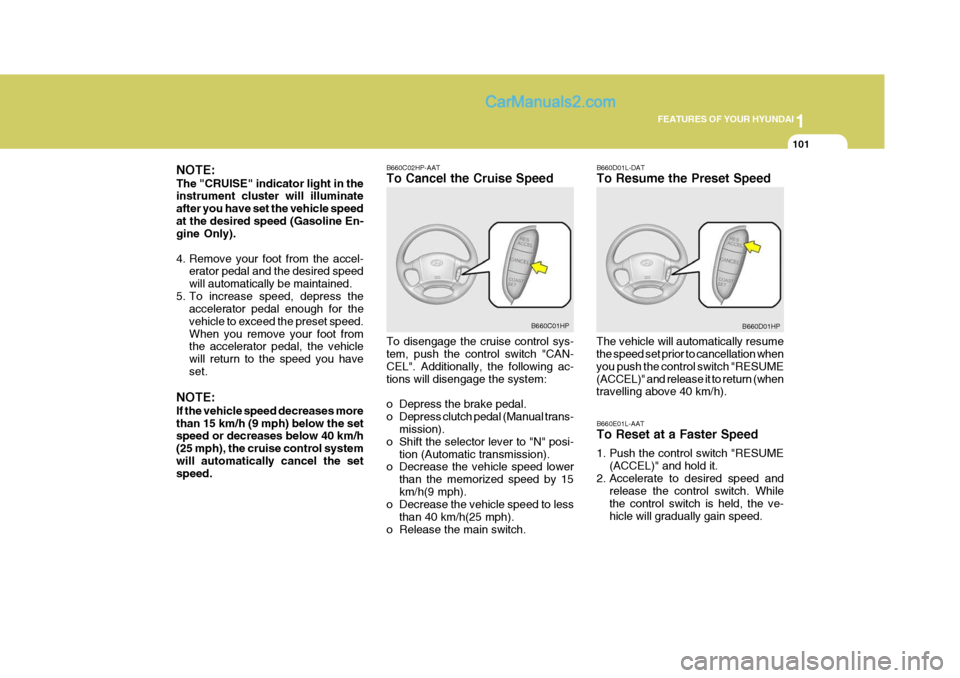
NOTE: If the vehicle speed decreases more than 15 km/h (9 mph) below the set speed or decreases below 40 km/h (25 mph), the cruise control systemwill automatically cancel the set speed. B660C02HP-AAT To Cancel the Cruise Speed To disengage the cruise control sys- tem, push the control switch "CAN- CEL". Additionally, the following ac-tions will disengage the system:
o Depress the brake pedal.
o Depress clutch pedal (Manual trans-
mission).
o Shift the selector lever to "N" posi- tion (Automatic transmission).
o Decrease the vehicle speed lower
than the memorized speed by 15km/h(9 mph).
o Decrease the vehicle speed to less
than 40 km/h(25 mph).
o Release the main switch. B660D01L-DAT To Resume the Preset Speed
The vehicle will automatically resume the speed set prior to cancellation when you push the control switch "RESUME(ACCEL)" and release it to return (when travelling above 40 km/h).
B660C01HP
B660D01HP
B660E01L-AAT To Reset at a Faster Speed
1. Push the control switch "RESUME (ACCEL)" and hold it.
2. Accelerate to desired speed and release the control switch. While the control switch is held, the ve-hicle will gradually gain speed.
Page 121 of 539
1
FEATURES OF YOUR HYUNDAI
107
Floor-Defrost Level
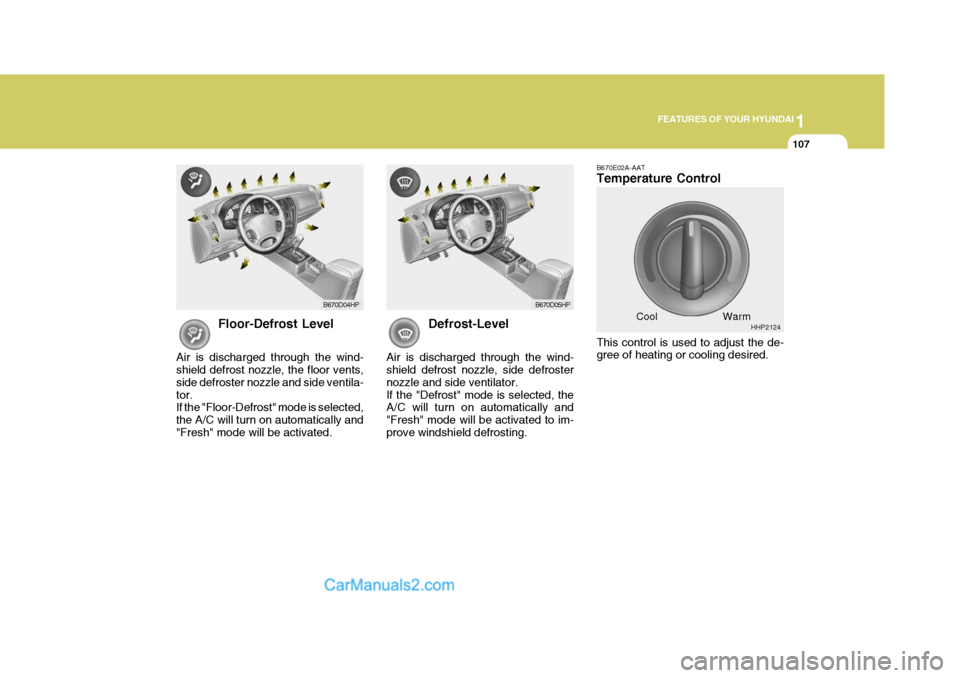
Air is discharged through the wind- shield defrost nozzle, the floor vents, side defroster nozzle and side ventila-tor. If the "Floor-Defrost" mode is selected, the A/C will turn on automatically and"Fresh" mode will be activated. Defrost-Level
Air is discharged through the wind- shield defrost nozzle, side defroster nozzle and side ventilator.If the "Defrost" mode is selected, the A/C will turn on automatically and "Fresh" mode will be activated to im-prove windshield defrosting. B670E02A-AAT Temperature Control This control is used to adjust the de- gree of heating or cooling desired.
Cool
B670D04HP
B670D05HP
HHP2124
Warm
Page 122 of 539
1FEATURES OF YOUR HYUNDAI
108VENTILATIONHEATING CONTROLS
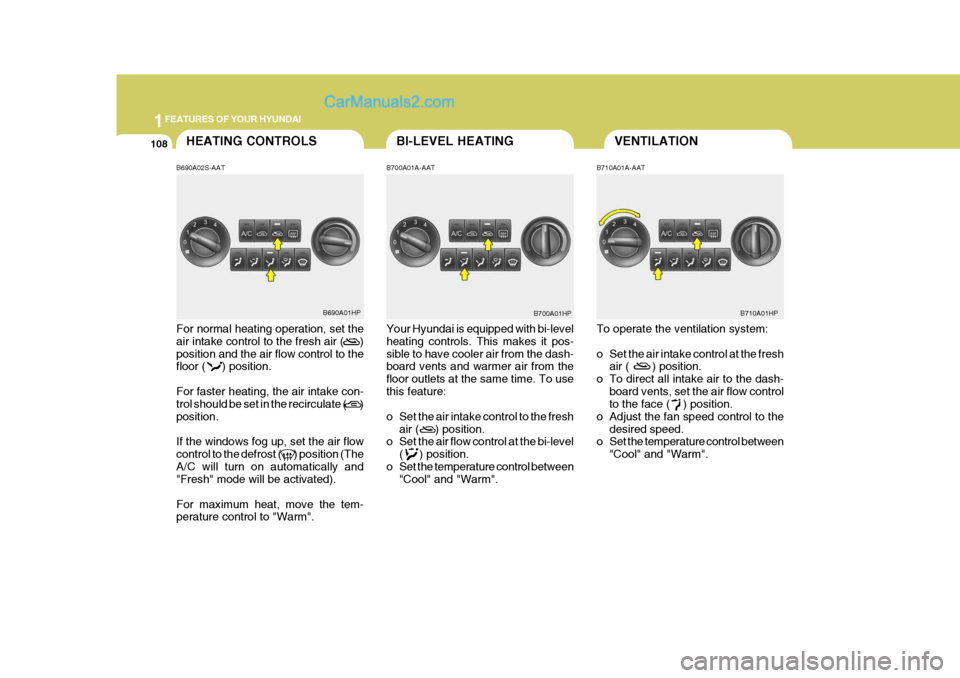
B690A02S-AAT For normal heating operation, set the air intake control to the fresh air ( ) position and the air flow control to the floor ( ) position. For faster heating, the air intake con- trol should be set in the recirculate ( ) position. If the windows fog up, set the air flow control to the defrost ( ) position (TheA/C will turn on automatically and "Fresh" mode will be activated). For maximum heat, move the tem- perature control to "Warm". B700A01A-AAT Your Hyundai is equipped with bi-level heating controls. This makes it pos- sible to have cooler air from the dash- board vents and warmer air from the floor outlets at the same time. To usethis feature:
o Set the air intake control to the fresh
air ( ) position.
o Set the air flow control at the bi-level
( ) position.
o Set the temperature control between "Cool" and "Warm". B710A01A-AAT To operate the ventilation system:
o Set the air intake control at the fresh
air ( ) position.
o To direct all intake air to the dash- board vents, set the air flow control to the face ( ) position.
o Adjust the fan speed control to the desired speed.
o Set the temperature control between
"Cool" and "Warm".
B690A01HP B700A01HP
BI-LEVEL HEATING
B710A01HP
Page 123 of 539
1
FEATURES OF YOUR HYUNDAI
109DEFROSTING/DEFOGGING
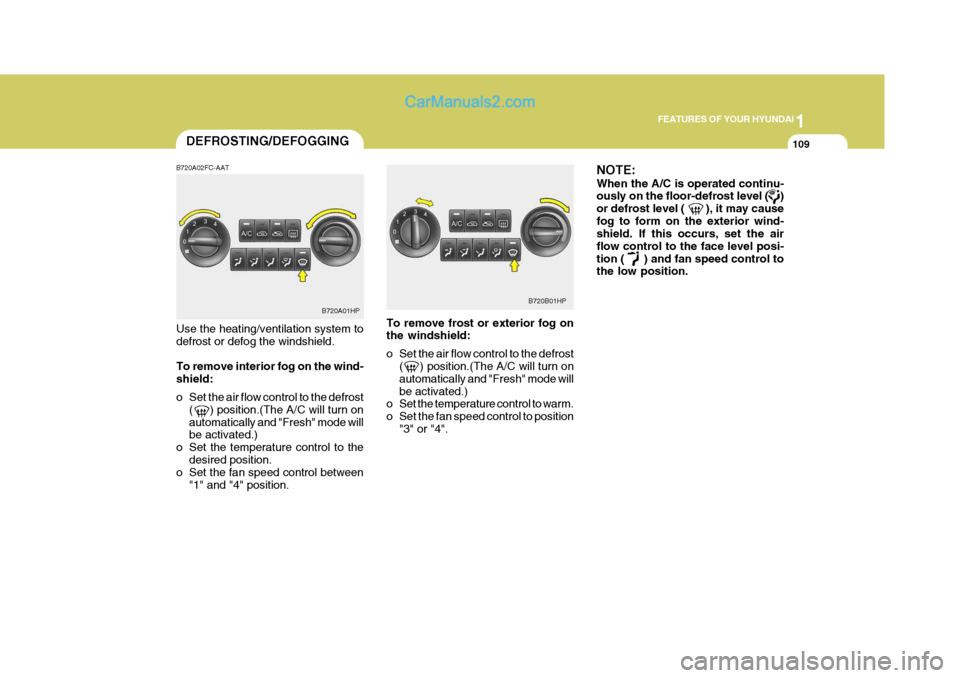
B720A02FC-AAT Use the heating/ventilation system to defrost or defog the windshield. To remove interior fog on the wind- shield:
o Set the air flow control to the defrost ( ) position.(The A/C will turn on automatically and "Fresh" mode will be activated.)
o Set the temperature control to the desired position.
o Set the fan speed control between
"1" and "4" position. To remove frost or exterior fog onthe windshield:
o Set the air flow control to the defrost
( ) position.(The A/C will turn on automatically and "Fresh" mode willbe activated.)
o Set the temperature control to warm.
o Set the fan speed control to position
"3" or "4". NOTE: When the A/C is operated continu- ously on the floor-defrost level ( ) or defrost level ( ), it may causefog to form on the exterior wind- shield. If this occurs, set the air flow control to the face level posi-tion ( ) and fan speed control to the low position.
B720A01HP
B720B01HP
Page 126 of 539
1FEATURES OF YOUR HYUNDAI
112AUTOMATIC HEATING AND COOLING CONTROL SYSTEM
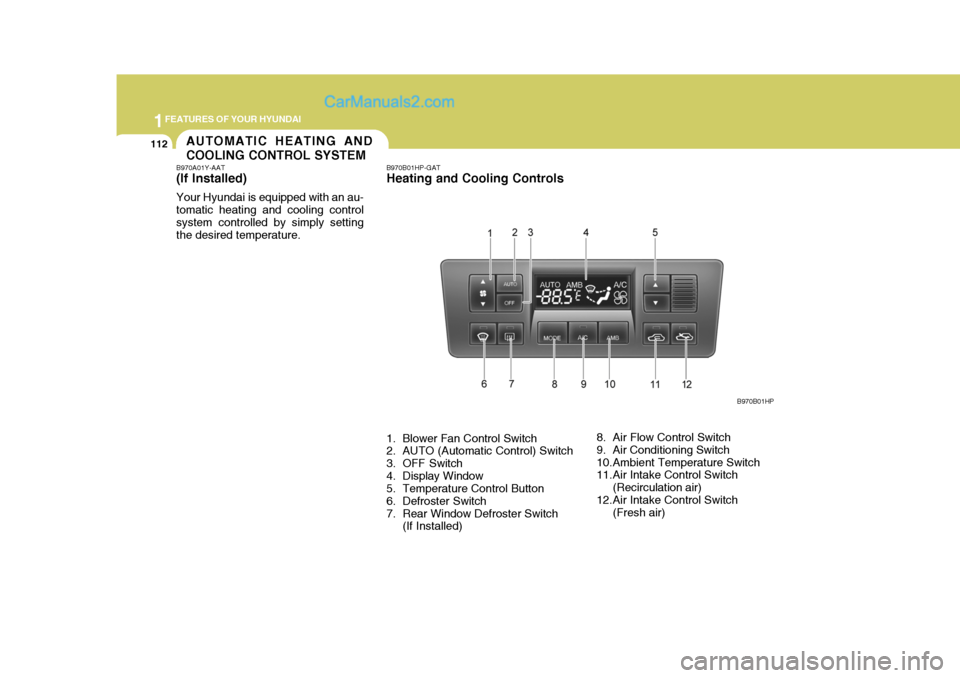
B970A01Y-AAT (If lnstalled) Your Hyundai is equipped with an au- tomatic heating and cooling controlsystem controlled by simply setting the desired temperature. B970B01HP-GAT Heating and Cooling Controls
1. Blower Fan Control Switch
2. AUTO (Automatic Control) Switch
3. OFF Switch
4. Display Window
5. Temperature Control Button
6. Defroster Switch
7. Rear Window Defroster Switch
(If Installed) 8. Air Flow Control Switch
9. Air Conditioning Switch
10.Ambient Temperature Switch
11.Air Intake Control Switch
(Recirculation air)
12.Air Intake Control Switch (Fresh air) B970B01HP