2005 Hyundai Sonata heating
[x] Cancel search: heatingPage 117 of 271
1FEATURES OF YOUR HYUNDAI
104
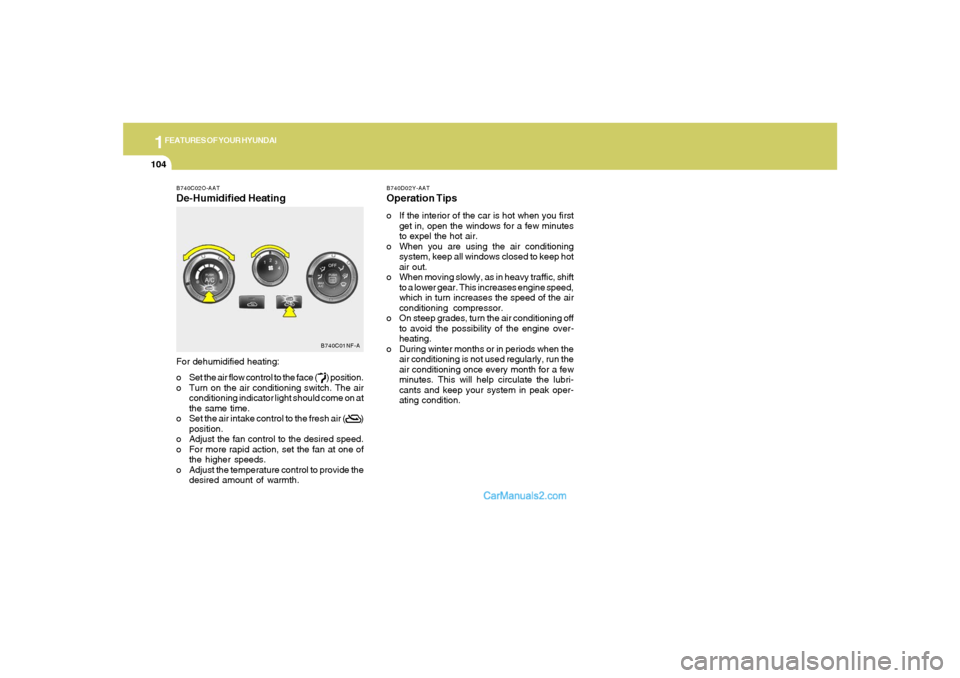
B740C02O-AATDe-Humidified HeatingFor dehumidified heating:
o Set the air flow control to the face ( ) position.
o Turn on the air conditioning switch. The air
conditioning indicator light should come on at
the same time.
o Set the air intake control to the fresh air ( )
position.
o Adjust the fan control to the desired speed.
o For more rapid action, set the fan at one of
the higher speeds.
o Adjust the temperature control to provide the
desired amount of warmth.
B740C01NF-A
B740D02Y-AATOperation Tipso If the interior of the car is hot when you first
get in, open the windows for a few minutes
to expel the hot air.
o When you are using the air conditioning
system, keep all windows closed to keep hot
air out.
o When moving slowly, as in heavy traffic, shift
to a lower gear. This increases engine speed,
which in turn increases the speed of the air
conditioning compressor.
o On steep grades, turn the air conditioning off
to avoid the possibility of the engine over-
heating.
o During winter months or in periods when the
air conditioning is not used regularly, run the
air conditioning once every month for a few
minutes. This will help circulate the lubri-
cants and keep your system in peak oper-
ating condition.
Page 118 of 271
1
FEATURES OF YOUR HYUNDAI
105
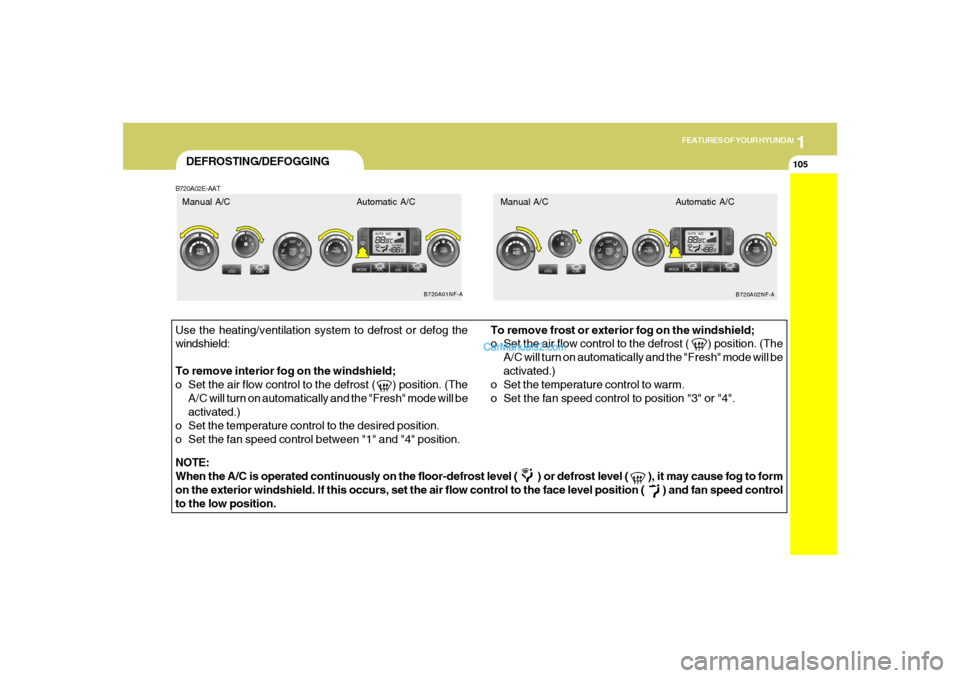
DEFROSTING/DEFOGGINGB720A02E-AATUse the heating/ventilation system to defrost or defog the
windshield:
To remove interior fog on the windshield;
o Set the air flow control to the defrost ( ) position. (The
A/C will turn on automatically and the "Fresh" mode will be
activated.)
o Set the temperature control to the desired position.
o Set the fan speed control between "1" and "4" position.To remove frost or exterior fog on the windshield;
o Set the air flow control to the defrost ( ) position. (The
A/C will turn on automatically and the "Fresh" mode will be
activated.)
o Set the temperature control to warm.
o Set the fan speed control to position "3" or "4".
NOTE:
When the A/C is operated continuously on the floor-defrost level ( ) or defrost level ( ), it may cause fog to form
on the exterior windshield. If this occurs, set the air flow control to the face level position ( ) and fan speed control
to the low position.
B720A01NF-A
B720A02NF-A
Manual A/C Automatic A/C Manual A/C Automatic A/C
Page 119 of 271
1FEATURES OF YOUR HYUNDAI
106
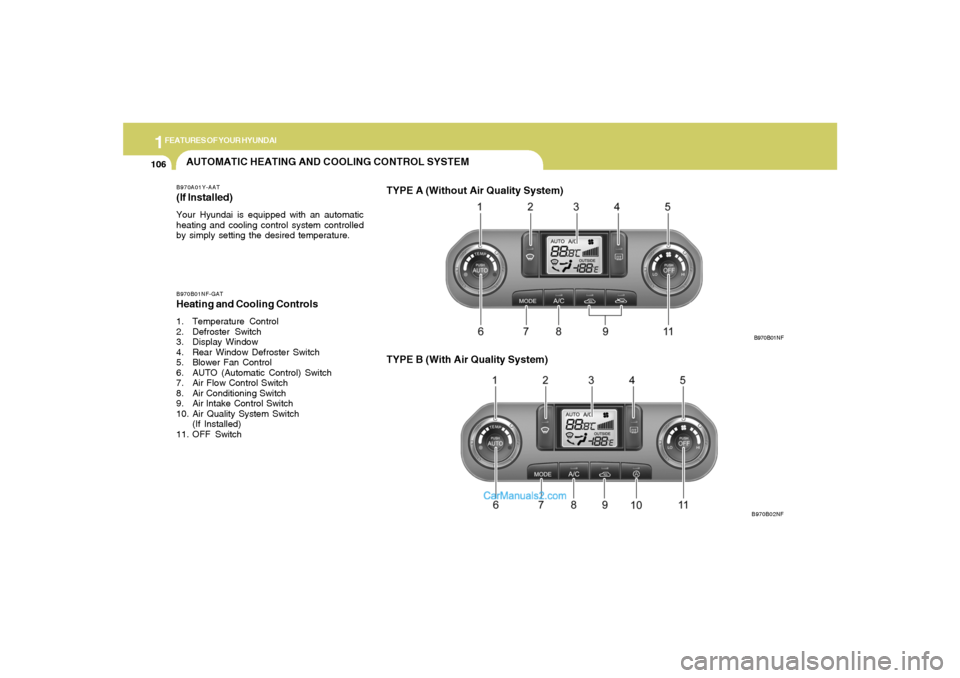
AUTOMATIC HEATING AND COOLING CONTROL SYSTEMB970A01Y-AAT(If lnstalled)Your Hyundai is equipped with an automatic
heating and cooling control system controlled
by simply setting the desired temperature.B970B01NF-GATHeating and Cooling Controls1. Temperature Control
2. Defroster Switch
3. Display Window
4. Rear Window Defroster Switch
5. Blower Fan Control
6. AUTO (Automatic Control) Switch
7. Air Flow Control Switch
8. Air Conditioning Switch
9. Air lntake Control Switch
10. Air Quality System Switch
(If Installed)
11. OFF Switch
TYPE B (With Air Quality System)
B970B01NF
B970B02NF
TYPE A (Without Air Quality System)
Page 120 of 271

1
FEATURES OF YOUR HYUNDAI
107
B970C01NF-AATAutomatic OperationThe FATC (Full Automatic Temperature Con-
trol) system automatically controls heating and
cooling as follows:
1. Push the "AUTO" switch. The indicator light
will illuminate confirming that the Face, Floor
and/or Bi-Level modes as well as the blower
speed and air conditioner will be controlled
automatically.
And, the air conditioning will operate if ambi-
ent temperature is higher than 34.7°F(1.5°C)
and automatically turns off if the ambient
temperature drops below 33.08°F(0.6°C).2. Turn the "TEMP" knob to set the desired
temperature.
The temperature will increase to the maxi-
mum "HI" by turning the knob clockwise.
The temperature will decrease to the mini-
mum "LO" by turning the knob counter-
clockwise.
NOTE:If the battery has been discharged or dis-
connected, the temperature mode will reset
to Centigrade degrees.
This is a normal condition and you can
change the temperature mode from Centi-
grade to Fahrenheit as follows;
Press the "OFF" and "AUTO " button simul-
taneously for 3 seconds.
The display shows that the unit of tempera-
ture is adjusted to Centigrade or Fahrenheit
(°C
→ →→ →
→ °F or °F
→ →→ →
→ °C).
HNF2135HNF2137
B970C01NF-A
Photo Sensor
NOTE:Never place anything over the sensor which
is located on the instrument panel to en-
sure better control of the heating and cool-
ing system.
Page 121 of 271
1FEATURES OF YOUR HYUNDAI
108
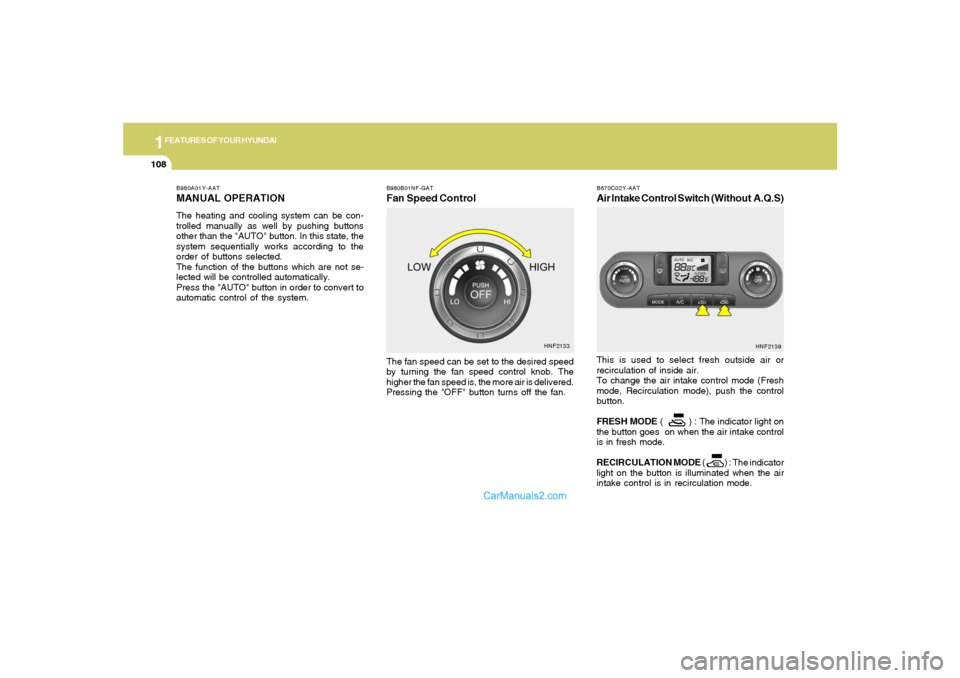
B980B01NF-GATFan Speed ControlThe fan speed can be set to the desired speed
by turning the fan speed control knob. The
higher the fan speed is, the more air is delivered.
Pressing the "OFF" button turns off the fan.
HNF2133 B980A01Y-AAT
MANUAL OPERATIONThe heating and cooling system can be con-
trolled manually as well by pushing buttons
other than the "AUTO" button. In this state, the
system sequentially works according to the
order of buttons selected.
The function of the buttons which are not se-
lected will be controlled automatically.
Press the "AUTO" button in order to convert to
automatic control of the system.
B670C02Y-AATAir Intake Control Switch (Without A.Q.S)This is used to select fresh outside air or
recirculation of inside air.
To change the air intake control mode (Fresh
mode, Recirculation mode), push the control
button.
FRESH MODE ( ) : The indicator light on
the button goes on when the air intake control
is in fresh mode.
RECIRCULATION MODE ( ) : The indicator
light on the button is illuminated when the air
intake control is in recirculation mode.
HNF2139
Page 122 of 271
1
FEATURES OF YOUR HYUNDAI
109
With the "Fresh" mode selected, air enters the
vehicle from the outside and is heated or cooled
according to the function selected.
With the "Recirculation" mode selected, air from
within the passenger compartment will be drawn
through the heating system and heated or
cooled according to the function selected.NOTE:o It should be noted that prolonged opera-
tion of the heating system in "recircula-
tion" mode will give rise to fogging of the
windshield and side windows and the air
within the passenger compartment will
become stale. In addition, prolonged
use of the air conditioning with the "Re-
circulation" mode selected may result in
the air within the passenger compart-
ment becoming excessively dry.
o When the ignition switch is turned "ON"
the air intake control will change to " "
mode (regardless of switch position).
This is normal operation. The air intake
control operates in "AUTO" mode when
turning the ignition to the ON position if
the "AUTO" mode was used before shut-
ting off the engine.Recirculation mode :
Air from witin the passenger compartment will
be drawn through the heating system and heated
or cooled according to the function selected.
Exhaust gas cutoff mode :
Air enters the vehicle from the outside.
But if exhaust gas enters the vehicle from the
outside, the exhaust gas cutoff mode ( ) is
automatically converted to the ( ) mode, to
prevent exhaust gas from entering the vehicle.
NOTE:o It should be noted that prolonged opera-
tion of the heating system in recircula-
tion mode ( ) will give rise to misting
of the windshield and side windows and
the air within the passenger compart-
ment will become stale. In addition, pro-
longed use of the air conditioning with
the recirculation mode ( ) sele-cted
may result in the air within the passenger
compartment becoming excessively dry.
o When the ignition switch is turned "ON",
the air intake control will change to
"Fresh" mode (regardless of switch po-
sition). This is normal operation. The air
intake control operates in "AUTO" mode
when turning the ignition to the ON
position if the "AUTO" mode was used
before shutting off the engine.
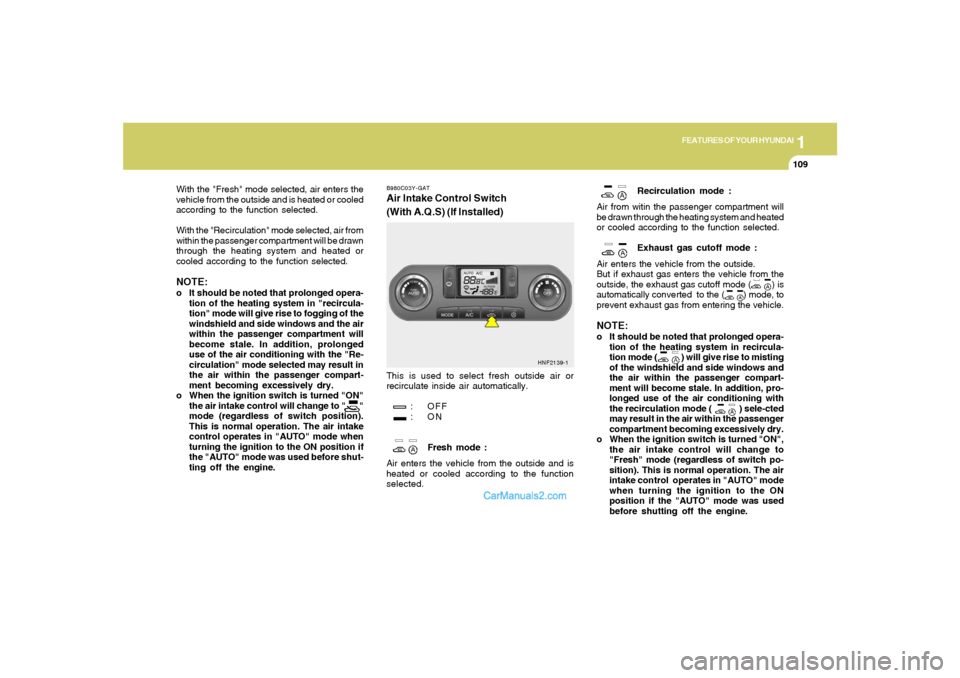
B980C03Y-GATAir Intake Control Switch
(With A.Q.S) (If Installed)This is used to select fresh outside air or
recirculate inside air automatically.
: OFF
:ON
Fresh mode :
Air enters the vehicle from the outside and is
heated or cooled according to the function
selected.
HNF2139-1
Page 123 of 271
1FEATURES OF YOUR HYUNDAI
110
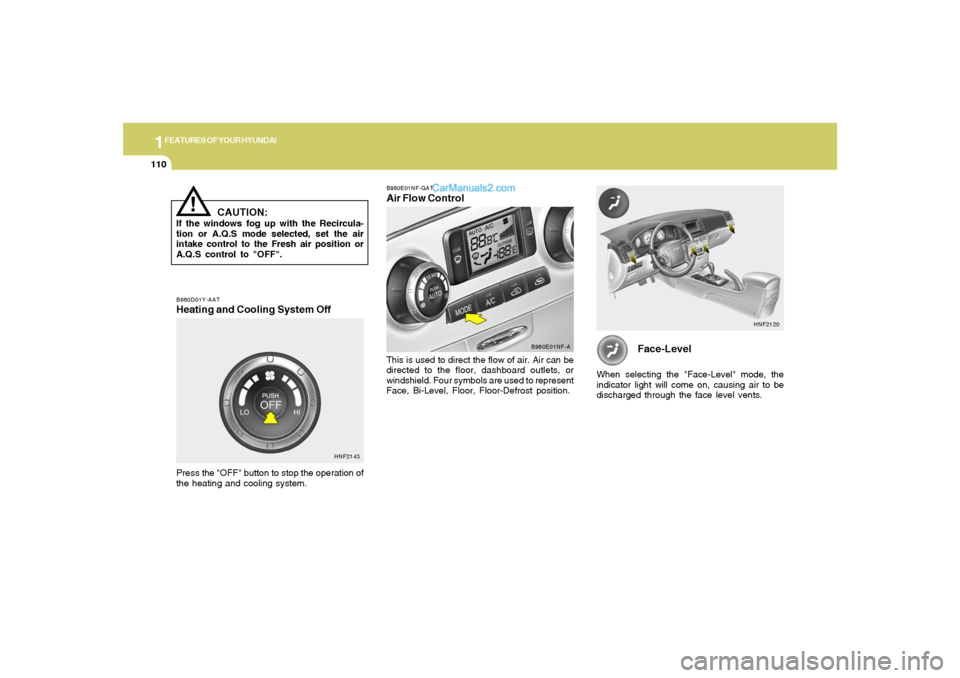
Face-Level
When selecting the "Face-Level" mode, the
indicator light will come on, causing air to be
discharged through the face level vents.
HNF2120
B980D01Y-AATHeating and Cooling System OffPress the "OFF" button to stop the operation of
the heating and cooling system.
HNF2143B980E01NF-GAT
Air Flow ControlThis is used to direct the flow of air. Air can be
directed to the floor, dashboard outlets, or
windshield. Four symbols are used to represent
Face, Bi-Level, Floor, Floor-Defrost position.
B980E01NF-A
!
CAUTION:
If the windows fog up with the Recircula-
tion or A.Q.S mode selected, set the air
intake control to the Fresh air position or
A.Q.S control to "OFF".
Page 133 of 271

1FEATURES OF YOUR HYUNDAI
120
o Press the RND button until the desired shuffle
mode is displayed. The audio system will
then engage the desired random mode.
6. CHANGE DIRECTORY(DIR)Press DIR control to change MP3 directories.7. MP3 TEXT modeEach press of the TEXT button will advance
through the following MP3 track information:
1) Filename
2) Song Title
3) Artist Name
4) Album Name
5) Directory Name
6) Number of tracks on the current disc
Rotate the AUDIO-SEL knob to view additional
characters.EQ Button - Equalization FeatureThe Compact disc player has five EQ modes:
OFF, CLASSICAL (CLAS), POP, ROCK, and
JAZZ.
Each press of the EQ button will advance to the
next EQ setting. Radio and CD have indepen-
dent EQ settings.
8. Adjustment Mode Select KnobPressing the AUDIO SEL knob will initiate Audio
Mode. Each subsequent press will select the
next adjustment in the following order:
1) Bass adjust
The bass adjust control allows you to in-
crease or decrease the audio system's
bass output. Rotate the AUDIO SEL knob to
change the bass setting.
2) Midrange adjust
The midrange adjust control allows you to
increase or decrease the audio system's
midrange output. Rotate the AUDIO SEL
knob to change the midrange setting.
3) Treble adjust
The treble adjust control allows you to in-
crease or decrease the audio system's
treble output. Rotate the AUDIO SEL knob to
change the treble setting.
4) Speaker balance adjust
Speaker sound distribution can be adjusted
between the right and left speakers by rotat-
ing the AUDIO SEL knob.
5) Speaker fade adjust
Speaker sound can be adjusted between the
front and rear speakers by rotating the
AUDIO SEL knob.
9. CD EJECTo Press the EJ button to stop and eject a CD.
If a CD is ejected and not removed, the player
will automatically reload the CD. This feature
may be used when the ignition is ON or OFF.NOTE:o To assure proper operation of the unit,
keep the vehicle interior temperature
within a normal range by using the
vehicle's air conditioning or heating
system.
o When replacing the fuse, replace it with
a fuse having the correct capacity.
o This equipment is designed to be used
only in a 12 volt DC battery system with
negative ground.
o This unit is made of precision parts. Do
not attempt to disassemble or adjust
any parts.
o When driving your vehicle, be sure to
keep the volume of the unit set low
enough to allow you to hear sounds
coming from the outside.
o Do not expose this equipment (includ-
ing the speakers) to water or excessive
moisture.