2005 Hyundai Accent ESP
[x] Cancel search: ESPPage 2 of 219

A010A03A-AAT
WARRANTIES FOR YOUR HYUNDAI VEHICLE
o New Vehicle 60 Months/60,000 Miles Limited Warranty
o New Vehicle 120 Months/100,000 Miles Limited Powertrain Warranty (original owner only)
o Anti-Perforation Limited Warranty
o Emission Defect Warranty - Federal Vehicle
o California Emission Control System Warranty (if applicable)
o Emission Performance Warranty - Federal Vehicle
o Replacement Parts and Accessories Limited WarrantyNOTE:Detailed warranty information is provided in your Hyundai Owner's Handbook.A020A01A-AAT
RESPONSIBILITY FOR MAINTENANCE
The maintenance requirements for your new Hyundai are found in Section 5. As the owner, it is your responsibility
to see that all maintenance operations specified by the manufacturer are carried out at the appropriate intervals.
When the vehicle is used in severe driving conditions, more frequent maintenance is required for some operations.
Maintenance requirements for severe operating conditions are also included in Section 5.
Page 6 of 219

A110A01A-AAT
VEHICLE DATA COLLECTION AND EVENT DATA RECORDERS
Your Hyundai vehicle is equipped with many high technology, electronically controlled systems that help to ensure
your vehicle operates properly and provides the performance that you expect. These systems utilize computers
to monitor the operation of various systems and components and help to control their operation. These
computerized system operations are wide-ranging and involve components to reduce emissions, to continuously
evaluate the readiness of the airbag and seat belt pretensioner systems, to determine when the airbag and seat
belt pre-tensioner systems should be deployed and then to activate the deployment, and if equipped, to operate
anti-lock braking, traction control and electrical stability control to assist the driver to control the vehicle in difficult
driving situations. These systems electronically store information that is useful to service technicians when they
need to diagnose and repair these systems. Additional information is stored only when a crash occurs that results
in the deployment of the airbags or seat belt pre-tensioners. This type of data storage is done by devices called
event data recorders(EDR).
After a crash event, the airbag and seat belt pre-tensioner computer system, known as the Supplemental
Restraint System Control Module (SRSCM) or Airbag Control Unit (ACU), may record some information about
the condition of the vehicle and how it was being operated. This information consists of data related to seat belt
usage and if there was diagnostic information in the airbag or seat belt systems at the time that a crash occurred,
and if the ACU sensed that a crash of sufficient severity occurred to require seat belt pre-tensioner or airbag
deployment.
To retrieve this information, special equipment is needed and access to the vehicle or the device that stores the
data is required. Hyundai will not access information about a crash event or share it with others except:
o in response to an official request of police or similar government office, or
o with the consent of the vehicle owner or, if the vehicle is leased, with the consent of the lessee, or
o as part of Hyundai’s defense of litigation through the discovery process, or
o as required by law.
Page 16 of 219

1FEATURES OF YOUR HYUNDAI4
DOOR LOCKS!
B030B01A-AATRecord Your Key NumberA code number is stamped on the number plate
that came with the keys to your Hyundai. This
key number plate should not be left with the
keys but kept in a safe place, not in the vehicle.
The key number should also be recorded in a
place where it can be found in an emergency.
If you need additional keys, or if you should lose
your keys, your authorized Hyundai dealer can
make new keys if you can supply the key
number.
B030B01EB040A01A-AAT B040B02A-AAT
Locking and Unlocking Front Doors with
a Keyo The door can be locked or unlocked with a
key.
o Lock the door by turning the key toward the
front of the vehicle and unlock it by turning
the key toward the rear.NOTE:The driver's door can be unlocked by turning
the key once toward the rear. If you wish to
unlock all doors, turn the key again toward
the rear within 4 seconds. (With central
door locking system)
WARNING:
o Unlocked doors can be dangerous. Be-
fore you drive away (especially if there
are children in the car), be sure that all the
doors are securely closed and locked so
that the doors cannot be opened from the
inside. This helps ensure that the doors
will not be opened accidentally. Also,
when combined with the proper use of
seat belts, locking the doors helps keep
occupants from being ejected from the
car in case of an accident.
o Before opening the door, always look
for and avoid oncoming traffic.UNLOCK
HLC2003
LOCK
Page 18 of 219

1FEATURES OF YOUR HYUNDAI6
!KEYLESS ENTRY SYSTEM
B040G02A-GATCentral Door Lock (If Installed)
B040G01A-1
The central door locking is operated by pushing
the driver's door lock switch toward the front or
rear of the vehicle. If the passenger and rear
doors are open when the switch is pushed, the
door will remain locked when closed.NOTE:o When pushing the switch toward the rear,
all doors will unlock.
When pushing the switch toward the front,
all doors will lock.
o When the door is unlocked, the red mark
on the switch is visible and the character
"LOCK" on the switch is not visible.
o The central door locking is operated by
turning the key toward the front or rear of
the vehicle.
B070F02O-AAT(If Installed)This device complies with Part 15 of the FCC
rules. Operation is subject to the following two
conditions:
(1) This device may not cause harmful inter-
ference. and (2) this device must accept any
interference received.
Including interference that may cause undes-
ired operation.
CAUTION:
Changes or modifications not expressly
approved by the party responsible for com-
pliance could void the user's authority to
operate the equipement
Locking doors1. Close all doors.
2. Push the "LOCK" button on the transmitter.
3. At the same time all doors lock, the turn
signal light will blink once to indicate that the
system is armed.Unlocking doors1. Push the "UNLOCK" button on the trans-
mitter.
2. At the same time the driver's door unlocks,
the turn signal light will blink twice to indicate
that the system is disarmed.NOTE:If you wish to unlock all the doors, press the
"UNLOCK" button on the transmitter again
within 4 seconds.
Page 68 of 219
1FEATURES OF YOUR HYUNDAI56
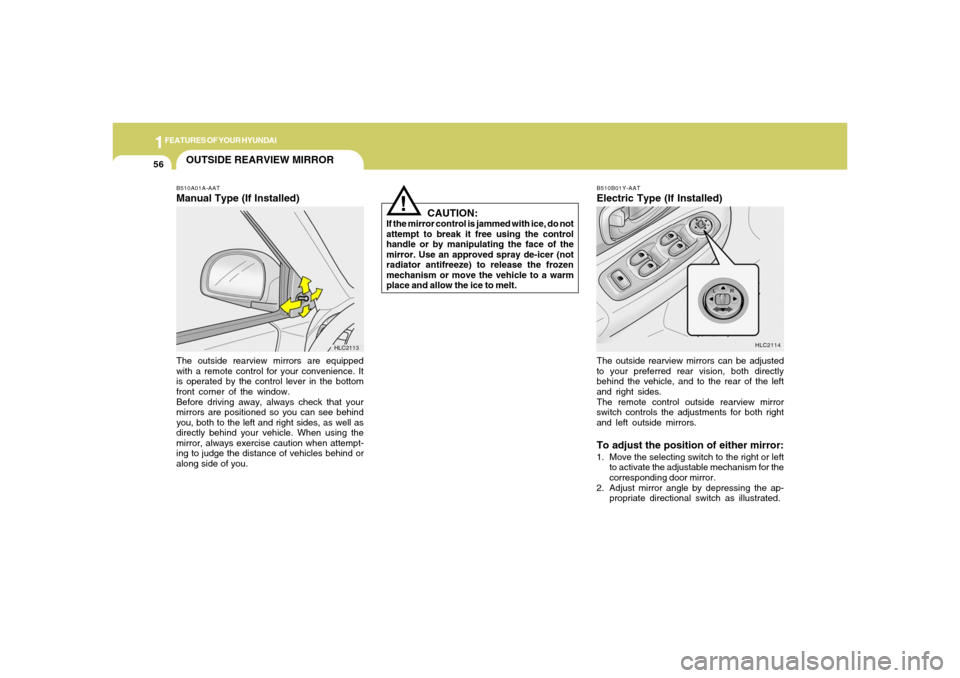
OUTSIDE REARVIEW MIRRORB510A01A-AATManual Type (If Installed)The outside rearview mirrors are equipped
with a remote control for your convenience. It
is operated by the control lever in the bottom
front corner of the window.
Before driving away, always check that your
mirrors are positioned so you can see behind
you, both to the left and right sides, as well as
directly behind your vehicle. When using the
mirror, always exercise caution when attempt-
ing to judge the distance of vehicles behind or
along side of you.
HLC2113
CAUTION:
If the mirror control is jammed with ice, do not
attempt to break it free using the control
handle or by manipulating the face of the
mirror. Use an approved spray de-icer (not
radiator antifreeze) to release the frozen
mechanism or move the vehicle to a warm
place and allow the ice to melt.
!
B510B01Y-AATElectric Type (If Installed)
HLC2114
The outside rearview mirrors can be adjusted
to your preferred rear vision, both directly
behind the vehicle, and to the rear of the left
and right sides.
The remote control outside rearview mirror
switch controls the adjustments for both right
and left outside mirrors.To adjust the position of either mirror:1. Move the selecting switch to the right or left
to activate the adjustable mechanism for the
corresponding door mirror.
2. Adjust mirror angle by depressing the ap-
propriate directional switch as illustrated.
Page 89 of 219

1
FEATURES OF YOUR HYUNDAI
77
2. FAD (Fader Control) KnobTurn the control knob counterclockwise to em-
phasize front speaker sound (rear speaker
sound will be attenuated). When the control
knob is turned clockwise, rear speaker sound
will be emphasized (front speaker sound will
be attenuated).3. BASS Control KnobPress to pop the knob out and turn to the left or
right for the desired bass tone.TREBLE Control Knob.Pull the bass control knob further out. Turn to
the left or right for the desired treble tone.4. BAND SelectorPressing the button changes the AM, FM1
and FM2 bands. The mode selected is dis-
played on LCD.5. TUNE (Manual) Select ButtonPress the ( ) side or ( ) side to increase or to
decrease the frequency. With the button held
down for 1 sec. or more, the stop signal (broad-
casting radio wave) is ignored and channel
selection continues.
SEEK Operation
(Automatic Channel Selection)Press the TUNE select button for 1 sec. or
more. When the ( ) side is pressed, the unit will
automatically tune to the next higher frequency
and when the ( ) side is pressed, it will automa-
tically tune to the next lower frequency.6. PRESET STATION SELECT ButtonSix (6) stations for AM, FM1 and FM2 respec-
tively can be preset in the electronic memory
circuit on this unit.HOW TO PRESET STATIONSSix AM and twelve FM stations may be pro-
grammed into the memory of the radio. Then, by
simply pressing the band select button and/or
one of the six station select buttons, you may
recall any of these stations instantly. To pro-
gram the stations, follow these steps:
o Press band selector to set the band for AM,
FM1, and FM2.
o Select the desired station to be stored by
seek, scan or manual tuning.
o Determine the preset station select button
you wish to use to access that station.
H210B04O-AAT1. POWER ON-OFF/VOLUME Control
KnobThe radio unit may be operated when the igni-
tion key is in the "ACC" or "ON" position. Rotate
the knob clockwise to switch the radio unit on
and to increase the volume.
The LCD shows the radio frequency in the radio
mode. Turn the knob counterclockwise to re-
duce the volume and to switch the radio unit off.BAL (Balance Control) KnobPull and turn the control knob clockwise to
emphasize right speaker sound (left speaker
sound will be attenuated). When the control
knob is turned counterclockwise, left speaker
sound will be emphasized (right speaker sound
will be attenuated).
After adjusting the balance, push the knob
again to use the other function.SCAN KnobWhen the scan knob is pressed, the frequency
will increase and the receivable stations will be
tuned in one after another, receiving each sta-
tion for 5 seconds. To stop scanning, press the
scan knob again.
FM
AM
Page 92 of 219

1FEATURES OF YOUR HYUNDAI80
3. TREB (Treble Control) KnobPress to pop the knob out and turn to the left or
right for the desired treble tone.FAD (Fader Control) KnobPull the treble control knob further out.
Turn the control knob counterclockwise to em-
phasize front speaker sound (rear speaker
sound will be attenuated).
When the control knob is turned clockwise,
rear speaker sound will be emphasized (front
speaker sound will be attenuated).4. TUNE (Manual) Select ButtonPress the ( ) side or ( ) side to increase or to
decrease the frequency. Press either button and
hold down to continuously scroll. Release but-
ton once the desired station is reached.SEEK Operation
(Automatic Channel Selection)Press the TUNE select button 0.5 sec or more.
Releasing it will automatically tune to the next
available station with a beep sound.When the ( ) side is pressed longer than 0.5
second, releasing will automatically tune to the
next higher frequency and when the ( ) side
is pressed longer than 0.5 second, releasing
will automatically tune to the next lower fre-
quency.
5. BAND SelectorPressing the button changes the AM, FM1
and FM2 bands. The mode selected is dis-
played on LCD.6. PRESET STATION SELECT ButtonSix (6) stations for AM, FM1 and FM2 respec-
tively can be preset in the electronic memory
circuit on this unit.HOW TO PRESET STATIONSSix AM and twelve FM stations may be pro-
grammed into the memory of the radio. Then, by
simply pressing the band select button and/or
one of the six station select buttons, you may
recall any of these stations instantly. To pro-
gram the stations, follow these steps:
H240B04O-AAT1. POWER ON-OFF Control KnobThe radio unit may be operated when the igni-
tion key is in the "ACC" or "ON" position. Press
the knob to switch the power on. The LCD
shows the radio frequency in the radio mode or
the tape direction indicator in the tape mode. To
switch the power off, press the knob again.VOLUME ControlRotate the knob clockwise to increase the vol-
ume and turn the knob counterclockwise to
reduce the volume.2. BASS Control KnobPress the control knob to pop knob out and
turn to the left or right for the desired bass
tone.BAL (Balance Control) KnobPull the bass control knob further out.Turn the
control knob clockwise to emphasize right
speaker sound (left speaker sound will be
attenuated).
When the control knob is turned counterclock-
wise, left speaker sound will be emphasized
(right speaker sound will be attenuated).
FM/AM
Page 97 of 219

1
FEATURES OF YOUR HYUNDAI
85
3. BASS Control KnobPress to pop the knob out and turn to the left or
right for the desired bass tone.TREB (Treble Control) KnobPull the bass control knob further out. Turn to
the left or right for the desired treble tone.4. SCAN ButtonWhen the scan button is pressed, the frequency
will increase and the receivable stations will be
tuned in one after another, receiving each sta-
tion for 5 seconds. To stop scanning, press the
scan button again.5. TUNE (Manual) Select ButtonPress the ( ) side or ( ) side to increase or to
decrease the frequency. Press either button and
hold down to continuously scroll. Release but-
ton once the desired station is reached.
SEEK Operation
(Automatic Channel Selection)Press the TUNE select button for 0.5 sec or
more. Releasing it will automatically tune to the
next available station with a beep sound.
When the ( ) side is pressed longer than 0.5
second, releasing will automatically tune to the
next higher frequency and when the ( ) side is
pressed longer than 0.5 second, releasing will
automatically tune to the next lower frequency.6. BAND SelectorPressing the button changes the AM, FM1
and FM2 bands. The mode selected is dis-
played on LCD.7. PRESET STATION SELECT ButtonSix (6) stations for AM, FM1 and FM2 respec-
tively can be preset in the electronic memory
circuit on this unit.
H260B05O-AAT1. POWER ON-OFF Control KnobThe radio unit may be operated when the igni-
tion key is in the "ACC" or "ON" position. Press
the knob to switch the power on. The LCD
shows the radio frequency in the radio mode or
the CD track indicator in the CD mode. To
switch the power off, press the knob again.VOLUME ControlRotate the knob clockwise to increase the vol-
ume and turn the knob counterclockwise to
reduce the volume.BALANCE ControlPull and turn the control knob clockwise to
emphasize right speaker sound (left speaker
sound will be attenuated). When the control
knob is turned counterclockwise, left speaker
sound will be emphasized (right speaker sound
will be attenuated).2. FAD (Fader Control) KnobTurn the control knob counterclockwise to em-
phasize front speaker sound (rear speaker
sound will be attenuated). When the control
knob is turned clockwise, rear speaker sound
will be emphasized (front speaker sound will
be attenuated).
FM/AM