Page 126 of 273

�µ�´
Press and hold the CLOCK (SCAN/
RPT) button. Change the hours by
pressing the H (preset 4) button
until the numbers advance to the
desired time. Change the minutes by
pressing the M (preset 5) button
until the numbers advance to the
desired time. When you are f inished,
release the CLOCK button. If your vehicle’s battery is
disconnected or goes dead, you will
need to set the clock.
You can quickly set the time to the
nearest hour. If the displayed time is
bef ore the half hour, pressing and
holding the clock button, then
pressing the RESET (preset 6)
buttonsetstheclockbacktothe
previous hour. If the displayed time
is af ter the half hour, the clock sets
f orward to the beginning of the next
hour.
For example: 1:06 will reset to 1:00
1:52 will reset to 2:00 Therightdisplayshowsthetime
when the ignition is in the
ACCESSORY (I) or ON (II) position.
Press and hold the SET (TUNE)
button until the numbers f lash.
Change the hours by pressing the
H ( ) button until the numbers
advance to the desired time. Change
the minutes by pressing the M ( )
button until the numbers advance to
the desired time. When you are
finished, press the SET button again.
LX model
EX and EX-L models
Setting the Clock
124
SET
BUTTON CLOCK
H BUTTON
RESET
MH M BUTTON
CLOCK CLOCK BUTTON
LX MODEL
EX and EX-L
MODELS
Page 136 of 273

There are various types of DVDs
available. Some of them are not
compatible with your system.
The DVD player in your Rear
Entertainment System can play
DVDs and CDs bearing the above
marks on their packages or jackets.
Those packages or jackets should
also bear the designation of ‘‘1’’ or
‘‘ALL’’. DVD-ROMs cannot be played
in this system.If you see an error message in the display while operating the DVD player,
f ind the cause in the chart. If you cannot clear the error message, take your
vehicle to a dealer.
Error Message
Cause Solution
FOCUS Error
Mechanical Error, or a
DVD has been loaded in
the CD player
High Temperature
Low Vehicle Battery
VoltagePress the EJECT button and pull out the DVD.
Check if it is inserted correctly in the DVD
Player.MakesuretheDVDisnotscratchedor
damaged.
Press the EJECT button and pull out the DVD.
Check it for damage or deformation.
If the DVD cannot be pulled out, or the error
message does not disappear after the DVD is
ejected, see an Acura dealer.
Do not try to force the DVD out of the player.
Will disappear when the temperature returns to
normal.
Run the engine to recharge the battery.
Playable DVDs
DVD Player Error Messages
DVD Specif ications
134
Page 137 of 273
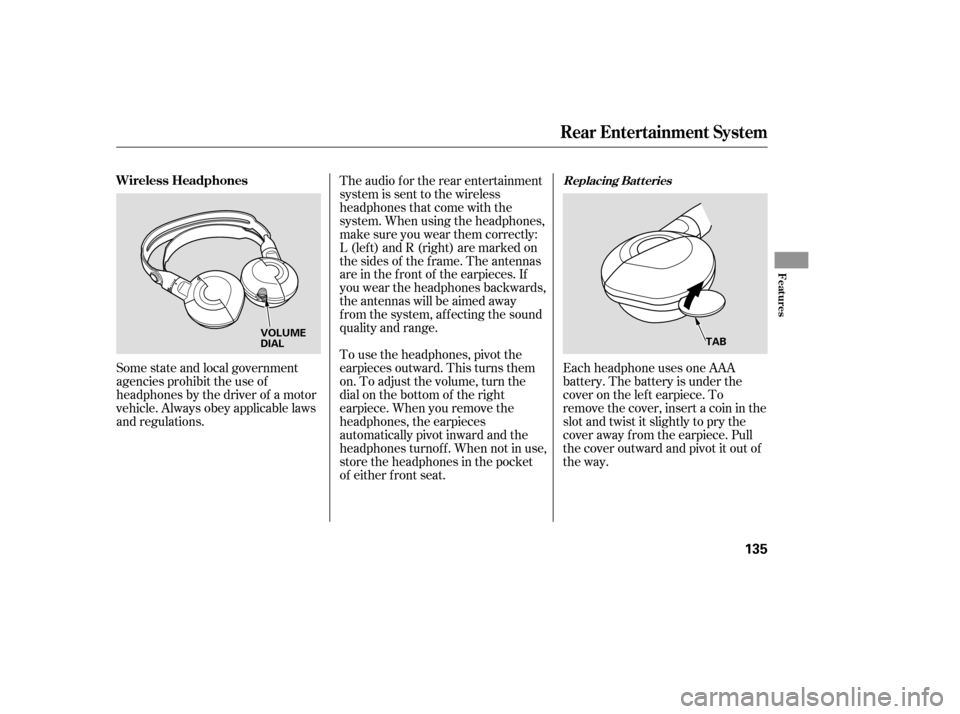
Each headphone uses one AAA
battery. The battery is under the
cover on the lef t earpiece. To
remove the cover, insert a coin in the
slot and twist it slightly to pry the
cover away f rom the earpiece. Pull
the cover outward and pivot it out of
the way.
Some state and local government
agencies prohibit the use of
headphones by the driver of a motor
vehicle. Always obey applicable laws
and regulations. The audio f or the rear entertainment
system is sent to the wireless
headphones that come with the
system. When using the headphones,
make sure you wear them correctly:
L (lef t) and R (right) are marked on
the sides of the frame. The antennas
are in the f ront of the earpieces. If
you wear the headphones backwards,
the antennas will be aimed away
from the system, affecting the sound
quality and range.
To use the headphones, pivot the
earpieces outward. This turns them
on. To adjust the volume, turn the
dial on the bottom of the right
earpiece. When you remove the
headphones, the earpieces
automatically pivot inward and the
headphones turnof f . When not in use,
store the headphones in the pocket
of either f ront seat.
Replacing Bat t eriesWireless Headphones
Rear Entertainment System
Features
135
VOLUME
DIAL
TAB
Page 138 of 273
There are three headphone
connectors f or the third seat
passengers. Each connector has its
own volume control. The system will accept auxiliary
inputs f rom standard video games
and video equipment.
V=Videojack
L = Lef t audio jack
R = Right audio jack
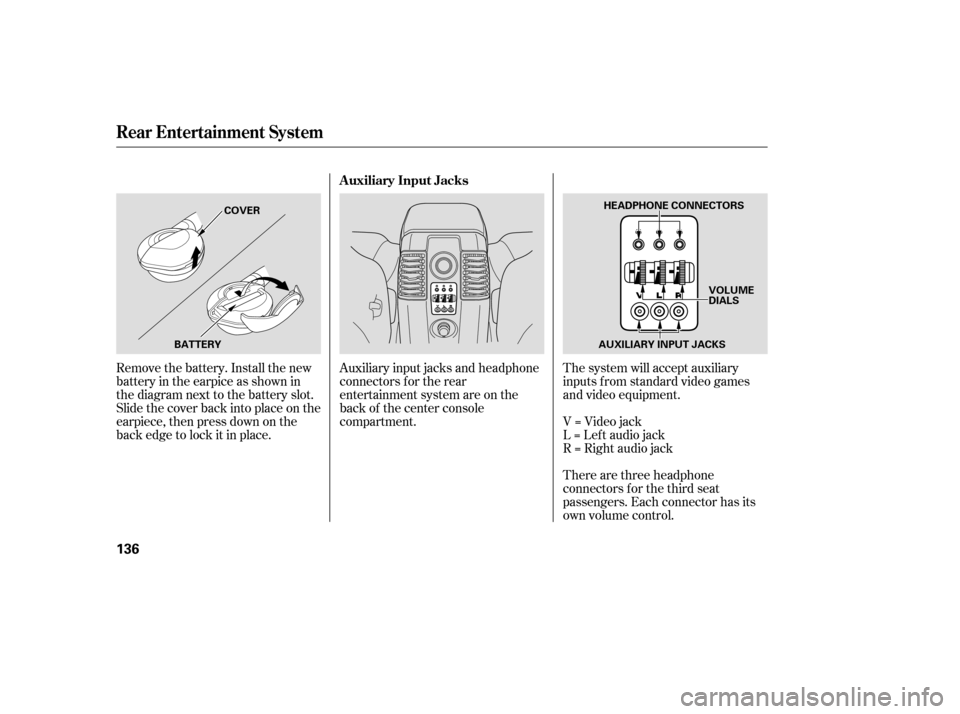
Auxiliary input jacks and headphone
connectors f or the rear
entertainment system are on the
back of the center console
compartment.
Remove the battery. Install the new
battery in the earpice as shown in
the diagram next to the battery slot.
Slide the cover back into place on the
earpiece, then press down on the
back edge to lock it in place.
Rear Entertainment System
Auxiliary Input Jacks
136
AUXILIARY INPUT JACKS
BATTERY COVER
HEADPHONE CONNECTORS
VOLUME
DIALS
Page 142 of 273

�µ
The HomeLinkUniversal
Transceiver built into your vehicle
canbeprogrammedtooperateupto
three remote controlled devices
around your home, such as garage
doors, lighting, or home security
systems.
If you are training HomeLink to
operate a garage door or gate, you
should unplug the motor f or that
device during training. Repeatedly
pressing the remote control button
could burn out the motor. If you just
received your vehicle and have not
trained any of the buttons in
HomeLink bef ore, you should erase
any previously learned codes bef ore
training the first button. To do this,
press and hold the two outside
buttons on the HomeLink
Transceiver for about 20 seconds, or
until the red indicator f lashes.
Release the buttons, then go to step
1.
If your garage door opener was
manuf actured bef ore April 1982, you
may not be able to program
HomeLink to operate it. They do not
have the safety feature that causes
the motor to stop and reverse if an
obstacle is detected during closing,
increasing the risk of injury.
Always ref er to the opening
instructions and saf ety inf ormation
that came with your garage door
opener or other equipment you
intend to operate with the HomeLink
Universal Transceiver. If you do not
have this information, contact the
manuf acturer of the equipment.
HomeLink stores the code in a
permanent memory. There should
be no need to retrain HomeLink if
your vehicle’s battery goes dead or is
disconnected.
On EX and EX-L Models
HomeL ink Universal T ransceiver
General Inf ormation T raining HomeL ink
Bef ore you begin
Important Saf ety Precautions
140
Page 161 of 273

Apply the parking brake.
In cold weather, turn of f all
electrical accessories to reduce
the drain on the battery.
Make sure the shif t lever is in
Park. Press on the brake pedal.
Without touching the accelerator
pedal, turn the ignition key to the
START (III) position. Do not hold
the key in START for more than
15 seconds at a time. If the engine
does not start right away, pause
f or at least 10 seconds bef ore
trying again.If the engine does not start within
15 seconds, or starts but stalls
right away, repeat step 4 with the
accelerator pedal pressed halfway
down. If the engine starts, release
pressure on the accelerator pedal
so the engine does not race.
If the engine fails to start, press
the accelerator pedal all the way
downandholdittherewhile
starting to clear flooding. If the
engine still does not start, return
to step 5.
5.
6.
1.
2.
3.
4.
75
Starting the Engine
Driving
159
Immobilizer System T he immobilizer system protects your
vehicle f rom thef t. If an improperly-
coded key (or other device) is used, the
engine’s f uel system is disabled. See
on page . The engine is harder to start in cold
weather. Also, the thinner air f ound at
altitudes above 8,000 f eet (2,400
meters) adds to this problem.
Page 184 of 273

Your vehicle can be towed behind a
motorhome at legal highway speeds
up to 65 mph (100 km/h). Do not
exceed 65 mph (100 km/h) or severe
transmission damage will occur. To
avoid damage to the 4WD system, it
must be towed with all f our wheels
on the ground (f lat towing).
When purchasing a tow bar, make
sure you select a reputable
manuf acturer. Follow the
manufacturer’s attachment
instructions caref ully.
Perf orm the f ollowing procedure
everyday immediately bef ore you
begin towing. Otherwise severe
automatic transmission damage will
occur.Check the transmission f luid level
(see page ).
Start the engine. Press on the brake pedal. Move
the shif t lever through all its
positions.
ShifttoD,thentoN.Letthe
engine run f or three minutes, then
turn it off.
Release the parking brake.
Leave the ignition switch in the
ACCESSORY (I) position so the
steering wheel does not lock.
Make sure the radio and any
items plugged into the
accessory power sockets are
turned of f so you do not run
down the battery.
If you tow more than 8 hours in one
day, you should repeat the above
procedure at least every 8 hours
(when you stop f or f uel, etc.)
204
Do not overf ill. Ext ended T owing
Towing Your Vehicle Behind a Motorhome
182
Improper towing preparation will
damage the transmission. Follow the
above procedure exactly. If you cannot
shif t the transmission or start the
engine, your car must be transported
on a f lat-bed or trailer.
The steering system can be damaged if
the steering wheel is locked. Leave the
ignition switch in the ACCESSORY (I)
position, and make sure the steering
wheel turns f reely bef ore you begin
towing.
Page 189 of 273

This section also includes
Maintenance Schedules f or normal
driving and severe driving conditions,
a Maintenance Record, and instruc-
tions f or simple maintenance tasks
you may want to take care of
yourself .
If you have the skills and tools to per-
f orm more complex maintenance
tasks on your vehicle, you may want
to purchase the Service Manual. See
page f or inf ormation on how to
obtain a copy, or see your dealer. This section explains why it is
important to keep your vehicle well
maintained and how to f ollow basic
maintenance saf ety precautions.......................
Maintenance Saf ety .188
.................
Maintenance Schedule . 189
....................
Maintenance Record .195
..............................
Fluid Locations .198
........................
Adding Engine Oil .199
.........
Changing the Oil and Filter . 200
..............................
Engine Coolant .202
....................
Windshield Washers .203
.....
Automatic Transmission Fluid . 204
...............................
Dif f erential Oil .205
....................................
Timing Belt .205
....................................
Brake Fluid .206
....................
Power Steering Fluid . 207
.............................................
Lights .208
.....................................
Floor Mats .213
.......................
Cleaning Seat Belts .213
.................................
Wiper Blades .214
...............................................
Tires .216
...................
Checking the Battery . 221
.............................
Vehicle Storage .222
261
Maintenance
Maint enance
187