Page 80 of 414
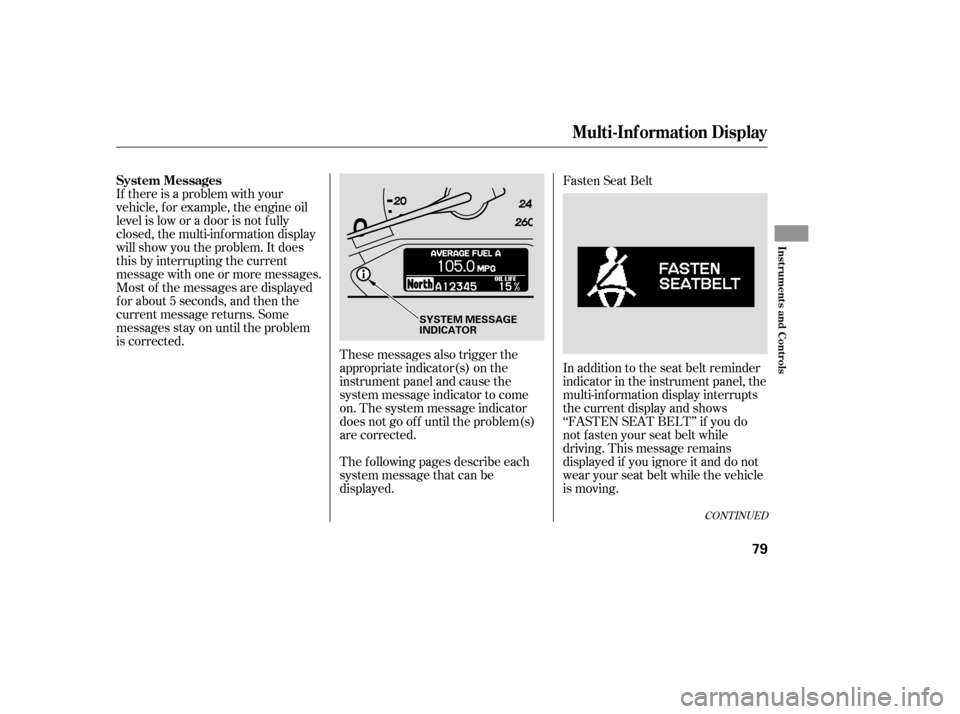
If there is a problem with your
vehicle, f or example, the engine oil
level is low or a door is not f ully
closed, the multi-inf ormation display
will show you the problem. It does
this by interrupting the current
message with one or more messages.
Most of the messages are displayed
f or about 5 seconds, and then the
current message returns. Some
messages stay on until the problem
is corrected.These messages also trigger the
appropriate indicator(s) on the
instrument panel and cause the
system message indicator to come
on. The system message indicator
does not go of f until the problem(s)
are corrected.Fasten Seat Belt
The f ollowing pages describe each
system message that can be
displayed. In addition to the seat belt reminder
indicator in the instrument panel, the
multi-inf ormation display interrupts
the current display and shows
‘‘FASTEN SEAT BELT’’ if you do
notfastenyourseatbeltwhile
driving. This message remains
displayed if you ignore it and do not
wear your seat belt while the vehicle
is moving.
CONT INUED
System Messages
Multi-Inf ormation Display
Inst rument s and Cont rols
79
SYSTEM MESSAGE
INDICATOR
Page 85 of 414
Check TPMS SystemIf there is a problem with the vehicle
stability assist (VSA) system, you
will see ‘‘CHECK VSA SYSTEM’’ in
the multi-information display. If you
see this message, have the VSA
system checked by your dealer (see
page ).If the engine oil is very low or has
lost pressure, you will see ‘‘CHECK
ENGINE OIL LEVEL’’ in the multi-
inf ormation display. You will also see
the low oil pressure indicator in the
instrument panel f lashing or staying
on. If you see this message, you
should take immediate action since
serious engine damage is possible.
Follow the procedure on page . Check Engine Oil Level
Check VSA System
If there is a problem in the tire
pressure monitoring system (TPMS),
you will see ‘‘CHECK TPMS
SYSTEM’’ in the multi-inf ormation
display. If you see this message, the
TPMS is not monitoring tire
pressures. Have the TPMS checked
by your dealer as soon as possible
(see page ). 301
303 371
On U.S. Touring model only
Multi-Inf ormation Display
84
Page 278 of 414
Bef ore you begin driving your
vehicle, you should know what
gasoline to use and how to check the
levels of important f luids. You also
need to know how to properly store
luggage or packages. The
inf ormation in this section will help
you. If you plan to add any
accessories to your vehicle, please
read the information in this section
first...............................
Break-in period .278
...............................
Gasoline Type .278
.........
Service Station Procedures . 279
....................................
Ref ueling .279
Opening and Closing the .......................................
Hood .280
...................................
Oil Check .281
.............
Engine Coolant Check . 282
...............................
Fuel Economy .283
........
Improving Fuel Economy . 283
...
Accessories and Modif ications . 284
.............................
Carrying Cargo .286
Bef ore Driving
Bef ore Driving
277
Page 279 of 414

Help assure your vehicle’s f uture
reliability and perf ormance by paying
extra attention to how you drive
during the f irst 600 miles (1,000 km).
During this period:Avoid full-throttle starts and rapid
acceleration.
Avoidhardbrakingforthefirst
200 miles (300 km).
Do not change the oil until the
scheduled maintenance time.
You should also f ollow these
recommendations with an
overhauled or exchanged engine, or
when the brakes are replaced. Do not tow a trailer. Your vehicle is designed to operate
on unleaded gasoline with a pump
octane number of 86 or higher. Use
of a lower octane gasoline can cause
a persistent, heavy metallic rapping
noise that can lead to engine damage.
We recommend quality gasolines
containing detergent additives that
help prevent f uel system and engine
deposits.
In addition, in order to maintain good
perf ormance, f uel economy, and
emissions control, we strongly
recommend, in areas where it is
available, the use of gasoline that
does NOT contain manganese-based
f uel additives such as MMT.
If you notice any undesirable
operating symptoms, try another
service station or switch to another
brand of gasoline. Some gasoline today is blended with
oxygenates such as ethanol or
MTBE. Your vehicle is designed to
operate on oxygenated gasoline
containing up to 10 percent ethanol
by volume and up to 15 percent
MTBE by volume. Do not use
gasoline containing methanol.
For f urther important f uel-related
inf ormation, please ref er to your
.
Use of gasoline with these additives
may adversely af f ect perf ormance,
and cause the malfunction indicator
lamp on your instrument panel to
come on. If this happens, contact your dealer f or service.
Break-in Period, Gasoline T ype
Break-in Period
Gasoline Type
Quick Start Guide
278
Page 282 of 414
Wait a f ew minutes af ter turning the
engine of f bef ore you check the oil.Remove the dipstick again, and
check the level. It should be
between the upper and lower
marks.
To close the hood, lif t it up slightly to
remove the support rod f rom the
hole. Put the support rod back into
its holding clip. Lower the hood to
about a f oot (30 cm) above the
f ender, then let it drop. Make sure it
is securely latched. Remove the dipstick (orange loop).
Wipe of f the dipstick with a clean
cloth or paper towel.
Insert it all the way back in its hole.
Pull the support rod out of its clip
and insert the end into the hole on
thepassenger’ssideof thehood.
If it is near or below the lower mark,
seeon page .
1.
3.
2.
3.4.
328
Oil Check
A dding Engine Oil
Service Station Procedures
Bef ore Driving
281
DIPSTICK
SUPPORT ROD
UPPER MARK
LOWER MARK
Page 314 of 414

This section explains why it is
important to keep your vehicle well
maintained and how to f ollow basic
maintenance saf ety precautions.......................
Maintenance Saf ety .314
....................
Maintenance Minder . 315
....................
Maintenance Record .325
..............................
Fluid Locations .327
........................
Adding Engine Oil .328
.........
Changing the Oil and Filter . 329
..............................
Engine Coolant .331
....................
Windshield Washers .333
....
Automatic Transmission Fluid . 334
....................................
Brake Fluid .335
....................
Power Steering Fluid . 336
....................................
Timing Belt .336
.............................................
Lights .337
................
Cleaning the Seat Belts . 343
.....................................
Floor Mats .343
.................................
Wiper Blades .344
...............................................
Tires .346
...................
Checking the Battery . 352
.............................
Vehicle Storage .353
This section also includes
instructions on how to read the
maintenance messages in the
odometer/trip meter display or
multi-Inf ormation display, a
maintenance record, and instructions
for simple maintenance tasks you
may want to take care of yourself.
If you have the skills and tools to
perf orm more complex maintenance
tasks on your vehicle, you may want
to purchase the service manual. See
page f or inf ormation on how to
obtain a copy, or see your dealer.
401
Maintenance
Maint enance
313
Page 316 of 414

Your vehicle displays engine oil lif e
and maintenance service items in the
odometer/trip meter display on the
LX and EX models, or in the multi-
inf ormation display on the Touring
model, to show you when you should
have your dealer perf orm engine oil
replacement and indicated
maintenance service.
Based on the engine operating
conditions and accumulated engine
revolutions, the onboard computer in
your vehicle calculates the remaining
engine oil lif e and displays it as a
percentage.To see the current engine oil lif e,
turn the ignition switch to ON (II),
and push and release the SELECT/
RESET knob on the instrument
panel 3 times.If the oil lif e is 15 percent or less,
you will see the oil lif e indicator f or
several seconds every time you turn
the ignition switch to ON (II). The
maintenance minder indicator will
also come on, and the maintenance
item code(s) f or other scheduled
maintenance items needing service
will be displayed next to the engine
oil lif e indicator.
CONT INUED
On LX and EX models
Maintenance Minder
Engine Oil L if e Indicator
Maint enance
315
MAINTENANCE ITEM CODE
ENGINE OIL LIFE
INDICATOR
MAINTENANCE MINDER
INDICATOR
Page 317 of 414
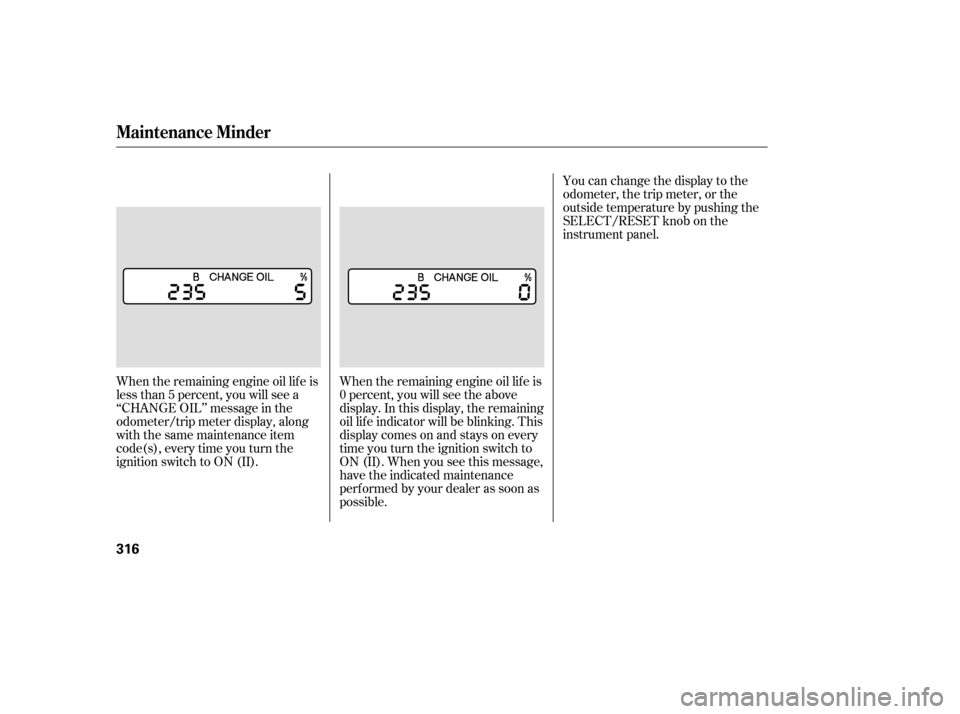
When the remaining engine oil lif e is
less than 5 percent, you will see a
‘‘CHANGE OIL’’ message in the
odometer/trip meter display, along
with the same maintenance item
code(s), every time you turn the
ignition switch to ON (II).When the remaining engine oil lif e is
0 percent, you will see the above
display. In this display, the remaining
oil lif e indicator will be blinking. This
display comes on and stays on every
time you turn the ignition switch to
ON (II). When you see this message,
have the indicated maintenance
perf ormed by your dealer as soon as
possible.You can change the display to the
odometer, the trip meter, or the
outside temperature by pushing the
SELECT/RESET knob on the
instrument panel.
Maintenance Minder
316