Page 53 of 205
This shows the temperature of the
engine’s coolant. During normal
operation, the pointer should rise to
about the middle of the gauge. In
severe driving conditions, the pointer
may rise to the upper zone. If it
reaches the red (Hot) mark, pull
safely to the side of the road. Turn to
page f or instructions and
precautions on checking the engine’s
cooling system.174
Gauges
Temperature Gauge 58
�����—�����—�
���y�
�������������y���
�(���)�������y�������
�y
Page 59 of 205
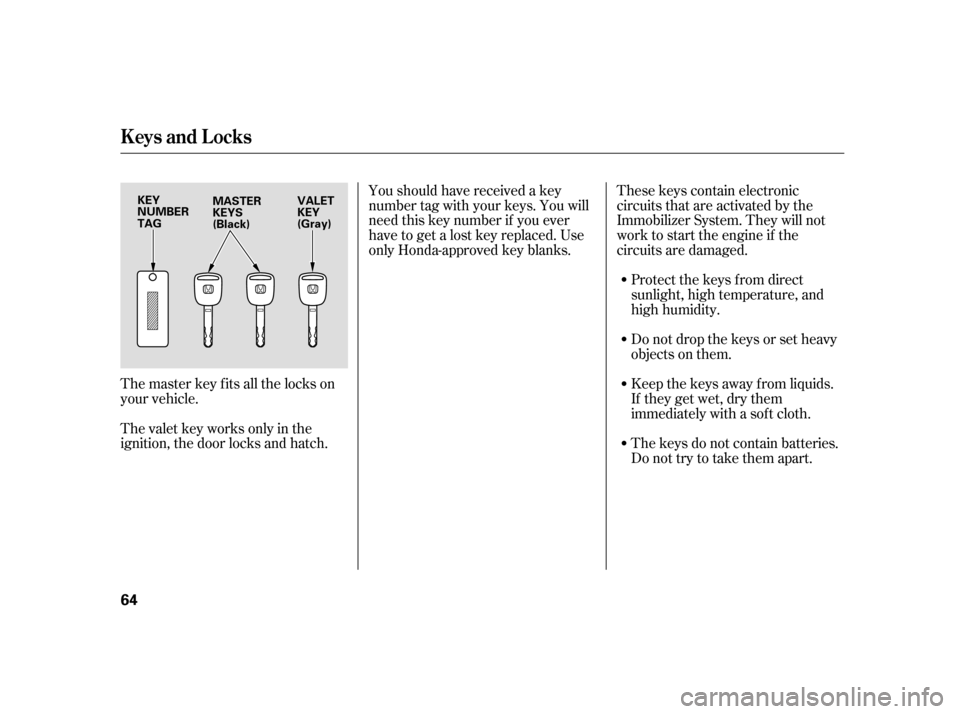
The master key fits all the locks on
your vehicle.
The valet key works only in the
ignition, the door locks and hatch.Youshouldhavereceivedakey
number tag with your keys. You will
need this key number if you ever
have to get a lost key replaced. Use
only Honda-approved key blanks.
These keys contain electronic
circuits that are activated by the
Immobilizer System. They will not
work to start the engine if the
circuits are damaged.
Protect the keys f rom direct
sunlight, high temperature, and
high humidity.
Donotdropthekeysorsetheavy
objects on them.
Keep the keys away f rom liquids.
If they get wet, dry them
immediately with a sof t cloth.
The keys do not contain batteries.
Do not try to take them apart.
Keys and Locks
64 KEY
NUMBERTAG
MASTER
KEYS
(Black) VALET
KEY
(Gray)
�����—�����—�
���y�
���������
���y���
�(���)�������y���������y
Page 60 of 205

The Immobilizer System protects
your vehicle f rom thef t. If an
improperly-coded key (or other
device) is used, the engine will not
start.If the system repeatedly does not
recognize the coding of your key,
contact your dealer.
Do not attempt to alter this system
or add other devices to it. Electrical
problems could result that may make
your vehicle undriveable.
If you have lost your key and cannot
start your engine, contact your
dealer.
When you turn the ignition switch to
ON (II), the Immobilizer System
indicator should come on f or a f ew
seconds, then go out. If the indicator
starts to blink, it means the system
does not recognize the coding of the
key. Turn the ignition switch to
LOCK (0), remove the key, reinsert
it, and turn the switch to ON (II)
again.
The system may not recognize your
key’s coding if another immobilizer
key or other metal object (i.e. key
f ob) is near the ignition switch when
you insert the key.As required by the FCC:
This device complies with Part 15 of theFCC rules. Operation is subject to thef ollowing two conditions: (1) This devicemay not cause harmf ul interf erence, and(2) this device must accept anyinterf erence received, includinginterf erence that may cause undesired
operation.
Changes or modif ications not expresslyapproved by the party responsible f orcompliance could void the user’sauthority to operate the equipment.
This device complies with IndustryCanada Standard RSS-210.Operation is subject to the f ollowing twoconditions: (1) this device may not causeinterf erence, and (2) this device mustaccept any interf erence that may causeundesired operation of the device.
Immobilizer Syst em
Inst rument s and Cont rols
65
�����—�����—�
���y�
���������
���y���
�(���)�������y���������y
Page 61 of 205
�µ
�µ
�µ �µ
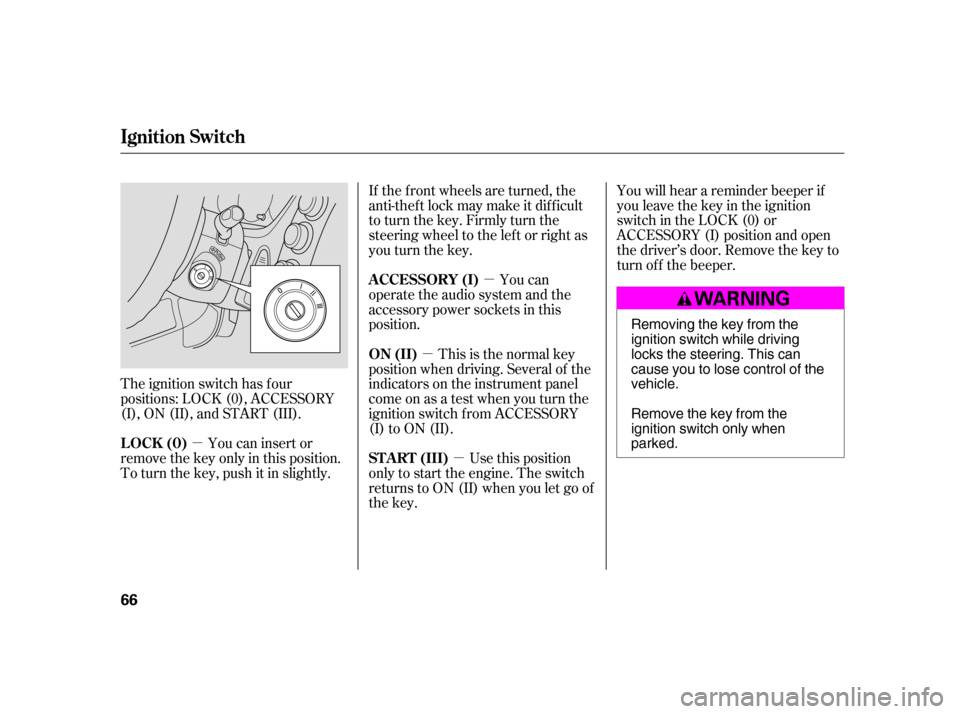
The ignition switch has f our
positions: LOCK (0), ACCESSORY
(I), ON (II), and START (III). If the f ront wheels are turned, the
anti-thef t lock may make it dif f icult
to turn the key. Firmly turn the
steering wheel to the lef t or right as
you turn the key.
You can
operate the audio system and the
accessory power sockets in this
position.
Use this position
only to start the engine. The switch
returns to ON (II) when you let go of
the key. You will hear a reminder beeper if
you leave the key in the ignition
switch in the LOCK (0) or
ACCESSORY (I) position and open
thedriver’sdoor.Removethekeyto
turn of f the beeper.
You can insert or
remove the key only in this position.
To turn the key, push it in slightly. This is the normal key
position when driving. Several of the
indicators on the instrument panel
come on as a test when you turn the
ignition switch f rom ACCESSORY
(I) to ON (II).
A CCESSORY (I)
ST A RT (III)
LOCK (0) ON (II)
Ignition Switch
66 Removing the key from the
ignition switch while driving
locks the steering. This can
cause you to lose control of thevehicle.
Remove the key from the
ignition switch only whenparked.
�����—�����—�
���y�
�������������y���
�(���)�������y���������y
Page 72 of 205

�µ
�µ If the driver’s
window senses any obstacle while it
is closing automatically, it will
reverse direction and then stop. To
close the window, remove the
obstacle, then use the window switch
again.
If your vehicle’s battery is
disconnected or goes dead, or the
driver’s window f use is removed, the
AUTO f unction will be disabled. The
power window system needs to be
reset af ter reconnecting the battery
or installing the f use.
Start the engine. Push down and
hold the driver’s window switch
until the window is f ully open. If the power windows do not operate
properly af ter resetting, have your
vehicle checked by your dealer.
To open or close the
driver’s window, push or pull the
window switch firmly down or up to
the second detent, and release it.
The window will automatically go up
or down all the way. To stop the
window, pull or push on the window
switch brief ly.
If the MAIN switch is OFF, the
passenger window cannot be raised
or lowered. Keep the MAIN switch
off whenyouhavechildreninthe
vehicle so they do not injure
themselves by operating the window
unintentionally.
Pull and hold the driver’s window
switch to close the window
completely, then hold the switch
f or a second or two more.
1. 2.
Power Windows
AUTO REVERSE
AUTO
Inst rument s and Cont rols
77
�����—�����—�
���y�
�������������y���
�(���)�������y���������y
Page 82 of 205

The f low-through ventilation system
draws in outside air, circulates it
through the interior, then exhausts it
through vents near the rear side
panels.Select and Fresh Air mode.
Set the f an to the desired speed.
Adjust the warmth of the air with
the temperature control dial. you can
cool it down more rapidly by partially
opening the windows, turning on the
A/C, and setting the fan to
maximum speed in Fresh Air mode.
Air conditioning places an extra load
on the engine. Watch the engine
coolant temperature gauge (see page
). If it moves near the red zone,
turn of f the A/C until the gauge
reads normally.
The heater uses engine coolant to
warm the air. If the engine is cold, it
will be several minutes bef ore you
f eel warm air coming through the
system. Turn on the A/C by pressing the
button. The indicator in the button
comesonwhenafanspeedis
selected.
Make sure the temperature is set
to maximum cool.
Select .
If the outside air is humid, select
Recirculation mode. If the outside
air is dry, select Fresh Air mode.
Set the f an to the desired speed.
Set the temperature to the lower
limit.
Make sure the A/C is of f .
Select and Fresh Air mode.
Set the f an to the desired speed.
1. 2. 3.4.
1. 2. 3. 4. 5.
1. 2.3. 60
If the interior is very warm,
Vents, Heating, and A/C
Ventilation
Using the Heater
Using the A /C
88
�����—�����—�
���y�
����
��������y���
�(���)�������y�������
�y
Page 103 of 205

Help assure your vehicle’s f uture
reliability and perf ormance by paying
extra attention to how you drive
during the f irst 600 miles (1,000 km).Avoid full-throttle starts and rapid
acceleration.
Avoidhardbrakingforthefirst
200 miles (300 km).
Do not change the oil until the
scheduled maintenance time.
Youshouldfollowthesesame
recommendations with an
overhauled or exchanged engine, or
when the brakes are relined.
During this period:
Your vehicle is designed to operate
on unleaded gasoline with a pump
octane number of 86 or higher. Use
of a lower octane gasoline can cause
a persistent, heavy metallic rapping
noise that can lead to engine damage.
In addition, in order to maintain good
perf ormance, f uel economy, and
emissions control, we strongly
recommend, in areas where it is
available, the use of gasoline that
does NOT contain manganese-based
f uel additives such as MMT.
Use of gasoline with these additives
may adversely af f ect perf ormance,
and cause the Malfunction Indicator
Lamp on your instrument panel to
come on. If this happens, contactyour dealer f or service.
For f urther important f uel-related
inf ormation, please ref er to your
.
Some gasoline today is blended with
oxygenates such as ethanol or
MTBE. Your vehicle is designed to
operate on oxygenated gasoline
containing up to 10 percent ethanol
by volume and up to 15 percent
MTBE by volume. Do not use
gasoline containing methanol.
If you notice any undesirable
operating symptoms, try another
service station or switch to another
brand of gasoline.
We recommend using quality
gasoline containing detergent
additives that help prevent fuel
system and engine deposits.
Break-in Period Fuel Recommendation
Quick Start Guide
Break-in Period, Fuel Recommendation
110
�����—�����—�
���y�
����
��������y���
�(���)�������y���
�
���y
Page 104 of 205
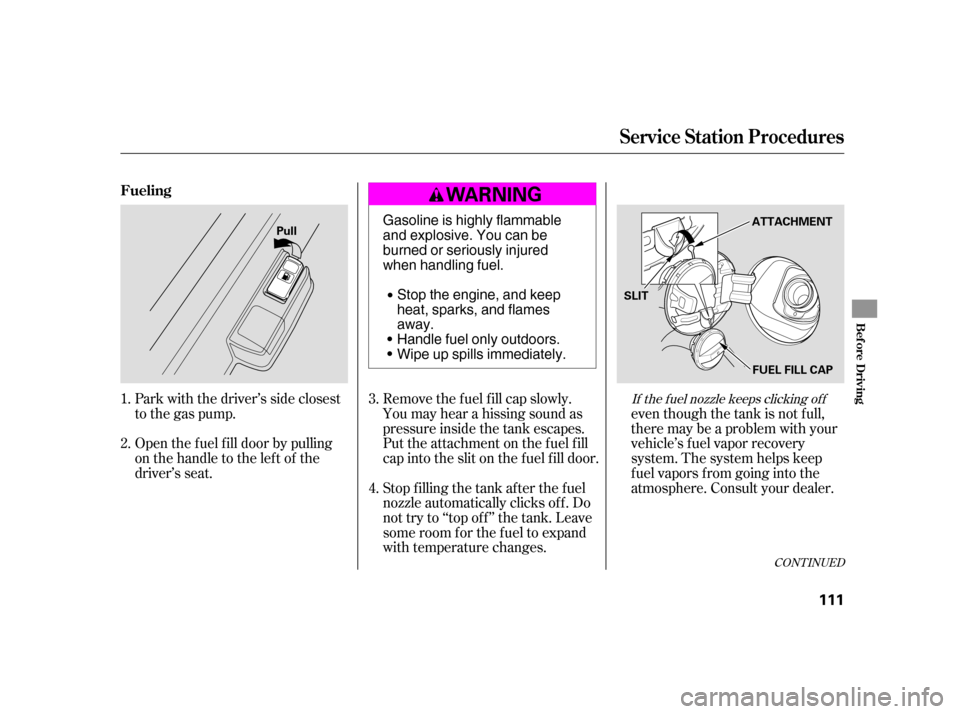
Park with the driver’s side closest
to the gas pump.
Open the f uel f ill door by pulling
onthehandletotheleftof the
driver’s seat.even though the tank is not f ull,
there may be a problem with your
vehicle’s fuel vapor recovery
system. The system helps keep
f uel vapors f rom going into the
atmosphere. Consult your dealer.
Stop f illing the tank af ter the f uel
nozzle automatically clicks of f . Do
not try to ‘‘top of f ’’ the tank. Leave
some room f or the f uel to expand
with temperature changes.
Remove the f uel f ill cap slowly.
You may hear a hissing sound as
pressure inside the tank escapes.
Put the attachment on the fuel fill
cap into the slit on the f uel f ill door.
1. 2.
3. 4.
CONT INUED
If the f uel nozzle keeps clicking of f
Service Station Procedures
Fueling
Bef ore Driving
111
Pull
FUEL FILL CAP
ATTACHMENT
SLIT
Gasoline is highly flammable
and explosive. You can be
burned or seriously injured
when handling fuel.
Stop the engine, and keep
heat, sparks, and flamesaway.
Handle fuel only outdoors.
Wipe up spills immediately.
�����—�����—�
���y�
����
����
���y���
�(���)�������y���
�
���y