Page 114 of 289

�µ
�µ
�µ
The ignition switch must be in the
ACCESSORY (I) or ON (II) position.
Turn the system on by pushing the
PWR/VOL knob or the AM/FM
button. Adjust the volume by turning
the PWR/VOL knob.
Pushing the AUDIO DISPLAY
button will also turn on the system.
The band and f requency that the
radio was last tuned to is displayed.
To change bands, press the AM/FM
button. On the FM band, ST will be
displayed if the station is broadcast-
ing in stereo. Stereo reproduction on
AM is not available.
XM Satellite Radio inf ormation is
available on page . You can use any of f ive methods to
f ind radio stations on the selected
band: , , , the
preset bars/icons, and
. The scan f unction samples
all stations with strong signals on the
selected band. To activate it, press
the SCAN button, then release it, or
touch the SCAN icon (models with
navigation system). You will see
SCAN in the display. The system will
scan f or a station with a strong signal.
When it f inds one, it will stop and
play that station for about 5 seconds.
Use the TUNE bar or
knob to tune the radio to a desired
f requency. Press the side of the
bar or turn the knob right to tune to
a higher f requency, and press the side or turn the knob left to
tune to a lower f requency.
The SEEK f unction
searches up and down f rom the
current f requency to f ind a station
with a strong signal. To activate it,
press the or side of the
bar, then release it. If you do nothing, the system will
scan f or the next strong station and
play it f or 5 seconds. When it plays a
station you want to listen to, press
the SCAN button or touch the SCAN
icon again.
124
CONT INUED
On models with navigation system
To Select a Station T UNE SEEK SCA N AUTO
SEL ECT SCAN
TUNE SEEK
To Play the AM/FM Radio
Playing the AM/FM Radio
Features
119
�����—�����—�����y�
�������������y���
�(���%�������y���
�����y
Page 115 of 289

�µ�µ�µ
�µ
Each side of the bars (1
6) or preset icon can store one
f requency on AM, and two
f requencies on FM.
Select the desired band, AM or
FM. FM1 and FM2 let you store
two f requencies with each side of
the preset bar or each preset icon.
Press the SOUND button repeatedly
to display the bass (BAS), treble
(TRE), balance (BAL), and f ader
(FAD) settings. On models with
navigation system, touch the
SOUND icon or press the TUNE
knob.press the
A.SEL button or touch the AUTO
SELECTicon.Thisrestoresthe
presets you originally set.
If you do not like the stations auto
select has stored, you can store
other f requencies on the preset bars
or icons as previously described.
You will see a ‘‘0’’ displayed af ter
pressing a preset bar or icon if auto
select cannot f ind a strong station f or
every preset bar or icon.
Repeat steps 1 through 3 to store a
total of six stations on AM and
twelve stations on FM.
The preset f requencies will be lost if
your vehicle’s battery goes dead, is
disconnected, or the radio f use is
removed. If you are
traveling far from home and can no
longer receive your preset stations,
you can use the auto select feature to
find stations in the local area.
Press the A. SEL button or touch the
AUTO SELECT icon. ‘‘A. SEL’’
f lashes in the display (the upper
display on models with navigation
system), and the system goes into
scan mode f or several seconds. It
stores the f requencies of six AM,
and twelve FM stations in the preset
bars or icons.
Pick a preset number (1 6), and
hold it until you hear a beep.
Press the lef t or right side of the
bar or icon and hold it until you
hear a beep.
UsetheTUNE,SEEK,orSCAN
function to tune the radio to a
desired station.
First push the AUDIO DISPLAY
button to view the preset icons.
1. 2. 3. 4.
To turn of f auto select,
On models without navigation system
Preset
Adjusting the Sound
AUTO SELECT
Playing the AM/FM Radio
120
�����—�����—�����y�
�������������y���
�(���%�������y���
�����y
Page 116 of 289

�µ
�µ
�µ �µ
If you want to adjust the sound while
the radio/CD is playing, push the
AUDIO DISPLAY button, then touch
the SOUND icon in the display.
Touch the arrows next to the BAS or
TRE icons. The adjustment shows
you the current setting. Touch the
lef t or right bars on the sound grid.
Balance is equalized when the
vertical lines are centered on the
grid. Touch the f ront or rear bars on
the sound grid. The f ader is
equalized when the horizontal lines
arecenteredonthegrid.
Adjusts the balance, or side-
to-side strength of the sound.
The system will return to the audio
display about 5 seconds af ter you
stopadjustingamode.Onmodels
with navigation system, touch the
RETURN icon to go back to the
audio screen.
Eachmodeisshowninthedisplayas
it changes. Turn the PWR/VOL
knob to adjust the setting to your
liking. When the level reaches the
center, you will see a ‘‘ ’’ in the
display. Adjusts the bass.
Adjusts the treble. Adjusts the fader, or the
f ront-to-back strength of the sound.
On models with navigation system
On models with navigation system
On models without navigation system
BAL
BAS
TRE
FAD
Playing the AM/FM Radio
Features
121
FADER ADJUST ICONS
SOUND GRID
RETURN ICONBALANCE
ADJUST ICONS
BASS ADJUST ICONS TREBLE ADJUST ICONS
With navigation system
�����—�����—�����y�
���������
���y���
�(���%�������y���
�����y
Page 119 of 289
Playing t he XMSatellite Radio
124
PWR/VOL KNOB
TUNE BAR
PWR/VOL KNOB
SCAN BUTTON
PRESET BARS CATEGORY/CHANNEL MODE INDICATOR
MODE ICON
SCAN ICON PRESET ICONS
AUDIO DISPLAY
BUTTON
SEEK/SKIP
BAR SCAN
BUTTON
CATEGORY/CHANNEL
MODE INDICATOR
SEEK/SKIP
BAR TUNE KNOB
CH/DISC BAR
Without navigation system
SATELLITE
RADIO
BUTTON SATELLITE
RADIO
BUTTON
DISPLAY
BUTTON With navigation system
U.S. EX with Leather and EX-V6 models
�����—�����—�����y�
�������������y���
�(���%�������y���
�����y
Page 120 of 289

�µ
CONT INUED
The ignition must be in the
ACCESSORY (I) or ON (II) position.
Turn the system on:When in the satellite radio mode,
you can use any of three methods to
f ind channels: TUNE, SEEK/SKIP
(CATEGORY), and SCAN.
Turn the TUNE knob to change
channels. Turn the knob right f or
higher numbered channels and lef t
f or lower numbered channels.
Press the TUNE bar to change
channel selections. Press f or
higher numbered channels and
f or lower numbered channels.
Push any of the f ollowing: PWR/
VOL knob, the CD/AUX (XM), or
AUDIO button.
Push any of the f ollowing: PWR/
VOL knob or the CD/AUX (XM)
button.
Turn the PWR/VOL knob to adjust
the volume.
Satellite radio is
available in U.S.
models only.
XM
is a registered trademark of
XM Satellite Radio, Inc.
Your vehicle is capable of receiving XM
Satellite Radio anywhere in the
United States except Hawaii and
Alaska. It is not available in Canada.
Vehicles with navigation system
Vehicles without navigation system Vehicles with navigation system
Vehicles without navigation system
Satellite Digital Radio To Select a Channel
TUNE
To Play XMSatellite Radio
Playing t he XMSatellite Radio
Features
U.S. EX wit h L eat her and EX-V6
models
125
�����—�����—�����y�
�������������y���
�(���%�������y���
�����y
Page 121 of 289

�µ
�µ �µ
�µ
The
seek/skip f unction selects the
various categories in XM, such as
Jazz/Blues, Rock, Classical, etc.
Push the to change the
category f orward. Push the to
change the category backward. To
search f or channels within a
category, turn the TUNE knob
clockwiseorpresstheTUNEbar .
Press and release this
button to change the display. The
display will change in the f ollowing
sequence: channel name, channel
number, category, artist name, and
music title. The scan f unction samples
all channels f or 5 seconds. To
activate the f unction, push the SCAN
button. Push it again to get out of the
sequence.
Each preset icon or each
side of the preset bar can store one
channel in XM1 and one in XM2.
Push the SAT button, you will see
XM1 or XM2.
Use the TUNE, SEEK or SCAN
function to tune the radio to a
desired channel.
Pick a preset icon or number and
hold it until you hear a beep. Once your XM channels are preset,
pressing either side of the CH/DISC
bar will select your preset channels.
Repeat steps 1 through 3 to store a
total of six stations on XM1 and
six on XM2.
1. 2. 3. 4.
Vehicles with navigation system Vehicles with navigation system
SEEK /SK IP (CA T EGORY)
DISPSCAN
Preset
Playing t he XMSatellite Radio
126
�����—�����—�����y�
�������������y���
�(���%�������y���
�����y
Page 126 of 289
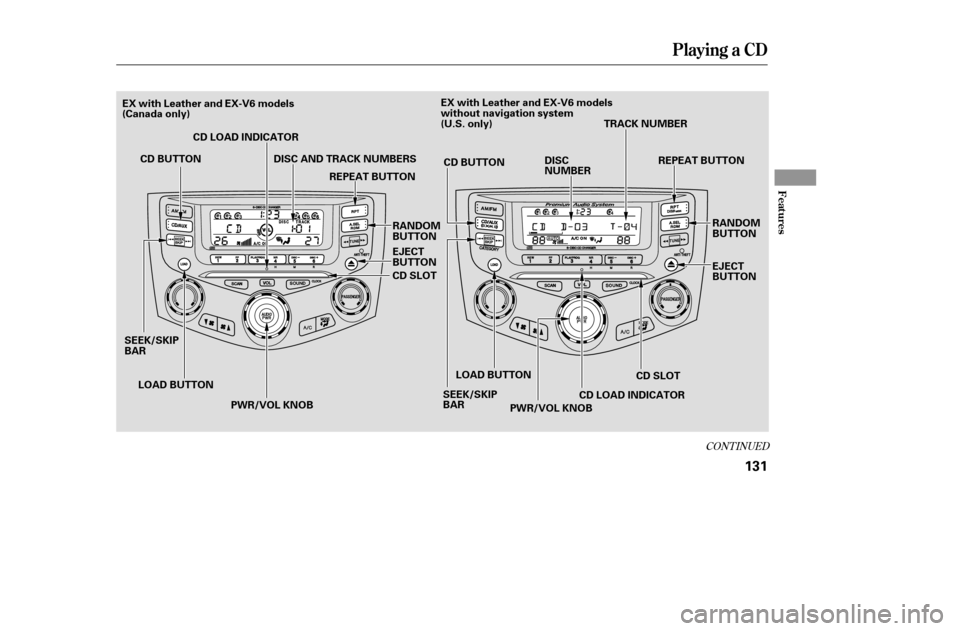
CONT INUED
Playing a CD
Features
131
PWR/VOL KNOB
CD SLOT
CD BUTTON
CD SLOT
LOAD BUTTON
CD BUTTON
SEEK/SKIP
BAR SEEK/SKIP
BARDISC
NUMBER
CD LOAD INDICATOR
LOAD BUTTON EJECT
BUTTON
CD LOAD INDICATOR
EJECT
BUTTON
DISC AND TRACK NUMBERS
TRACK NUMBER
PWR/VOL KNOB REPEAT BUTTON
RANDOM
BUTTON REPEAT BUTTON
RANDOM
BUTTON
EX with Leather and EX-V6 models
(Canada only)
EX with Leather and EX-V6 models
without navigation system
(U.S. only)
�����—�����—�����y�
�������������y���
�(���%�������y���
�����y
Page 127 of 289
Playing a CD
132
PWR/VOL KNOBUPPER DISPLAY
DISC AND TRACK NUMBERS
CH/DISC BARCD SLOT
EJECT BUTTON
RANDOM ICON
LOAD BUTTON
SCAN BUTTON
DISC
SCANICON TRACK
SCAN ICON
SEEK/
SKIP BAR
CD
LOAD INDICATORAUDIO DISPLAY BUTTON
CD/AUX/SATELLITE
RADIO BUTTON
TRACK
REPEATICON
DISC
REPEATICON
EX with Leather and EX-V6 models
with navigation system (U.S. only)
�����—�����—�����y�
�������������y���
�(���%�������y���
�����y