Page 107 of 289

�µ
In cold weather, the f an will not
come on automatically until the
heater starts to develop warm air. Making any manual selection causes
thewordAUTOinthedisplaytogo
out.
The system automatically selects the
proper mix of conditioned and/or
heated air that will, as quickly as
possible, raise or lower the interior
temperature to your pref erence.
You can manually select various
f unctions of the climate control
system when it is in f ully automatic
mode. All other f eatures remain
automatically controlled.
If you press the A/C button next to
the display, the manual selections
will show in the display. Making any
manual selection causes the
indicator in the AUTO button to turn
off.
When you set the temperature to its
lower limit ( ) or its upper limit
( ), the system runs at f ull
cooling or heating only. It does not
regulate the interior temperature.
When
the indicator in the dual button is on,
the driver’s side and passenger’s side
temperature can be controlled
independently (see page ). When the climate control system is
turned OFF, the temperature in the
upper display will also turn of f . To keep stale air and mustiness
f rom collecting, you should have
the f an running at all times.
Keep the system completely of f
f or short periods only.
Turningthefanspeedand
temperature control dials all the way
to the left shuts off the system
completely.
If you press OFF, the climate control
system shuts of f completely.
113
Without navigation system With navigation system
With navigation system
On EX with Leather and EX-V6 models Except EX with Leather and EX-V6
models
On EX with Leather and EX-V6 models
Vents, Heating, and A/C
To Turn Everything Of f
Semi-automatic Operation
Dual Temperature Control
112
�����—�����—�����y�
�������������y���
�(���%�������y���
�
���y
Page 108 of 289
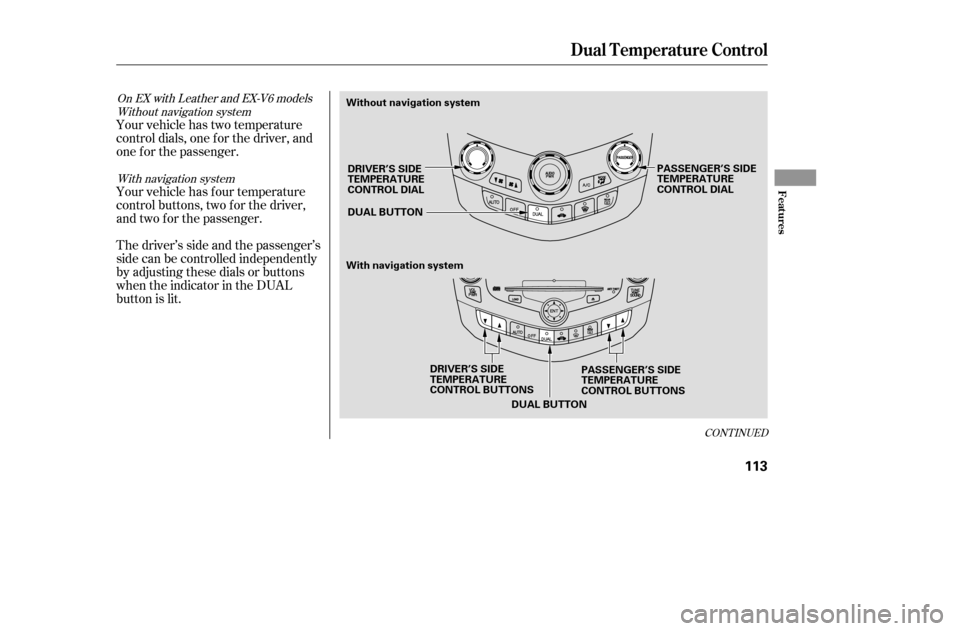
Your vehicle has two temperature
control dials, one f or the driver, and
one f or the passenger.
Your vehicle has four temperature
control buttons, two f or the driver,
and two f or the passenger.
Thedriver’ssideandthepassenger’s
side can be controlled independently
by adjusting these dials or buttons
when the indicator in the DUAL
button is lit.
CONT INUED
Without navigation systemWith navigation system
On EX with Leather and EX-V6 models
Dual Temperature Control
Features
113
DUAL BUTTON
DUAL BUTTON
DRIVER’S SIDE
TEMPERATURE
CONTROL BUTTONS PASSENGER’S SIDE
TEMPERATURE
CONTROL BUTTONS
DRIVER’S SIDE
TEMPERATURE
CONTROL DIAL
PASSENGER’S SIDE
TEMPERATURE
CONTROL DIAL
Without navigation system
With navigation system
�����—�����—�����y�
�������������y���
�(���%�������y���
�
���y
Page 109 of 289
�Û�Ý�Û�Ý When you set the temperature to its
lower limit or its upper limit, it will be
displayed as or .
To set the driver’s side temperature
to a different value than the
passenger’s, press the DUAL button,
then turn the driver’s control dial or
press the or buttons on the
driver’s side. To set the passenger’s
side to a dif f erent value than the
driver’s, turn the passenger’s control
dial or press the or buttons on
the passenger’s side. You can adjust
the passenger’s side without
pressing the DUAL button first.
Push AUTO or . The selected
temperatures appears in the display
(in the upper display with the
navigation system). When the
indicator in the DUAL button is of f ,
you can adjust both sides to the
same temperature by adjusting the
driver’s side temperature control dial
or buttons.
Dual Temperature Control
T emperat ure Cont rol Dials/But t ons
114
DRIVER’S SIDE PASSENGER’S SIDE
�����—�����—�����y�
�������������y���
�(���%�������y���
�
���y
Page 110 of 289
Theclimatecontrolsystemhastwo
sensors. A sunlight sensor is in the
top of the dashboard, and a
temperature sensor is next to the
steering column. Do not cover the
sensors or spill any liquid on them.
Climat e Cont rol Sensors
Sunlight and T emperature
Sensors
Features
115
SUNLIGHT SENSORTEMPERATURE SENSOR
�����—�����—�����y�
���������
�
�y���
�(���%�������y���
�
���y
Page 134 of 289
Error Message Cause Solution
FOCUS Error
Mechanical Error
High TemperaturePress the eject button, and pull out the CD.
Check if it is inserted correctly in the CD player.
Make sure the CD is not scratched or damaged.
Press the eject button, and pull out the CD.
Check the CD for damage or deformation.
If the CD cannot be pulled out, or the error
message does not disappear after the CD is
ejected, see your dealer.
Will disappear when the temperature returns to
normal.
If you see an error message in the
display while playing a CD, f ind the
cause in the chart to the right. If you
cannot clear the error message, take
the vehicle to your dealer.
CD Player Error Messages
On L X model
Features
139
�����—�����—�����y�
�������������y���
�(���%�������y���
�����y
Page 135 of 289
If you see an error message in the
display while operating the CD
changer, find the cause in the
f ollowing charts. If you cannot clear
theerrormessage,takethevehicle
to your dealer.
Error Message Cause Solution
FOCUS Error
Mechanical Error
No CD in the CD
changer
High TemperaturePress the CD eject button, and pull out the CDs.
Check f or an error message, and insert the CDs
again. If the message does not disappear or the
CDs cannot be pulled out, see your dealer.
Press the CD eject button, and pull out the CDs.
Check f or an error message, and insert the CDs
again. If the message does not disappear, or the
CDs cannot be pulled out, see your dealer.
Insert CDs.
Will disappear when the temperature returns to
normal.
:: Without navigation system
With navigation system
CD Changer Error Messages
Except f or L X model
140
�����—�����—�����y�
�������������y���
�(���%�������y���
�����y
Page 136 of 289
Error Message Cause Solution
FOCUS Error
No CD in the CD magazine
Mechanical Error
High Temperature
No CD magazine in the
CD changerPress the magazine eject button, pull the
magazine out, and check f or an error message.
Insertthemagazineagain.Ifthemessagedoes
not disappear, or the magazine cannot be pulled
out, see your dealer.
Insert CD.
Press the magazine eject button, pull the
magazine out, and check f or an error message.
Insertthemagazineagain.Ifthemessagedoes
not disappear, or the magazine cannot be pulled
out, see your dealer.
Will disappear when the temperature returns to
normal.
Insert CD magazine.
CD Changer Error Messages
Opt ional CD Changer f or L X model
Features
141
�����—�����—�����y�
�������������y���
�(���%�������y���
�����y
Page 142 of 289

Thetapeplayerpicksupdirtand
oxides f rom the tape. This
contamination builds up over time
and causes the sound quality to
degrade. To prevent this, you should
clean the player af ter every 30 hours
of use.
If you do not clean the tape player
regularly, it may eventually become
impossible to remove the
contamination with a normal
cleaning kit. Your dealer has a
cleaning kit available.
Use 100-minute or shorter tapes.
Tapes longer than that may break or
jam the drive.Store tapes in their cases to protect
them f rom dust and moisture. Never
placetapeswheretheywillbe
exposed to direct sunlight, high heat,
or high humidity. If a tape is exposed
to extreme heat or cold, let it reach a
moderate temperature bef ore
inserting it into the player.
If the tape is loose, tighten it by
turning the hub with a pencil or your
f inger. If the label is peeling of f ,
remove it or it could cause the tape
to jam in the player. Never try to
insert a warped or damaged tape in
the player.
Never try to insert f oreign objects
into the tape player. If you see the error message
‘‘ ’’ on the display (on the
upper display on models with
navigation system), press the tape
eject button to remove the tape f rom
the unit. Make sure the tape is not
damaged. If the tape will not eject or
the error message stays on after the
tape ejects, take the vehicle to your
dealer.
Playing a T ape (Opt ional)
Caring f or the T ape Player
Features
147
�����—�����—�����y�
�����������
�y���
�(���%�������y���
�����y