Page 112 of 289
CONT INUED
Playing the AM/FM Radio
Features
117
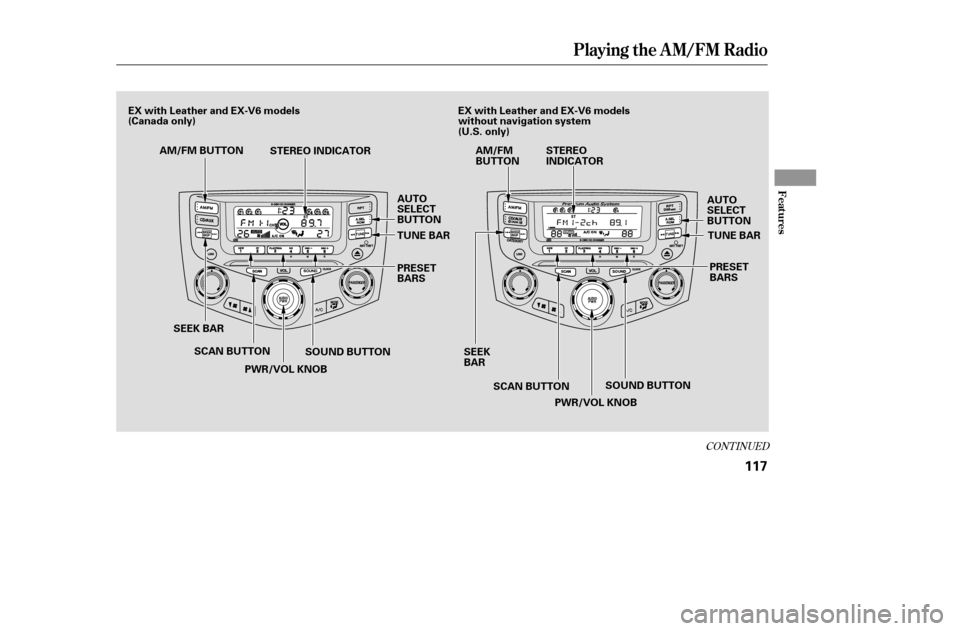
PWR/VOL KNOB
STEREO INDICATOR
SEEK BAR TUNE BAR
PRESET
BARS
TUNE BAR
PRESET
BARS
SOUND BUTTON
SCAN BUTTON
PWR/VOL KNOB SOUND BUTTON
AM/FM BUTTON
SCAN BUTTON AM/FM
BUTTON
STEREO
INDICATOR
SEEK
BAR
AUTO
SELECT
BUTTON
AUTO
SELECT
BUTTON
EX with Leather and EX-V6 models
(Canada only)
EX with Leather and EX-V6 models
without navigation system
(U.S. only)
�����—�����—�����y�
�������������y���
�(���%�������y���
�����y
Page 113 of 289
Playing the AM/FM Radio
118
AM/FM BUTTON
PWR/VOL KNOBSEEK BAR UPPER DISPLAY
AUDIO DISPLAY BUTTON TUNE/SOUND KNOB
SOUND ICON
AUDIO SELECT ICON
SCAN BUTTON
STEREO INDICATOR
SCAN ICONPRESET ICONS
EX with Leather and EX-V6 models
with navigation system (U.S. only)
�����—�����—�����y�
�������������y���
�(���%�������y���
���
�y
Page 114 of 289

�µ
�µ
�µ
The ignition switch must be in the
ACCESSORY (I) or ON (II) position.
Turn the system on by pushing the
PWR/VOL knob or the AM/FM
button. Adjust the volume by turning
the PWR/VOL knob.
Pushing the AUDIO DISPLAY
button will also turn on the system.
The band and f requency that the
radio was last tuned to is displayed.
To change bands, press the AM/FM
button. On the FM band, ST will be
displayed if the station is broadcast-
ing in stereo. Stereo reproduction on
AM is not available.
XM Satellite Radio inf ormation is
available on page . You can use any of f ive methods to
f ind radio stations on the selected
band: , , , the
preset bars/icons, and
. The scan f unction samples
all stations with strong signals on the
selected band. To activate it, press
the SCAN button, then release it, or
touch the SCAN icon (models with
navigation system). You will see
SCAN in the display. The system will
scan f or a station with a strong signal.
When it f inds one, it will stop and
play that station for about 5 seconds.
Use the TUNE bar or
knob to tune the radio to a desired
f requency. Press the side of the
bar or turn the knob right to tune to
a higher f requency, and press the side or turn the knob left to
tune to a lower f requency.
The SEEK f unction
searches up and down f rom the
current f requency to f ind a station
with a strong signal. To activate it,
press the or side of the
bar, then release it. If you do nothing, the system will
scan f or the next strong station and
play it f or 5 seconds. When it plays a
station you want to listen to, press
the SCAN button or touch the SCAN
icon again.
124
CONT INUED
On models with navigation system
To Select a Station T UNE SEEK SCA N AUTO
SEL ECT SCAN
TUNE SEEK
To Play the AM/FM Radio
Playing the AM/FM Radio
Features
119
�����—�����—�����y�
�������������y���
�(���%�������y���
�����y
Page 115 of 289

�µ�µ�µ
�µ
Each side of the bars (1
6) or preset icon can store one
f requency on AM, and two
f requencies on FM.
Select the desired band, AM or
FM. FM1 and FM2 let you store
two f requencies with each side of
the preset bar or each preset icon.
Press the SOUND button repeatedly
to display the bass (BAS), treble
(TRE), balance (BAL), and f ader
(FAD) settings. On models with
navigation system, touch the
SOUND icon or press the TUNE
knob.press the
A.SEL button or touch the AUTO
SELECTicon.Thisrestoresthe
presets you originally set.
If you do not like the stations auto
select has stored, you can store
other f requencies on the preset bars
or icons as previously described.
You will see a ‘‘0’’ displayed af ter
pressing a preset bar or icon if auto
select cannot f ind a strong station f or
every preset bar or icon.
Repeat steps 1 through 3 to store a
total of six stations on AM and
twelve stations on FM.
The preset f requencies will be lost if
your vehicle’s battery goes dead, is
disconnected, or the radio f use is
removed. If you are
traveling far from home and can no
longer receive your preset stations,
you can use the auto select feature to
find stations in the local area.
Press the A. SEL button or touch the
AUTO SELECT icon. ‘‘A. SEL’’
f lashes in the display (the upper
display on models with navigation
system), and the system goes into
scan mode f or several seconds. It
stores the f requencies of six AM,
and twelve FM stations in the preset
bars or icons.
Pick a preset number (1 6), and
hold it until you hear a beep.
Press the lef t or right side of the
bar or icon and hold it until you
hear a beep.
UsetheTUNE,SEEK,orSCAN
function to tune the radio to a
desired station.
First push the AUDIO DISPLAY
button to view the preset icons.
1. 2. 3. 4.
To turn of f auto select,
On models without navigation system
Preset
Adjusting the Sound
AUTO SELECT
Playing the AM/FM Radio
120
�����—�����—�����y�
�������������y���
�(���%�������y���
�����y
Page 119 of 289
Playing t he XMSatellite Radio
124
PWR/VOL KNOB
TUNE BAR
PWR/VOL KNOB
SCAN BUTTON
PRESET BARS CATEGORY/CHANNEL MODE INDICATOR
MODE ICON
SCAN ICON PRESET ICONS
AUDIO DISPLAY
BUTTON
SEEK/SKIP
BAR SCAN
BUTTON
CATEGORY/CHANNEL
MODE INDICATOR
SEEK/SKIP
BAR TUNE KNOB
CH/DISC BAR
Without navigation system
SATELLITE
RADIO
BUTTON SATELLITE
RADIO
BUTTON
DISPLAY
BUTTON With navigation system
U.S. EX with Leather and EX-V6 models
�����—�����—�����y�
�������������y���
�(���%�������y���
�����y
Page 121 of 289

�µ
�µ �µ
�µ
The
seek/skip f unction selects the
various categories in XM, such as
Jazz/Blues, Rock, Classical, etc.
Push the to change the
category f orward. Push the to
change the category backward. To
search f or channels within a
category, turn the TUNE knob
clockwiseorpresstheTUNEbar .
Press and release this
button to change the display. The
display will change in the f ollowing
sequence: channel name, channel
number, category, artist name, and
music title. The scan f unction samples
all channels f or 5 seconds. To
activate the f unction, push the SCAN
button. Push it again to get out of the
sequence.
Each preset icon or each
side of the preset bar can store one
channel in XM1 and one in XM2.
Push the SAT button, you will see
XM1 or XM2.
Use the TUNE, SEEK or SCAN
function to tune the radio to a
desired channel.
Pick a preset icon or number and
hold it until you hear a beep. Once your XM channels are preset,
pressing either side of the CH/DISC
bar will select your preset channels.
Repeat steps 1 through 3 to store a
total of six stations on XM1 and
six on XM2.
1. 2. 3. 4.
Vehicles with navigation system Vehicles with navigation system
SEEK /SK IP (CA T EGORY)
DISPSCAN
Preset
Playing t he XMSatellite Radio
126
�����—�����—�����y�
�������������y���
�(���%�������y���
�����y
Page 129 of 289

�µ�µ�´
�Û�Ý �µ
You can also load a CD into an empty
position while a CD is playing by
pressing the appropriate side of a
preset bar or touching a disc icon.
The system stops playing the current
CD and starts the loading sequence.
It plays the CD just loaded.
Insert the disc into the CD slot
when the green CD load indicator
comes on. Insert it only about
half way; the drive will pull it in the
rest of the way. You will see
‘‘BUSY’’ in the display as the CD
load indicator turns red and blinks
as the CD is loaded.
You cannot load and play 3-inch
(8-cm)discsinthissystem.
Repeat this until all six positions
are loaded. If you are not loading
all six positions, the system begins
playing the last CD loaded.
Do not try to insert a disc until
‘‘LOAd’’ appears. You could
damage the audio unit.
When the CD load indicator turns
green and ‘‘LOAd’’ appears in the
screen again, insert the next CD in
the slot.
To select a dif f erent disc, press the
appropriate side of a preset bar
(1 6) or use the Preset 5 (DISC )
to select the previous disc or Preset
6 (DISC ) to select the next disc in
sequence. On models with navigation
system, touch the appropriate disc
icon or press the or side of the
CH/DISC bar. If you select a loaded
position in the CD changer, the system will try to load the CD in the
next available slot.
You operate the CD changer with
the same controls used f or the radio.
The numbers of the disc and track
playingareshowninthedisplay.On
models with navigation system,
these numbers also appear in the
upper display. Each time you
press and release the side, the
player skips f orward to the
beginning of the next track. Press
and release the side, to skip
backward to the beginning of the
current track. Press it again to skip
to the beginning of the previous
track.
To move rapidly within a track, press
andholdthe or side.
4. 5.
3.
On models without navigation system
Playing a CD
To Change or Select Tracks
SEEK /SK IP
134
�����—�����—�����y�
�������������y���
�(���%�������y���
�����y
Page 132 of 289

�µ�´ �µ�´
To select the CD changer, press the
CD button. The disc and track
numbers will be displayed. To select
a dif f erent disc, use the preset 5
(DISC ) side or preset 6 (DISC )
side of the preset bar. To select the
previous disc, press the preset 5
(DISC ), or preset 6 (DISC ) to
select the next disc in sequence.
If you select an empty slot in the
magazine, the changer will search
f or the next available CD to load and
play.
On LX model, if there are no CDs in
the changer, the display will f lash,
and you will have to select another
mode.
You can also eject discs when the
ignition switch is of f . The disc that
was last selected is ejected f irst.
To remove the disc currently in play,
press the eject ( ) button. When
a disc is removed f rom a slot, the
system automatically begins the load
sequence so you can load another
CD in that position. If you do not
remove the disc f rom the changer
within 15 seconds, the system
returns to the previous mode (AM/
FM or satellite radio). The disc will
reload into the system and will
remainthereinapausemode.
To remove a different CD from the
changer,firstselectitwiththe
appropriate preset bar, or the
appropriate icon or the CH/DISC bar.
When that CD begins playing, press
the eject button. Continue pressing
the eject button to remove all the
discs f rom the changer. An optional six or eight disc CD
changer is available f or your vehicle
f rom your dealer.
This disc changer uses the same
controls used f or the in-dash CD
player/changer or the radio.
Load the desired CDs in the
magazine, and load the magazine in
the changer according to the
instructions that came with the unit.
Except f or LX model
Playing a CD
Operating the Optional CD
Changer
Removing CD’s f rom the In-dash
CD Changer
Features
137
�����—�����—�����y�
�������������y���
�(���%�������y���
�����y