Page 40 of 289
To deactivate the locking
mechanism and remove a child seat,
unlatch the buckle, unroute the seat
belt, and let the belt f ully retract.
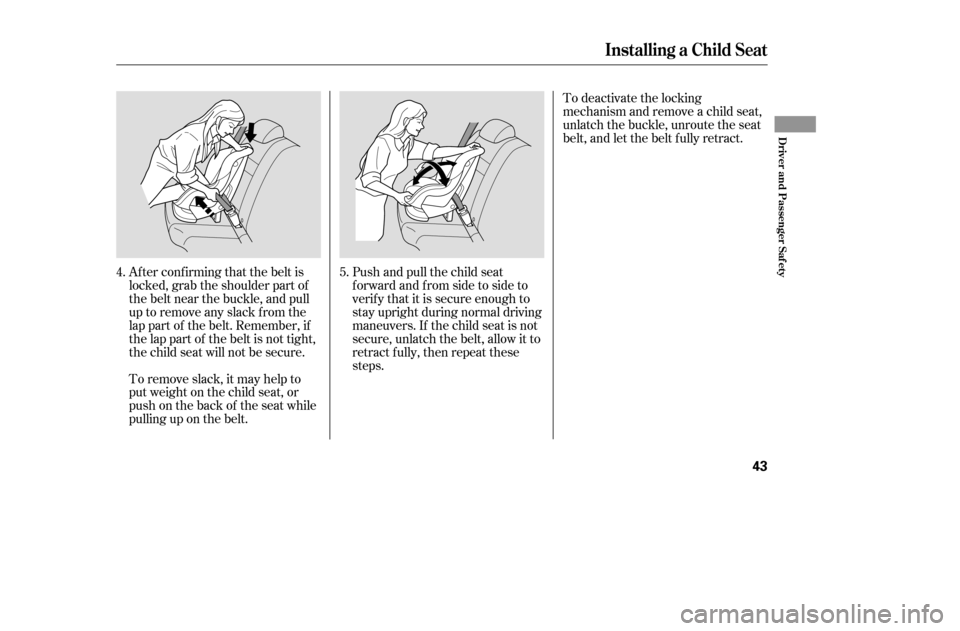
Push and pull the child seat
f orward and f rom side to side to
verif y that it is secure enough to
stay upright during normal driving
maneuvers. If the child seat is not
secure, unlatch the belt, allow it to
retract f ully, then repeat these
steps.
Af ter conf irming that the belt is
locked, grab the shoulder part of
the belt near the buckle, and pull
up to remove any slack from the
lap part of the belt. Remember, if
the lap part of the belt is not tight,
the child seat will not be secure.
To remove slack, it may help to
putweightonthechildseat,or
push on the back of the seat while
pulling up on the belt. 5.
4.
Installing a Child Seat
Driver and Passenger Saf ety
43
�����—�����—�����y�
������
����
�y���
�(���%�������y���������y
Page 50 of 289
Control L ocations
54
MIRROR CONTROLS
POWER WINDOW
SWITCHESHOOD RELEASE
HANDLE AUDIO SYSTEM
POWER DOOR LOCK
MASTER SWITCH
CLIMATE CONTROL
SYSTEM
HEATING/COOLING
CONTROLS
HAZARD WARNING
BUTTON
INSTRUMENT PANEL INDICATORS
GAUGES
ACCESSORY
POWER SOCKETS
FUEL FILL
DOOR/
TRUNK
RELEASE
HANDLE
SEAT HEATER
SWITCH
(P.63)
(P.55)
(P.93)
(P.76)
(P.89)
(P.161, 80) (P.162) (P.88)
(P.99)(P.111)
(P.104)
(P.150)
(P.70)
(P.116)
CLOCK
�����—�����—�����y�
���������
���y���
�(���%�������y���������y
Page 51 of 289
�Î�Î
�Î
The U.S. instrument panel is shown. Dif f erences f or the Canadian models are noted in the text.
Instrument Panel
Inst rument s and Cont rols
55
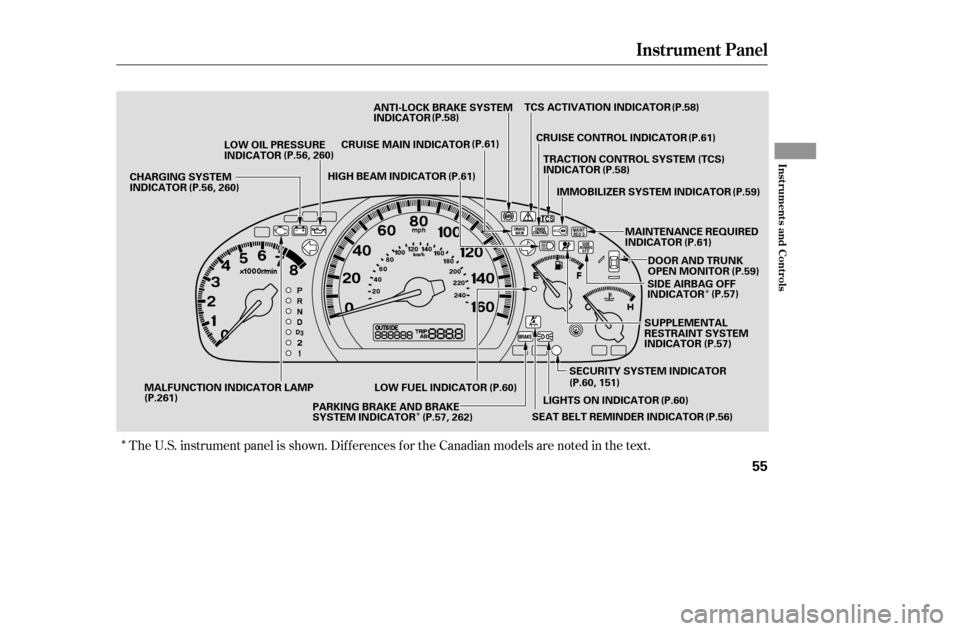
LOW FUEL INDICATORMAINTENANCE REQUIRED
INDICATOR
HIGH BEAM INDICATOR
CRUISE MAIN INDICATOR ANTI-LOCK BRAKE SYSTEM
INDICATOR
LOW OIL PRESSURE
INDICATOR
CHARGING SYSTEM
INDICATOR
SECURITY SYSTEM INDICATORSUPPLEMENTAL
RESTRAINT SYSTEM
INDICATOR
TCS ACTIVATION INDICATOR
CRUISE CONTROL INDICATOR
DOOR AND TRUNK
OPEN MONITOR
LIGHTS ON INDICATOR
PARKING BRAKE AND BRAKE
SYSTEM INDICATOR TRACTION CONTROL SYSTEM (TCS)
INDICATOR
MALFUNCTION INDICATOR LAMP IMMOBILIZER SYSTEM INDICATOR
SEAT BELT REMINDER INDICATOR (P.58)
(P.61)
(P.58) (P.59)
(P.61) (P.59)
(P.57)
(P.60, 151) (P.56)
(P.60)
(P.57, 262)
(P.261) (P.56, 260)
(P.56, 260)
(P.61)(P.61)
(P.58)
SIDE AIRBAG OFF
INDICATOR(P.57)
(P.60)
�����—�����—�����y�
�������������y���
�(���%�������y���������y
Page 54 of 289

This indicator normally comes on f or
a f ew seconds when you turn the
ignition switch to ON (II). If it comes
on at any other time, there is a
problem in the ABS. If this happens,
have your vehicle checked at a
dealer. With this indicator on, your
vehicle still has normal braking
ability but no anti-lock f unction. For
more inf ormation, see page .This indicator has three f unctions: This indicator normally comes on f or
a f ew seconds when you turn the
ignition switch to ON (II). If it comes
on and stays on with the TCS
activation indicator, there is a
problem with the TCS. For more
inf ormation on the TCS, see page.
This indicator also comes on f or a
f ew seconds when you turn the
ignition switch to ON (II). If it comes
on and stays on at any other time, or
it does not come on when you turn
the ignition switch to ON (II), there
is a problem with the TCS. Take the
vehicle to your dealer to have it
checked. See page f or more
inf ormation on the TCS. If itcomesonandstaysonwhen
the TCS is on, it indicates that
there is a problem in the TCS.
It f lashes when the TCS is
regulating wheelspin.
Itcomesonasareminderthatyou
have turned off the traction
control system (TCS).
1. 2. 3.
185 187
187On all V6 models On all V6 models
Instrument Panel Indicators
Anti-lock Brake System
(A BS) Indicator T CS A ctivation Indicator T raction Control System
(T CS) Indicator
58
�����—�����—�����y�
�������������y���
�(���%�������y�������
�y
Page 55 of 289

This indicator also blinks several
times when you turn the ignition
switch f rom ON (II) to ACCESSORY
(I) or LOCK (0).The appropriate indicator comes on
in this monitor if the trunk or either
door is not closed tightly.
All the indicators in the monitor
come on f or a f ew seconds when you
turn the ignition switch to ON (II).
This indicator comes on f or a f ew
seconds when you turn the ignition
switch to ON (II). It will then go of f
if you have inserted a properly-coded
ignition key. If it is not a properly-
coded key, the indicator will blink,
and the engine will not start (see
page ).
The lef t or right turn signal indicator
blinks when you signal a lane change
or turn. If the indicator does not
blink or blinks rapidly, it usually
means one of the turn signal bulbs is
burned out (see page ). Replace
the bulb as soon as possible, since
other drivers cannot see that you are
signaling.
When you press the hazard warning
button, both turn signal indicators
blink. All turn signals on the outside
of the vehicle should f lash.
74
231
Instrument Panel Indicators
Immobilizer System
IndicatorDoor and T runk Open Monitor T urn Signal and
Hazard Warning
Indicators
Inst rument s and Cont rols
59
�����—�����—�����y�
���������
�
�y���
�(���%�������y���������y
Page 56 of 289
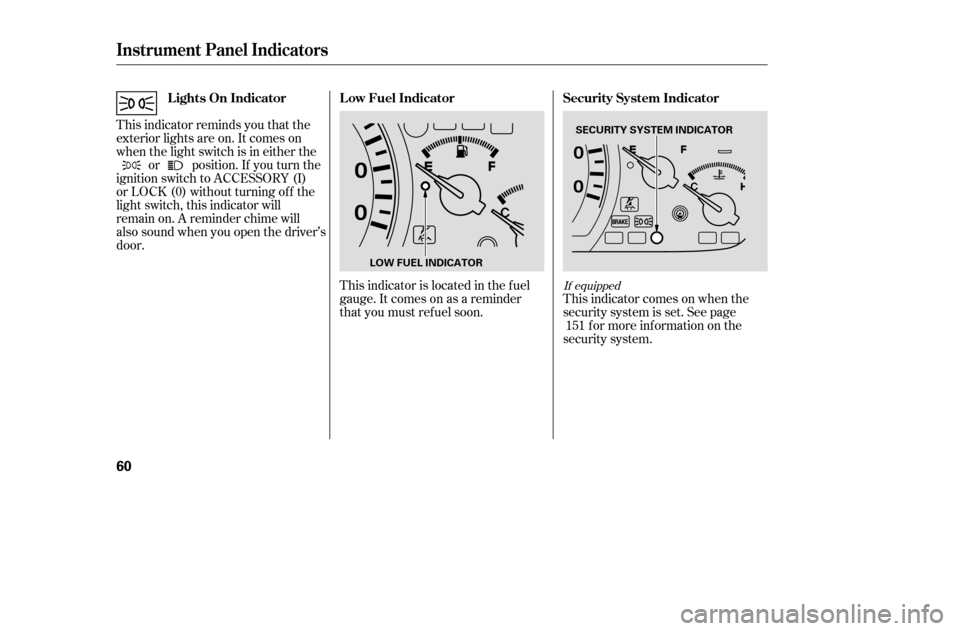
This indicator reminds you that the
exterior lights are on. It comes on
when the light switch is in either theor position. If you turn the
ignition switch to ACCESSORY (I)
or LOCK (0) without turning of f the
light switch, this indicator will
remain on. A reminder chime will
also sound when you open the driver’s
door.
This indicator is located in the f uel
gauge. It comes on as a reminder
that you must ref uel soon.This indicator comes on when the
security system is set. See page
f or more inf ormation on the
security system. 151
If equipped
Instrument Panel Indicators
Lights On Indicator
Security System Indicator
Low Fuel Indicator
60
SECURITY SYSTEM INDICATOR
LOW FUEL INDICATOR
�����—�����—�����y�
�����������
�y���
�(���%�������y���������y
Page 64 of 289
�µ
�µ
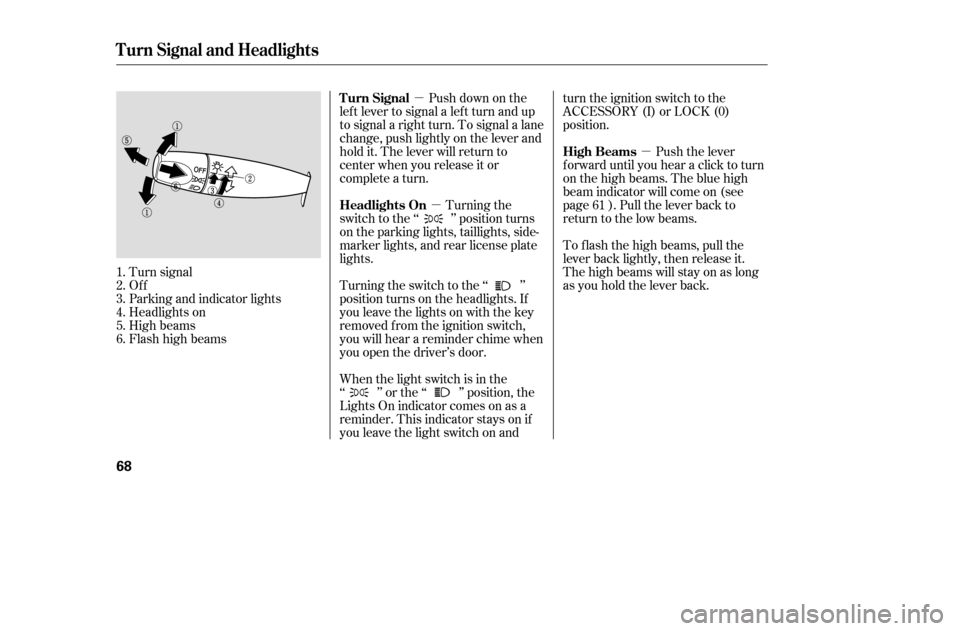
�µTurning the
switch to the ‘‘ ’’ position turns
on the parking lights, taillights, side-
marker lights, and rear license plate
lights.
Turning the switch to the ‘‘ ’’
position turns on the headlights. If
you leave the lights on with the key
removed f rom the ignition switch,
you will hear a reminder chime when
you open the driver’s door.
Turn signal
Of f
Parking and indicator lights
Headlights on
High beams
Flashhighbeams Push down on the
lef t lever to signal a lef t turn and up
to signal a right turn. To signal a lane
change, push lightly on the lever and
hold it. The lever will return to
center when you release it or
complete a turn.
When the light switch is in the
‘‘ ’’ or the ‘‘ ’’ position, the
Lights On indicator comes on as a
reminder. This indicator stays on if
you leave the light switch on and turn the ignition switch to the
ACCESSORY (I) or LOCK (0)
position.
To f lash the high beams, pull the
lever back lightly, then release it.
The high beams will stay on as long
as you hold the lever back.
Push the lever
f orward until you hear a click to turn
on the high beams. The blue high
beam indicator will come on (see
page ). Pull the lever back to
return to the low beams.
1.2.3.4.5.6. 61
Turn Signal and Headlights
Headlights On
Turn Signal
High Beams
68
�����—�����—�����y�
�������������y���
�(���%�������y�������
�y
Page 65 of 289

This f eature turns of f the headlights,
parking lights, taillights, and license
plate lights within 15 seconds of
removing the key from the ignition
switch and closing the driver’s door.
This feature activates if you leave
the headlight switch in the ‘‘ ’’
or ‘‘ ’’ position, remove the key,
then open and close the driver’s door.
If you remove the key f rom the
ignition switch with the headlight
switch on, but do not open the door
and get out, the lights will turn of f
af ter 10 minutes.The lights will turn on again when
you unlock or open the driver’s door.
With the headlight switch off, the
high beam headlights and the high
beam indicator come on with
reduced brightness when you turn
the ignition switch to ON (II) and
release the parking brake. They
remain on until you turn the ignition
switch of f , even if you set the
parking brake.
If you unlock the door, but do not
open it within 15 seconds, the lights
will go off. With the driver’s door
open, you will hear a lights-on
reminder chime.
The headlights revert to normal
operation when you turn them on
with the switch.Canadian models only
Headlights
Automatic Lighting Of f Feature Daytime Running Lights
Inst rument s and Cont rols
69
�����—�����—�����y�
�������������y���
�(���%�������y���������y