2005 GMC SIERRA parking brake
[x] Cancel search: parking brakePage 164 of 574
Vehicle Personalization
Memory Seat
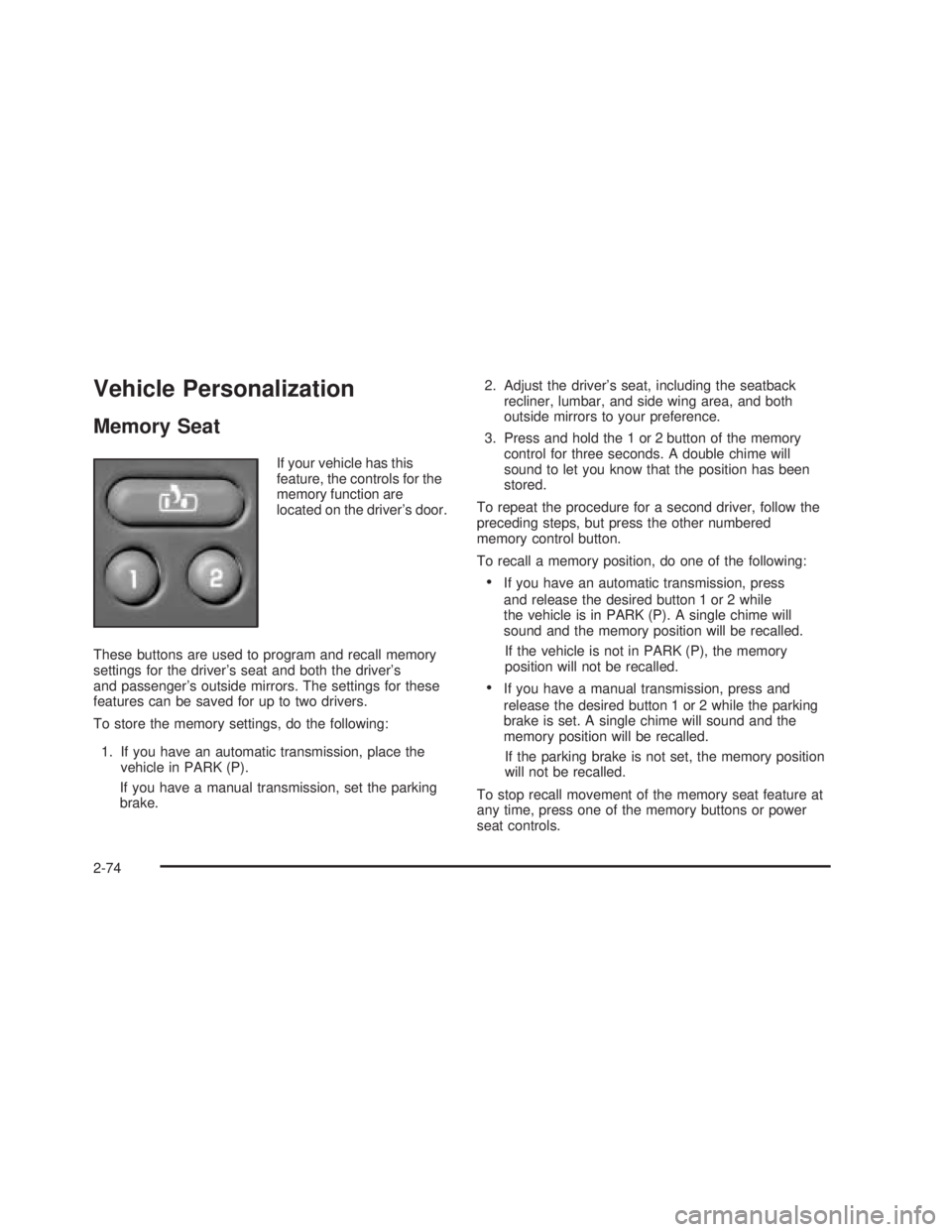
If your vehicle has this
feature, the controls for the
memory function are
located on the driver’s door.
These buttons are used to program and recall memory
settings for the driver’s seat and both the driver’s
and passenger’s outside mirrors. The settings for these
features can be saved for up to two drivers.
To store the memory settings, do the following:
1. If you have an automatic transmission, place the
vehicle in PARK (P).
If you have a manual transmission, set the parking
brake.2. Adjust the driver’s seat, including the seatback
recliner, lumbar, and side wing area, and both
outside mirrors to your preference.
3. Press and hold the 1 or 2 button of the memory
control for three seconds. A double chime will
sound to let you know that the position has been
stored.
To repeat the procedure for a second driver, follow the
preceding steps, but press the other numbered
memory control button.
To recall a memory position, do one of the following:
If you have an automatic transmission, press
and release the desired button 1 or 2 while
the vehicle is in PARK (P). A single chime will
sound and the memory position will be recalled.
If the vehicle is not in PARK (P), the memory
position will not be recalled.
If you have a manual transmission, press and
release the desired button 1 or 2 while the parking
brake is set. A single chime will sound and the
memory position will be recalled.
If the parking brake is not set, the memory position
will not be recalled.
To stop recall movement of the memory seat feature at
any time, press one of the memory buttons or power
seat controls.
2-74
Page 165 of 574

Easy Exit Seat
The controls for this memory function are located on the
driver’s door.
B(Easy Exit Seat):This button is used to program
and recall the desired driver’s seat position when
exiting/entering the vehicle. The seat position can be
saved for up to two drivers.
To store the seat exit position, do the following:
1. If you have an automatic transmission, place the
vehicle in PARK (P).
If you have a manual transmission, set the parking
brake.
2. Press and release the 1 or 2 button. The seat will
move to the stored memory position.
3. Adjust the seat to the desired exit position.
4. Press and hold the exit button of the memory
control for three seconds. A double chime will sound
to let you know that the position has been stored
for the selected button 1 or 2.
To repeat the procedure for a second driver, follow
the preceding steps, but press the other numbered
memory control button.To use the seat exit position, do one of the following:
If you have an automatic transmission, press
and release the exit button on the memory control
while the vehicle is in PARK (P).
If you have a manual transmission, press and
release the exit button on the memory control while
the parking brake is set.
Or, if this feature is activated in the DIC, removing
the key from the ignition will move the seat to the
exit position.
See “Easy Exit Seat” underDIC Vehicle Customization
on page 3-63for more information on activating this
feature in the DIC.
2-75
Page 171 of 574

The main components of your instrument panel are the following:
A. Dome Lamp Button. SeeDome Lamps on page 3-17.
B. Headlamp Controls. SeeHeadlamps on page 3-13.
C. Air Outlets. SeeOutlet Adjustment on page 3-30.
D. Automatic Transfer Case/Electronic Transfer
Case/Traction Assist System (TAS). SeeFour-Wheel
Drive on page 2-37.
E. Multifunction Lever. SeeTurn Signal/Multifunction
Lever on page 3-7.
F. Instrument Panel Cluster. SeeInstrument Panel
Cluster on page 3-32.
G. Gearshift Lever (Automatic Transmission). See
Automatic Transmission Operation on page 2-26.
H. Tow/Haul Selector and Overdrive Disable (Allison
Transmission
®Only) Button (If Equipped). See
Tow/Haul Mode on page 2-29.
I. Audio System. SeeAudio System(s) on page 3-69.
J. Climate Control System. SeeClimate Control
System on page 3-21,Dual Climate Control System
on page 3-22andDual Automatic Climate Control
System on page 3-25.
K. Instrument Panel Fuse Block.Instrument Panel Fuse
Block on page 5-122.
L. Cargo Lamp Button. SeeCargo Lamp on page 3-19.
M. Hood Release. SeeHood Release on page 5-13.N. Steering Wheel Control Buttons (If Equipped). See
Driver Information Center (DIC) on page 3-50.
O. Center Instrument Panel Block. SeeCenter
Instrument Panel Fuse Block on page 5-124.
P. Parking Brake Release. SeeParking Brake on
page 2-48.
Q. Tilt Wheel Lever. SeeTilt Wheel on page 3-7.
R. Lighter and Accessory Power Outlet. SeeAccessory
Power Outlets on page 3-19, andAshtrays and
Cigarette Lighter on page 3-20.
S. Storage Area. SeeFront Storage Area on page 2-71.
T. Ashtray. SeeAshtrays and Cigarette Lighter on
page 3-20.
U. Manual Selectable Ride Control (If Equipped).
SeeManual Selectable Ride on page 4-10.
V. 4-Wheel Steer Button (If Equipped). See
QUADRASTEER™ on page 4-14.
W. Passenger Airbag Off Switch (If Equipped).
SeeAirbag Off Switch on page 1-73.
X. Auxiliary Roof Mounted Lamp Button (If Equipped).
SeeAuxiliary Roof Mounted Lamp on page 3-17.
Y. Glove Box. SeeGlove Box on page 2-70.
3-5
Page 181 of 574

When it begins to get dark, the automatic headlamp
system will switch from DRL to the headlamps.
When you turn the headlamp switch off, the headlamps
will go off, and your DRL lamps will illuminate,
provided it is not dark outside.
Shifting the transmission into PARK (P) will allow you to
idle the vehicle with the DRL off. The DRL will stay
off until you shift the transmission out of PARK (P).
This procedure applies only to vehicles rst sold in the
United States.
Automatic Headlamp System
When it is dark enough outside, your automatic
headlamp system will turn on your headlamps at the
normal brightness along with other lamps such as
the taillamps, sidemarker, parking lamps and the
instrument panel lights. The radio lights will also be dim.
To turn off the automatic headlamp system, turn the
exterior lamps switch to the off position and then
release. Turning off the automatic headlamp system
with the headlamp switch is not available for vehicles
rst sold in Canada. For vehicles rst sold in Canada,
you can turn off the automatic headlamp systemwhen parked at night by applying the parking brake
before starting your vehicle. The headlamps will remain
off once the vehicle is started for as long as you are
parked. If you release the parking brake, the lights will
turn on. If the parking brake is not released before
you begin to drive, the exterior lamps will turn on above
2 mph (3.2 km/h).
Your vehicle is equipped with a light sensor located on
the top of the instrument panel in the defroster grille.
Be sure it is not covered, or the system will be on
whenever the ignition is on.
The system may also turn on your headlamps when
driving through a parking garage, heavy overcast
weather or a tunnel. This is normal.
There is a delay in the transition between the daytime
and nighttime operation of the Daytime Running
Lamps (DRL) and the automatic headlamp systems so
that driving under bridges or bright overhead street
lights does not affect the system. The DRL and
automatic headlamp system will only be affected when
the light sensor sees a change in lighting lasting
longer than the delay.
3-15
Page 205 of 574

Readings in the low warning zone may occur when a
large number of electrical accessories are operating in
the vehicle and the engine is left at an idle for an
extended period. This condition is normal since the
charging system is not able to provide full power
at engine idle. As engine speeds are increased, this
condition should correct itself as higher engine speeds
allow the charging system to create maximum power.
You can only drive for a short time with the reading
in either warning zone. If you must drive, turn off
all unnecessary accessories.
Readings in either warning zone indicate a possible
problem in the electrical system. Have the vehicle
serviced as soon as possible.
Up-Shift Light (Manual
Transmission)
This light is used on some
models with manual
transmissions.The shift indicator light will show you when to shift to
the next highest gear, and will help you get the best
fuel economy.
Brake System Warning Light
With the ignition on, the brake system warning light will
ash when you set the parking brake. The light will ash if
the parking brake doesn’t release fully. If you try to drive
with the parking brake engaged, a chime will sound when
the vehicle speed is greater than 3 mph (5 km/h).
Your vehicle’s hydraulic brake system is divided into
two parts. If one part isn’t working, the other part can still
work and stop you. For good braking, though, you
need both parts working well.
3-39
Page 209 of 574

Transmission Temperature Gage
Your vehicle may be equipped with a transmission
temperature gage.
When your ignition is on, the gage shows the
temperature of the transmission uid. The normal
operating range is from 180°F (82°C) to about
200°F (93°C).
At approximately 265°F (130°C), the driver information
center will display a TRANSMISSION HOT message
and the transmission will enter a transmission protection
mode. When the transmission enters the protection
mode, you may notice a change in the transmission
shifting patterns. The transmission will return to normal
shifting patterns when the transmission uid temperature
falls below 260°F (127°C).SeeDriver Information Center (DIC) on page 3-50for
further information.
If your vehicle has an Allison transmission, and the uid
reaches temperatures of approximately 275°F (135°C)
or greater, the driver information center will display
a TRANS HOT IDLE ENGINE warning message and a
chime will sound until the temperature falls below
265°F (129°C). Pull the vehicle off the roadway when it
is safe to do so. Set the parking brake, place the
transmission in PARK (P) and allow the engine to idle
until the transmission temperature falls below 265°F
(129°C). If the transmission continues to operate above
265°F (130°C), contact your nearest dealer or the
GM Roadside Assistance Center. SeeRoadside
Assistance Program on page 7-5.
Notice:If you drive your vehicle with the
transmission temperature gage above normal
operating range, you can damage the transmission.
This could lead to costly repairs that would not
be covered by your warranty. Do not drive your
vehicle while the transmission temperature gage
reading is above normal. See your dealer for service. United States
Canada
3-43
Page 322 of 574

{CAUTION:
Driving to the top (crest) of a hill at full speed
can cause an accident. There could be a
drop-off, embankment, cliff, or even another
vehicle. You could be seriously injured or
killed. As you near the top of a hill, slow down
and stay alert.
Q:What should I do if my vehicle stalls,
or is about to stall, and I cannot make it
up the hill?
A:If this happens, there are some things you should
do, and there are some things you must not do.
First, here is what youshoulddo:
Push the brake pedal to stop the vehicle and
keep it from rolling backwards. Also, apply the
parking brake.
If your engine is still running, shift the transmission
to REVERSE (R), release the parking brake, and
slowly back down the hill in REVERSE (R).
If your engine has stopped running, you will need to
restart it. With the brake pedal pressed and the
parking brake still applied, shift the transmission to
PARK (P) (or shift to NEUTRAL if your vehicle
has a manual transmission) and restart the engine.
Then, shift to REVERSE (R), release the parking
brake, and slowly back down the hill as straight as
possible in REVERSE (R).
As you are backing down the hill, put your left hand
on the steering wheel at the 12 o’clock position.
This way, you will be able to tell if your wheels are
straight and maneuver as you back down. It is
best that you back down the hill with your wheels
straight rather than in the left or right direction.
Turning the wheel too far to the left or right
will increase the possibility of a rollover.
4-28
Page 323 of 574

Here are some things youmust notdo if you stall, or
are about to stall, when going up a hill.
Never attempt to prevent a stall by shifting into
NEUTRAL (N) (or pressing the clutch, if you have a
manual transmission) to rev-up the engine and
regain forward momentum. This will not work. Your
vehicle will roll backwards very quickly and you
could go out of control.
Instead, apply the regular brake to stop the vehicle.
Then apply the parking brake. Shift to
REVERSE (R), release the parking brake, and
slowly back straight down.
Never attempt to turn around if you are about to
stall when going up a hill. If the hill is steep
enough to stall your vehicle, it is steep enough to
cause you to roll over if you turn around. If you
cannot make it up the hill, you must back straight
down the hill.
Q:Suppose, after stalling, I try to back down the hill
and decide I just cannot do it. What should I do?
A:Set the parking brake, put your transmission in
PARK (P), or the manual transmission in FIRST (1),
and turn off the engine. Leave the vehicle and go get
some help. Exit on the uphill side and stay clear of
the path the vehicle would take if it rolled downhill.
Do not shift the transfer case to NEUTRAL when you
leave the vehicle. Leave it in some gear.
{CAUTION:
Shifting the transfer case to NEUTRAL can
cause your vehicle to roll even if the
transmission is in PARK (P) (or, if you have the
manual transmission, even if you are in gear).
This is because the NEUTRAL position on the
transfer case overrides the transmission. You or
someone else could be injured. If you are going
to leave your vehicle, set the parking brake and
shift the transmission to PARK (P) (or, put your
manual transmission in FIRST (1)). But do not
shift the transfer case to NEUTRAL. Leave the
transfer case in the 2 Wheel High, 4 High or
4 Low position.
4-29