2005 GMC ENVOY XUV service
[x] Cancel search: servicePage 92 of 474

Passlock®
Your vehicle is equipped with the Passlock®
theft-deterrent system.
Passlock
®is a passive theft-deterrent system.
Passlock®enables fuel if the ignition lock cylinder is
turned with a valid key. If a correct key is not used or the
ignition lock cylinder is tampered with, the fuel system
is disabled and the vehicle will not start.
During normal operation, the security light will turn off
approximately ve seconds after the key is turned
to RUN.
If the engine stalls and the security light ashes, wait
about 10 minutes until the light stops ashing before
trying to restart the engine. Remember to release
the key from START as soon as the engine starts.
If the engine does not start after three tries, the vehicle
needs service.
If the engine is running and the security light comes on,
you will be able to restart the engine if you turn the
engine off. However, your Passlock
®system is
not working properly and must be serviced by your
dealer. Your vehicle is not protected by Passlock
®
at this time. You may also want to check the fuse.
See your dealer for service.
Starting and Operating
Your Vehicle
New Vehicle Break-In
Notice:Your vehicle does not need an elaborate
break-in. But it will perform better in the long run if
you follow these guidelines:
Keep your speed at 55 mph (88 km/h) or less
for the rst 500 miles (805 km).
Do not drive at any one speed — fast or
slow — for the rst 500 miles (805 km).
Do not make full-throttle starts.
Avoid making hard stops for the rst 200 miles
(322 km) or so. During this time your new brake
linings are not yet broken in. Hard stops with new
linings can mean premature wear and earlier
replacement. Follow this breaking-in guideline
every time you get new brake linings.
Do not tow a trailer during break-in. SeeTowing a
Trailer on page 4-55for more information.
2-24
Page 93 of 474

Ignition Positions
Use the key to turn the ignition switch to four different
positions.
A (Lock):This position locks the ignition and
transmission. It is a theft-deterrent feature. You will only
be able to remove the key when the ignition is turned
to LOCK.
Notice:Using a tool to force the key from the
ignition switch could cause damage or break the key.
Use the correct key and turn the key only with your
hand. Make sure the key is in all the way. If none of
this works, then your vehicle needs service.B (Accessory):This position lets you use things
like the radio and the windshield wipers when the
engine is off.
Notice:Lengthy operation of features such as
the radio in the accessory ignition position may
drain the battery and prevent your vehicle from
starting. Do not operate your vehicle in the
accessory ignition position for a long period
of time.
C (Run):This is the position for driving.
D (Start):This position starts the engine.
Retained Accessory Power (RAP)
Your vehicle is equipped with a Retained Accessory
Power (RAP) feature which will allow certain features of
your vehicle to continue to work up to 20 minutes
after the ignition key is turned to LOCK.
Your radio, power windows, sunroof (option) and
overhead console (including tailgate glass and power
roof) will work when the ignition key is in RUN or
ACCESSORY. Once the key is turned from RUN to
LOCK, these features will continue to work for up
to 20 minutes or until a door is opened.
2-25
Page 101 of 474

{CAUTION:
Shifting the transfer case to NEUTRAL
can cause your vehicle to roll even if the
transmission is in PARK (P). You or someone
else could be seriously injured. Be sure to set
the parking brake before placing the transfer
case in NEUTRAL. SeeParking Brake on
page 2-36.
NEUTRAL:Shift the vehicle’s transfer case to NEUTRAL
only when towing your vehicle. SeeRecreational Vehicle
Towing on page 4-50for more information.
An indicator light in the knob will show you which position
the transfer case is in. The indicator lights will come on
briey when you turn on the ignition and one will stay on.If the lights do not come on, you should take your vehicle
to your dealer for service. An indicator light will ash while
shifting the transfer case. It will remain illuminated when
the shift is complete. If for some reason the transfer case
cannot make a requested shift, it will return to the last
chosen setting.
If the service four-wheel drive light on the instrument
panel cluster stays on, you should take your vehicle to
your dealer for service. SeeService Four-Wheel Drive
Warning Light on page 3-46for further information.
Shifting Into 4HI or A4WD
Turn the knob to 4HI or A4WD. This can be done at any
speed unless you are shifting out of 4LO. The indicator
light will ash while shifting. It will remain illuminated
when the shift is complete.
Shifting Into 2HI
Turn the knob to 2HI. This can be done at any speed
unless you are shifting out of 4LO.
2-33
Page 110 of 474

Mirrors
Manual Rearview Mirror
While sitting in a comfortable driving position, adjust the
rearview mirror so you can see clearly behind your
vehicle. Grip the mirror in the center to move it up or
down and side to side. The day/night control, located at
the bottom of the mirror, adjusts the mirror to reduce
headlamp glare from behind during evening or dark
conditions. Turn the control clockwise for night
use; return it to the center for daytime use.
Manual Rearview Mirror with
OnStar
®
The vehicle may have a rearview mirror with the
OnStar®system.
Control buttons for the OnStar
®system are at the
bottom of the mirror. See your GM dealer for more
information on the OnStar
®system and how to
subscribe to OnStar®. Also, seeOnStar®System on
page 2-52for more information about the services
OnStar
®provides.
Mirror Operation
While sitting in a comfortable driving position, adjust the
rearview mirror so you can see clearly behind your
vehicle. Grip it in the center to move it up or down and
side to side. The day/night control, located at the
bottom of the mirror, adjusts the mirror to reduce
headlamp glare from behind during evening or dark
conditions. Move the control to the right for night
conditions. Return it to the center for daytime.
Manual Rearview Mirror with
Compass
The vehicle may have a manual rearview mirror with an
eight-point compass display located in the upper right.
Mirror Operation
While sitting in a comfortable position, adjust the
rearview mirror so you can see clearly behind your
vehicle. Grip it in the center and move it up or down and
side to side. The day/night control, located at the
bottom of the mirror, adjusts the mirror to reduce
headlamp glare from behind during evening or dark
conditions. Push the control for daytime use; pull it for
night use.
2-42
Page 112 of 474

To adjust for compass variance do the following:
1. Find the current location and variance zone number
on the following zone map.
2. Press and hold the on/off button until a zone
number appears in the display.
3. Once a zone number appears in the display, press
the on/off button quickly until the correct zone
number appears in the display. If C appears in
the compass window, the compass may need
calibration. See “Compass Calibration”
explained previously.Manual Rearview Mirror with
OnStar
®and Compass
The vehicle may have a manual rearview mirror with
OnStar®and an eight-point compass display located in
the upper right.
Control buttons for the OnStar
®system are at the
bottom of the mirror. See your GM dealer for more
information on the OnStar
®system. Also, seeOnStar®
System on page 2-52for more information about the
services OnStar®provides.
Mirror Operation
While sitting in a comfortable position, adjust the
rearview mirror so you can see clearly behind your
vehicle. Grip it in the center and move it up or down and
side to side. The day/night control, located at the
bottom of the mirror, adjusts the mirror to reduce
headlamp glare from behind during evening or dark
conditions. Push the control for daytime use; pull it for
night use.
2-44
Page 116 of 474

To adjust for compass variance do the following:
1. Find the current location and variance zone number
on the following zone map.
2. Press and hold the on/off button until a zone
number appears in the display.
3. Once a zone number appears in the display, press
the on/off button quickly until the correct zone
number appears in the display. If C appears in
the compass window, the compass may need
calibration. See “Compass Calibration” explained
previously.Manual Rearview Mirror with
OnStar
®, Compass, and
Temperature Display
The vehicle may have a manual rearview mirror with
OnStar®and an eight-point compass and temperature
display located in the upper right.
Control buttons for the OnStar
®system are at the
bottom of the mirror. See your GM dealer for more
information about the OnStar
®system. Also, see
OnStar®System on page 2-52for more information
about the services OnStar®provides.
When cleaning the mirror, use a paper towel or similar
material dampened with glass cleaner. Do not spray
glass cleaner directly on the mirror as that may cause
the liquid cleaner to enter the mirror housing.
Mirror Operation
While sitting in a comfortable position, adjust the
rearview mirror so you can see clearly behind your
vehicle. Grip it in the center and move it up or down and
side to side. The day/night control, located at the
bottom of the mirror, adjusts the mirror to reduce
headlamp glare from behind during evening or dark
conditions. Push the control for daytime use; pull it for
night use.
2-48
Page 120 of 474

OnStar®System
OnStar®uses global positioning system (GPS) satellite
technology, wireless communications, and call centers
to provide you with a wide range of safety, security,
information, and convenience services.
A complete OnStar
®user’s guide and the terms and
conditions of the OnStar®Subscription Service
Agreement are included in the vehicle’s glove box
literature. For more information, visit www.onstar.com
or www.onstarcanada.com. Contact OnStar
®at
1-888-4-ONSTAR (1-888-466-7827), or press the
OnStar
®button to speak to an OnStar®advisor
24 hours a day, 7 days a week.
Terms and conditions of the Subscription Service
Agreement can be found at www.onstar.com or
www.onstarcanada.com.
OnStar®Services
For new vehicles equipped with OnStar®, the Safe and
Sound Plan is included for the rst year. You can
extend this plan beyond the rst year, or upgrade to the
Directions and Connections Plan to meet your needs.
For more information, press the OnStar
®button to speak
with an advisor.
Safe and Sound Plan
Advanced Automatic Collision Notication
Automatic Notication of Airbag Deployment
Emergency Services
Roadside Assistance
Stolen Vehicle Tracking
AccidentAssist
Remote Door Unlock/Vehicle Alert
Remote Diagnostics
Information and Convenience Services
Online Concierge
Directions and Connections Plan
All Safe and Sound Plan Services
Driving Directions
RideAssist
Information and Convenience Services
2-52
Page 122 of 474
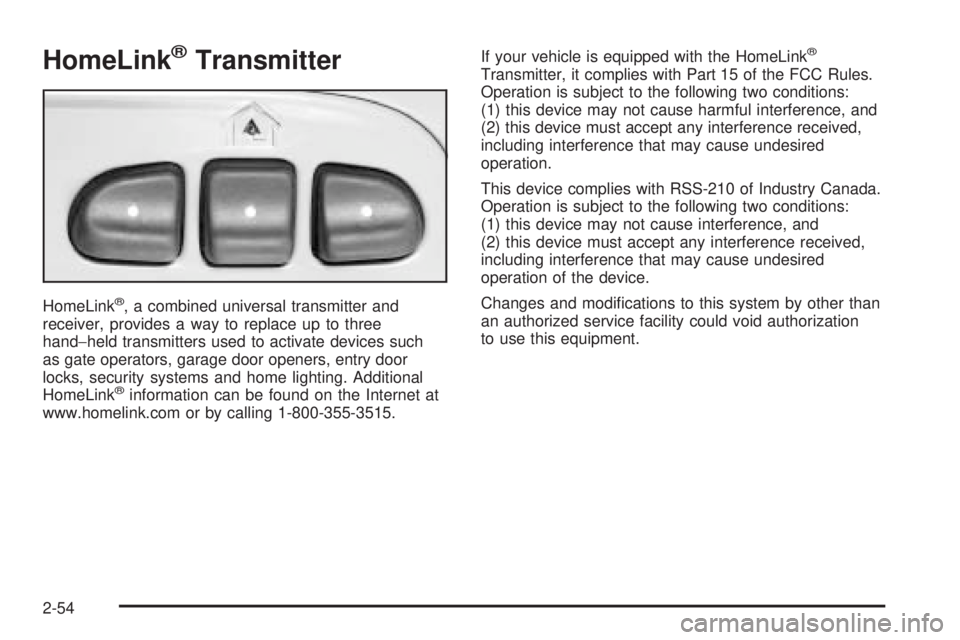
HomeLink®Transmitter
HomeLink®, a combined universal transmitter and
receiver, provides a way to replace up to three
hand−held transmitters used to activate devices such
as gate operators, garage door openers, entry door
locks, security systems and home lighting. Additional
HomeLink
®information can be found on the Internet at
www.homelink.com or by calling 1-800-355-3515.If your vehicle is equipped with the HomeLink
®
Transmitter, it complies with Part 15 of the FCC Rules.
Operation is subject to the following two conditions:
(1) this device may not cause harmful interference, and
(2) this device must accept any interference received,
including interference that may cause undesired
operation.
This device complies with RSS-210 of Industry Canada.
Operation is subject to the following two conditions:
(1) this device may not cause interference, and
(2) this device must accept any interference received,
including interference that may cause undesired
operation of the device.
Changes and modications to this system by other than
an authorized service facility could void authorization
to use this equipment.
2-54