2005 GMC ENVOY XL length
[x] Cancel search: lengthPage 34 of 480

3. Your comfort guide may have an adjuster to
lengthen or shorten the cord. If it does, you
can adjust the cord by following these steps.
3.1. Squeeze and hold the ends of the lock (A)
on the elastic cord.
3.2. Pull the loop to shorten the guide or pull
the cord to lengthen the guide.
3.3. Release the lock.4. Be sure that the belt is not twisted and it lies at.
The elastic cord must be under the belt and the
guide on top.
1-28
Page 94 of 480

Ignition Positions
Use the key to turn the ignition switch to four different
positions.
A (LOCK):This position locks the ignition and
transmission. It is a theft-deterrent feature. You will
only be able to remove the key when the ignition
is turned to LOCK.Notice:Using a tool to force the key from the
ignition switch could cause damage or break the
key. Use the correct key and turn the key only
with your hand. Make sure the key is all the way in.
If it is, turn the steering wheel left and right while
you turn the key hard. If none of this works,
then your vehicle needs service.
B (ACCESSORY):This position lets you use things like
the radio and the windshield wipers when the engine
is off.
Notice:Lengthy operation of features such
as the radio in the accessory ignition position
may drain the battery and prevent your vehicle
from starting. Do not operate your vehicle in
the accessory ignition position for a long period
of time.
C (RUN):This is the position for driving.
D (START):This position starts the engine.
2-20
Page 218 of 480

oSEEKp:Press the left arrow to go to the start
of the current or the previous track. Press the right
arrow to go to the start of the next track. Pressing
either arrow for more than two seconds will scan the
previous or next tracks at ve to eight seconds per
track. SCAN and the track number will appear on the
display. Press either arrow to stop scanning.
oTUNEp:Turning the TUNE knob will fast track
reverse or advance through tracks. The track number
will appear on the display for each track.
DISPL (Display):Press this knob to see how long the
current track has been playing. ET and the elapsed time
of the track will appear on the display. To change the
default on the display, track or elapsed time, press this
knob until you see the display you want, then press and
hold the knob for two seconds. The radio will produce
one beep and the selected display will now be the default.
BAND:Press this button to listen to the radio when
a CD is playing. The inactive CD will remain safely
inside the radio for future listening.
CD AUX (Auxiliary):Press this button to play a CD
when listening to the radio. The CD symbol will appear
on the display when a CD is loaded.
Z(Eject):Press this button to eject a CD. Eject
may be activated with either the ignition or radio off.
CDs may be loaded with the ignition and radio off if
this button is pressed rst.
Using an MP3 CD
MP3 Format
This MP3 player will accept MP3 les that were recorded
on an up to 700 MB CD-R CD. The les can be recorded
with the following xed bit rates: 32 kpbs, 40 kpbs,
56 kpbs, 64 kpbs, 80 kpbs, 96 kpbs, 112 kpbs, 128 kpbs,
160 kpbs, 192 kpbs, 224 kpbs, 256 kpbs, and 320 kpbs
or a variable bit rate. Song title, artist name, and album
will be available when recorded using ID3 tags versions 1
and 2.
The player will be able to read and play a maximum of
50 folders, 50 playlists, 10 sessions, and 255 les. Long
le, folder, or playlist names or a combination of a large
number of les and folders or playlists may cause the
player to be unable to play up to the maximum number
of les, folders, playlists, or sessions. If you wish to play
large numbers of les, folders, playlists or sessions
minimize the length of the le, folder or playlist name.
You can also play an MP3 CD that was recorded using
no le folders. The system can support up to 11 folders in
depth, though, keep the depth of the folders to a minimum
in order to keep down the complexity and confusion in
trying to locate a particular folder during playback. If a
CD contains more than the maximum of 50 folders,
50 playlists, 10 sessions, and 255 les the player will let
you access and navigate up to the maximum, but all
items over the maximum will be ignored.
3-82
Page 269 of 480
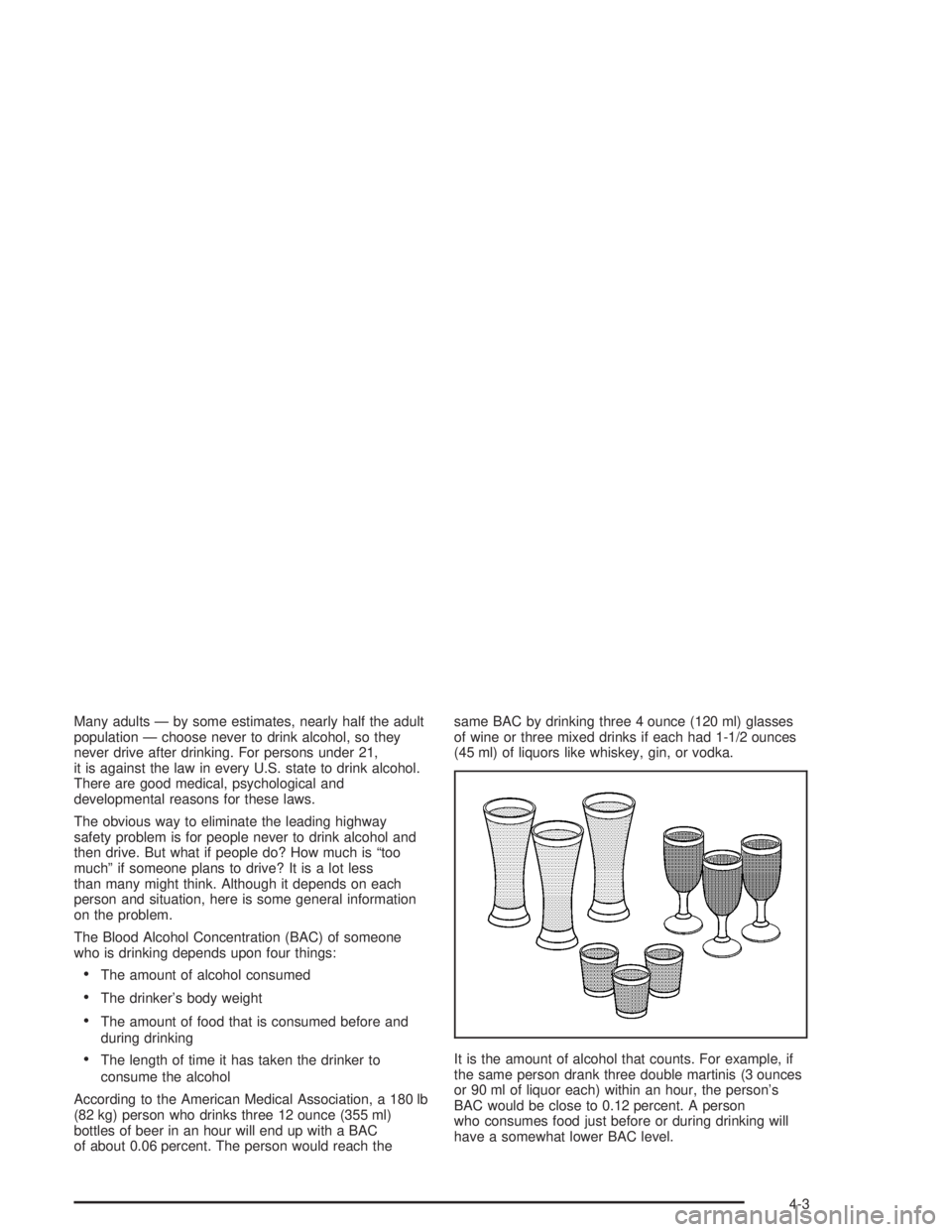
Many adults — by some estimates, nearly half the adult
population — choose never to drink alcohol, so they
never drive after drinking. For persons under 21,
it is against the law in every U.S. state to drink alcohol.
There are good medical, psychological and
developmental reasons for these laws.
The obvious way to eliminate the leading highway
safety problem is for people never to drink alcohol and
then drive. But what if people do? How much is “too
much” if someone plans to drive? It is a lot less
than many might think. Although it depends on each
person and situation, here is some general information
on the problem.
The Blood Alcohol Concentration (BAC) of someone
who is drinking depends upon four things:
The amount of alcohol consumed
The drinker’s body weight
The amount of food that is consumed before and
during drinking
The length of time it has taken the drinker to
consume the alcohol
According to the American Medical Association, a 180 lb
(82 kg) person who drinks three 12 ounce (355 ml)
bottles of beer in an hour will end up with a BAC
of about 0.06 percent. The person would reach thesame BAC by drinking three 4 ounce (120 ml) glasses
of wine or three mixed drinks if each had 1-1/2 ounces
(45 ml) of liquors like whiskey, gin, or vodka.
It is the amount of alcohol that counts. For example, if
the same person drank three double martinis (3 ounces
or 90 ml of liquor each) within an hour, the person’s
BAC would be close to 0.12 percent. A person
who consumes food just before or during drinking will
have a somewhat lower BAC level.
4-3
Page 290 of 480

Q:Am I likely to stall when going downhill?
A:It is much more likely to happen going uphill.
But if it happens going downhill, here is what to do.
1. Stop your vehicle by applying the regular brakes.
Apply the parking brake.
2. Shift to PARK (P) and, while still braking, restart
the engine.
3. Shift back to a low gear, release the parking brake,
and drive straight down.
4. If the engine will not start, get out and get help.
Driving Across an Incline
Sooner or later, an off-road trail will probably go
across the incline of a hill. If this happens, you have
to decide whether to try to drive across the incline.
Here are some things to consider:
A hill that can be driven straight up or down may be
too steep to drive across. When you go straight up or
down a hill, the length of the wheel base — the
distance from the front wheels to the rear
wheels — reduces the likelihood the vehicle will
tumble end over end. But when you drive across an
incline, the much more narrow track width — the
distance between the left and right wheels — may
not prevent the vehicle from tilting and rolling over.Also, driving across an incline puts more weight on
the downhill wheels. This could cause a downhill
slide or a rollover.
Surface conditions can be a problem when you drive
across a hill. Loose gravel, muddy spots, or even wet
grass can cause your tires to slip sideways, downhill.
If the vehicle slips sideways, it can hit something that
will trip it — a rock, a rut, etc. — and roll over.
Hidden obstacles can make the steepness of the
incline even worse. If you drive across a rock with the
uphill wheels, or if the downhill wheels drop into a rut
or depression, your vehicle can tilt even more.
For reasons like these, you need to decide carefully
whether to try to drive across an incline. Just because the
trail goes across the incline does not mean you have to
drive it. The last vehicle to try it might have rolled over.
{CAUTION:
Driving across an incline that is too steep will
make your vehicle roll over. You could be
seriously injured or killed. If you have any
doubt about the steepness of the incline, do
not drive across it. Find another route instead.
4-24