2005 GMC ENVOY XL radio controls
[x] Cancel search: radio controlsPage 260 of 480
Cleaning the Video Screen
Pour some isopropyl or rubbing alcohol on a clean
cloth and gently wipe the video screen. Do not spray
directly onto the screen and do not press too hard or
too long on the video screen.
Rear Seat Audio (RSA)
This feature allows rear seat passengers to listen to any
of the sources: radio, cassette tapes, CDs, or DVDs.
However, the rear seat passengers can only control
the sources that the front seat passengers are not
listening to. For example, rear seat passengers may
listen to and control cassette tapes, CDs, or DVDs
through the headphones while the driver listens to
the radio through the front speakers. The rear seat
passengers have control of the volume for each set
of headphones.
The front seat audio controls always have priority
over the RSA controls. If the front seat passengers
switch the source for the main radio to a remote source,
the RSA will not be able to control the source. You
can operate the rear seat audio when the main radio
is off.
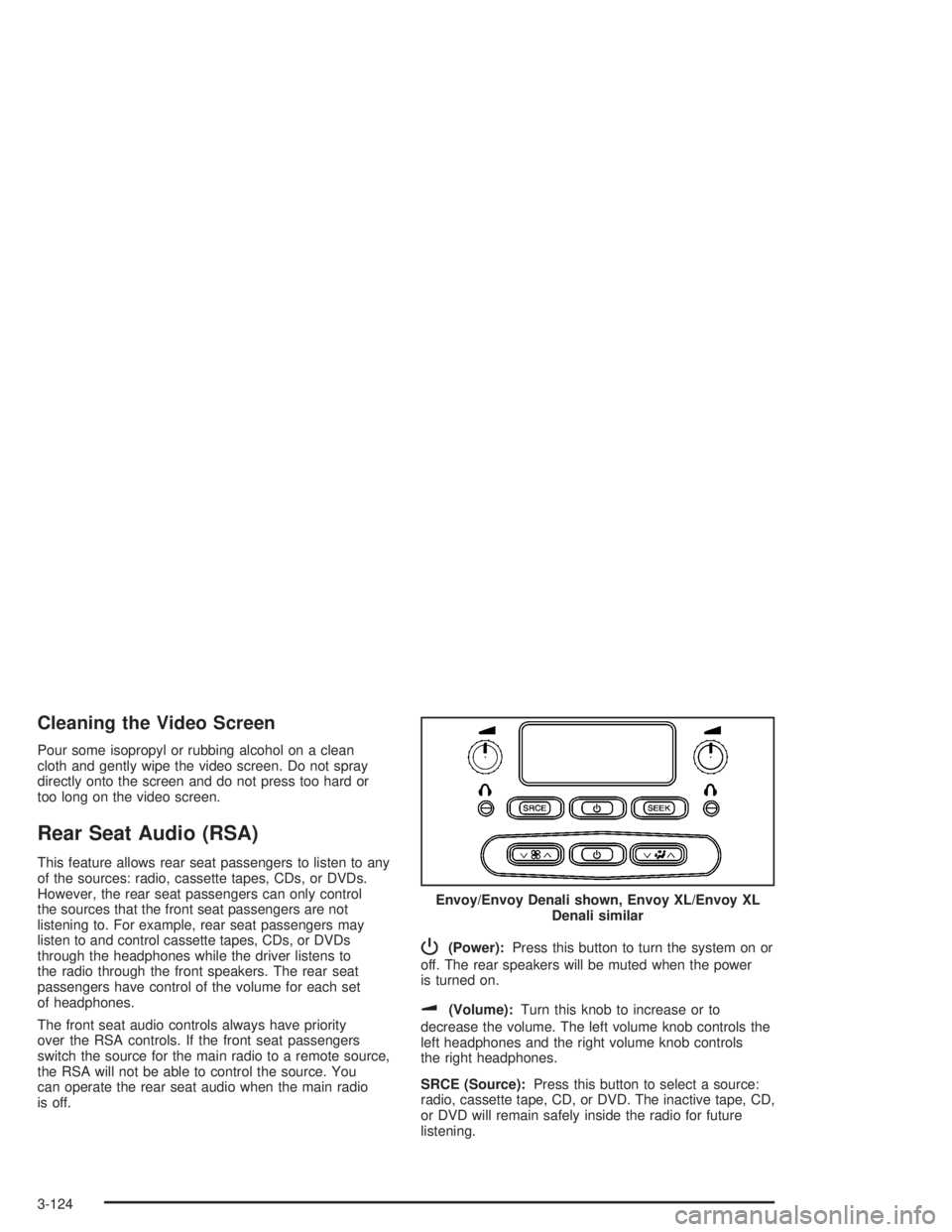
P(Power):Press this button to turn the system on or
off. The rear speakers will be muted when the power
is turned on.
u(Volume):Turn this knob to increase or to
decrease the volume. The left volume knob controls the
left headphones and the right volume knob controls
the right headphones.
SRCE (Source):Press this button to select a source:
radio, cassette tape, CD, or DVD. The inactive tape, CD,
or DVD will remain safely inside the radio for future
listening.Envoy/Envoy Denali shown, Envoy XL/Envoy XL
Denali similar
3-124
Page 262 of 480

Audio Steering Wheel Controls
If your vehicle has this feature, some audio functions
can be adjusted at the steering wheel. They include the
following:
g(OnStar/Voice Recognition):If your vehicle has
OnStar®, press this button to interact with the OnStar®
system. See the OnStar®manual provided with your
vehicle for more information.
If your vehicle does not have OnStar
®, press this button
to silence the system. Press it again, or any other
radio button, to turn on the sound.PROG (Program):Press this button to play a station
you have programmed on the radio preset pushbuttons.
The radio will only seek preset stations with a strong
signal that are in the selected band.
When a CD is playing in the CD changer, press this
button to go to the next available CD, if multiple CDs are
loaded.
QSOURCER:Press this button to switch between
FM1, FM2, AM, or XM1 or XM2 (if equipped), or a
CD. If a CD is loaded the CD symbol will appear on the
display.
QSEEKR:Press the up or the down arrow to go
to the next or to the previous radio station and stay
there. The radio will only seek stations with a strong
signal that are in the selected band.
When a CD is playing, press the up or the down arrow
to fast forward or reverse.
QVOLR(Volume):Press the up or the down arrow
to increase or to decrease the volume.
3-126
Page 467 of 480

A
Accessory Inator...........................................5-64
Accessory Power Outlets.................................3-19
Adding a Snow Plow or Similar Equipment.........4-50
Adding Equipment to Your Airbag-Equipped
Vehicle.......................................................1-66
Additives, Fuel................................................. 5-6
Add-On Electrical Equipment............................5-91
Adjustable Throttle and Brake Pedal..................2-22
Air Cleaner/Filter, Engine.................................5-19
Air Conditioning......................................3-20, 3-23
Airbag
Passenger Status Indicator...........................3-36
Readiness Light..........................................3-35
Airbag Sensing and Diagnostic Module (SDM)...... 7-9
Airbag System................................................1-52
Adding Equipment to Your Airbag-Equipped
Vehicle...................................................1-66
How Does an Airbag Restrain?......................1-59
Passenger Sensing System...........................1-62
Servicing Your Airbag-Equipped Vehicle..........1-66
What Makes an Airbag Inate?......................1-59
What Will You See After an Airbag Inates?....1-60
When Should an Airbag Inate?....................1-57
Where Are the Airbags?...............................1-55
Antenna, Fixed Mast......................................3-129
Antenna, XM™ Satellite Radio Antenna
System.....................................................3-129Anti-Lock Brake System (ABS)........................... 4-6
Anti-Lock Brake, System Warning Light..............3-40
Appearance Care............................................5-81
Aluminum Wheels........................................5-87
Care of Safety Belts....................................5-85
Chemical Paint Spotting...............................5-88
Cleaning Exterior Lamps/Lenses....................5-85
Cleaning the Inside of Your Vehicle................5-82
Fabric/Carpet..............................................5-83
Finish Care.................................................5-86
Finish Damage............................................5-88
Instrument Panel, Vinyl, and Other Plastic
Surfaces.................................................5-84
Leather......................................................5-84
Sheet Metal Damage...................................5-88
Tires..........................................................5-88
Underbody Maintenance...............................5-88
Vehicle Care/Appearance Materials................5-89
Washing Your Vehicle...................................5-85
Weatherstrips..............................................5-85
Windshield, Backglass, and Wiper Blades.......5-86
Ashtrays........................................................3-20
Assist Handles...............................................2-54
Audio System(s).............................................3-62
Audio Steering Wheel Controls....................3-126
Care of Your Cassette Tape Player...............3-127
Care of Your CD and DVD Player................3-128
Care of Your CDs and DVDs.......................3-128
Chime Level Adjustment.............................3-129
1
Page 475 of 480

N
Navigation/Radio System, see Navigation
Manual.....................................................3-113
New Vehicle Break-In......................................2-19
Normal Maintenance Replacement Parts............6-14
O
Odometer......................................................3-33
Odometer, Trip...............................................3-33
Off-Road Recovery..........................................4-12
Oil
Change Engine Oil Light...............................3-45
Engine.......................................................5-15
Pressure Gage............................................3-44
Oil, Engine Oil Life System..............................5-18
Older Children, Restraints................................1-31
Online Owner Center........................................ 7-3
OnStar
®System, see OnStar®Manual...............2-47
Operating Your All-Wheel-Drive Vehicle
Off Paved Roads.........................................4-15
Other Warning Devices...................................... 3-6
Outlet Adjustment............................................3-27
Outside
Convex Mirror.............................................2-47
Curb View Assist Mirror................................2-46
Heated Mirrors............................................2-47
Manual Mirrors............................................2-46
Power Mirrors.............................................2-46Outside (cont.)
Overhead Console..........................................2-53
Owner Checks and Services.............................. 6-8
Owners, Canadian............................................... ii
P
Park (P)
Shifting Into................................................2-32
Shifting Out of............................................2-34
Parking
Brake........................................................2-31
Over Things That Burn.................................2-34
Passenger Airbag Status Indicator.....................3-36
Passenger Sensing System..............................1-62
Passing.........................................................4-12
Passlock
®......................................................2-18
Power
Accessory Outlets........................................3-19
Electrical System.........................................5-91
Lumbar Controls........................................... 1-5
Rear Quarter Windows.................................2-16
Reduced Engine Light..................................3-46
Retained Accessory (RAP)............................2-21
Seat............................................................ 1-4
Steering Fluid.............................................5-34
Windows....................................................2-14
Pretensioners, Safety Belt................................1-30
Programmable Automatic Door Locks.................2-10
9
Page 478 of 480

Shifting Out of Park (P)...................................2-34
Signals, Turn and Lane-Change.......................... 3-7
Snow Plow....................................................4-50
Spare Tire.....................................................5-81
Accessory Inator........................................5-64
Installing....................................................5-70
Removing...................................................5-67
Storing.......................................................5-78
Specications, Capacities...............................5-103
Speedometer..................................................3-33
Starting Your Engine.......................................2-21
Steering........................................................4-10
Steering Wheel Controls, Audio.......................3-126
Steering Wheel, Tilt Wheel................................. 3-6
Storage Areas
Center Console Storage Area........................2-54
Convenience Net.........................................2-58
Glove Box..................................................2-53
Luggage Carrier..........................................2-54
Overhead Console.......................................2-53
Rear Compartment Storage Panel/Cover.........2-56
Rear Floor Storage Lid.................................2-58
Stuck in Sand, Mud, Ice or Snow......................4-42
Sun Visors.....................................................2-16
Sunroof.........................................................2-60T
Tachometer....................................................3-33
Taillamps
Turn Signal, and Stoplamps..........................5-46
Theft-Deterrent, Radio....................................3-125
Theft-Deterrent Systems...................................2-17
Content Theft-Deterrent................................2-17
Passlock
®...................................................2-18
Throttle, Adjustable..........................................2-22
Tilt Wheel........................................................ 3-6
Tires.............................................................5-50
Accessory Inator........................................5-64
Aluminum Wheels, Cleaning..........................5-87
Buying New Tires........................................5-59
Chains.......................................................5-63
Changing a Flat Tire....................................5-66
Cleaning....................................................5-88
If a Tire Goes Flat.......................................5-65
Ination -- Tire Pressure...............................5-56
Inspection and Rotation................................5-57
Installing the Spare Tire................................5-70
Removing the Flat Tire.................................5-70
Removing the Spare Tire and Tools...............5-67
Secondary Latch System..............................5-75
12