2005 FORD TAURUS engine
[x] Cancel search: enginePage 13 of 248
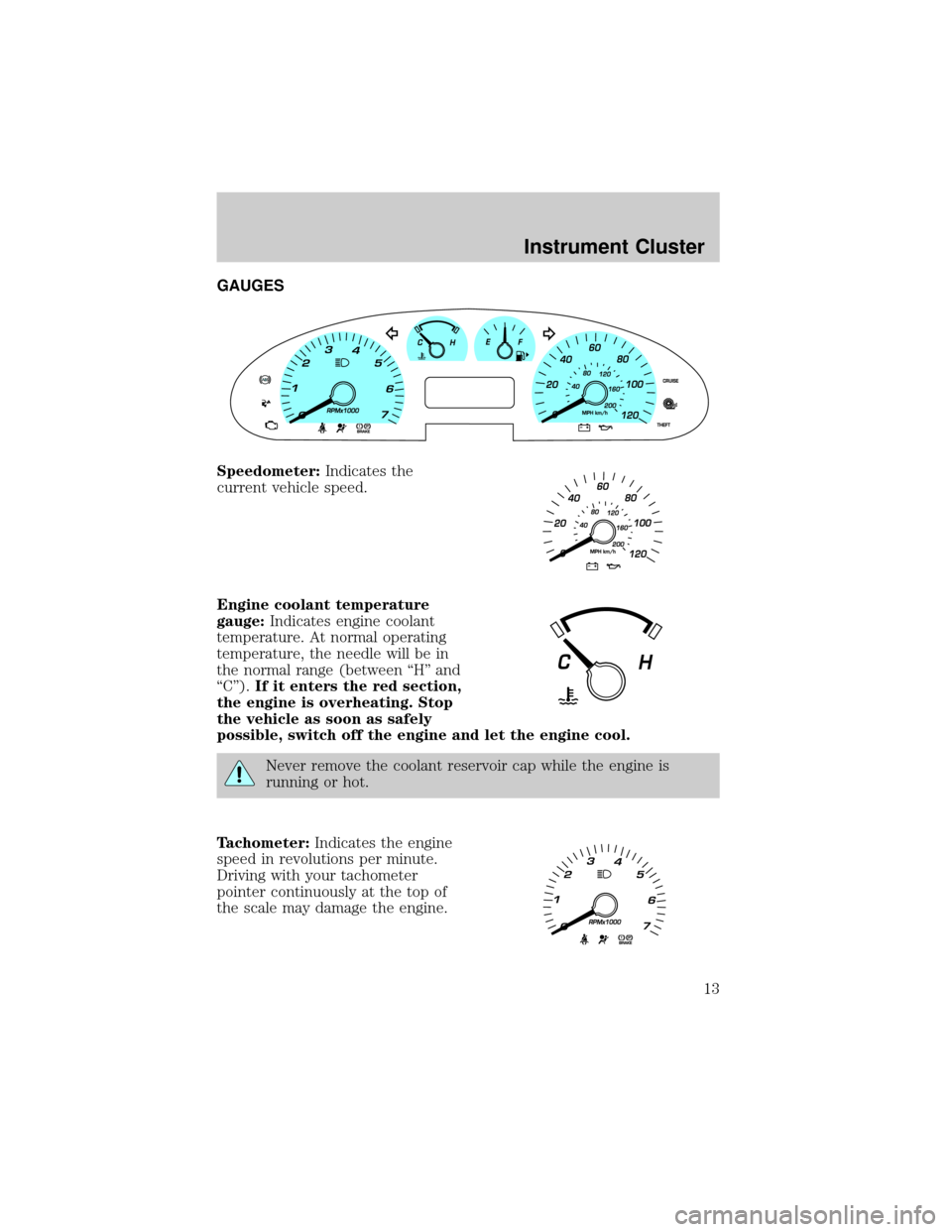
GAUGES
Speedometer:Indicates the
current vehicle speed.
Engine coolant temperature
gauge:Indicates engine coolant
temperature. At normal operating
temperature, the needle will be in
the normal range (between ªHº and
ªCº).If it enters the red section,
the engine is overheating. Stop
the vehicle as soon as safely
possible, switch off the engine and let the engine cool.
Never remove the coolant reservoir cap while the engine is
running or hot.
Tachometer:Indicates the engine
speed in revolutions per minute.
Driving with your tachometer
pointer continuously at the top of
the scale may damage the engine.
Instrument Cluster
13
Page 62 of 248
2. Start the engine.
3. Press and hold the INFO button for 2 seconds to select the
Compass/Odometer function. (Do not select Trip, DTE, or AFE. The top
of the message center must be blank).
Note:If the compass displays9CAL 000000.0 mi9instead of heading
information, the compass will need to be calibrated. Slowly drive the
vehicle in a circle (less than 3 mph [5 km/h]) until the9CAL9indicator
changes to display compass heading. This may take up to 3 circles to
complete calibration.
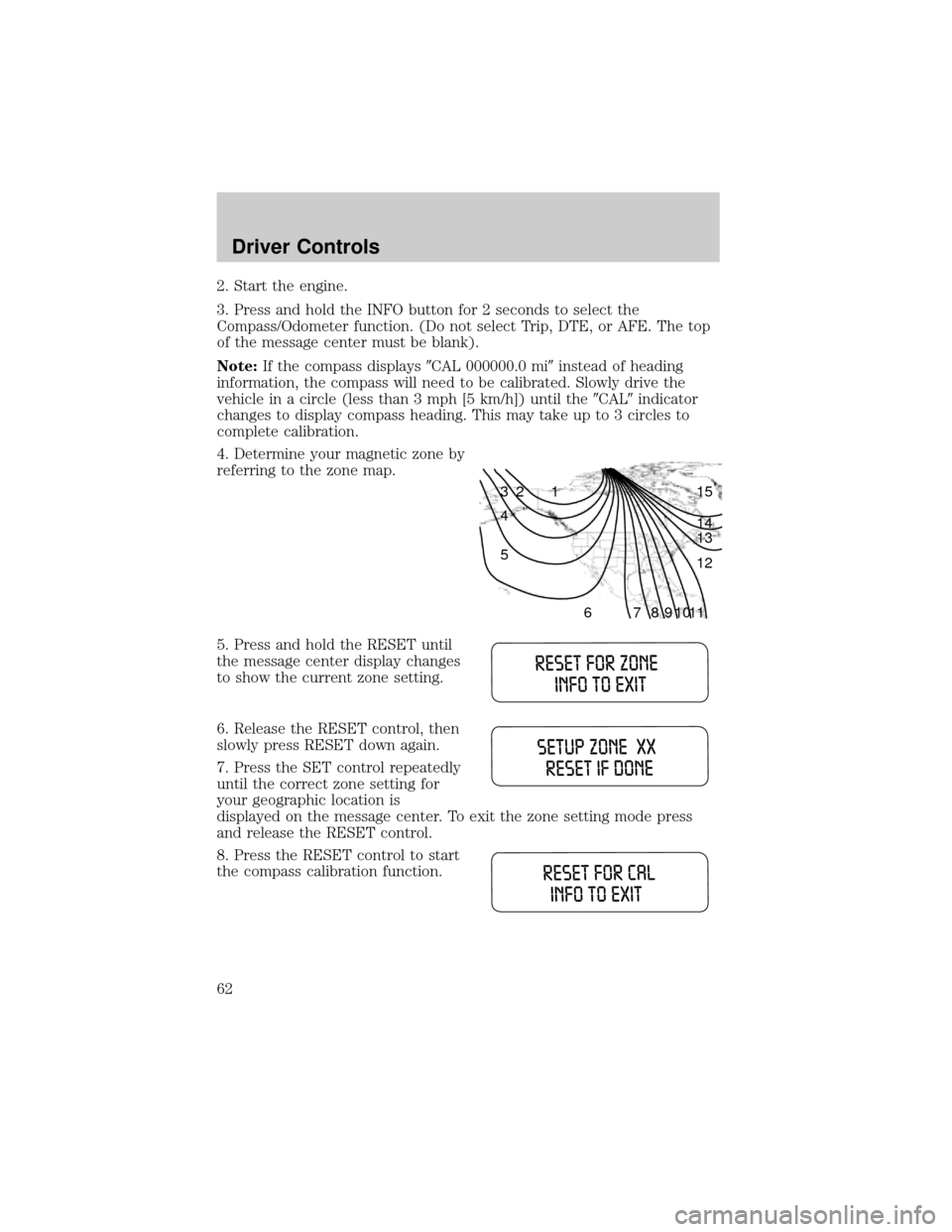
4. Determine your magnetic zone by
referring to the zone map.
5. Press and hold the RESET until
the message center display changes
to show the current zone setting.
6. Release the RESET control, then
slowly press RESET down again.
7. Press the SET control repeatedly
until the correct zone setting for
your geographic location is
displayed on the message center. To exit the zone setting mode press
and release the RESET control.
8. Press the RESET control to start
the compass calibration function.
1 2 3
4
5
6 7 8 9 101112 13 14 15
Driver Controls
62
Page 64 of 248
Units (English/Metric)
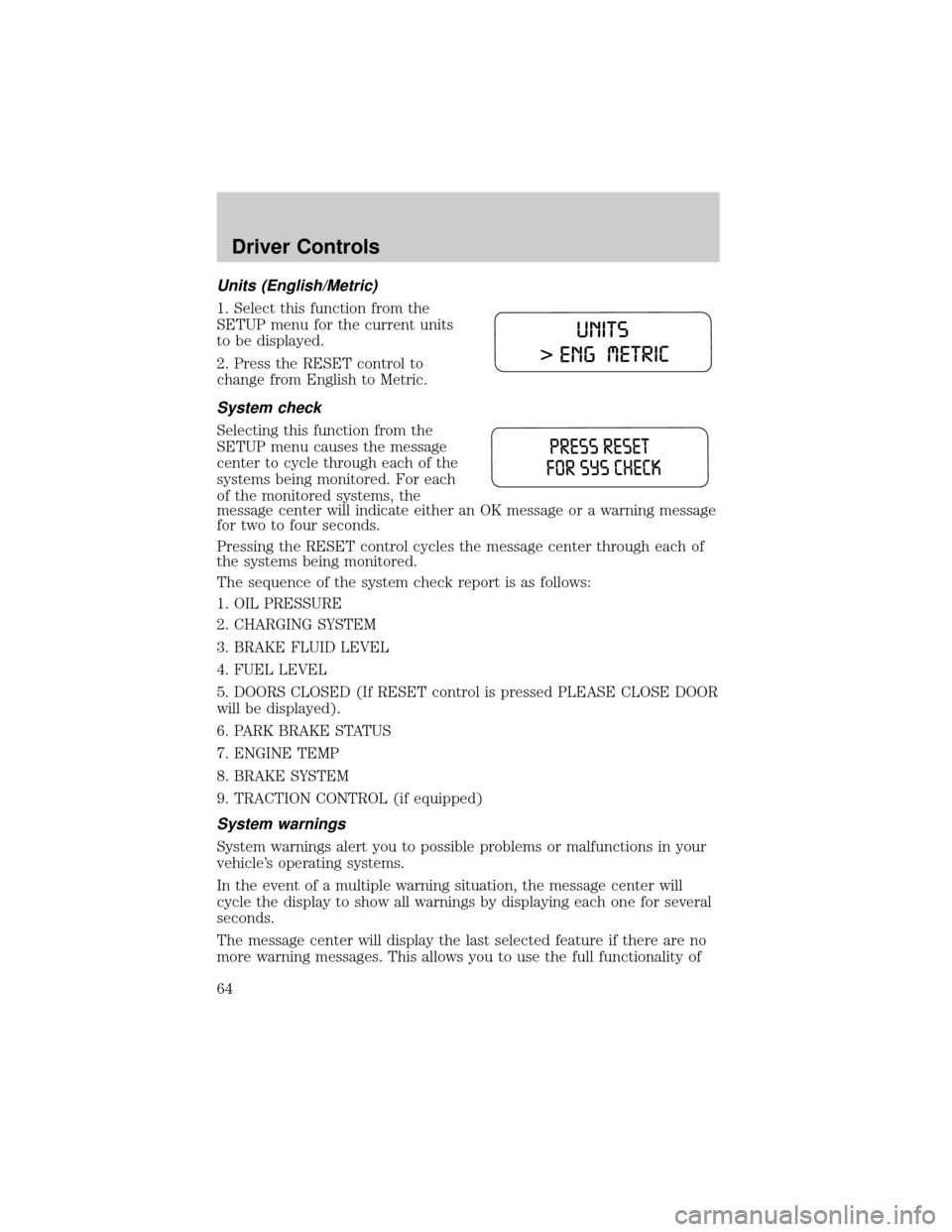
1. Select this function from the
SETUP menu for the current units
to be displayed.
2. Press the RESET control to
change from English to Metric.
System check
Selecting this function from the
SETUP menu causes the message
center to cycle through each of the
systems being monitored. For each
of the monitored systems, the
message center will indicate either an OK message or a warning message
for two to four seconds.
Pressing the RESET control cycles the message center through each of
the systems being monitored.
The sequence of the system check report is as follows:
1. OIL PRESSURE
2. CHARGING SYSTEM
3. BRAKE FLUID LEVEL
4. FUEL LEVEL
5. DOORS CLOSED (If RESET control is pressed PLEASE CLOSE DOOR
will be displayed).
6. PARK BRAKE STATUS
7. ENGINE TEMP
8. BRAKE SYSTEM
9. TRACTION CONTROL (if equipped)
System warnings
System warnings alert you to possible problems or malfunctions in your
vehicle's operating systems.
In the event of a multiple warning situation, the message center will
cycle the display to show all warnings by displaying each one for several
seconds.
The message center will display the last selected feature if there are no
more warning messages. This allows you to use the full functionality of
Driver Controls
64
Page 65 of 248

the message center after you acknowledge the warning by pressing the
RESET control and clearing the warning message.
Warning messages that have been reset are divided into three categories:
²They will not disappear until a condition is changed.
²They will reappear on the display ten minutes from the reset.
²They will not reappear until an ignition OFF-ON cycle has been
completed.
This acts as a reminder that these warning conditions still exist within
the vehicle.
Warnings Status
Driver's door ajar Warning cannot be reset (CLOSE
DOOR TO RESET) will be displayed
Passenger door ajar
Left rear door ajar
Right rear door ajar
Park brake engaged RELEASE PARK BRAKE will be
displayed
Check engine temp Warning returns after 10 minutes
Transmission overheated
Check transmission
Low fuel level
Check fuel cap
Check charging system
Oil pressure low
Check brake system
Low brake fluid Warning returns after the ignition key
is turned from OFF to RUN
Liftgate ajar (if equipped)
Check Traction Control (if
equipped)
Data error
DRIVER'S DOOR AJAR.Displayed when the driver's door is not
completely closed.
PASSENGER DOOR AJAR.Displayed when the passenger side door is
not completely closed.
LEFT REAR DOOR AJAR.Displayed when the left rear door is not
completely closed.
Driver Controls
65
Page 66 of 248

RIGHT REAR DOOR AJAR.Displayed when the right rear door is not
completely closed.
PARK BRAKE ENGAGED.Displayed when the park brake is engaged.
If the warning stays on after the park brake is off, contact your dealer as
soon as possible.
CHECK ENGINE TEMPERATURE.Displayed when the engine
coolant is overheating. Stop the vehicle as soon as safely possible, turn
off the engine and let it cool. Check the coolant and coolant level. Refer
toEngine coolantin theMaintenance and specificationschapter. If
the warning stays on or continues to come on, contact your dealer as
soon as possible.
TRANSMISSION OVERHEATED.Indicates the transmission is
overheating. This warning may appear when towing heavy loads or when
driving in a low gear at a high speed for an extended period of time.
Stop the vehicle as soon as safely possible, turn off the engine and let it
cool. Refer toTransmission fluidin theMaintenance and
specificationschapter. If the warning stays on or continues to come on,
contact your dealer for transmission service as soon as possible.
CHECK TRANSMISSION.Indicates the transmission is not operating
properly. If this warning stays on, contact your dealer as soon as
possible.
LOW FUEL LEVEL.Displayed as an early reminder of a low fuel
condition.
CHECK FUEL CAP.Displayed when the fuel filler cap is not properly
installed. Check the fuel filler cap for proper installation. Refer toFuel
filler capin theMaintenance and specificationschapter.
CHECK CHARGING SYSTEM.Displayed when the electrical system is
not maintaining proper voltage. If you are operating electrical accessories
when the engine is idling at a low speed, turn off as many of the
electrical loads as possible. If the warning stays on or comes on when the
engine is operating at normal speeds, have the electrical system checked
as soon as possible.
OIL PRESSURE LOW.Displayed when the engine oil level is low. If this
warning message is displayed, check the level of the engine oil. Refer to
Engine oilin theMaintenance and specificationschapter for
information about adding engine oil.
CHECK BRAKE SYSTEM.Displayed when the brake system needs
servicing. If the warning stays on or continues to come on, contact your
dealer as soon as possible.
Driver Controls
66
Page 67 of 248

LOW BRAKE FLUID.Indicates the brake fluid level is low and the
brake system should be inspected immediately. Refer toChecking and
adding brake fluidin theMaintenance and specificationschapter.
LIFTGATE AJAR (if equipped).Displayed when the liftgate is not
completely closed.
CHECK TRACTION CONTROL (if equipped).Displayed when the
Traction Controlysystem is not operating properly. If this warning stays
on, contact your dealer for service as soon as possible. For further
information, refer toTraction controlyin theDrivingchapter.
DATA ERR.These messages indicate improper operation of the vehicle
network communication between electronic modules.
²Fuel computer
²Charging system
²Coolant system
²Traction control (if equipped)
²Door sensor
²Brake fluid
²Compass (if equipped)
²Outside temperature (if equipped)
²Engine sensor
²Transmission sensor
²Fuel cap sensor
²Seat belt sensor
²Park brake
²Oil pressure sensor
Contact your dealer as soon as possible if these messages occur on a
regular basis.
CENTER CONSOLE
Your vehicle may be equipped with a variety of console features. These
include:
²Utility compartment
²Bin mat (snap-in)
²Cupholders (front and rear)
Driver Controls
67
Page 82 of 248

2. Press and release the 1²2 within five seconds of completing Step 1.
3. Press and hold the 1²2 for two seconds to erase the customer
programmed codes.
All personal codes are now erased and only the factory set 5±digit code
will work.
Note:To exit programming mode, either wait 5 seconds after pressing 1
²2 on the keypad, or press the 7²8 and 9²0 pads simultaneously to
lock all vehicle doors and end programming mode.
Unlocking and locking the doors using keyless entry
To unlock the driver's door,enter the factory set 5-digit code or your
personal code. Each number must be pressed within five seconds of each
other. The interior lamps will illuminate.
To unlock all doors and the liftgate (wagon),enter the factory set
code or your personal code, then press the 3²4 control within five
seconds.
To unlock the trunk or unlock the liftgate (wagon),enter the
factory set code or your personal code, then press the 5²6 control
within five seconds.
To lock all doors,press the 7²8 and the 9²0 at the same time. You
do notneed to enter the keypad code first.
Autolock (if equipped)
This feature automatically locks all vehicle doors when the following
conditions are met:
²all the doors are closed,
²the engine is running,
²you shift into gear, putting the vehicle in motion, and.
²the vehicle's speed is greater than 3 mph (5 km/h).
Relock
The autolock feature repeats when the following conditions are met:
²any door is opened then closed while the engine is running, and
²you shift into gear, putting the vehicle in motion, and
²the vehicle's speed is greater than 3 mph (5 km/h).
To deactivate/reactivate the autolock feature using the power door
unlock control
You must complete Steps 1-7 within 30 seconds or the procedure will
have to be repeated. If the procedure needs to be repeated, you must
wait 30 seconds.
Locks and Security
82
Page 83 of 248

1. Turn the ignition key to the 4 (ON) position.
2. Press the power door unlock control three times.
3. Turn the ignition key from the 4 (ON) to the 3 (OFF) position.
4. Press the power door unlock control three times.
5. Turn the ignition back to the 4 (ON) position. The horn will chirp.
6. Press the unlock control, then press the lock control.Note:The horn
will chirp twice if autolock was deactivated or chirp twice then honk
(two short and one long chirp) if autolock was activated.
7. Press the power door unlock control and then the lock control again
in order to toggle the autolock/relock states.
8. Turn the ignition to the 3 (OFF) position. The horn will chirp once to
confirm the procedure is complete.
SECURILOCKYPASSIVE ANTI-THEFT SYSTEM
SecuriLockypassive anti-theft system is an engine immobilization
system. This system is designed to prevent the engine from being started
unless acoded key programmed to your vehicleis used. The use of
the wrong type of coded key may lead to a ªno-startº condition.
Your vehicle comes with two coded keys; additional coded keys may be
purchased from your dealer. The dealer can program your spare keys to
your vehicle or you can program the keys yourself. Refer to
Programming spare keysfor instructions on how to program the coded
key.
Note:The SecuriLockypassive anti-theft system is not compatible with
non-Ford aftermarket remote start systems. Use of these systems may
result in vehicle starting problems and a loss of security protection.
Note:Large metallic objects, electronic devices that are used to
purchase gasoline or similar items, or a second coded key on the same
key chain may cause vehicle starting issues. You need to prevent these
objects from touching the coded key while starting the engine. These
objects will not cause damage to the coded key, but may cause a
momentary issue if they are too close to the key when starting the
engine. If a problem occurs, turn the ignition off, remove all objects on
the key chain away from the coded key and restart the engine.
Theft indicator
The theft indicator is located in the instrument cluster.
²When the ignition is in the 2 (LOCK) position, the indicator will flash
once every 2 seconds to indicate the SecuriLockysystem is
functioning as a theft deterrent.
Locks and Security
83