2005 FORD FREESTAR door lock
[x] Cancel search: door lockPage 99 of 312

If there is any potential remote keyless entry problem with your vehicle,
ensureALL remote entry transmittersare taken to your authorized
dealer to aid in troubleshooting.
Unlocking the doors
1. Pressand release to unlock the driver’s door.Note:The interior
lamps will illuminate and the anti-theft system (if equipped) will disarm.
2. Press
and release again within three seconds to unlock all doors
and the liftgate.
Opening/closing power sliding doors (if equipped)
•5–button remote
•6–button remote
•Press this control twice within three seconds to open the power
sliding door. The interior lamps will illuminate.
•Press this control another two times within three seconds to close the
power sliding door and turn off the interior lights.
REVIEW COPY
2005 Freestar(win), Owners Guide (post-2002-fmt)(own2002),
Market:USA_English(fus)
Locks and Security
99
Page 100 of 312

Opening power liftgate (PLG) (if equipped)
Press the control twice within three seconds to power open the power
liftgate. The interior lamps will illuminate.
Make sure all persons are
clear of the power liftgate
area before using the power
liftgate controls to open or close
the liftgate.
Press the control another two times
within three seconds to close the
power liftgate and turn off the
interior lights.
If anything obstructs the power liftgate while it is power opening or
closing, the power liftgate will automatically reverse or stop depending
on the position of the liftgate, provided it meets sufficient resistance. If
the power liftgate encounters an obstacle while closing, the power
liftgate will reverse to full open. Once the obstacle is removed, the power
liftgate can be again closed under power. If the power liftgate encounters
an obstacle while opening, the power liftgate will stop when it
encounters a solid obstacle. Close the liftgate manually and remove the
obstruction. Normal operation can then be resumed.
Make sure the power liftgate is closed to prevent exhaust fumes
from being drawn into the vehicle. If you must drive with the
liftgate open, keep the climate control vents open so that fresh outside
air circulates through the vehicle.
For more information regarding the operation of the power liftgate, refer
toPower liftgate (PLG) (if equipped)in theDriver Controlschapter.
Locking the doors
1. Pressand release to lock all the doors and liftgate. The parking
lamps will flash once if all doors, the liftgate and the hood (if equipped
with perimeter alarm) are closed and locked.
2. Press
and release again within three seconds to confirm that all the
doors and liftgate are closed and locked.Note:The doors will lock again,
the horn will chirp once, and the parking lamps will flash once more.
If any of the doors, the liftgate or the hood (if equipped with perimeter
alarm) are not properly closed, the horn will make two quick chirps.
REVIEW COPY
2005 Freestar(win), Owners Guide (post-2002-fmt)(own2002),
Market:USA_English(fus)
Locks and Security
100
Page 102 of 312
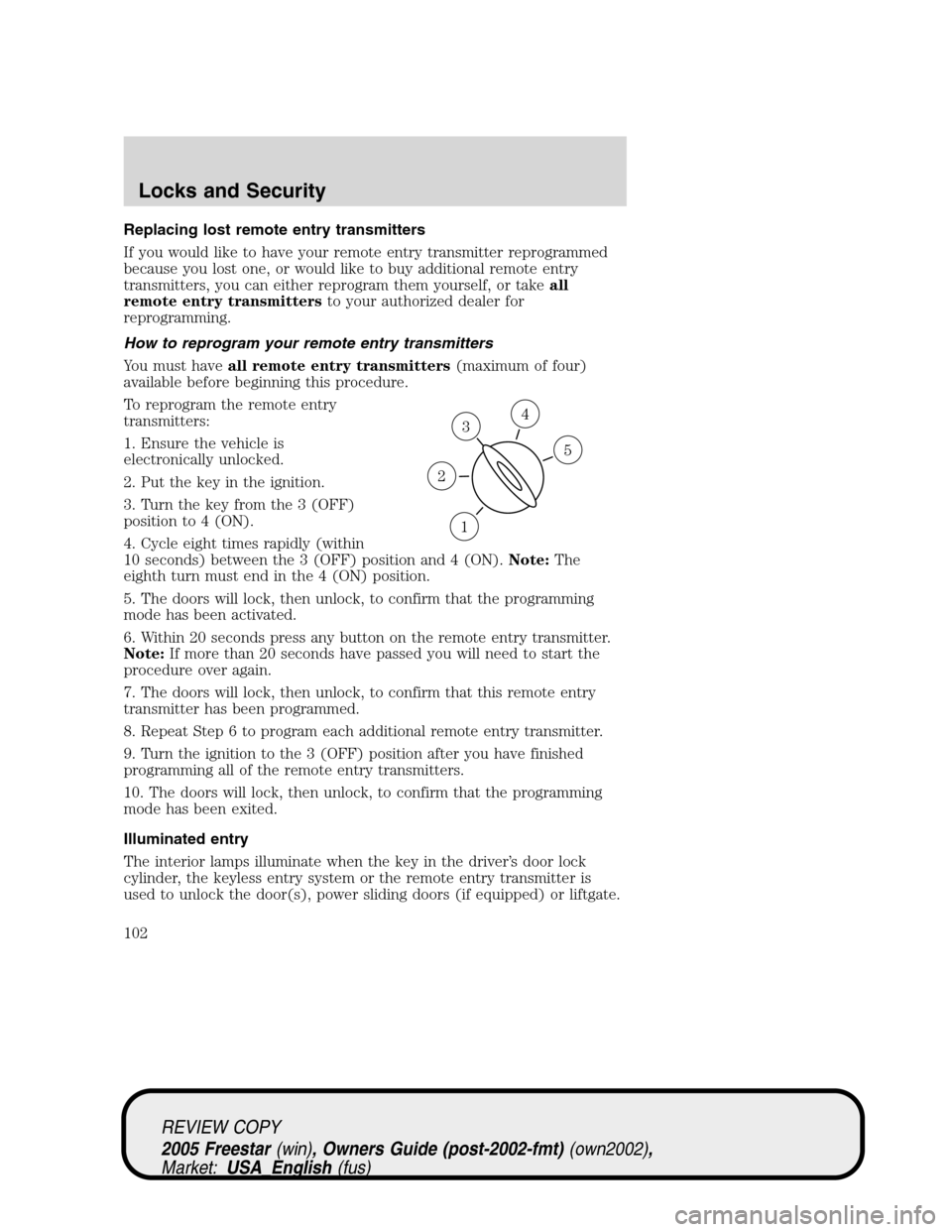
Replacing lost remote entry transmitters
If you would like to have your remote entry transmitter reprogrammed
because you lost one, or would like to buy additional remote entry
transmitters, you can either reprogram them yourself, or takeall
remote entry transmittersto your authorized dealer for
reprogramming.
How to reprogram your remote entry transmitters
You must haveall remote entry transmitters(maximum of four)
available before beginning this procedure.
To reprogram the remote entry
transmitters:
1. Ensure the vehicle is
electronically unlocked.
2. Put the key in the ignition.
3. Turn the key from the 3 (OFF)
position to 4 (ON).
4. Cycle eight times rapidly (within
10 seconds) between the 3 (OFF) position and 4 (ON).Note:The
eighth turn must end in the 4 (ON) position.
5. The doors will lock, then unlock, to confirm that the programming
mode has been activated.
6. Within 20 seconds press any button on the remote entry transmitter.
Note:If more than 20 seconds have passed you will need to start the
procedure over again.
7. The doors will lock, then unlock, to confirm that this remote entry
transmitter has been programmed.
8. Repeat Step 6 to program each additional remote entry transmitter.
9. Turn the ignition to the 3 (OFF) position after you have finished
programming all of the remote entry transmitters.
10. The doors will lock, then unlock, to confirm that the programming
mode has been exited.
Illuminated entry
The interior lamps illuminate when the key in the driver’s door lock
cylinder, the keyless entry system or the remote entry transmitter is
used to unlock the door(s), power sliding doors (if equipped) or liftgate.
3
1
2
5
4
REVIEW COPY
2005 Freestar(win), Owners Guide (post-2002-fmt)(own2002),
Market:USA_English(fus)
Locks and Security
102
Page 103 of 312

The illuminated entry system will turn off the interior lights if:
•the ignition switch is turned to the 4 (ON) position, or
•the keyless entry system or the remote entry transmitter lock control
is pressed, or
•after 25 seconds of illumination.
The panel dimmer control mustnotbe set to the off position for the
illuminated entry system to operate.
The inside lights will not turn off if:
•they have been turned on with the panel dimmer control, or
•any door, power sliding door (if equipped) or the liftgate is open.
The battery saver will shut off the interior lamps 30 minutes after the
last door is closed, even if the panel dimmer control is left on.
Illuminated exit
•The interior lights will illuminate when the key is removed from the
ignition.
•When the headlamp control is on the“sleeping baby mode”, only the
lower interior lights will illuminate.
The system automatically turns off after 25 seconds. The panel dimmer
control mustnotbe set to the off position for the illuminated exit to
operate.
Perimeter lamps illuminated entry (if equipped)
The exterior lamps illuminate when the vehicle is unlocked using the
remote entry transmitter, keyless keypad, or the driver’s door key lock
cylinder. The following items will illuminate:
•Puddle lamps
•Head lamps
•Park lamps
•Tail lamps
The system will automatically turn off if:
•the vehicle is locked using the remote entry system, the keyless entry
keypad or a key in the driver’s door key cylinder, or
•the ignition is turned to the 4 (ON) position, or
•after 25 seconds of illumination.
Deactivating/activating perimeter lamps
You may enable/disable this feature by having your vehicle serviced by
your authorized dealer.
REVIEW COPY
2005 Freestar(win), Owners Guide (post-2002-fmt)(own2002),
Market:USA_English(fus)
Locks and Security
103
Page 104 of 312

You may also perform the following power door lock sequence to
enable/disable the perimeter lamps feature:
1. Turn the ignition to the 4 (ON) position, then press the power door
unlock control 3 times.
2. Turn the ignition to the 3 (OFF) position, then press the power door
unlock control 3 times.
3. Turn the ignition to 4 (ON) position. Completing the sequence within
30 seconds enters a program mode and is confirmed by a horn chirp.
Activating or deactivating perimeter lighting once in program mode is
accomplished by:
•Pressing the power door unlock control twice within five seconds. At
this point, perimeter lighting will be activated if it was previously
deactivated, and deactivated if it was previously activated.
Confirmation of perimeter lighting being activated is provided by a
short horn chirp followed by a long horn sound; Confirmation of
perimeter lighting being deactivated is provided by a short horn chirp
only.
•Exiting the program mode is accomplished by turning the ignition to
any position other than the 4 (ON) position, or two minutes elapsing
since the program mode was entered.
Note:The puddle lamps cannot be deactivated. Performing this
deactivation procedure will only deactivate the head, park and tail lamps.
Autolock
This feature automatically locks all vehicle doors when:
•all doors are closed,
•the ignition is in the 4 (ON) position,
•the brake is pressed before reaching 5 km/h (3 mph), and
•the vehicle is traveling more than 5 km/h (3 mph).
Relock
The autolock feature repeats when:
•an“autolock”occurrence has already taken place,
•
the brake is depressed while vehicle speed is less than 5 km/h (3 mph),
•all vehicle doors become closed again, and
•the vehicle speed increases to 5 km/h (3 mph), or greater.
Deactivating/activating the autolock feature
The deactivating/activating the autolock feature can be turned off by the
keyless entry keypad (if equipped) on your door, driver configuration
mode or by your dealer.
REVIEW COPY
2005 Freestar(win), Owners Guide (post-2002-fmt)(own2002),
Market:USA_English(fus)
Locks and Security
104
Page 105 of 312

Memory feature (if equipped)
The remote entry system allows you to recall the memory seat/side view
mirrors/adjustable pedals feature.
Press
to automatically move the driver seat, side view mirrors and
adjustable pedals to the desired memory position.
Associating the remote transmitter with the memory feature
To activate this feature:
1. Position the driver’s seat, side view mirrors and adjustable pedals to
the positions you desire.
2. Press the SET control on the
door next to the window inside from
the mirror.
3. Within 5 five seconds, press any
control on the remote transmitter
and then press the 1 or 2 control on
the driver’s door panel to associate
with the Driver 1 or Driver 2
positions.
4. Repeat this procedure for another
remote transmitter if desired.
Disassociating the memory feature from the remote transmitter
To deactivate this feature:
1. Press the SET control on the driver’s door panel.
2. Within 5 five seconds, press any control on the remote transmitter
which you would like to deactivate and then press the SET control on
the driver’s door panel again.
3. Repeat this procedure for another remote transmitter if desired.
KEYLESS ENTRY SYSTEM (IF EQUIPPED)
You can use the keyless entry
keypad to:
•lock or unlock the doors without
using a key.
•activate or deactivate the
autolock feature.
•open and close the right and left power sliding doors (if equipped).
REVIEW COPY
2005 Freestar(win), Owners Guide (post-2002-fmt)(own2002),
Market:USA_English(fus)
Locks and Security
105
Page 106 of 312

•recall memory seat/side view mirrors/adjustable pedals position Driver
1 or Driver 2 (if equipped).
The keypad can be operated with the factory set 5–digit entry code; this
code is located:
•on the owner’s wallet card in the glove box,
•marked on the passenger compartment fuse panel (located below and
to the left of the steering, near the brake pedal),
•and is available from your
authorized dealer.
You can also create your own 5–digit
personal entry code.
When pressing the controls on the
keypad, press the middle of the
controls to ensure a good activation.
Programming a personal entry
code
To create your own personal entry code(s):
1. Enter the factory set code.Note:The driver’s door will unlock.
2. Within five seconds press and release the 1•2 on the keypad.Note:
The lock motors will cycle, locked then unlocked.
3. Enter your personal 5-digit code. Each number must be entered
within five seconds of each other.
4. Enter a sixth digit if you wish to have the personal entry code recall
memory position Driver 1 or Driver 2 (if equipped with the memory
seat/side view mirrors/adjustable pedals feature).Note:The lock motors
will cycle, locked then unlocked.
•Press 1•2 to recall the Driver 1 position.
•Press 3•4 to recall the Driver 2 position.
5. After five seconds of keypad inactivity, programming mode is exited.
All of the vehicle doors will lock and unlock to confirm the code has
been stored. Each memory feature driver position (Driver 1 or Driver 2)
can be associated with only one personal code. The factory-set code
cannot be associated with a memory recall position.
You can program up to three personal codes; these codes do not replace
the factory-set code.
REVIEW COPY
2005 Freestar(win), Owners Guide (post-2002-fmt)(own2002),
Market:USA_English(fus)
Locks and Security
106
Page 107 of 312

Tips for setting codes:
•The factory set code cannot be erased or changed.
•The factory code will work even after you have set your own personal
codes.
•Do not set a code that uses five of the same number.
•Do not use five numbers in sequential order.
Erasing personal code
1. Enter the factory set 5–digit code.
2. Within five seconds of entering the factory code, press and release the
1•2 control. The door locks will lock and quickly unlock to confirm
entry into the programming mode.
3. Within five seconds of Step 2, press and hold the 1•2 for two
seconds to erase the customer programmed code.
The programming mode is exited after five seconds of keypad inactivity.
The door locks will lock and quickly unlock to confirm programming
mode has been exited.
The personal code is now erased and only the factory set 5–digit code
will work.
Unlocking and locking the doors using keyless entry
To unlock the driver’s door,enter the factory set 5-digit code or your
personal code. Each number must be pressed within five seconds of each
other. The keyless entry keypad will illuminate after pressing the first
control on the keypad.
To unlock all doors,press the 3•4 control within five seconds.
To lock all doors,press the 7•8 and the 9•0 at the same time. You
do notneed to enter the keypad code first.Note:The interior lamps
will turn off.
To open (or close) the power sliding doors (if equipped),press the
5•6 control within five seconds to open (or close) the left power
sliding door or the 9•0 control in order to open (or close) the right
power sliding door.
Autolock
This feature automatically locks all vehicle doors when:
•all doors are closed,
REVIEW COPY
2005 Freestar(win), Owners Guide (post-2002-fmt)(own2002),
Market:USA_English(fus)
Locks and Security
107