Page 129 of 368
Retain the original transmitter for use in other vehicles as well as for
future programming procedures (i.e. new HomeLink�equipped vehicle
purchase). It is also suggested that upon the sale of the vehicle, the
programmed Homelink�buttons be erased for security purposes, refer to
Programmingin this section.
Programming
Do not program HomeLink�with the vehicle parked in the garage.
Note:Your vehicle may require the ignition switch to be turned to the
ACC position for programming and/or operation of the HomeLink�.Itis
also recommended that a new battery be placed in the hand-held
transmitter of the device being programmed to HomeLink�for quicker
training and accurate transmission of the radio-frequency signal.
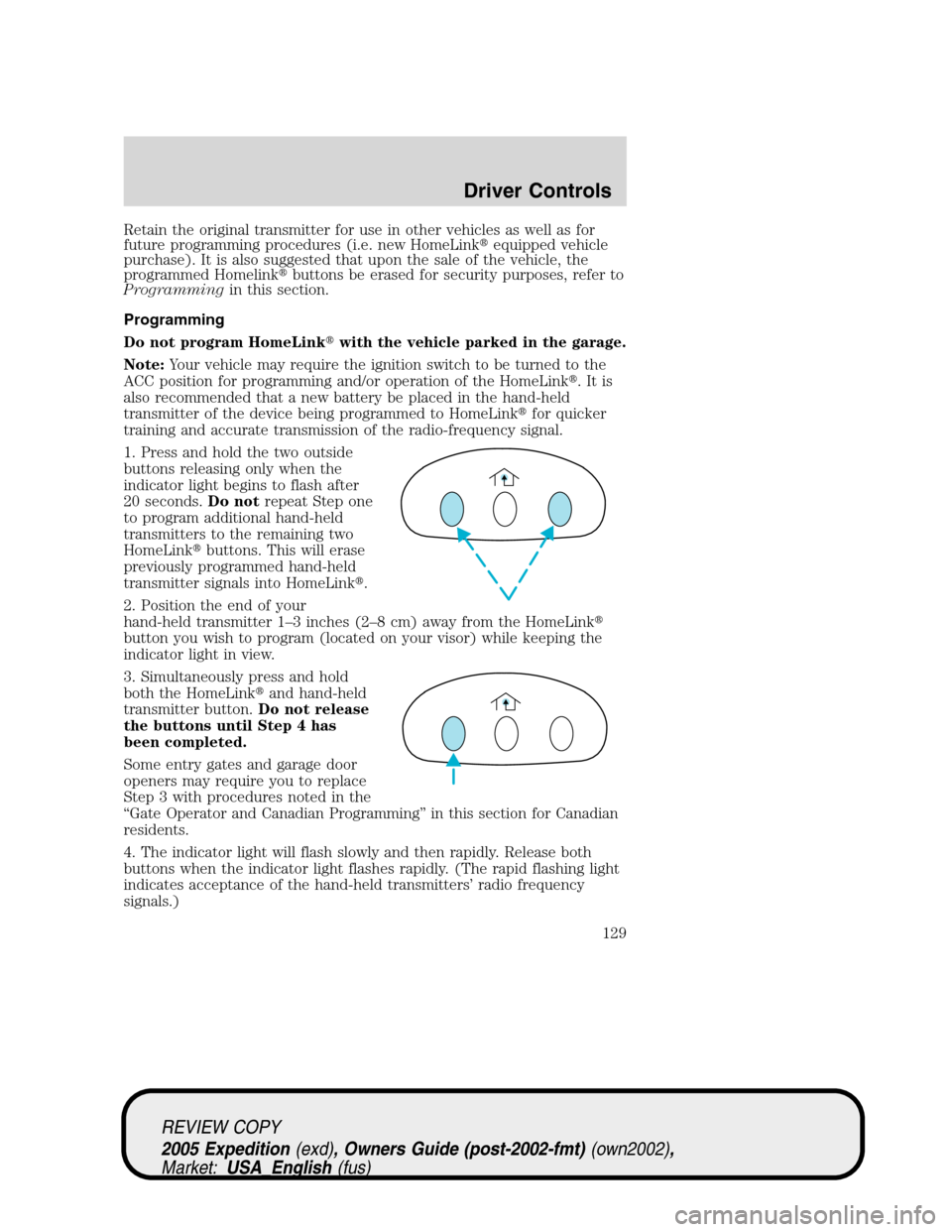
1. Press and hold the two outside
buttons releasing only when the
indicator light begins to flash after
20 seconds.Do notrepeat Step one
to program additional hand-held
transmitters to the remaining two
HomeLink�buttons. This will erase
previously programmed hand-held
transmitter signals into HomeLink�.
2. Position the end of your
hand-held transmitter 1–3 inches (2–8 cm) away from the HomeLink�
button you wish to program (located on your visor) while keeping the
indicator light in view.
3. Simultaneously press and hold
both the HomeLink�and hand-held
transmitter button.Do not release
the buttons until Step 4 has
been completed.
Some entry gates and garage door
openers may require you to replace
Step 3 with procedures noted in the
“Gate Operator and Canadian Programming” in this section for Canadian
residents.
4. The indicator light will flash slowly and then rapidly. Release both
buttons when the indicator light flashes rapidly. (The rapid flashing light
indicates acceptance of the hand-held transmitters’ radio frequency
signals.)
REVIEW COPY
2005 Expedition(exd), Owners Guide (post-2002-fmt)(own2002),
Market:USA_English(fus)
Driver Controls
129
Page 131 of 368
seconds(“cycle”) your hand-held transmitter until the frequency
signal has been accepted by the HomeLink�. The indicator light will
flash slowly and then rapidly after HomeLink�accepts the radio
frequency signal.
•Proceed with Step 4 in the “Programming” section.
Operating the HomeLink�Wireless Control System
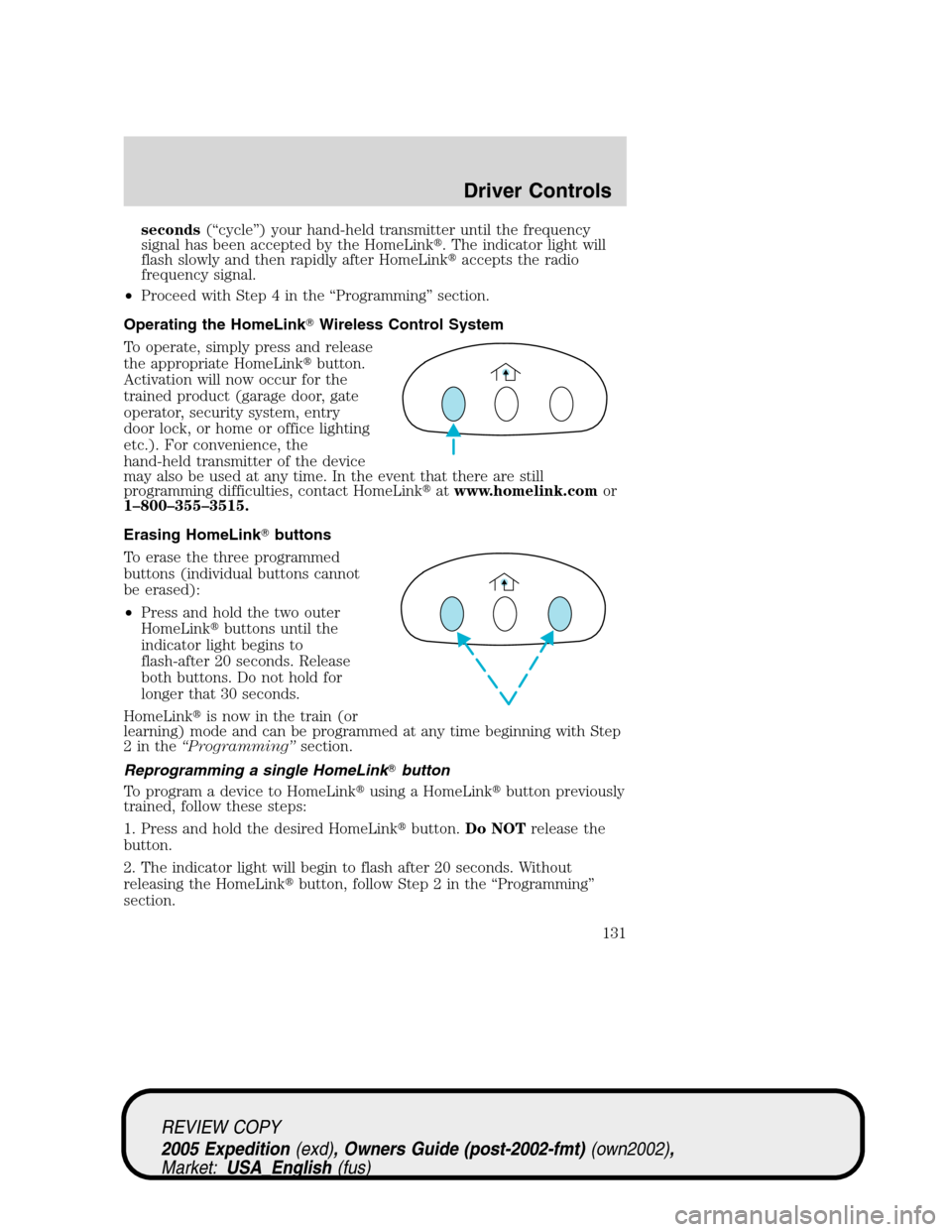
To operate, simply press and release
the appropriate HomeLink�button.
Activation will now occur for the
trained product (garage door, gate
operator, security system, entry
door lock, or home or office lighting
etc.). For convenience, the
hand-held transmitter of the device
may also be used at any time. In the event that there are still
programming difficulties, contact HomeLink�atwww.homelink.comor
1–800–355–3515.
Erasing HomeLink�buttons
To erase the three programmed
buttons (individual buttons cannot
be erased):
•Press and hold the two outer
HomeLink�buttons until the
indicator light begins to
flash-after 20 seconds. Release
both buttons. Do not hold for
longer that 30 seconds.
HomeLink�is now in the train (or
learning) mode and can be programmed at any time beginning with Step
2inthe“Programming”section.
Reprogramming a single HomeLink�button
To program a device to HomeLink�using a HomeLink�button previously
trained, follow these steps:
1. Press and hold the desired HomeLink�button.Do NOTrelease the
button.
2. The indicator light will begin to flash after 20 seconds. Without
releasing the HomeLink�button, follow Step 2 in the “Programming”
section.
REVIEW COPY
2005 Expedition(exd), Owners Guide (post-2002-fmt)(own2002),
Market:USA_English(fus)
Driver Controls
131
Page 145 of 368
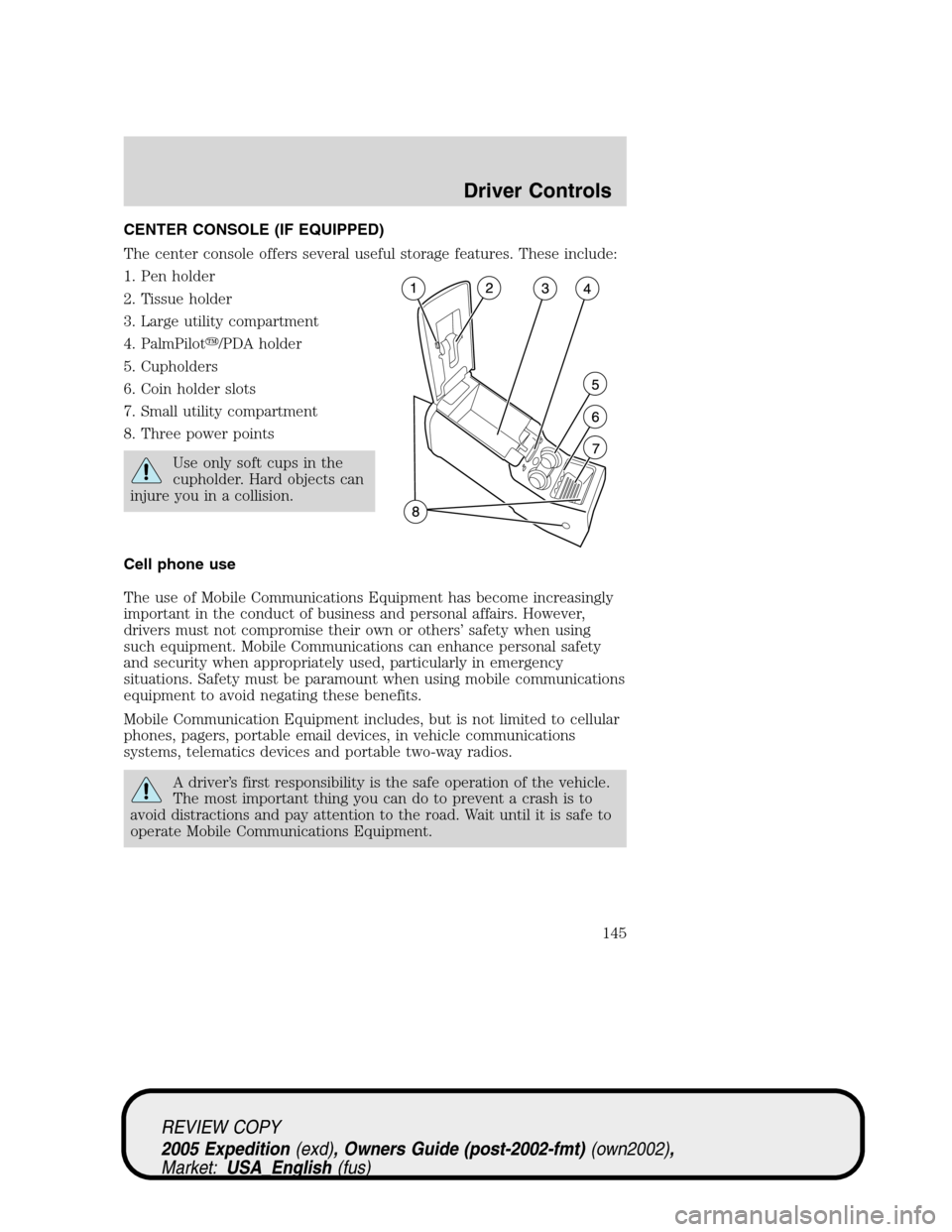
CENTER CONSOLE (IF EQUIPPED)
The center console offers several useful storage features. These include:
1. Pen holder
2. Tissue holder
3. Large utility compartment
4. PalmPilot�/PDA holder
5. Cupholders
6. Coin holder slots
7. Small utility compartment
8. Three power points
Use only soft cups in the
cupholder. Hard objects can
injure you in a collision.
Cell phone use
The use of Mobile Communications Equipment has become increasingly
important in the conduct of business and personal affairs. However,
drivers must not compromise their own or others’ safety when using
such equipment. Mobile Communications can enhance personal safety
and security when appropriately used, particularly in emergency
situations. Safety must be paramount when using mobile communications
equipment to avoid negating these benefits.
Mobile Communication Equipment includes, but is not limited to cellular
phones, pagers, portable email devices, in vehicle communications
systems, telematics devices and portable two-way radios.
A driver’s first responsibility is the safe operation of the vehicle.
The most important thing you can do to prevent a crash is to
avoid distractions and pay attention to the road. Wait until it is safe to
operate Mobile Communications Equipment.
REVIEW COPY
2005 Expedition(exd), Owners Guide (post-2002-fmt)(own2002),
Market:USA_English(fus)
Driver Controls
145
Page 291 of 368
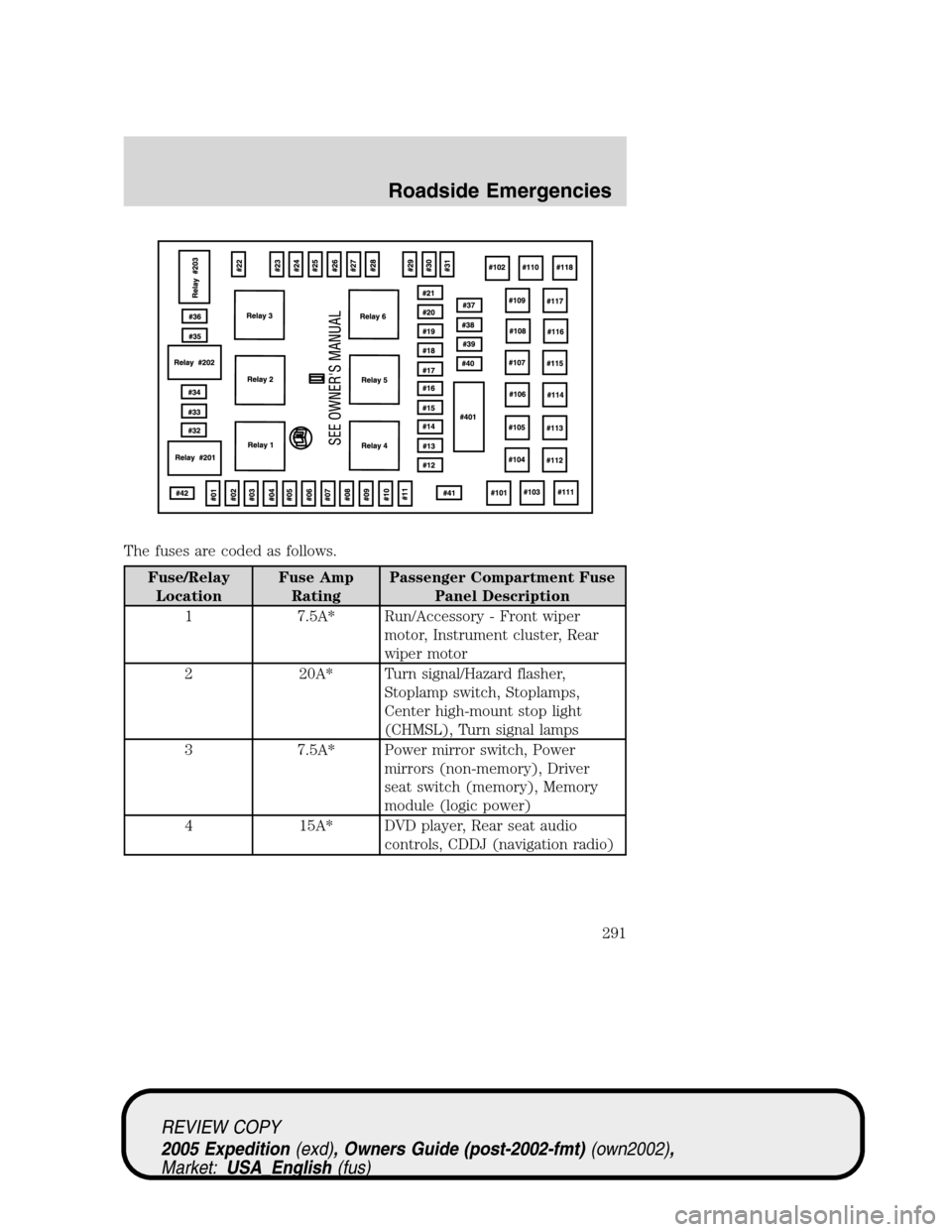
The fuses are coded as follows.
Fuse/Relay
LocationFuse Amp
RatingPassenger Compartment Fuse
Panel Description
1 7.5A* Run/Accessory - Front wiper
motor, Instrument cluster, Rear
wiper motor
2 20A* Turn signal/Hazard flasher,
Stoplamp switch, Stoplamps,
Center high-mount stop light
(CHMSL), Turn signal lamps
3 7.5A* Power mirror switch, Power
mirrors (non-memory), Driver
seat switch (memory), Memory
module (logic power)
4 15A* DVD player, Rear seat audio
controls, CDDJ (navigation radio)
REVIEW COPY
2005 Expedition(exd), Owners Guide (post-2002-fmt)(own2002),
Market:USA_English(fus)
Roadside Emergencies
291
Page 366 of 368

Parts (see Motorcraft parts) ....350
Pedals (see Power adjustable
foot pedals) ...............................123
Power adjustable foot pedals ...123
Power distribution box
(see Fuses) ...............................290
Power door locks ......................148
Power mirrors ...........................121
Power point ...............................118
Power steering ..........................262
fluid, checking and adding ....345
fluid, refill capacity ................351
fluid, specifications .........353, 356
Power Windows .........................120
Preparing to drive
your vehicle ...............................264
R
Radio ................................18, 28, 33
Rear window defroster .............101
Relays ........................................288
Remote entry system .......149, 151
illuminated entry ....................154
locking/unlocking doors .........150
opening the trunk ...................150
panic alarm .............................151
replacement/additional
transmitters .............................153
Reverse sensing system ...........272
Roadside assistance ..................286
S
Safety Belt Maintenance ..........189
Safety belts (see
Safety restraints) ......176, 179–183Safety Canopy ...........................194
Safety defects, reporting ..........314
Safety restraints ........176, 179–183
belt minder .............................185
extension assembly ................188
for adults .........................180–182
for children .....................197–198
lap belt ....................................183
safety belt maintenance .........189
warning light and
chime ...............................184–185
Safety seats for children ..........201
Seat belts (see
Safety restraints) ......................176
Seats ..........................................161
child safety seats ....................201
memory seat ...................151, 165
SecuriLock passive
anti-theft system ...............157–159
Servicing your vehicle ..............321
Setting the clock
AM/FM/In-dash 6 CD ................35
Snowplowing .................................7
Spare tire (see
Changing the Tire) ...................221
Spark plugs, specifications ......350,
356
Special notice
utility-type vehicles ....................7
Specification chart,
lubricants ...........................353, 356
Speed control ............................123
Starting your vehicle ........255–257
jump starting ..........................298
Steering wheel
controls ....................................126
tilting .......................................116
REVIEW COPY
2005 Expedition(exd), Owners Guide (post-2002-fmt)(own2002),
Market:USA_English(fus)
Index
366
Page:
< prev 1-8 9-16 17-24