Page 23 of 280

FIND Program type:Allows you to search RDS-equipped stations for a
certain category of music format: Classic, Country, Info, Jazz, Oldies,
R&B, Religious, Rock, Soft, Top 40.
Show TYPE:Displays the station’s call letters and format.
Compression:In CD mode, press to bring soft and loud CD passages
together for a more consistent listening level.
Setting the clock:Press MENU until SELECT HOUR or SELECT MINS
is displayed. Use SEL to manually increase (
) or decrease () the
hours/minutes. Press MENU again to disengage clock mode.
10.Memory presets:To set a
station: Select frequency band
AM/FM; tune to a station, press and
hold a preset button until sound
returns. In CD mode, press to move between CDs.
This radio is equipped with six station memory preset controls which
allow you to set up to six AM stations and 12 FM stations (six in FM1
and six in FM2).
11.CD:Press to select CD mode.
Seamless play:In CD mode, the
transition between the end of one
CD and the beginning of another will not contain delay time unless SEEK
or a preset control is pressed.
12.AM/FM:Press to select a
frequency band in radio mode.
Autoset:Allows you to set the
strongest local radio stations without losing your original manually set
preset stations for AM/FM1/FM2 . Press and momentarily hold AM/FM.
AUTOSET will flash on the display. When the six strongest stations are
filled, the station stored in preset 1 will begin playing. If there are less
than six strong stations, the system will store the last one in the
remaining presets. Press again to disengage.
13.Power/volume:Press to turn
ON/OFF; turn to increase or
decrease volume levels.
REVIEW COPY
2005 U137 Excursion(hdw), Owners Guide (post-2002-fmt)(own2002),
Market:USA_English(fus)
Entertainment Systems
23
Page 52 of 280
3. Turn on the low beam headlamps to illuminate the wall or screen and
open the hood. Cover one of the headlamps so no light hits the wall.
4. On the wall or screen you will
observe a light pattern with a
distinct horizontal edge towards the
right. If this edge is not at the
horizontal reference line, the beam will need to be adjusted so the edge
is at the same height as the horizontal reference line.
5. Locate the vertical adjuster on
each headlamp, then usea4mm
socket/wrench to turn the adjuster
either counterclockwise (to adjust
down) or clockwise (to adjust up)
aligning the upper edge of the light
pattern up to the horizontal line.
6. Repeat step 3–5 for the other
headlamp.
7. Close the hood and turn off the
lamps.
TURN SIGNAL CONTROL
•Push down to activate the left
turn signal.
•Push up to activate the right turn
signal.
REVIEW COPY
2005 U137 Excursion(hdw), Owners Guide (post-2002-fmt)(own2002),
Market:USA_English(fus)
Lights
52
Page 56 of 280
5. Remove the bulb assembly by
turning it counterclockwise and
pulling it straight out.
Handle a halogen headlamp bulb carefully and keep out of
children’s reach. Grasp the bulb only by its plastic base and do
not touch the glass. The oil from your hand could cause the bulb to
break the next time the headlamps are operated.
Install the new bulb(s) in reverse order.
Replacing park/turn and sidemarker lamp bulbs
1. Make sure that the headlamp control is in the OFF position and open
the hood.
REVIEW COPY
2005 U137 Excursion(hdw), Owners Guide (post-2002-fmt)(own2002),
Market:USA_English(fus)
Lights
56
Page 57 of 280
2. Remove the four screws from the
top and bottom front of the
headlamp assembly.
3. Press the retaining clip at the top
of the headlamp assembly while
pulling the assembly straight out.
If removing the lamp is difficult,
removing the four screws along
the top of the grill will help
provide more clearance.
4. Remove the bulb assembly, (1)
sidemarker or (2) park/turn, by
turning it counterclockwise and
pulling it straight out.
5. Pull the old bulb out from the
socket.
Install the new bulb(s) in reverse order.
REVIEW COPY
2005 U137 Excursion(hdw), Owners Guide (post-2002-fmt)(own2002),
Market:USA_English(fus)
Lights
57
Page 58 of 280
Replacing foglamp bulbs
1. Make sure the headlamp switch is
in the OFF position and then rotate
the foglamp bulb counterclockwise
and remove from foglamp (the rear
side of the foglamp is shown).
2. Disconnect the electrical
connector from the foglamp bulb.
Install the new bulb in reverse order.
Replacing tail lamp/turn/backup lamp bulbs
1. Make sure the headlamp switch is
in the OFF position and remove the
four screws and the lamp assembly
from vehicle.
2. Rotate bulb socket
counterclockwise and remove from
lamp assembly.
3. Carefully pull the bulb straight
out of the socket.
Install the new bulb(s) in reverse order.
REVIEW COPY
2005 U137 Excursion(hdw), Owners Guide (post-2002-fmt)(own2002),
Market:USA_English(fus)
Lights
58
Page 59 of 280
Replacing high-mount brakelamp bulbs
1. Make sure the headlamp switch is
in the OFF position and remove the
two screws and then the lamp
assembly.
2. Remove the bulb socket from
lamp assembly and pull the bulb
straight out.
Install the new bulb(s) in reverse order.
Replacing license plate lamp bulbs
1. Make sure the headlamp switch is
in the OFF position and reach
behind the rear bumper to locate
the bulb socket.
2. Twist the socket counterclockwise
and remove.
3. Pull the old bulb straight out.
Install the new bulb in reverse order.
REVIEW COPY
2005 U137 Excursion(hdw), Owners Guide (post-2002-fmt)(own2002),
Market:USA_English(fus)
Lights
59
Page 61 of 280

Changing the wiper blades
1. Pull the wiper arm away from the
vehicle. Turn the blade at an angle
from the wiper arm. Push the lock
pin manually to release the blade
and pull the wiper blade down
toward the windshield to remove it
from the arm.
2. Attach the new wiper to the
wiper arm and press it into place
until a click is heard.
3. Replace wiper blades every 6 months for optimum performance.
4. Poor wiper quality can sometimes be improved by cleaning the wiper
blades, refer toWindow and wiper bladesin theCleaningchapter.
5. To prolong the life of the wiper blades, it is highly recommended to
scrape off the ice on the windshield before turning on the wipers. The
layer of ice has many sharp edges and can damage the micro edge of the
wiper rubber element.
TILT STEERING WHEEL
To adjust the steering wheel:
1. Pull and hold the steering wheel
release control toward you.
2. Move the steering wheel up or
down until you find the desired
location.
3. Release the steering wheel
release control. This will lock the
steering wheel in position.
Never adjust the steering wheel when the vehicle is moving.
REVIEW COPY
2005 U137 Excursion(hdw), Owners Guide (post-2002-fmt)(own2002),
Market:USA_English(fus)
Driver Controls
61
Page 66 of 280
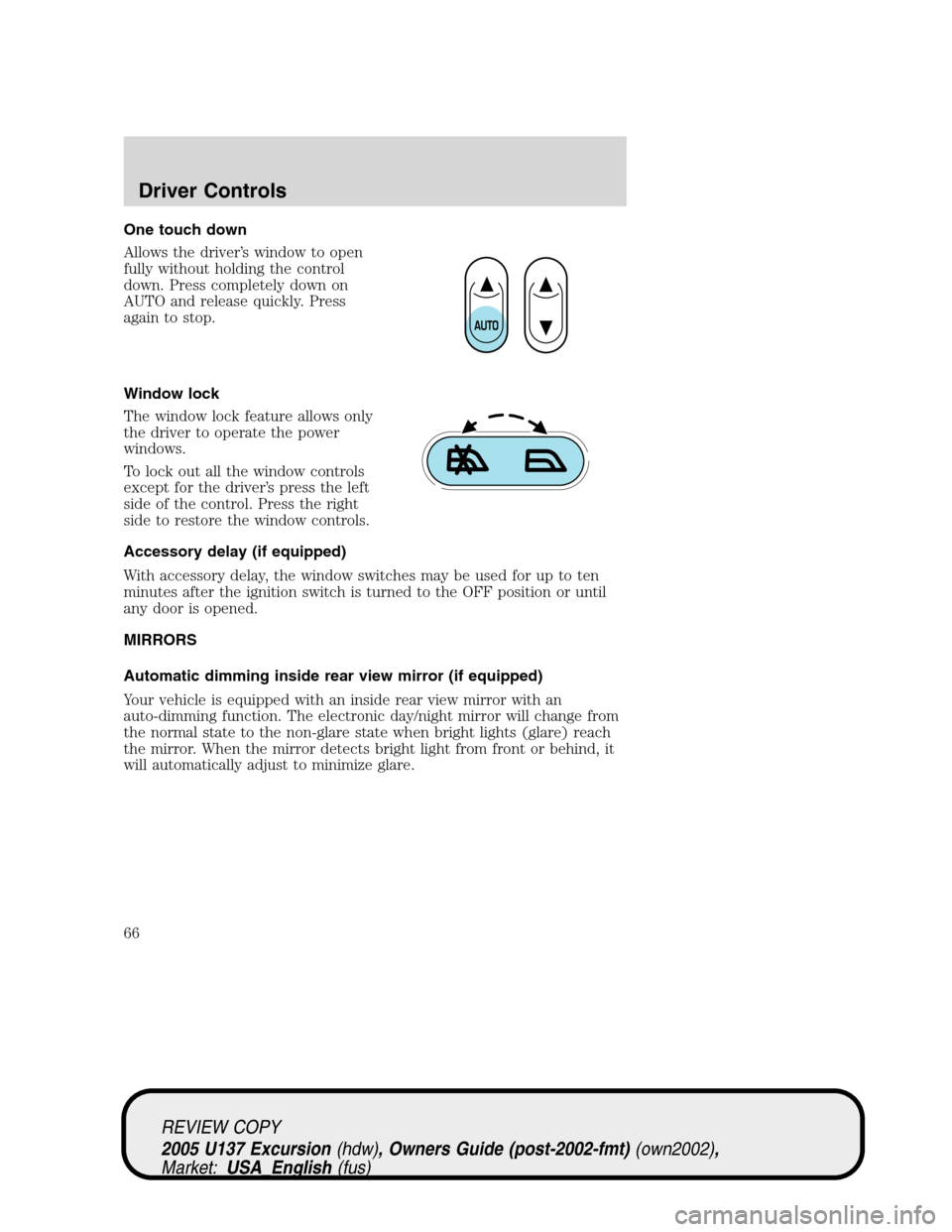
One touch down
Allows the driver’s window to open
fully without holding the control
down. Press completely down on
AUTO and release quickly. Press
again to stop.
Window lock
The window lock feature allows only
the driver to operate the power
windows.
To lock out all the window controls
except for the driver’s press the left
side of the control. Press the right
side to restore the window controls.
Accessory delay (if equipped)
With accessory delay, the window switches may be used for up to ten
minutes after the ignition switch is turned to the OFF position or until
any door is opened.
MIRRORS
Automatic dimming inside rear view mirror (if equipped)
Your vehicle is equipped with an inside rear view mirror with an
auto-dimming function. The electronic day/night mirror will change from
the normal state to the non-glare state when bright lights (glare) reach
the mirror. When the mirror detects bright light from front or behind, it
will automatically adjust to minimize glare.
REVIEW COPY
2005 U137 Excursion(hdw), Owners Guide (post-2002-fmt)(own2002),
Market:USA_English(fus)
Driver Controls
66


