Page 21 of 264
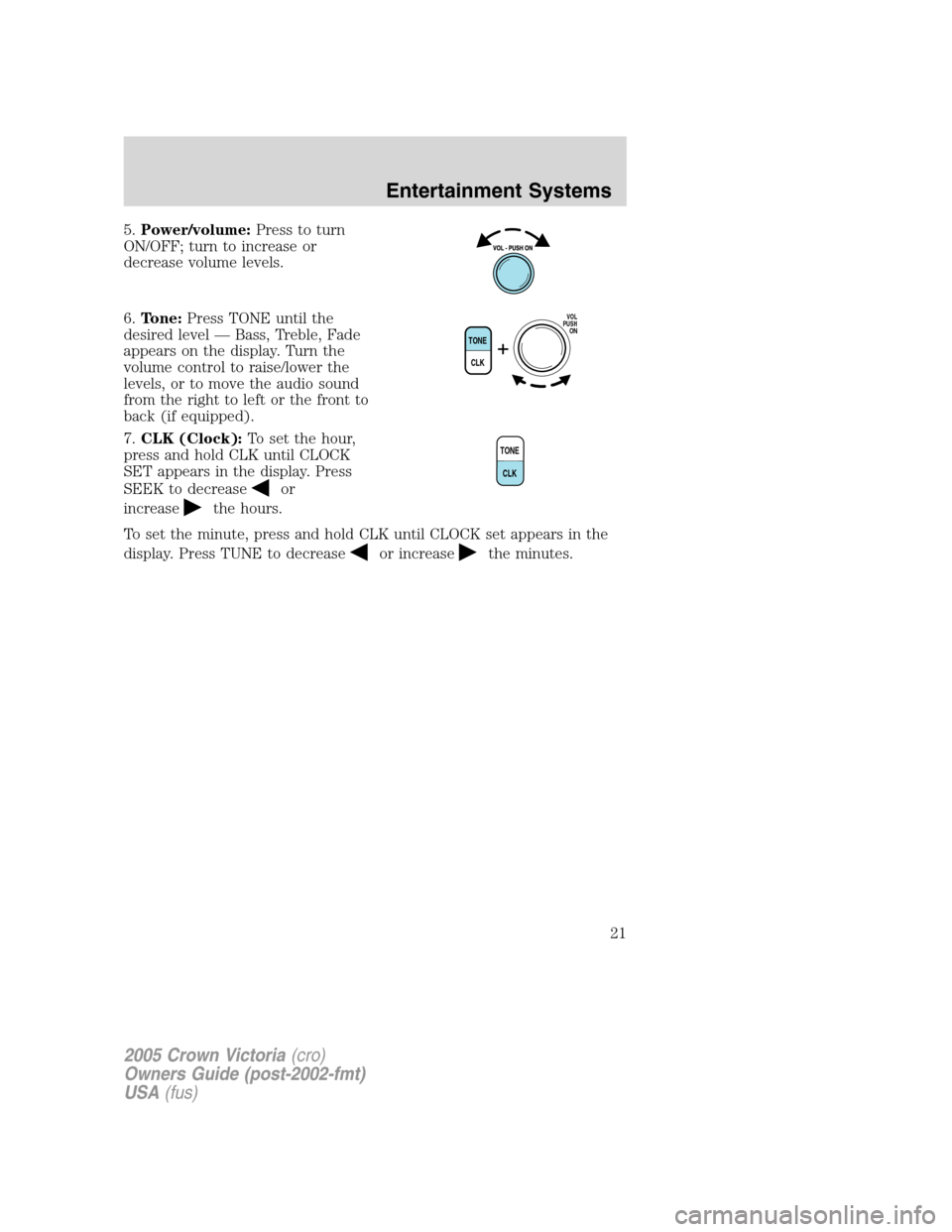
5.Power/volume:Press to turn
ON/OFF; turn to increase or
decrease volume levels.
6.Tone:Press TONE until the
desired level — Bass, Treble, Fade
appears on the display. Turn the
volume control to raise/lower the
levels, or to move the audio sound
from the right to left or the front to
back (if equipped).
7.CLK (Clock):To set the hour,
press and hold CLK until CLOCK
SET appears in the display. Press
SEEK to decrease
or
increase
the hours.
To set the minute, press and hold CLK until CLOCK set appears in the
display. Press TUNE to decrease
or increasethe minutes.
TONE
CLK
VOL
PUSH
ON
TONE
CLK
2005 Crown Victoria(cro)
Owners Guide (post-2002-fmt)
USA(fus)
Entertainment Systems
21
Page 25 of 264
AM/FM STEREO SINGLE CD PREMIUM AUDIO SYSTEM
(IF EQUIPPED)
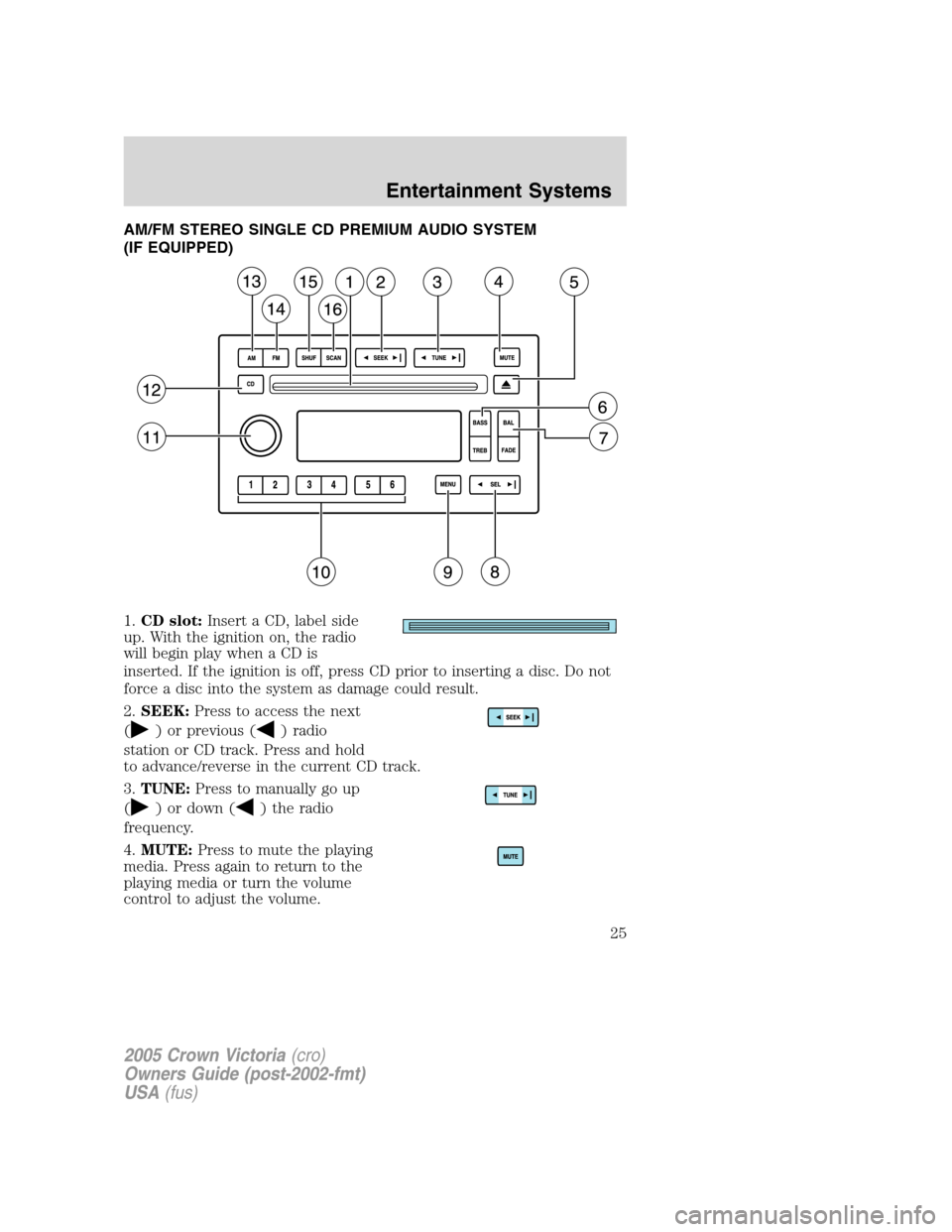
1.CD slot:Insert a CD, label side
up. With the ignition on, the radio
will begin play when a CD is
inserted. If the ignition is off, press CD prior to inserting a disc. Do not
force a disc into the system as damage could result.
2.SEEK:Press to access the next
(
) or previous () radio
station or CD track. Press and hold
to advance/reverse in the current CD track.
3.TUNE:Press to manually go up
(
) or down () the radio
frequency.
4.MUTE:Press to mute the playing
media. Press again to return to the
playing media or turn the volume
control to adjust the volume.
2005 Crown Victoria(cro)
Owners Guide (post-2002-fmt)
USA(fus)
Entertainment Systems
25
Page 27 of 264
When activated, AUTOSET will momentarily appear in the display when
any of the preset controls are pressed.
Speed sensitive volume:Radio volume changes automatically and
slightly with vehicle speed to compensate for road and wind noise.
Recommended level is 1–3. Level 0 turns the feature off and level 7 is
the maximum setting.
Press MENU to access and use
SELto adjust the volume setting.
The level will appear in the display.
Setting the clock:Press MENU until SELECT HOUR or SELECT MINS
is displayed. Press
SELto manually decrease/increase the
hours/minutes. Press MENU again to disengage clock mode.
Note:The menu selections will remain in the display for approximately
10 seconds, at which time the display will return to the previous mode.
You may also exit the menu options by pressing any other audio control.
10.Memory presets:To set a
station: Select frequency band, tune
to a station, press and hold a preset
button until sound returns.
11.On/Off/Volume:Push to turn
on/off; turn to adjust the volume
levels.
Note:With the ignition turned off,
you may press the volume control to
momentarily view the clock.
12.CD:Press to enter CD mode if a CD is already present in the system.
In radio mode, the CD icon will appear in the display if a CD is loaded
into the system.
13.AM:Press to select the AM
frequency.
14.FM:Press to select the FM
frequency. Press repeatedly to
toggle between FM1 and FM2.
15.SHUF (Shuffle):Press to play
all tracks on the current CD in
random order. Press again to stop.
2005 Crown Victoria(cro)
Owners Guide (post-2002-fmt)
USA(fus)
Entertainment Systems
27
Page 28 of 264
16.SCAN:Press SCAN to hear a
brief sampling of radio stations or
CD tracks. Press again to stop.
PREMIUM/AUDIOPHILE SATELLITE COMPATIBLE AM/FM STEREO
SINGLE CD/CASSETTE SYSTEM (IF EQUIPPED)
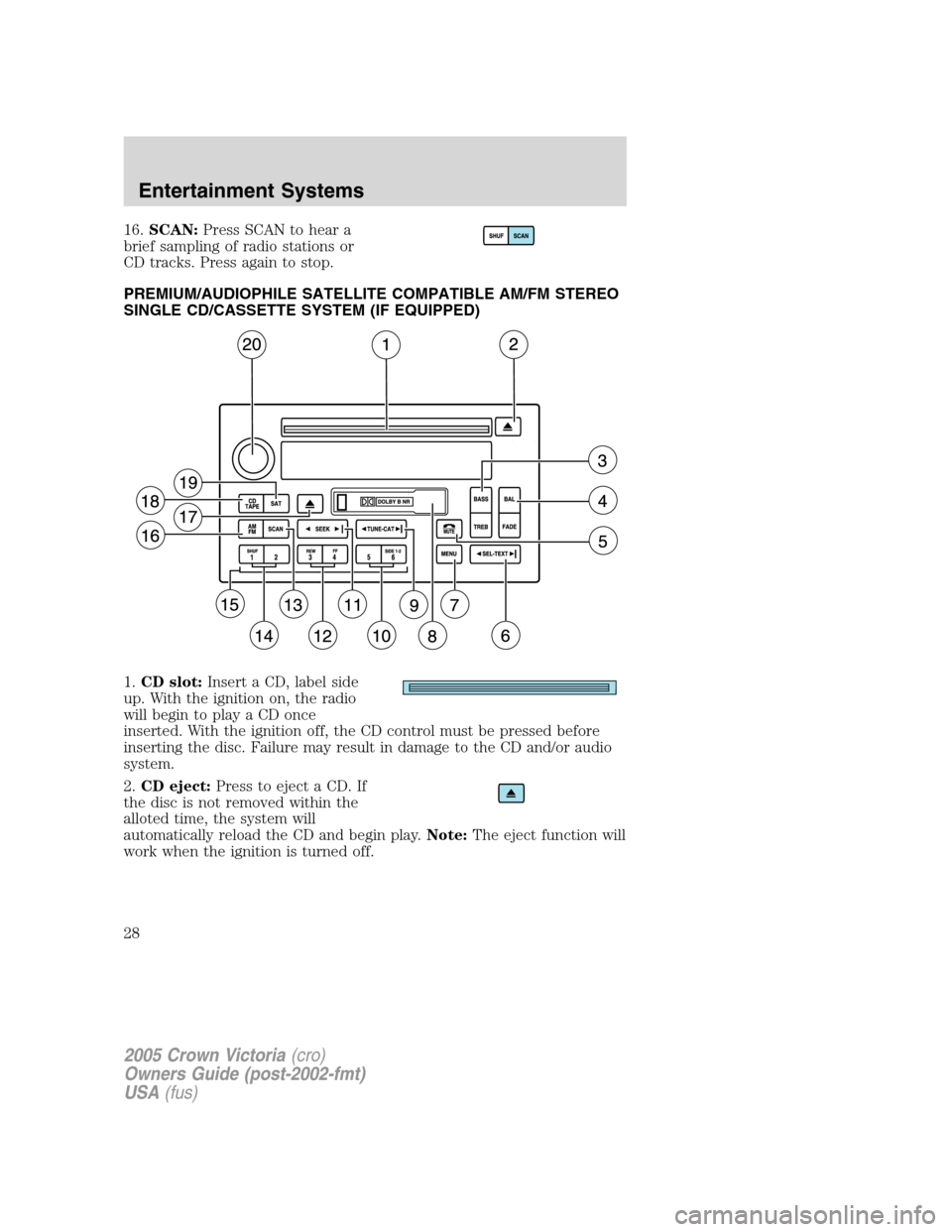
1.CD slot:Insert a CD, label side
up. With the ignition on, the radio
will begin to play a CD once
inserted. With the ignition off, the CD control must be pressed before
inserting the disc. Failure may result in damage to the CD and/or audio
system.
2.CD eject:Press to eject a CD. If
the disc is not removed within the
alloted time, the system will
automatically reload the CD and begin play.Note:The eject function will
work when the ignition is turned off.
2005 Crown Victoria(cro)
Owners Guide (post-2002-fmt)
USA(fus)
Entertainment Systems
28
Page 29 of 264
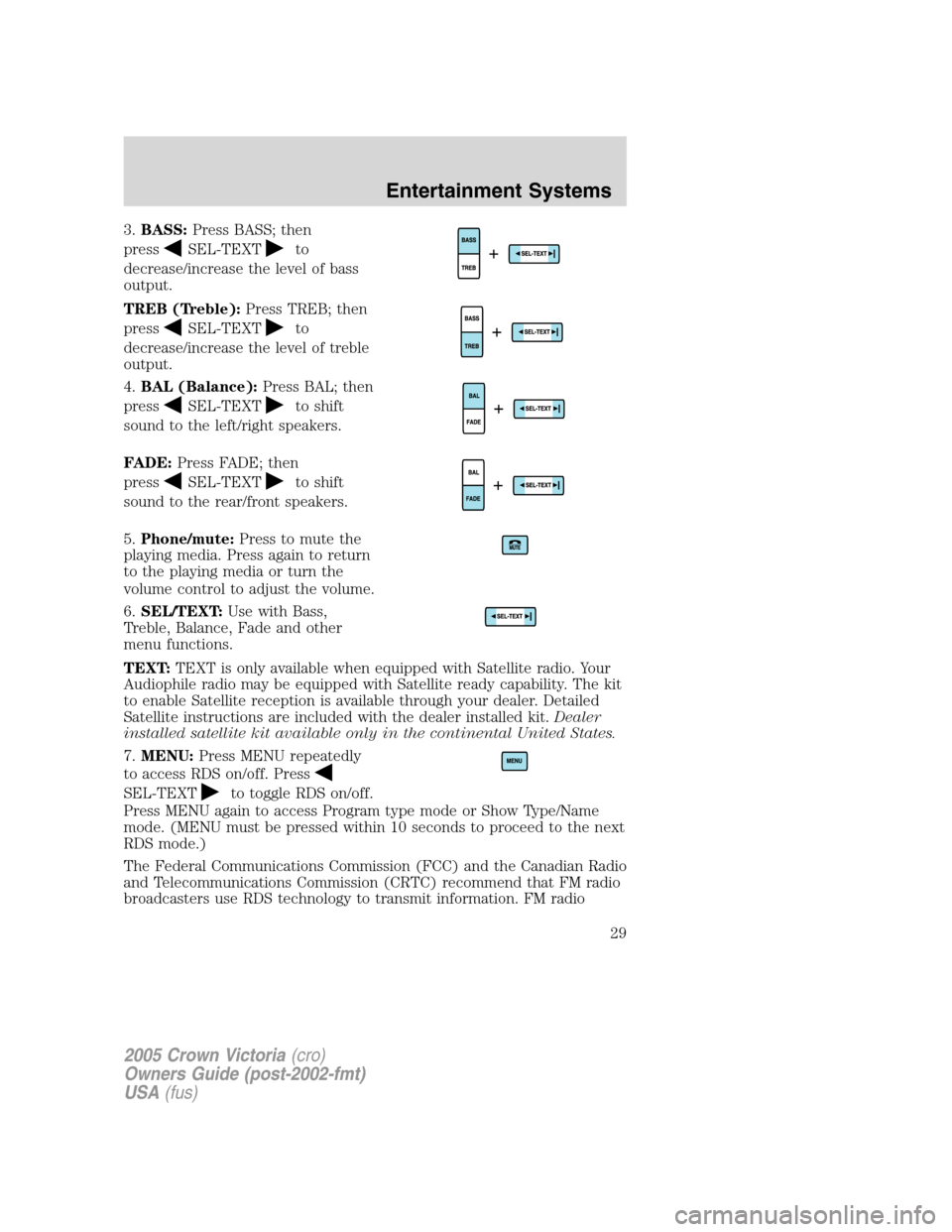
3.BASS:Press BASS; then
press
SEL-TEXTto
decrease/increase the level of bass
output.
TREB (Treble):Press TREB; then
press
SEL-TEXTto
decrease/increase the level of treble
output.
4.BAL (Balance):Press BAL; then
press
SEL-TEXTto shift
sound to the left/right speakers.
FADE:Press FADE; then
press
SEL-TEXTto shift
sound to the rear/front speakers.
5.Phone/mute:Press to mute the
playing media. Press again to return
to the playing media or turn the
volume control to adjust the volume.
6.SEL/TEXT:Use with Bass,
Treble, Balance, Fade and other
menu functions.
TEXT:TEXT is only available when equipped with Satellite radio. Your
Audiophile radio may be equipped with Satellite ready capability. The kit
to enable Satellite reception is available through your dealer. Detailed
Satellite instructions are included with the dealer installed kit.Dealer
installed satellite kit available only in the continental United States.
7.MENU:Press MENU repeatedly
to access RDS on/off. Press
SEL-TEXTto toggle RDS on/off.
Press MENU again to access Program type mode or Show Type/Name
mode. (MENU must be pressed within 10 seconds to proceed to the next
RDS mode.)
The Federal Communications Commission (FCC) and the Canadian Radio
and Telecommunications Commission (CRTC) recommend that FM radio
broadcasters use RDS technology to transmit information. FM radio
2005 Crown Victoria(cro)
Owners Guide (post-2002-fmt)
USA(fus)
Entertainment Systems
29
Page 30 of 264
stations are independently operated and individually elect to use RDS
technology to transmit station ID and program type as desired.
FIND Program type:Allows you to search RDS-equipped stations for a
certain category of music format: Classic, Country, Info, Jazz, Oldies,
R&B, Religious, Rock, Soft, Top 40.
With RDS ON, press MENU until the program type menu is displayed.
One of the various program types will appear. Press
SEL-TEXT
to scroll through music types. Press SEEK or SCAN to search for a
station playing the requested music category.
Show TYPE:Selects between displaying the station’s call letters or
music format when RDS is enabled. Press and hold MENU until SHOW
XX appears in the display. Press
SEL-TEXTto select NAME or
TYPE.
Compression:Brings soft and loud CD passages together for a more
consistent listening level when in CD mode. Press MENU repeatedly until
compression status is displayed. Press
SEL-TEXTcontrol to
enable the compression feature when COMPRESS OFF is displayed.
Press
SEL-TEXTcontrol again to disable the feature when
COMPRESS ON is displayed. When activated, the compression icon will
appear in the display.
Occupancy mode(Available only on Audiophile audios): Press MENU
repeatedly until occupancy mode appears in the display.
Press
SEL-TEXTto select ALL, DRIVER or REAR SEAT
occupancy mode.
Autoset:Allows you to set the strongest local radio stations without losing
your original manually set preset stations for AM/FM1/FM2. Press MENU
repeatedly until AUTOSET appears in the display. Press
SEL-TEXT
to toggle ON/OFF. When the six strongest stations are filled, the station
stored in preset 1 will begin playing. If there are less than six strong
stations, the system will store the last one in the remaining presets. When
activated, AUTOSET will momentarily appear in the display when any of the
preset controls are pressed.
Speed sensitive volume:Radio volume changes automatically and
slightly with vehicle speed to compensate for road and wind noise.
Recommended level is 1–3. Level 0 turns the feature off and level 7 is
the maximum setting.
Press MENU repeatedly to access and use
SEL/TEXTto adjust
the volume setting. The level will appear in the display.
2005 Crown Victoria(cro)
Owners Guide (post-2002-fmt)
USA(fus)
Entertainment Systems
30
Page 31 of 264
Dolby:Works in tape mode to reduces tape noise and hiss. Press MENU
until DOLBY XX appears in the display. Press
SEL-TEXTto
toggle ON/OFF.
The Dolby�noise reduction system is manufactured under license from
Dolby Laboratories Licensing Corporation. Dolby�and the double-D
symbol are registered trademarks of Dolby Laboratories Licensing
Corporation.
Setting the clock:Press MENU repeatedly until SELECT HOUR or
SELECT MINS is displayed. Press
SEL-TEXTto manually
decrease/increase the hours/minutes. Press MENU again to disengage
clock mode.
Note:The menu selections will remain in the display for approximately
10 seconds, at which time the display will return to the previous mode.
You may also exit the menu options by pressing any other audio control.
8.Cassette:Insert a cassette facing to the right.
9.TUNE:Press to manually go up
or down the radio frequency.
CAT:CAT is only available when equipped with Satellite Radio. Your
system may be equipped with Satellite ready capability. The kit to enable
Satellite reception is available through your dealer. Detailed Satellite
instructions are included with the dealer installed kit.
Dealer installed satellite kit not available in Canada.
10.Side 1–2:Press to access the
next side of the cassette tape. The
display will indicate whether TAPE
1orTAPE2isplaying.
11.SEEK:Press to access the
next/previous radio station, tape
selection or CD track.
12.REW (Rewind):Press to
rewind in tape or CD mode.
FF (Fast forward):Press to fast
forward in tape or CD mode.
REWFF34
2005 Crown Victoria(cro)
Owners Guide (post-2002-fmt)
USA(fus)
Entertainment Systems
31
Page 33 of 264
AUDIOPHILE AM/FM STEREO IN-DASH SIX CD SOUND SYSTEM
(IF EQUIPPED)
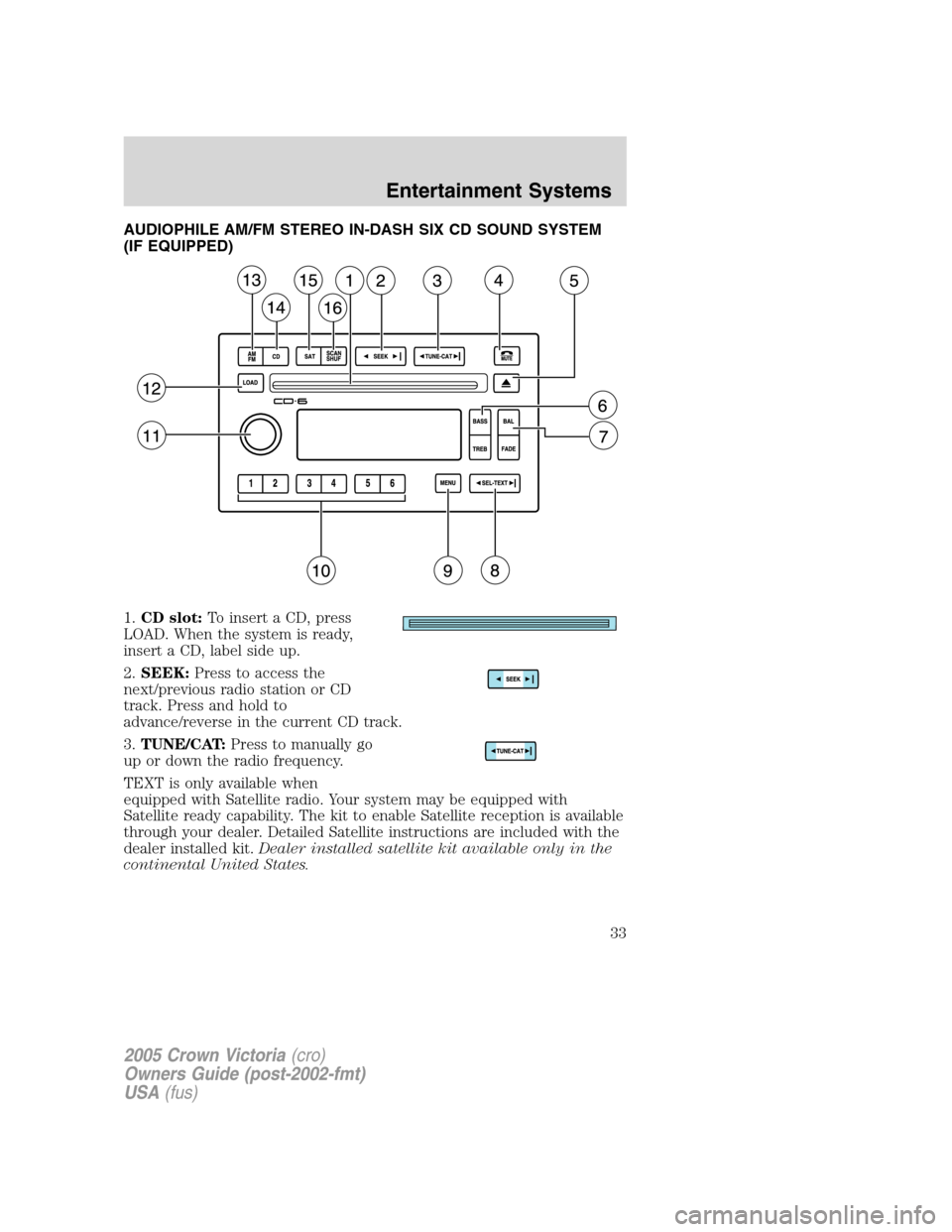
1.CD slot:To insert a CD, press
LOAD. When the system is ready,
insert a CD, label side up.
2.SEEK:Press to access the
next/previous radio station or CD
track. Press and hold to
advance/reverse in the current CD track.
3.TUNE/CAT:Press to manually go
up or down the radio frequency.
TEXT is only available when
equipped with Satellite radio. Your system may be equipped with
Satellite ready capability. The kit to enable Satellite reception is available
through your dealer. Detailed Satellite instructions are included with the
dealer installed kit.Dealer installed satellite kit available only in the
continental United States.
2005 Crown Victoria(cro)
Owners Guide (post-2002-fmt)
USA(fus)
Entertainment Systems
33