which are broadcasting this information. PTY (Program
Type) is used to characterize the station’s program ma-
terial, for example�Rock Music�.
PTY (Program Type) Button
Pressing this button once will turn on the PTY mode for
5 seconds. If no action is taken during the 5 second time
out the PTY icon will turn off. Pressing the PTY button
within 5 seconds will allow the program format type to
be selected. Many radio stations do not currently broad-
cast PTY information.
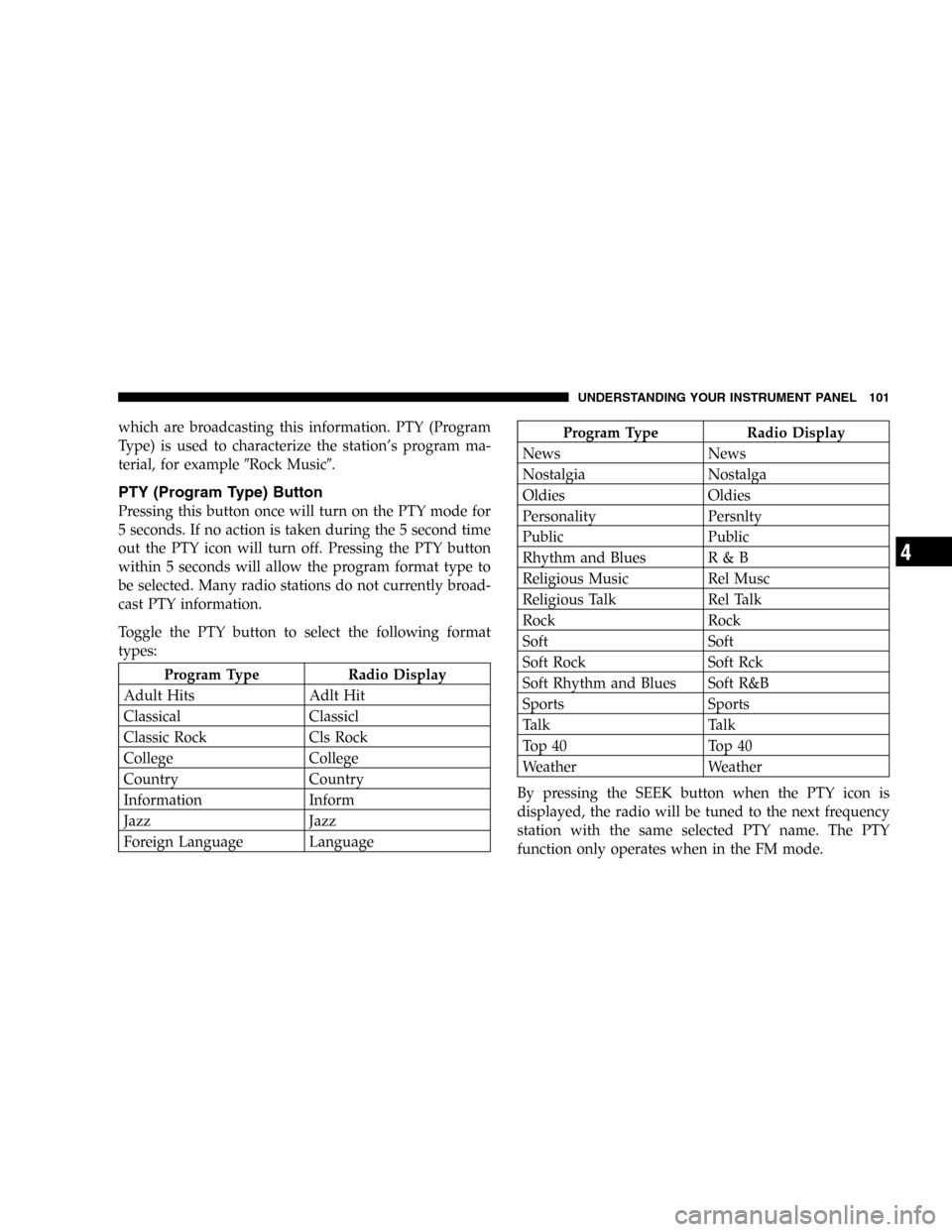
Toggle the PTY button to select the following format
types:
Program Type Radio Display
Adult Hits Adlt Hit
Classical Classicl
Classic Rock Cls Rock
College College
Country Country
Information Inform
Jazz Jazz
Foreign Language Language
Program Type Radio Display
News News
Nostalgia Nostalga
Oldies Oldies
Personality Persnlty
Public Public
Rhythm and Blues R & B
Religious Music Rel Musc
Religious Talk Rel Talk
Rock Rock
Soft Soft
Soft Rock Soft Rck
Soft Rhythm and Blues Soft R&B
Sports Sports
Talk Talk
Top 40 Top 40
Weather Weather
By pressing the SEEK button when the PTY icon is
displayed, the radio will be tuned to the next frequency
station with the same selected PTY name. The PTY
function only operates when in the FM mode.
UNDERSTANDING YOUR INSTRUMENT PANEL 101
4
Slight changes in engine speed or power may be noticed
when the air conditioning compressor is on. This is a
normal occurrence as the compressor will cycle on and
off to maintain comfort and increase fuel economy.
NOTE:If your air conditioning performance seems
lower than expected, check the front of the air condition-
ing condenser for an accumulation of dirt or insects. The
air conditioning condenser is located in front of the
radiator. Clean with a gentle water spray from behind the
radiator and through the condenser. Fabric front fascia
protectors may reduce air flow to the condenser, reducing
air conditioning performance.
Temperature Control
Use this control to regulate the tem-
perature of the air inside the passenger
compartment. The blue area of the
scale indicates cooler temperatures
while the red area indicates warmer
temperatures.
Mode Control
The mode control allows you to
choose from several patterns of air
distribution.
•Recirculation—Air Conditioning
Recirculated interior air is cooled and sent
through the instrument panel vents. Upon
initial start up of the vehicle in very hot or
humid weather, open windows and put in
outside air modes to flush hot/humid air out. Then
turn on the Recirculation mode to cool the vehicle
interior rapidly. The Recirculation mode can also be
used to temporarily block out any outside odors,
smoke, or dust.
NOTE:
Continuous use of the Recirculation mode may
make the inside air stuffy and under mild, humid condi-
tions cause windows to fog. Use of this mode for longer
than 15 minutes is not recommended.
UNDERSTANDING YOUR INSTRUMENT PANEL 133
4
The identity of each fuse is indicated on the backside of
the cover.
Cavity Fuse Circuit
1 30 Amp Green Blower Motor
2 10 Amp Red Right High Beam Head-
light, High Beam Indica-
tor
3 10 Amp Red Left High Beam Head-
light
4 15 Amp Blue Power Door Lock Switch
Illumination, Transmis-
sion Range Switch, Day-
time Running Light Mod-
ule (Canada), Power
Windows, Anti-lock
Brake System Module
Cavity Fuse Circuit
5 10 Amp Red Power Door Lock and
Door Lock Arm/Disarm
Switches, Vanity, Read-
ing, Map, Rear Seating,
Ignition, and Trunk
Lights, Illuminated Entry,
Radio, Power Antenna,
Data Link Connector,
Body Control Module,
Power Amplifier
6 10 Amp Red Heated Rear Window
Indicator
7 20 Amp Yellow Instrument cluster illumi-
nation, Park and tail
Lights
8 20 Amp Yellow Power Receptacle, Horns,
Ignition, Fuel, Start
9 15 Amp Blue Power Door Lock Motors
(Body Control Module)
10 20 Amp Yellow Daytime Running Light
Module (Canada)
236 MAINTAINING YOUR VEHICLE