Page 136 of 396
Release the buttons when the light in the indicator (D)
begins to flash after 20 seconds.
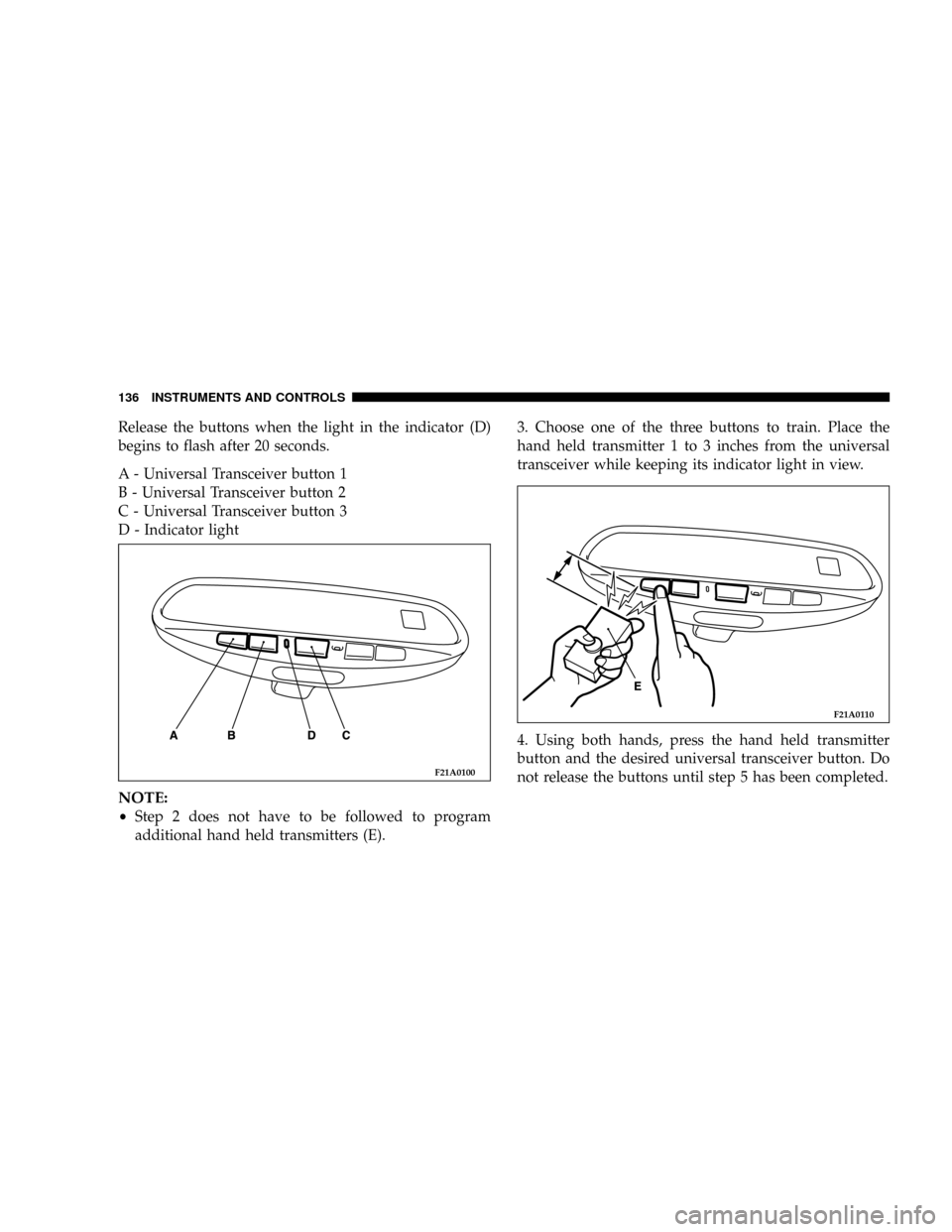
A - Universal Transceiver button 1
B - Universal Transceiver button 2
C - Universal Transceiver button 3
D - Indicator light
NOTE:
²Step 2 does not have to be followed to program
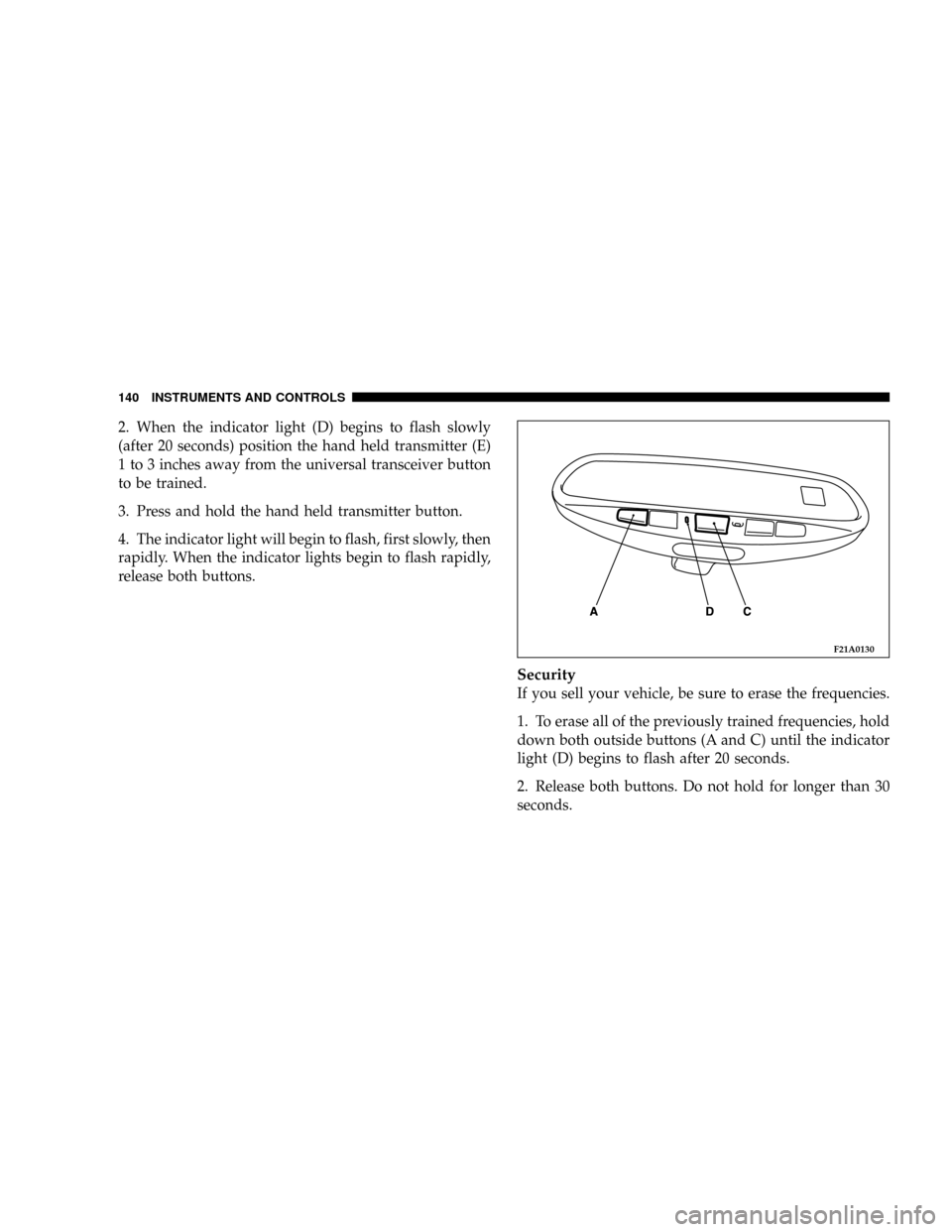
additional hand held transmitters (E).3. Choose one of the three buttons to train. Place the
hand held transmitter 1 to 3 inches from the universal
transceiver while keeping its indicator light in view.
4. Using both hands, press the hand held transmitter
button and the desired universal transceiver button. Do
not release the buttons until step 5 has been completed.
F21A0100
F21A0110
136 INSTRUMENTS AND CONTROLS
Page 137 of 396

NOTE:
²Some entry gates and garage door openers may re-
quire you to replace step 4 with the procedures listed
under Canadian Programming.
5. The indicator light (D) will begin to flash, first slowly
and then rapidly. The rapid flashing indicates successful
programming. If after 90 seconds the indicator light does
not flash rapidly or goes out, return to step 1 and repeat
the procedure. To train the other buttons, repeat steps 3
and 4. Be sure to keep your hand held transmitters in case
you need to retrain the universal transceiver.
Refer to the Rolling Code Programming or the
Canadian/Gate paragraphs for additional procedures, if
necessary.
If you do not successfully program the universal trans-
ceiver to learn the signal of your hand held transmitter,
refer to the Rolling Code Paragraph, or call toll-free for
customer assistance at 1±800±355±3515, or on the internet
at www.homelink.jci.com.
Canadian Programming/Gate Programming
Canadian frequency laws, and the technology of some
entry gates, require you to press and release the hand
held transmitter button every two seconds during pro-
gramming.
Continue to press and hold the universal transceiver
button (A, B or C) while you press and release the hand
held transmitter button until the frequency signal has
been learned. The indicator light (D) will flash slowly
and then rapidly when the programming is successful.
NOTE:
²When programming such a garage door opener or
gate, unplug the device to prevent possible damage to
the garage door or gate motor.
INSTRUMENTS AND CONTROLS 137
4
Page 138 of 396

Operation
Press and hold the desired button (A, B or C) on the
universal transceiver until the garage door or other
device begins to operate. The indicator light (D) shows
that the signal is being transmitted. The hand held
transmitter (E) may also be used at any time.
NOTE:
²
If you have difficulty in programming, call toll-free for
customer assistance at 1-800-355-3515, or the internet
at www.homelink.jci.com.
²If your hand held transmitter appears to program the
universal transceiver, but your garage door or other
device does not operate, and your device was manu-
factured after 1996, your garage door opener or other
device may have a ªRolling Codeº system.To check if your device is protected by a ªRolling Codeº
system:
²Check the owner's manual for the device for mention
of ªRolling Codeº.
²The hand held transmitter appears to program the
universal transceiver but the universal transceiver
does not activate the garage door.
²Press and hold the programmed button on the univer-
sal transceiver. If the indicator light (D) flashes rapidly
and then stays on after 2 seconds, the device has the
ªRolling Codeº feature.
ªRolling Codeº Programming
On garage door openers with the ªRolling Codeº feature,
the transmitter code changes after each use to prevent the
copying of your code. Set the universal transceiver by
following these steps:
NOTE:
²
The assistance of a second person may make the
following programming procedure quicker and easier.
138 INSTRUMENTS AND CONTROLS
Page 139 of 396
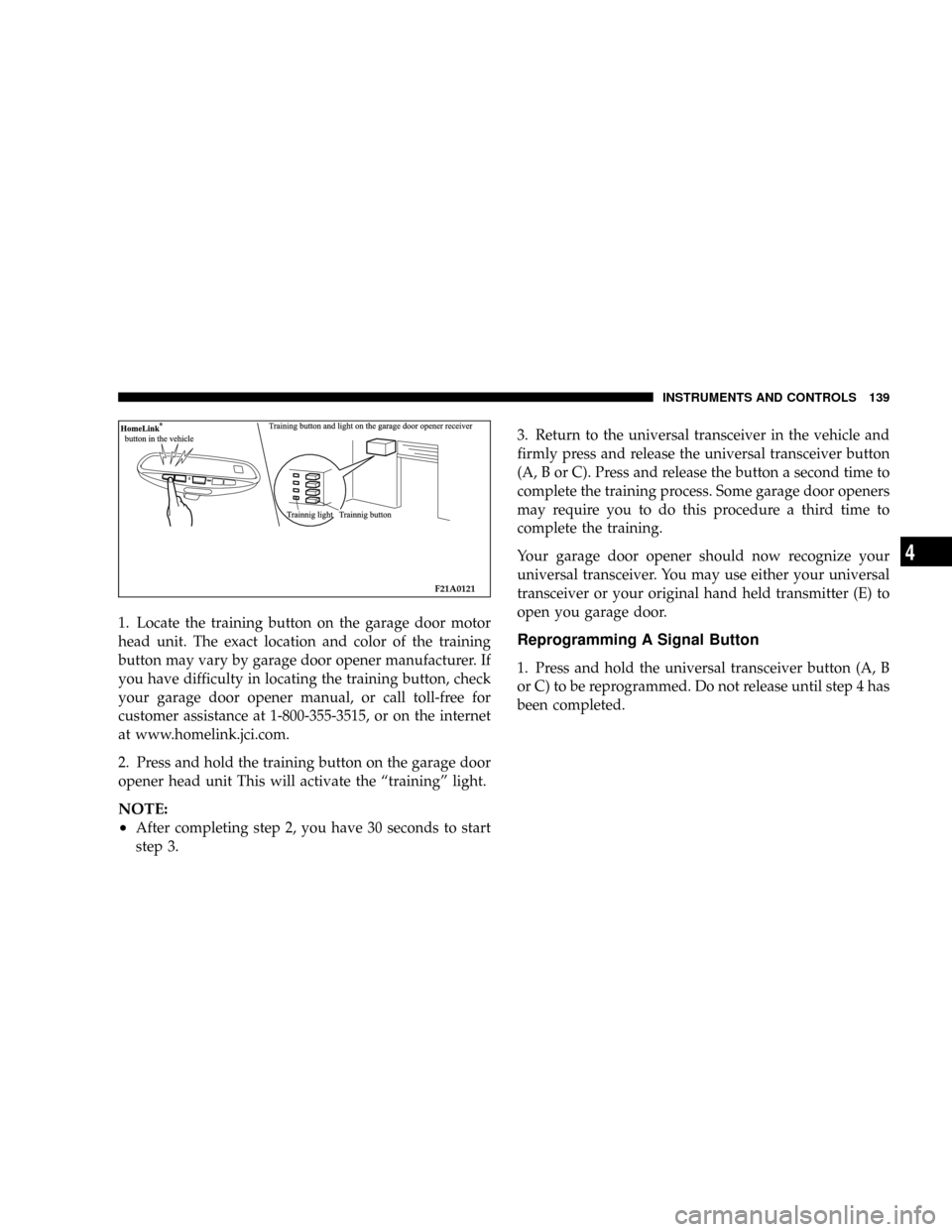
1. Locate the training button on the garage door motor
head unit. The exact location and color of the training
button may vary by garage door opener manufacturer. If
you have difficulty in locating the training button, check
your garage door opener manual, or call toll-free for
customer assistance at 1-800-355-3515, or on the internet
at www.homelink.jci.com.
2. Press and hold the training button on the garage door
opener head unit This will activate the ªtrainingº light.
NOTE:
²
After completing step 2, you have 30 seconds to start
step 3.3. Return to the universal transceiver in the vehicle and
firmly press and release the universal transceiver button
(A, B or C). Press and release the button a second time to
complete the training process. Some garage door openers
may require you to do this procedure a third time to
complete the training.
Your garage door opener should now recognize your
universal transceiver. You may use either your universal
transceiver or your original hand held transmitter (E) to
open you garage door.
Reprogramming A Signal Button
1. Press and hold the universal transceiver button (A, B
or C) to be reprogrammed. Do not release until step 4 has
been completed.
F21A0121
INSTRUMENTS AND CONTROLS 139
4
Page 140 of 396
2. When the indicator light (D) begins to flash slowly
(after 20 seconds) position the hand held transmitter (E)
1 to 3 inches away from the universal transceiver button
to be trained.
3. Press and hold the hand held transmitter button.
4. The indicator light will begin to flash, first slowly, then
rapidly. When the indicator lights begin to flash rapidly,
release both buttons.
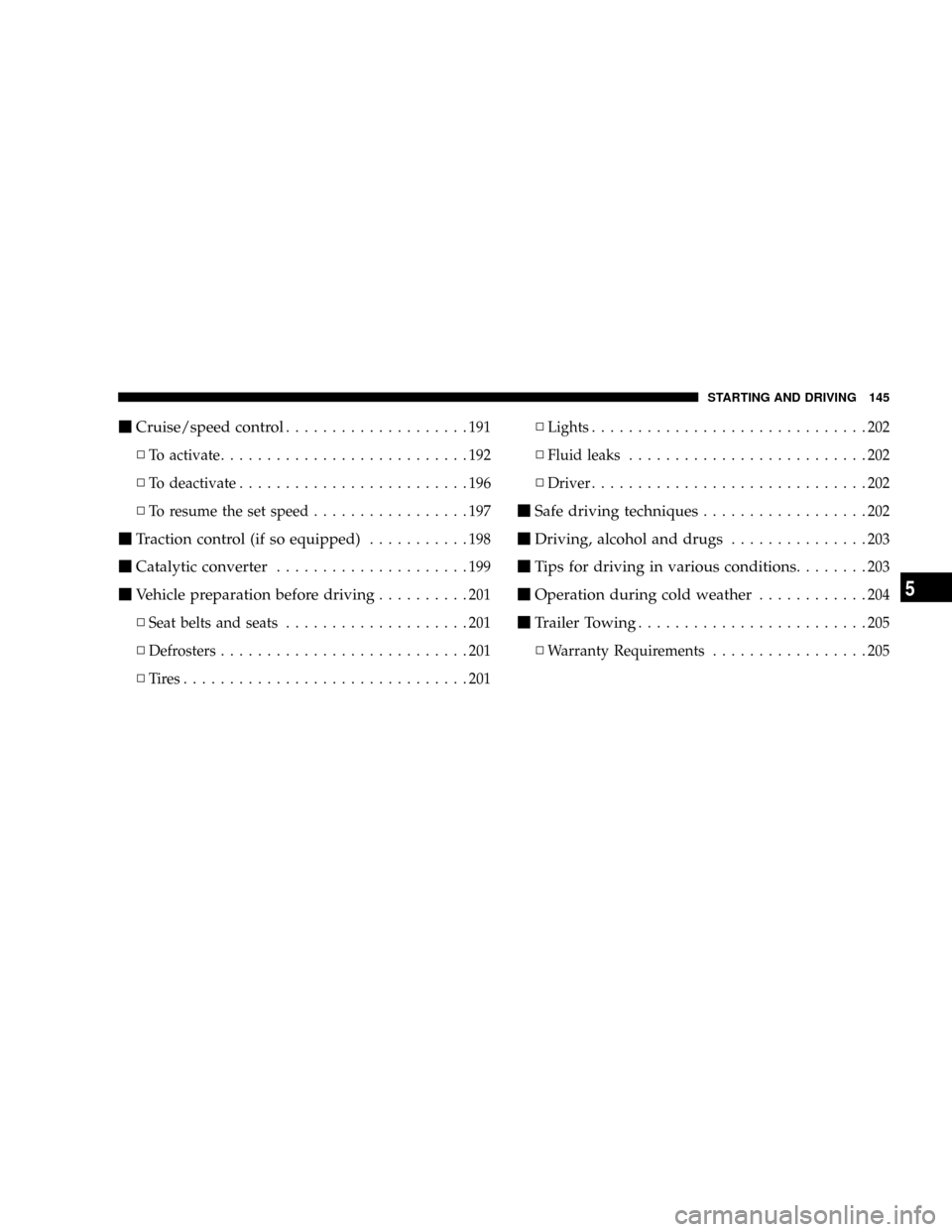
Security
If you sell your vehicle, be sure to erase the frequencies.
1. To erase all of the previously trained frequencies, hold
down both outside buttons (A and C) until the indicator
light (D) begins to flash after 20 seconds.
2. Release both buttons. Do not hold for longer than 30
seconds.
F21A0130
140 INSTRUMENTS AND CONTROLS
Page 144 of 396

NGear positions........................158
NDriving speed
(Vehicles with automatic transaxle).........159
NHolding on an upgrade.................159
NTransaxle reset mode...................160
mAutomatic transaxle Autostick
(if so equipped)
........................160
NSelector lever operation.................161
NIndicator lights.......................163
NSelector positions (Main gate).............164
NSelector positions Manual gate Autostick.....165
NHolding on an upgrade.................167
NTransaxle reset mode...................168
mManual transaxle (if so equipped)..........168
NTo start.............................169
NProper shift points.....................169NRecommended downshifting speed.........171
NDriving precautions....................171
mParking brake.........................171
mBrake pedal...........................173
mPower brakes.........................174
mBrake pad wear alarm...................174
mAnti-lock braking (ABS) system
(if so equipped)
........................175
NGeneral driving hints
(standard/anti-lock brakes)...............175
mSteering wheel tilt lock lever..............177
mPower steering........................178
mInside Day/Night rearview mirrors.........179
NElectrochromic inside rearview mirror
(if so equipped.......................180
NElectrochromic mirror operation
(if so equipped).......................181
144 STARTING AND DRIVING
Page 145 of 396
mCruise/speed control....................191
NTo activate...........................192
NTo deactivate.........................196
NTo resume the set speed.................197
mTraction control (if so equipped)...........198
mCatalytic converter.....................199
mVehicle preparation before driving..........201
NSeat belts and seats....................201
NDefrosters...........................201
NTires...............................201NLights..............................202
NFluid leaks..........................202
NDriver..............................202
mSafe driving techniques..................202
mDriving, alcohol and drugs...............203
mTips for driving in various conditions........203
mOperation during cold weather............204
mTrailer Towing.........................205
NWarranty Requirements.................205
STARTING AND DRIVING 145
5
Page 149 of 396

states adopting California emission standards, your ve-
hicle will operate satisfactorily on fuels meeting Federal
specifications, but emission control system performance
may be adversely affected.
Gasoline sold outside of California is permitted to have
higher sulfur levels which may affect the performance of
the vehicle's catalytic converter. This may cause the
Check Engine Light to illuminate. The manufacturer
recommends that you try a different brand of unleaded
gasoline having lower sulfur to determine if the problem
is fuel related prior to returning your vehicle to an
authorized dealer for service.
CAUTION!
If the Malfunction Indicator Light (Service Engine
Soon) is flashing, immediate service is required. See
the On Board Diagnostics paragraph in the Mainte-
nance section of this manual.
Materials Added to Fuel
All gasoline sold in the United States is required to
contain effective detergent additives. Use of additional
detergents or other additives is not needed under normal
conditions and would result in additional cost. Therefore
you should not have to add anything to the fuel.
Adding Fuel
NOTE:
The fuel tank filler tube has a restricting door
about 2 inches (50 mm) down from the opening. If fuel is
poured from a portable container, the container should
have a flexible nozzle long enough to force open the
restricting door.
CAUTION!
To avoid fuel spillage and overfilling, do not ªtop
offº the fuel tank after filling.
NOTE:When the fuel nozzle ªclicksº or shuts off, the
fuel tank is full.
STARTING AND DRIVING 149
5