Page 88 of 288

88 UNDERSTANDING YOUR INSTRUMENT PANEL
�Upper Air Vents . . . . . . . . . . . . . . . . . . . . . . . . . 120�Heated Rear Window (Optional) . . . . . . . . . . . 121�Windshield Heater (Optional) . . . . . . . . . . . . . 121�Residual Engine Heat Utilization (REST) . . . . 122
��
Air Conditioning, Regulated (Optional) . . . . . . 122�Climate Control (on Vehicles with Air
Conditioning) . . . . . . . . . . . . . . . . . . . . . . . . . . . 123�Dehumidification
(on Vehicles with Air Conditioning) . . . . . . . . 124�Air Conditioner for the Rear Passenger
Compartment (Optional) . . . . . . . . . . . . . . . . . 125�Air Recirculation . . . . . . . . . . . . . . . . . . . . . . . . 126�Air Strainer . . . . . . . . . . . . . . . . . . . . . . . . . . . . . 127
��
Electric Blower (Optional) . . . . . . . . . . . . . . . . . . . 128
��
Heater Booster . . . . . . . . . . . . . . . . . . . . . . . . . . . . . 129
��
Auxiliary Heater – Water or Air Heater
(Optional) . . . . . . . . . . . . . . . . . . . . . . . . . . . . . . . . . 130�Auxiliary Heater Switch . . . . . . . . . . . . . . . . . . 132�Timer Auxiliary Heater . . . . . . . . . . . . . . . . . . . 132�Settings with the Auxiliary Heater
switched on . . . . . . . . . . . . . . . . . . . . . . . . . . . . . 136
��
Auxiliary Heat Exchanger in Load
Compartment, only with Auxiliary Heater
(Optional) . . . . . . . . . . . . . . . . . . . . . . . . . . . . . . . . 137
��
Auxiliary Heater – Tips for Coping with
Problems . . . . . . . . . . . . . . . . . . . . . . . . . . . . . . . . . . 138�Overheating . . . . . . . . . . . . . . . . . . . . . . . . . . . . . 138
Page 90 of 288

90 UNDERSTANDING YOUR INSTRUMENT PANELLegend For Instruments And Controls
1. Left-hand air vent.
2. Multifunction switch.
3. Speed control .
4. Hood release lever .
5. Instrument cluster, refer to "Instrument Cluster and Indicator Lamps".
6. Hazard warning flasher switch .
7. Steering wheel with horn, front driver airbag .
8. Fuse box .
9. Windshield wiper switch, refer to "Windshield Wiper Switch".
10. Ignition lock/starter switch .
11. Center air vents .
12. Upper air vents .
13. Radio, see individual manual. 14. Temperature control switch
.
15. Airflow control switch .
16. Air distribution switch .
17. Temperature sensor, automatic heating control / air conditioning, regulated .
18. Air conditioning switch .
19. Heater booster switch .
20. Residual engine heat utilization switch .
21. Gear selector lever (automatic transmission)
22. Timer for auxiliary heater .
23. Electrical outlet .
24. Ashtray .
25. Cup holder .
26. Front passenger airbag .
27. Right-hand air vent .
28. Glove compartment .
NOTE: For layout of switches, see previous page.
Page 109 of 288
UNDERSTANDING YOUR INSTRUMENT PANEL 109
4
Legend for Switch Locations
1. Fog lamp switch (Optional), refer to "Fog Lamp Switch".
2. Headlamp range control, refer to "Headlamp Range Control".
3. Auxiliary heat exchanger switch (Optional) .
4. Heated rear window (Optional) .
5. Left-hand seat heater switch (Optional) .
6. Central locking switch with load compartment lock (Optional) .
7. Alarm pushbutton .
8. Deactivate Acceleration skid control (ASR) switch . 9. Switch for auxiliary heater (Optional)
10. Right-hand seat heater switch (Optional),
11. Sun roof operation switch (Optional)
.
12. Interior cargo area lighting (Optional), refer to "Interior Cargo Area Lighting".
13. Towing/passenger compartment protection switch (Optional) .
14. Airflow switch for the air conditioner for rear passenger compartment (Optional) .
15. Temperature control (Optional) .
16. Electric blower switch (Optional) .
17. Windshield heater switch (Optional).
18. Constant RPM switch (Optional).
Page 119 of 288
UNDERSTANDING YOUR INSTRUMENT PANEL 119
4
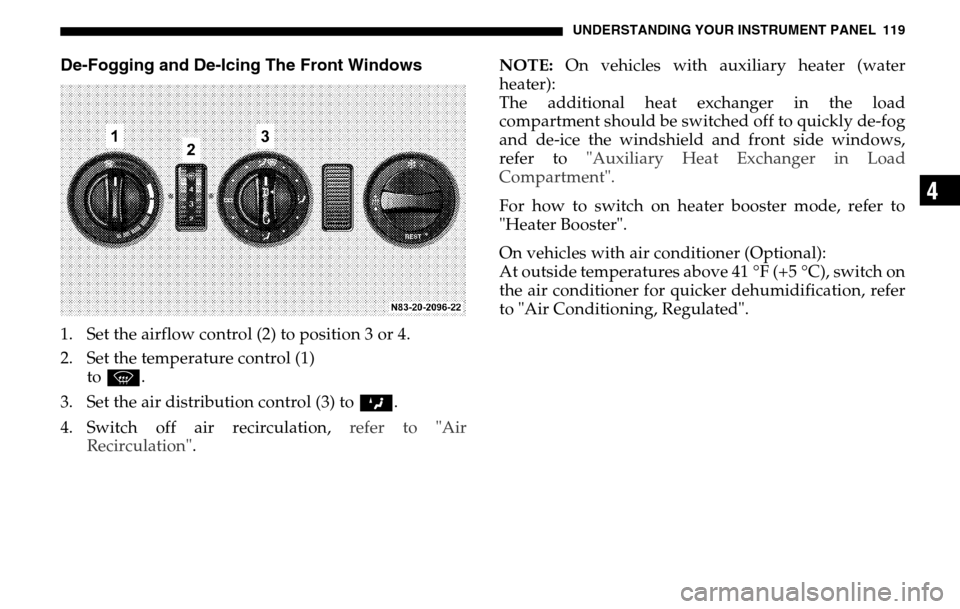
De-Fogging and De-Icing The Front Windows1. Set the airflow control (2) to position 3 or 4.
2. Set the temperature control (1) to P .
3. Set the air distribution control (3) to Z.
4. Switch off air recirculation, refer to "Air
Recirculation" . NOTE:
On vehicles with auxiliary heater (water
heater):
The additional heat exchanger in the load
compartment should be switched off to quickly de-fog
and de-ice the windshield and front side windows,
refer to "Auxiliary Heat Exchanger in Load
Compartment".
For how to switch on heater booster mode, refer to
"Heater Booster".
On vehicles with air conditioner (Optional):
At outside temperatures above 41 °F (+5 °C), switch on
the air conditioner for quicker dehumidification, refer
to "Air Conditioning, Regulated".
Page 130 of 288

130 UNDERSTANDING YOUR INSTRUMENT PANELAUXILIARY HEATER – WATER OR AIR HEATER
(OPTIONAL)
NOTE: The auxiliary heater (water or air heating
device) can be used whether or not the engine is
running.
After you have filled your vehicle’s gas tank with
winterized diesel fuel for the first time, it is
recommended that you operate the auxiliary heater
before beginning a journey or operating the heater
continuously so that any summer diesel fuel left in the
auxiliary heater can combust.
Before switching the auxiliary heater on make sure that
that the battery is sufficiently charged and that there is
enough fuel in the tank. At least a quarter of the tank
should be filled up. See Fuel Gauge.
WARNING!
The auxiliary heating must not be operated at gas
stations due to the risk of fire and explosion. For
this reason, switch off the auxiliary heating before
refuelling.
Auxiliary heaters emit fumes when in operation,
including carbon monoxide.
Inhaling carbon monoxide is a health hazard and
can result in unconsciousness and death.
For this reason, do not operate auxiliary heating in
enclosed spaces without ventilation or an
extractor system, e.g. in a garage. Otherwise you
could endanger yourself and others.
Always keep the ground under the vehicle as clear
as possible so that the auxiliary heater can receive
enough combustion air and exhaust fumes can
escape. Otherwise you could endanger yourself
and others.
WARNING!
Vehicles for transporting hazardous goods:
Observe the relevant safety regulations.
Page 131 of 288

UNDERSTANDING YOUR INSTRUMENT PANEL 131
4
NOTE: After three successive attempts to start the
heater, a malfunction will be recorded in the integrated
diagnostic system and no further operation on
auxiliary heater will be available (lock-out). The work
to annul the lock-out must be carried out at an
authorized Sprinter Dealer.
The auxiliary heater should be run at least once a
month for about 10 minutes.
The maximum heating period is 120 minutes. For more
information, refer to "Switching the Auxiliary Heater
On and Off - Ignition On".
The auxiliary heater will automatically switch off if the
fuel level is under about 4 US gal (15 l).
In case of faults, refer to "Auxiliary Heater – Tips for
Coping with Problems".
WARNING!
Aerosals, gas cartridges and other pressurized
containers transported in the vehicle may be high-
ly flammable and could explode when heated.
Make sure, particularly on vehicles with an air
heater, that such containers are not placed in the
flow of hot air of the auxiliary heating system
Otherwise there is a risk of severe personal
injuries, death and property damage due to
explosion.
WARNING!
Vehicles with air heater:
For safety reasons, we strongly recommend that
the heat exchanger be replaced by an authorized
Sprinter Dealer after 10 years of use.
If the vehicle is sold, the owner is required to
inform the buyer of this requirement. This should
be done when the Operator’s Manual is
transferred to the buyer.
Page 132 of 288
132 UNDERSTANDING YOUR INSTRUMENT PANELAuxiliary Heater Switch
To switch it on:
Press the switch upward.
The indicator lamp in the switch will
light up.
The auxiliary heater will
automatically switch off after about
120 minutes. The auxiliary heater
will switch over to after-running mode (about
2minutes).
To switch off:
Press the switch downward.
The indicator lamp in the switch will go out.
Timer Auxiliary HeaterNOTE: The timer water heater has no adjustable
temperature selection transformer (10).
1. Memory location (1 – 3)
2. Current day or preselected day
3. Current time or preselected time
4. Symbol ö – Status display
5. Button ” – Set time and day
Page 133 of 288

UNDERSTANDING YOUR INSTRUMENT PANEL 133
4
6. ButtonH – Select memory (1 – 3), activate
preselected time
7. Button ö – Switch on heater
8. Button ý – Set time, day, and preselected time;
shorten heating period (min. 1 minute)
9. Button þ – Set time, day, and preselected time;
lengthen heating period (max. 120 minutes)
10. Air Heater only, adjustable temperature selection transformer – adjustment range from 50 °F to 86 °F
(+10 °C to +30 °C)
NOTE: All symbols and digits in the display will flash
if the battery voltage has been interrupted over a
longer period of time. The timer must be reset.
The heater cannot be switched on until the time of day
has been set.
The timer lights up when the heater is switched on. Switching the Auxiliary Heater On and Off - Ignition
Off
To switch it on:
Press button
ö.
The vehicle-side blower automatically switches on.
Display: Symbol ö and remaining heating period.
The remaining heating period can be lengthened by
using the button þ (max. of 120 minutes); it may be
shortened by using the button ý (min. of 1 minute).
To switch off:
Press button ö again.
The blower inside the vehicle automatically switches
off. The auxiliary heater will automatically switch off
after about 3 minutes.
Display: Current time and current day of the week
(about 15 seconds).
Switching the Auxiliary Heater On and Off - Ignition
On
To switch it on:
Press the button ö.