Page 87 of 288

UNDERSTANDING YOUR INSTRUMENT PANEL
4
CONTENTS��
Instruments and Controls . . . . . . . . . . . . . . . . . . . . 89
��
Instrument Cluster and Indicator Lamps . . . . . . . 91�Indicator Lamp Symbols . . . . . . . . . . . . . . . . . . . 93�Multi-Function Indicator . . . . . . . . . . . . . . . . . . . 94�Clock . . . . . . . . . . . . . . . . . . . . . . . . . . . . . . . . . . . 96�Odometer and Trip Meter . . . . . . . . . . . . . . . . . . 97�Instrument and Display Lighting . . . . . . . . . . . 97�Outside Temperature Display . . . . . . . . . . . . . . 98�Reversing Aid Distance Display (Optional) . . . 99�Tachometer (Engine rpm) . . . . . . . . . . . . . . . . . 101�Coolant Temperature Gauge . . . . . . . . . . . . . . 101�Fuel Gauge with Reserve Fuel Indicator
Lamp . . . . . . . . . . . . . . . . . . . . . . . . . . . . . . . . . . 103�Battery Charge Indicator Lamp . . . . . . . . . . . . 104�Water in Fuel Indicator Lamp . . . . . . . . . . . . . 104�Engine Oil Level Indicator Lamp . . . . . . . . . . . 105�Coolant Level Indicator Lamp . . . . . . . . . . . . . 106�Engine Control Unit Indicator Lamp . . . . . . . 107
��
Switch Locations . . . . . . . . . . . . . . . . . . . . . . . . . . . 108
��
ASSYST Maintenance Computer (Optional). . . . 110�Engine Oil Level – Display in Instrument
Cluster (Vehicles with ASSYST Maintenance
Computer only) . . . . . . . . . . . . . . . . . . . . . . . . . 112�Displaying Engine Oil Level with
Engine Off . . . . . . . . . . . . . . . . . . . . . . . . . . . . . . 113
��
Engine Oil Level Indicator in Instrument
Cluster (Vehicles without ASSYST Maintenance
Computer) . . . . . . . . . . . . . . . . . . . . . . . . . . . . . . . . 115
��
Heating, Ventilation . . . . . . . . . . . . . . . . . . . . . . . . 116�Ventilation . . . . . . . . . . . . . . . . . . . . . . . . . . . . . . 117�Air Recirculation . . . . . . . . . . . . . . . . . . . . . . . . . 117�Heating . . . . . . . . . . . . . . . . . . . . . . . . . . . . . . . . . 118�De-Fogging and De-Icing The Front
Windows . . . . . . . . . . . . . . . . . . . . . . . . . . . . . . . 119�Side Air Vents and Center Air Vents . . . . . . . . 120
Page 92 of 288
92 UNDERSTANDING YOUR INSTRUMENT PANELLegend For Instrument Cluster And Indicator Lamps
1. Tachometer (Engine rpm), refer to "Tachometer (Engine rpm)".
2. Turn signal indicator lamp (left), refer to "Multifunction Switch".
3. Turn signal indicator lamp (right), refer to "Multifunction switch".
4. ASR warning lamp or ESP
* warning lamp .
5. Speedometer.
6. Multi-function indicator, refer to "Multi-Function Indicator".
7. Gear selector lever position .
8. Coolant temperature gauge, refer to "Coolant Temperature Gauge".
* 2500 Type vehicles only 9. Fuel gauge with reserve fuel indicator lamp
(yellow), refer to "Fuel Gauge with Reserve Fuel
Indicator Lamp".
10. Warning and indicator lamps.
11. Odometer/trip meter selector, refer to "Odometer and Trip Meter".
Clock/outside temperature display selector, refer
to "Clock and Outside Temperature Display".
12. Instrument lighting brighter/dimmer, refer to "Instrument Lighting".
Page 95 of 288

UNDERSTANDING YOUR INSTRUMENT PANEL 95
4
The multi-function indicator can be used to call up the
odometer, trip meter, clock and outside temperature,
or information such as remaining time/distance until
the next service is due, or the engine oil level.
If your vehicle is equipped with reversing aid, the
multi-function indicator also displays the distance
between your vehicle and a detected obstacle.
The multi-function indicator is activated by:
Turning the key to position 2 in the ignition lock,
opening the driver’s door,
pressing one of the buttons ( ‘), I , ç or
æ ,
switching the side lights on, refer to "Combination
Switch". 1. Press the button (
‘) to switch between the
odometer and the trip meter, and to reset the trip
meter.
Press the button ( ‘) to activate the ASSYST
maintenance computer.
2. Press the I button to switch between the time
and outside temperature and to activate the time
adjustment.
3. Press the ç to adjust (dim) the display and
instrument lighting and to adjust the clock.
4. Press the æ to adjust (brighten) the display and
instrument lighting and to adjust the clock.
Page 97 of 288
UNDERSTANDING YOUR INSTRUMENT PANEL 97
4
Odometer and Trip MeterActivate the multi-function indicator. The total
distance covered by the vehicle will be shown.
1. To switch between the odometer and the trip meter, press button (1) briefly.
2. To reset the trip meter, call up trip meter. Press
button (1) and hold until the trip meter shows 0000.
NOTE: Odometer and trip meter display– "mi" in USA only.
– "km" in Canada only.
Instrument and Display LightingDisplay lighting:
3. Press button ç, to display lighting dimmer
4. Press button æ, to display lighting brighter
Page 98 of 288
98 UNDERSTANDING YOUR INSTRUMENT PANELInstrument and display lighting:
1. Switch on the marker lamps, refer to "Combination Switch"
2. Press button ç, to instrument and display
lighting dimmer
3. Press button æ, to instrument display lighting
brighter
Outside Temperature Display1. Clock/outside temperature display selector Press button I briefly. The display will switch
to the required mode.
If button I is pressed twice within one second,
the display will revert to the original mode after
20 seconds.
Page 106 of 288

106 UNDERSTANDING YOUR INSTRUMENT PANELIf the engine oil level indicator lamp: does not go
out, or if it lights up again while the vehicle is moving,
the engine oil level has dropped to a point close to the
minimum level mark on the dipstick.
The indicator lamp : lights up only briefly at first,
becoming permanent as the oil level drops further.
Stop the engine immediately and check the engine oil
level. If no obvious leak is visible, correct the oil level.
If the engine oil level indicator lamp : lights up,
even if the engine oil level is sufficient, have the cause
traced and rectified by an authorized Sprinter Dealer.
For approved engine oils, please contact your
authorized Sprinter Dealer.
Coolant Level Indicator LampWhen the key is turned to position 2 in the ignition
lock, the coolant level indicator lamp / in the
instrument cluster lights up for about 2 seconds. It
must go out when the engine is running.
If the coolant level indicator lamp / remains on or
lights up again when the engine is running, the coolant
level is too low.
Do not drive on. Switch the engine off and add coolant.
Page 109 of 288
UNDERSTANDING YOUR INSTRUMENT PANEL 109
4
Legend for Switch Locations
1. Fog lamp switch (Optional), refer to "Fog Lamp Switch".
2. Headlamp range control, refer to "Headlamp Range Control".
3. Auxiliary heat exchanger switch (Optional) .
4. Heated rear window (Optional) .
5. Left-hand seat heater switch (Optional) .
6. Central locking switch with load compartment lock (Optional) .
7. Alarm pushbutton .
8. Deactivate Acceleration skid control (ASR) switch . 9. Switch for auxiliary heater (Optional)
10. Right-hand seat heater switch (Optional),
11. Sun roof operation switch (Optional)
.
12. Interior cargo area lighting (Optional), refer to "Interior Cargo Area Lighting".
13. Towing/passenger compartment protection switch (Optional) .
14. Airflow switch for the air conditioner for rear passenger compartment (Optional) .
15. Temperature control (Optional) .
16. Electric blower switch (Optional) .
17. Windshield heater switch (Optional).
18. Constant RPM switch (Optional).
Page 117 of 288
UNDERSTANDING YOUR INSTRUMENT PANEL 117
4
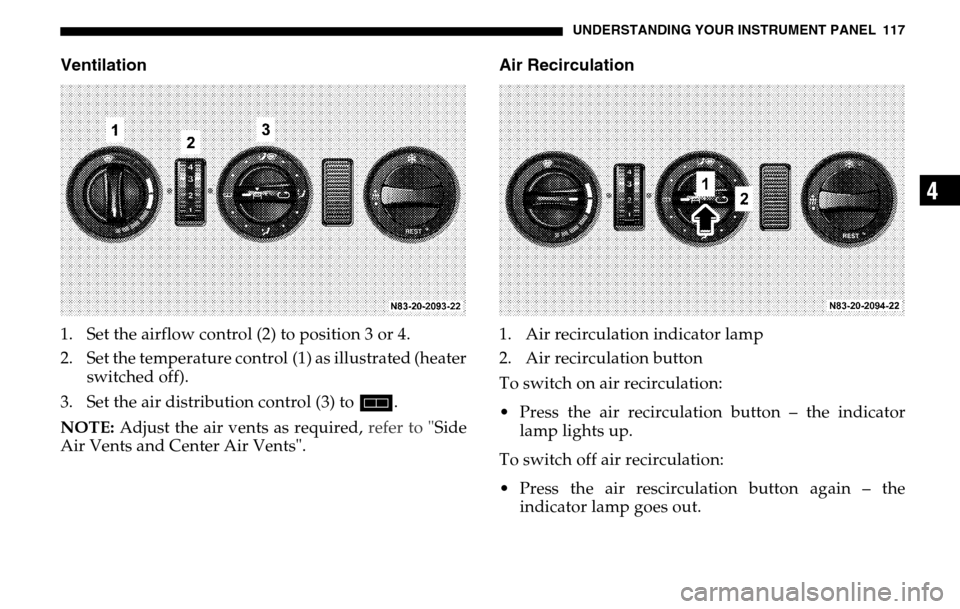
Ventilation1. Set the airflow control (2) to position 3 or 4.
2. Set the temperature control (1) as illustrated (heater switched off).
3. Set the air distribution control (3) to h.
NOTE: Adjust the air vents as required, refer to "Side
Air Vents and Center Air Vents".
Air Recirculation1. Air recirculation indicator lamp
2. Air recirculation button
To switch on air recirculation:
Press the air recirculation button – the indicator lamp lights up.
To switch off air recirculation:
Press the air rescirculation button again – the indicator lamp goes out.