Page 191 of 416

Operating Instructions - Satellite Radio Mode (If
Equipped)
Refer to the Satellite Radio section of the Owner’s
Manual.
Operating Instructions - Video Entertainment
System (VES�) (If Equipped)
Refer to separate Video Entertainment System (VES�)
Guide.
SATELLITE RADIO — IF EQUIPPED
Satellite radio uses direct satellite to receiver broadcast-
ing technology to provide clear digital sound, coast to
coast. The subscription service provider is Sirius™ Satel-
lite Radio. This service offers up to 100 channels of music,
sports, news, entertainment, and programming for chil-
dren, directly from its satellites and broadcasting studios.
System Activation
To activate your Sirius Satellite Radio service, call the
toll-free number 888-539-7474, or visit the Sirius web site
at www.sirius.com. Please have the following informa-
tion available when activating your system:
1. The Electronic Serial Number/Sirius Identification
Number (ESN/SID).
2. Credit card information.
3. Your Vehicle Identification Number.
Electronic Serial Number/Sirius Identification
Number (ESN/SID)
The Electronic Serial Number/Sirius Identification Num-
ber is needed to activate your Sirius Satellite Radio
system. To access the ESN/SID, refer to the following
steps:
INSTRUMENT PANEL AND CONTROLS 191
4
Page 192 of 416

ESN/SID Access With REF Radios
With the ignition switch in the ACCESSORY position and
the radio OFF, press the Eject or CD Eject (depending on
the radio type) and Time buttons simultaneously for 3
seconds. The first four digits of the twelve-digit ESN/SID
number will be displayed. Press the SEEK UP button to
display the next four digits. Continue to press the SEEK
UP button until all twelve ESN/SID digits have been
displayed. The SEEK DOWN will page down until the
first four digits are displayed. The radio will exit the
ESN/SID mode when any other button is pushed, the
ignition is turned OFF, or 5 minutes has passed since any
button was pushed.
ESN/SID Access With RAQ Radios
With the ignition switch in the ACCESSORY position and
the radio OFF, press the CD Eject and TIME buttons
simultaneously for 3 seconds. All twelve ESN/SID num-
bers will be displayed. The radio will exit the ESN/SIDmode when any other button is pushed, the ignition is
turned OFF, or 5 minutes has passed since any button
was pushed.
Selecting Satellite Mode in REF Radios
Press the MODE button repeatedly until�SA�appears in
the display. A CD may remain in the radio while in the
Satellite radio mode.
Selecting Satellite Mode in RAQ Radios
Press the MODE button repeatedly until the word
�SIRIUS�appears in the display. These radios will also
display the following:
•After 3 seconds, the current channel name and channel
number will be displayed for 5 seconds.
•The current program type and channel number will
then be displayed for 5 seconds.
•The current channel number will then be displayed
until an action occurs.
192 INSTRUMENT PANEL AND CONTROLS
Page 193 of 416

A CD may remain in the radio while in the Satellite radio
mode.
Selecting a Channel
Press and release the SEEK or TUNE buttons to search for
the next channel. Press the top of the button to search up
and the bottom of the button to search down. Holding the
TUNE button causes the radio to bypass channels until
the button is released.
Press and release the SCAN button (if equipped) to
automatically change channels every 7 seconds. The
radio will pause on each channel for 7 seconds before
moving on to the next channel. The word�SCAN�will
appear in the display between each channel change. Press
the SCAN button a second time to stop the search.
NOTE:Channels that may contain objectionable content
can be blocked. Contact Sirius Customer Care at 888-539-
7474 to discuss options for channel blocking or unblock-
ing. Please have your ESN/SID information available.
Storing and Selecting Pre-Set Channels
In addition to the 10 AM and 10 FM pre-set stations, you
may also commit 10 satellite stations to push button
memory. These satellite channel pre-set stations will not
erase any AM or FM pre-set memory stations. Follow the
memory pre-set procedures that apply to your radio.
Using the PTY (Program Type) Button (if
equipped)
Follow the PTY button instructions that apply to your
radio.
PTY Button�SCAN�
When the desired program type is obtained, press the
�SCAN�button within five seconds. The radio will play 7
seconds of the selected channel before moving to the next
channel of the selected program type. Press the�SCAN�
button a second time to stop the search.
NOTE:Pressing the�SEEK�or�SCAN�button while
performing a music type scan will change the channel by
INSTRUMENT PANEL AND CONTROLS 193
4
Page 195 of 416
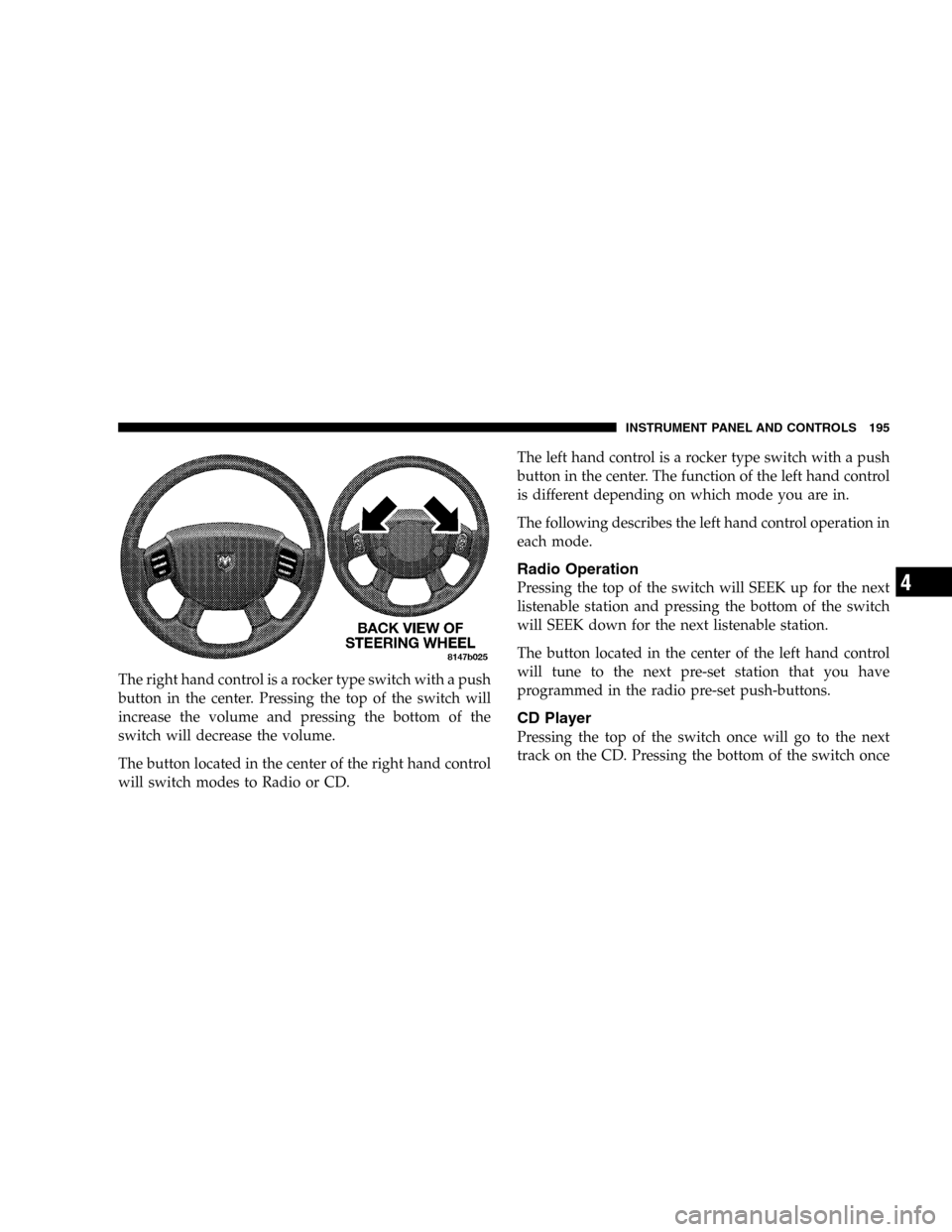
The right hand control is a rocker type switch with a push
button in the center. Pressing the top of the switch will
increase the volume and pressing the bottom of the
switch will decrease the volume.
The button located in the center of the right hand control
will switch modes to Radio or CD.The left hand control is a rocker type switch with a push
button in the center. The function of the left hand control
is different depending on which mode you are in.
The following describes the left hand control operation in
each mode.
Radio Operation
Pressing the top of the switch will SEEK up for the next
listenable station and pressing the bottom of the switch
will SEEK down for the next listenable station.
The button located in the center of the left hand control
will tune to the next pre-set station that you have
programmed in the radio pre-set push-buttons.
CD Player
Pressing the top of the switch once will go to the next
track on the CD. Pressing the bottom of the switch once
INSTRUMENT PANEL AND CONTROLS 195
4
Page 196 of 416

will go to the beginning of the current track or to the
beginning of the previous track if it is within one second
after the current track begins to play.
If you press the switch up or down twice it plays the
second track, three times, it will play the third, etc.
The button in the center of the left hand switch changes
CD’s on the 6–Disc in-dash CD changer radio. This
button does not function for all other radios.
COMPACT DISC MAINTENANCE
To keep the compact discs in good condition, take the
following precautions:
1. Handle the disc by its edge; avoid touching the
surface.
2. If the disc is stained, clean the surface with a soft cloth,
wiping from center to edge.3. Do not apply paper or tape to the disc; avoid scratch-
ing the disc.
4. Do not use solvents such as benzine, thinner, cleaners,
or antistatic sprays.
5. Store the disc in its case after playing.
6. Do not expose the disc to direct sunlight.
7. Do not store the disc where temperatures may become
too high.
NOTE:If you experience difficulty in playing a particu-
lar disc, it may be damaged (i.e. scratched, reflective
coating removed, a hair, moisture or dew on the disc)
oversized, or have theft protection encoding. Try a
known good disc before considering disc player service.
196 INSTRUMENT PANEL AND CONTROLS
Page 197 of 416
RADIO OPERATION AND CELLULAR PHONES
Under certain conditions, the cellular phone being On in
your vehicle can cause erratic or noisy performance from
your radio. This condition may be lessened or eliminated
by relocating the cellular phone antenna. This condition
is not harmful to the radio. If your radio performance
does not satisfactorily “clear” by the repositioning of the
antenna, it is recommended that the radio volume be
turned down or off during cellular phone operation.
CLIMATE CONTROLS
Manual Control
The Air Conditioning and Heating System is designed to
make you comfortable in all types of weather. The
following describes its operation:
INSTRUMENT PANEL AND CONTROLS 197
4
Page 237 of 416

The system’s pump motor runs during an ABS stop to
provide regulated hydraulic pressure. The pump motor
makes a low humming noise during operation, which is
normal.
The Anti-Lock Brake system includes an amber (ABS)
warning light. When the light is illuminated, the Anti-
Lock Brake system is not functioning. The system reverts
to standard non-anti-lock brakes. Turning the ignition Off
and On again may reset the Anti-Lock Brake system if the
fault detected was only momentary.WARNING!
Anti-Lock Brake Systems contain sophisticated elec-
tronic equipment. It may be susceptible to interfer-
ence caused by improperly installed or high output
radio transmitting equipment. This interference can
cause possible loss of anti-lock braking capability.
Installation of such equipment should be done by
qualified professionals.
WARNING!
Pumping of the Anti-Lock Brakes will diminish
their effectiveness and may lead to an accident.
Pumping makes the stopping distance longer. Just
press firmly on your brake pedal when you need to
slow down or stop.
STARTING AND OPERATING 237
5
Page 296 of 416

JUMP STARTING
WARNING!
•Battery fluid is a corrosive acid solution; do not
allow battery fluid to contact eyes, skin or cloth-
ing. Don’t lean over battery when attaching
clamps or allow the clamps to touch each other. If
acid splashes in eyes or on skin, flush the con-
taminated area immediately with large quantities
of water.
•A battery generates hydrogen gas which is flam-
mable and explosive. Keep flame or spark away
from the vent holes. Do not use a booster battery
or any other booster source with an output that
exceeds 12 volts.
Check the Battery Test Indicator (if equipped). If a light or
bright colored dot is visible in the indicator (if equipped),
DO NOT jump-start the battery.
If the indicator (if equipped) is dark or shows a green dot,
proceed as follows:
1. Wear eye protection and remove all metal jewelry such
as watch bands or bracelets which might make an
unintended electrical contact.
2. Park the booster vehicle within cable reach but with-
out letting the vehicles touch. Set the parking brake, place
the automatic transmission in PARK and turn the ignition
OFF on both vehicles.
3. Turn OFF heater, radio and all unnecessary electrical
loads.
296 WHAT TO DO IN EMERGENCIES
