Page 70 of 416

�Seats................................102
▫Front Seat Manual Seat Adjustment........102
▫Front Seats Manual Seat Recliners..........103
▫Manual Lumbar Support Adjustment — If
Equipped...........................103
▫Adjustable Head Restraints — All Seating
Positions...........................104
▫8 - Way Driver’s Power Seat — If Equipped . . 104
▫4 - Way Passenger’s Power Seat — If
Equipped...........................105
▫Front Heated Seats — If Equipped.........105
▫Second Row 40/20/40 Seat — Fold And
Tumble............................106
▫Third Row Seat Bench — If Equipped.......109▫Third Seat 50/50 Split Seat — If Equipped . . . 111
�Driver Memory System — If Equipped.......114
▫Setting Memory Positions And Linking Remote
Keyless Entry Transmitter To Memory.......115
▫Memory Position Recall.................116
▫To Disable A Transmitter Linked To Memory . . 116
▫Self-Limiting Control...................117
▫Driver Easy Exit And Easy Entry Control....117
▫Tilt Mirrors In Reverse.................118
�To Open And Close The Hood.............118
�Lights...............................120
▫Interior Lights.......................121
▫Battery Saver........................121
70 UNDERSTANDING THE FEATURES OF YOUR VEHICLE
Page 71 of 416

▫Headlight Delay......................122
▫Automatic Headlights — If Equipped.......122
▫Headlights, Parking Lights, Panel Lights.....123
▫Illuminated Entry.....................123
▫Daytime Running Lights (Canada Only).....123
▫Lights-On Reminder...................124
▫Fog Lights — If Equipped...............124
�Multifunction Control Lever...............124
▫Turn Signals.........................125
▫Passing Light........................125
▫High Beam / Low Beam Select Switch......126
▫Windshield Wipers....................126
▫Windshield Washers...................127�Traction Control Switch — If Equipped.......128
�Tilt Steering Column....................129
�Driver Adjustable Pedals — If Equipped......130
▫Adjustment.........................131
�Electronic Speed Control — If Equipped......132
▫To Activate..........................132
▫To Set At A Desired Speed...............132
▫To Deactivate........................132
▫To Resume Speed.....................133
▫To Vary The Speed Setting...............133
▫To Accelerate For Passing...............134
�Overhead Console......................135
▫Courtesy/Reading Lights................136
UNDERSTANDING THE FEATURES OF YOUR VEHICLE 71
3
Page 77 of 416
WARNING!
Vehicles and other objects seen in the right side
convex mirror will look smaller and farther away
than they really are. Relying too much on your right
side mirror could cause you to collide with another
vehicle or other object. Use your inside mirror when
judging the size or distance of a vehicle seen in the
right side mirror.
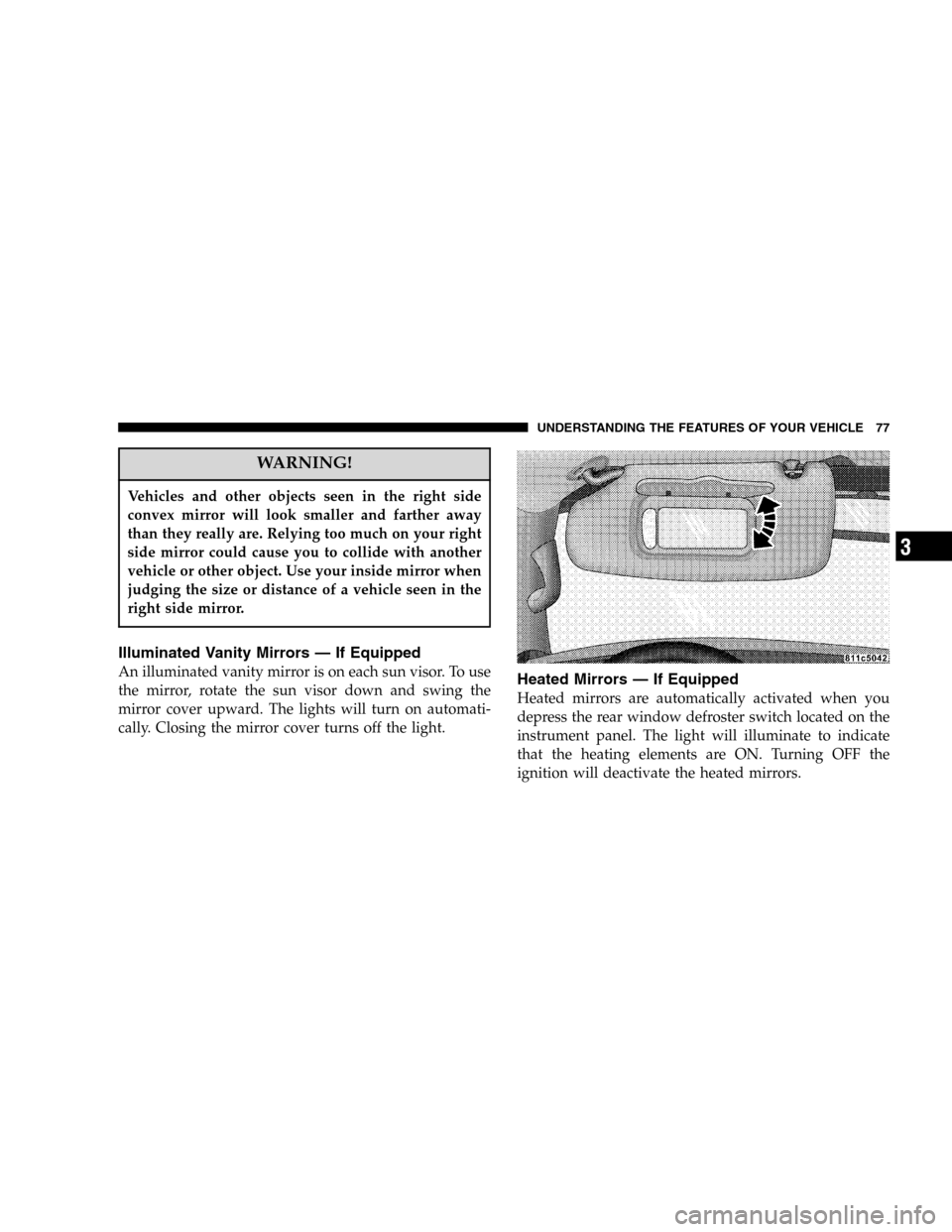
Illuminated Vanity Mirrors — If Equipped
An illuminated vanity mirror is on each sun visor. To use
the mirror, rotate the sun visor down and swing the
mirror cover upward. The lights will turn on automati-
cally. Closing the mirror cover turns off the light.Heated Mirrors — If Equipped
Heated mirrors are automatically activated when you
depress the rear window defroster switch located on the
instrument panel. The light will illuminate to indicate
that the heating elements are ON. Turning OFF the
ignition will deactivate the heated mirrors.
UNDERSTANDING THE FEATURES OF YOUR VEHICLE 77
3
Page 120 of 416
LIGHTS
120 UNDERSTANDING THE FEATURES OF YOUR VEHICLE
Page 121 of 416

Interior Lights
Courtesy and dome lights are turned on when the front
doors are opened, when the dimmer control (rotating
wheel on the right side of the switch) is rotated to the
second upward detent position, or when the UNLOCK
button is pressed on the key fob. When a door is open
and the interior lights are on, rotating the dimmer controlall the way down to the OFF detent will cause all the
interior lights to go out. This allows the doors to stay
open for extended periods of time without discharging
the vehicle’s battery.
The brightness of the instrument panel lighting can be
regulated by rotating the dimmer control up (brighter) or
down (dimmer). When the headlights are ON you can
supplement the brightness of the odometer, trip odom-
eter, radio and overhead console by rotating the control
up until you hear a click. This feature is termed the
�Parade�mode and is useful when headlights are re-
quired during the day.Battery Saver
To protect the life of your vehicle’s battery, Load Shed-
ding is provided for both the interior and exterior lights.
If the ignition is off and any door is left ajar for eight
minutes or the dimmer control is rotated upwards for 15
minutes, the interior lights will automatically turn off.
UNDERSTANDING THE FEATURES OF YOUR VEHICLE 121
3
Page 122 of 416

If the headlights remain on while the ignition is cycled
off, the exterior lights will automatically turn off after 8
minutes. If the headlights are turned on and left on for 8
minutes while the ignition is off, the exterior lights will
automatically turn off.
NOTE:Battery Saver mode is cancelled if the ignition is
ON.
NOTE:While the engine is running, the system will
deactivate the Fog Lights and Heated seats if a low
battery system voltage is detected.
Headlight Delay
To aid in your exit, your vehicle is equipped with a
headlight delay that will leave the headlights on for 90
seconds. This delay is initiated when the ignition is
cycled off while the headlight switch is on, and then the
headlight switch is cycled off. The headlights will remainon for 90 seconds. Headlight delay can be cancelled by
either turning the headlight switch ON then OFF or by
turning the ignition ON.
NOTE:This feature can be disabled by your authorized
dealer.
Automatic Headlights — If Equipped
Automatic Headlights can be activated by rotating the
rotary headlight switch to the symbol “A.” The head-
lights will turn on when the engine is running and the
ambient light sensor indicates that the headlights should
be activated. The headlights will turn off if the headlight
switch is rotated to the off position or 90 seconds after the
ignition is turned to OFF.
122 UNDERSTANDING THE FEATURES OF YOUR VEHICLE
Page 123 of 416

Headlights, Parking Lights, Panel Lights
When the headlight switch is rotated to the first position
to the right, the parking lights, taillights, side marker
lights, license plate light and instrument panel lights are
all turned on. The headlights will turn ON when the
switch is rotated to the second position.
Your vehicle is equipped with plastic headlight lenses
that are lighter and less susceptible to stone breakage
than glass headlights.
Plastic is not as scratch resistant as glass and therefore
different lens cleaning procedures must be followed.
To minimize the possibility of scratching the lenses and
reducing light output, avoid wiping with a dry cloth. To
remove road dirt, wash with a mild soap solution fol-
lowed by rinsing.
Do not use abrasive cleaning components, solvents, steel
wool or other abrasive materials to clean the lenses.
Illuminated Entry
Headlights turn on for 90 seconds, when the Remote
Keyless Entry UNLOCK button is pressed.
NOTE:This feature can be activated by your authorized
dealer.
Daytime Running Lights (Canada Only)
The headlights on your Durango will illuminate when
the engine is started. This provides a constant “Lights
ON” condition until the ignition is turned OFF. The lights
illuminate at reduced intensity. If the parking brake is
applied the Daytime Running Lights will turn off. If the
headlights are activated, the Daytime Running Lights
feature will transition to the normal headlight operating
mode.
UNDERSTANDING THE FEATURES OF YOUR VEHICLE 123
3
Page 124 of 416
Lights-on Reminder
If the headlights, parking lights, or courtesy lights are left
On, after the ignition is turned Off, a continuous fast
chime will sound when the driver’s door is opened.
Fog Lights — If Equipped
The foglights are turned ON by placing the headlight
rotary control in the parking light, headlight, or Autoposition and pressing the fog light button. The fog lights
will operate only when the parking lights are ON or
when the vehicle headlights are ON low beam. An
indicator light located in the instrument cluster will
illuminate when the fog lights are on. The fog lights will
turn off when the switch is pressed in, when the head-
light switch is rotated to the OFF position, or the high
beam is selected.
MULTIFUNCTION CONTROL LEVER
The multifunction control lever is located on the left side
of the steering column.
124 UNDERSTANDING THE FEATURES OF YOUR VEHICLE