Page 196 of 416

will go to the beginning of the current track or to the
beginning of the previous track if it is within one second
after the current track begins to play.
If you press the switch up or down twice it plays the
second track, three times, it will play the third, etc.
The button in the center of the left hand switch changes
CD’s on the 6–Disc in-dash CD changer radio. This
button does not function for all other radios.
COMPACT DISC MAINTENANCE
To keep the compact discs in good condition, take the
following precautions:
1. Handle the disc by its edge; avoid touching the
surface.
2. If the disc is stained, clean the surface with a soft cloth,
wiping from center to edge.3. Do not apply paper or tape to the disc; avoid scratch-
ing the disc.
4. Do not use solvents such as benzine, thinner, cleaners,
or antistatic sprays.
5. Store the disc in its case after playing.
6. Do not expose the disc to direct sunlight.
7. Do not store the disc where temperatures may become
too high.
NOTE:If you experience difficulty in playing a particu-
lar disc, it may be damaged (i.e. scratched, reflective
coating removed, a hair, moisture or dew on the disc)
oversized, or have theft protection encoding. Try a
known good disc before considering disc player service.
196 INSTRUMENT PANEL AND CONTROLS
Page 197 of 416
RADIO OPERATION AND CELLULAR PHONES
Under certain conditions, the cellular phone being On in
your vehicle can cause erratic or noisy performance from
your radio. This condition may be lessened or eliminated
by relocating the cellular phone antenna. This condition
is not harmful to the radio. If your radio performance
does not satisfactorily “clear” by the repositioning of the
antenna, it is recommended that the radio volume be
turned down or off during cellular phone operation.
CLIMATE CONTROLS
Manual Control
The Air Conditioning and Heating System is designed to
make you comfortable in all types of weather. The
following describes its operation:
INSTRUMENT PANEL AND CONTROLS 197
4
Page 198 of 416

Air Conditioning Operation
To turn the air conditioning On or Off perform the
following steps:
•Position the mode control button to the desired airflow
setting.
•Set the front blower control to any desired speed.
•Press the Snowflake (A/C) button which is located to
the right of the temperature control slide. An indicator
light on the Snowflake (A/C) button shows that the air
conditioning is On.
•Press the Snowflake (A/C) button a second time to
turn the air conditioning Off.
NOTE:The compressor will not engage until the engine
has been running for several seconds. Slight changes inengine speed or power may be noticed when the com-
pressor is on. This is a normal occurrence since the
compressor will cycle on and off to maintain comfort and
improve fuel economy.
Front Blower Control
The Front Blower controls the
amount of air delivered to the
passenger compartment.
There are four blower speeds.
The fan speed increases as
you move the control clock-
wise. When the front blower
control is turned to OFF, the
blower will be turned off and
the system will be positioned
in recirculation mode.
198 INSTRUMENT PANEL AND CONTROLS
Page 200 of 416

air goes to the floor outlets. This feature gives improved
comfort during sunny but cool conditions.
Heat (Floor)
Outside air flows primarily through the floor out-
lets located under the instrument panel. A small
amount of air is directed through the defrost and side
window demister outlets.
Mix
Outside air flows in equal proportions through the
floor and defroster outlet.
Defrost
Outside air is primarily directed to the windshield
through the defroster outlet located at the base of
the windshield and side window demist outlets.NOTE:The air conditioning compressor operates in
both Mix and Defrost or a blend of these modes, even if
the A/C button has not been pressed. This dehumidifies
the air to help dry the windshield.
Temperature Control
The temperature of the air is controlled by a slide located
on the top center of the control panel. Move the slide left
or right to change the temperature. The blue area of the
scale indicates cooler temperatures while the red area
indicates warmer temperatures.
200 INSTRUMENT PANEL AND CONTROLS
Page 202 of 416
mode on the front control will give you air from the
outlets in the headliner in the rear. Floor mode in the
front will give you floor in the rear.
Rear Window Defrosting and Rear Window
Washer/Wiper
See the “Rear Window Features” section of this book.
Automatic Temperature Control (ATC) — If
Equipped
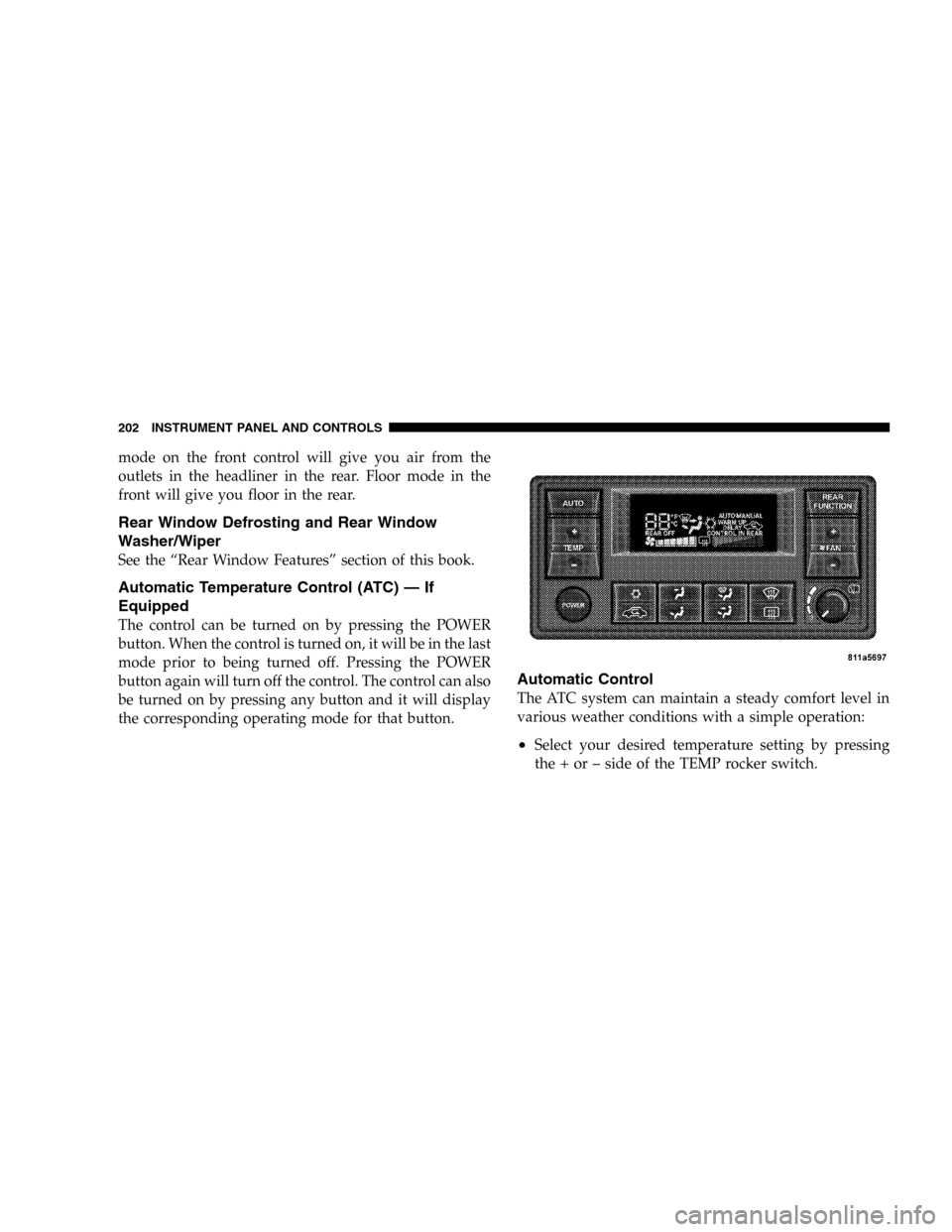
The control can be turned on by pressing the POWER
button. When the control is turned on, it will be in the last
mode prior to being turned off. Pressing the POWER
button again will turn off the control. The control can also
be turned on by pressing any button and it will display
the corresponding operating mode for that button.
Automatic Control
The ATC system can maintain a steady comfort level in
various weather conditions with a simple operation:
•Select your desired temperature setting by pressing
the + or – side of the TEMP rocker switch.
202 INSTRUMENT PANEL AND CONTROLS
Page 203 of 416

The ATC system uses an infrared sensor located in the
overhead console to measure the temperature of the
driver. Based on the sensor input, the system will auto-
matically control comfort by varying the temperature, fan
speed, and mode. This maintains a comfortable tempera-
ture, even under changing conditions. It is important that
the infrared sensor is kept clean and that objects are not
blocking the sensor. It is also important that objects are
not used that may scratch or damage it in any way.
Level Of Automatic Control
72°F (22°C) is the recommended setting for maximum
comfort for the average person, however, this may vary.
NOTE:The temperature setting can be adjusted at any
time without affecting automatic control operation. It is
not necessary to move the temperature setting for cold or
hot vehicles. The system automatically adjusts the tem-
perature, mode and fan speed to provide comfort as
quickly as possible.NOTE:In cold weather, the fan will not turn on in
AUTO mode until the engine coolant has warmed up
sufficiently. This is indicated by the WARM UP DELAY
message on the display.
NOTE:The temperature can be displayed in U.S. or
Metric by selecting the US/M customer programmable
feature. Refer to the�Overhead Console-Customer Pro-
grammable Features.�The mode will also be shown in the
display and will change as required during automatic
operation.
NOTE:The system can be put into recirculate mode
without affecting ATC operation. This will prevent out-
side air from entering the vehicle. Use this mode to
temporarily block out any outside odors, smoke, or dust.
INSTRUMENT PANEL AND CONTROLS 203
4
Page 204 of 416

Manual Control (ATC)
You also may choose to customize your comfort by
selecting the fan speed and mode manually. Pressing the
fan speed button or any mode button places the system
into manual operation.
While in manual operation there are six fan speeds
available and the choice of any mode. The airflow
temperature is adjusted automatically to maintain the
desired comfort level. You can adjust the temperature by
pressing the + or – TEMP rocker switch.
FAN Control
Use this button to regulate the amount of air deliv-
ered through the system in any mode you select.
Press the + or – side of the button to increase or decrease
fan speed.
Air Conditioning Operation
Press this button to turn on the air conditioning
compressor. A snow flake symbol in the displayshows that the compressor is on. Compressor operation is
automatic when you press the AUTO button and no
snowflake is shown.
The compressor can operate at any temperature above
32°F (0°C).
NOTE:The compressor will not engage until the engine
has been running for several seconds. Slight changes in
engine speed or power may be noticed when the com-
pressor is on. This is a normal occurrence since the
compressor will cycle on and off to maintain comfort and
improve fuel economy.
Recirculate Button
Press this button to recirculate the air inside the
vehicle. Outside air is prevented from entering
the vehicle. Use this mode to temporarily block
out any outside odors, smoke, dust or when
rapid cooling of the interior is required.
204 INSTRUMENT PANEL AND CONTROLS
Page 205 of 416

Manual control of Recirculation is possible only in Panel,
Floor, and Bi-Level modes. It will not operate in Mix, or
Defrost modes. The recirculation symbol will flash three
times indicating recirculation is not available in these
modes.
NOTE:If the interior of the windows begin to fog, press
the recirculate button to return to outside air. Some
conditions will cause captured interior air to fog win-
dows when in recirculate mode.
Panel
Outside air flows through the outlets located in the
instrument panel. These outlets can be adjusted to
direct the airflow.
Floor (Heat)
Outside air flows primarily through the floor out-
lets located under the instrument panel. A small
amount of air is directed through the defrost and side
window demister outlets.
Mix
Outside air flows in equal proportions through the
floor and defroster outlets.
Bi-Level
Air flows through the outlets located in the instru-
ment panel and those located on the floor.
NOTE:There is a difference in temperature between the
upper and lower outlets for added comfort. The warmer
air goes to the floor outlets. This feature gives improved
comfort during sunny but cool conditions.
Defrost
Outside air is primarily directed to the windshield
through the defroster outlets located at the base of
the windshield and side window demist outlets.
NOTE:The air conditioning compressor operates in
both Mix and Defrost or a blend of these modes, even if
INSTRUMENT PANEL AND CONTROLS 205
4