2005 CHRYSLER VOYAGER battery fuse
[x] Cancel search: battery fusePage 469 of 2339
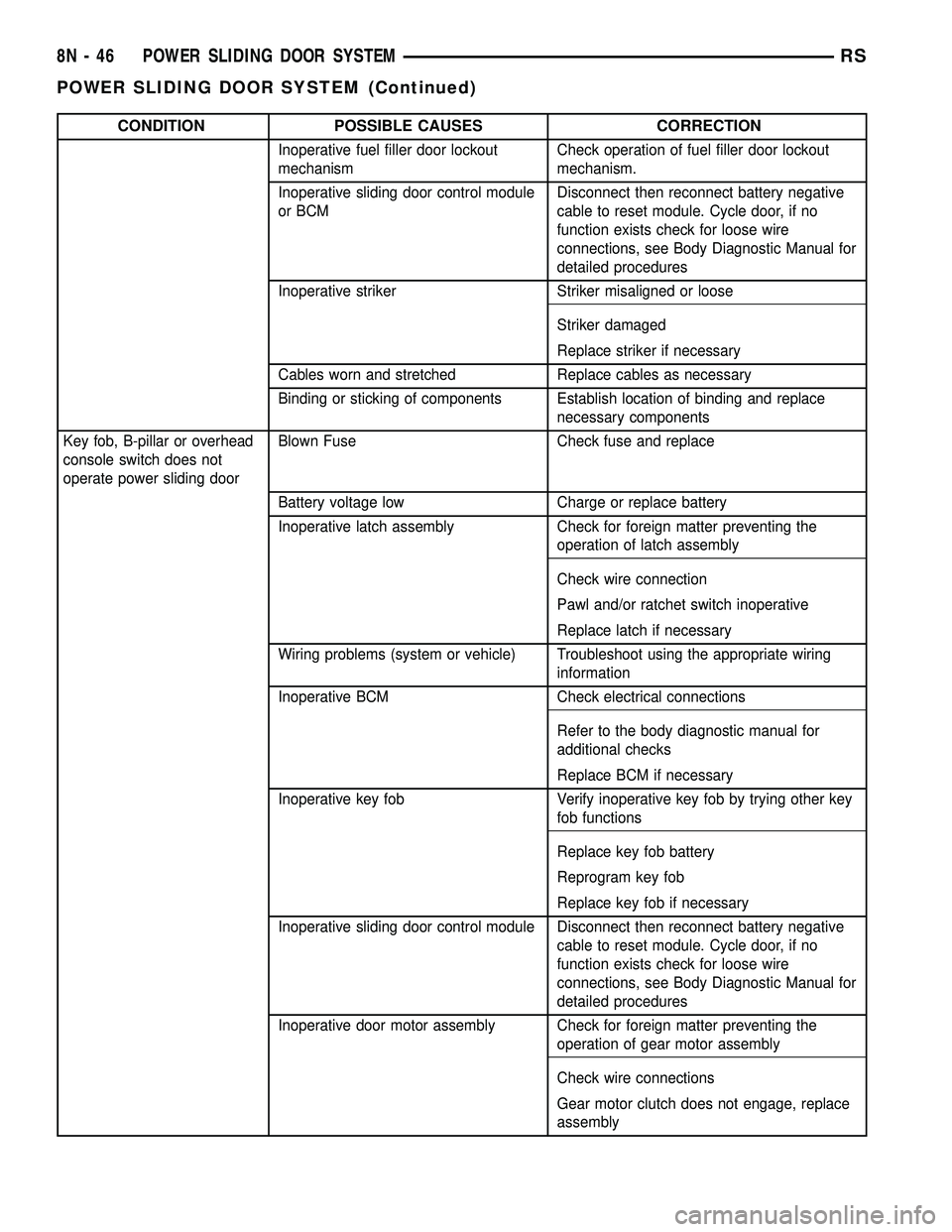
CONDITION POSSIBLE CAUSES CORRECTION
Inoperative fuel filler door lockout
mechanismCheck operation of fuel filler door lockout
mechanism.
Inoperative sliding door control module
or BCMDisconnect then reconnect battery negative
cable to reset module. Cycle door, if no
function exists check for loose wire
connections, see Body Diagnostic Manual for
detailed procedures
Inoperative striker Striker misaligned or loose
Striker damaged
Replace striker if necessary
Cables worn and stretched Replace cables as necessary
Binding or sticking of components Establish location of binding and replace
necessary components
Key fob, B-pillar or overhead
console switch does not
operate power sliding doorBlown Fuse Check fuse and replace
Battery voltage low Charge or replace battery
Inoperative latch assembly Check for foreign matter preventing the
operation of latch assembly
Check wire connection
Pawl and/or ratchet switch inoperative
Replace latch if necessary
Wiring problems (system or vehicle) Troubleshoot using the appropriate wiring
information
Inoperative BCM Check electrical connections
Refer to the body diagnostic manual for
additional checks
Replace BCM if necessary
Inoperative key fob Verify inoperative key fob by trying other key
fob functions
Replace key fob battery
Reprogram key fob
Replace key fob if necessary
Inoperative sliding door control module Disconnect then reconnect battery negative
cable to reset module. Cycle door, if no
function exists check for loose wire
connections, see Body Diagnostic Manual for
detailed procedures
Inoperative door motor assembly Check for foreign matter preventing the
operation of gear motor assembly
Check wire connections
Gear motor clutch does not engage, replace
assembly
8N - 46 POWER SLIDING DOOR SYSTEMRS
POWER SLIDING DOOR SYSTEM (Continued)
Page 470 of 2339
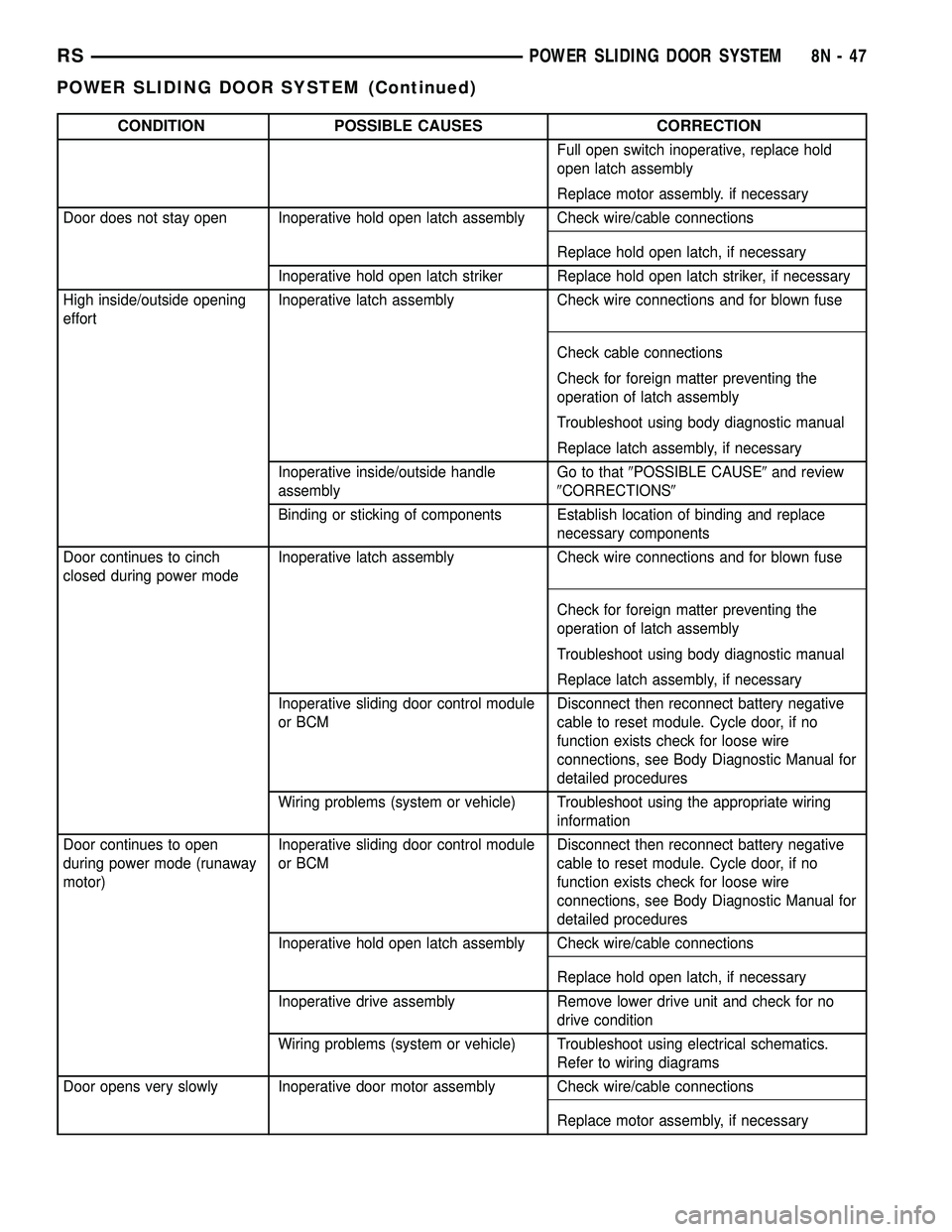
CONDITION POSSIBLE CAUSES CORRECTION
Full open switch inoperative, replace hold
open latch assembly
Replace motor assembly. if necessary
Door does not stay open Inoperative hold open latch assembly Check wire/cable connections
Replace hold open latch, if necessary
Inoperative hold open latch striker Replace hold open latch striker, if necessary
High inside/outside opening
effortInoperative latch assembly Check wire connections and for blown fuse
Check cable connections
Check for foreign matter preventing the
operation of latch assembly
Troubleshoot using body diagnostic manual
Replace latch assembly, if necessary
Inoperative inside/outside handle
assemblyGo to that9POSSIBLE CAUSE9and review
9CORRECTIONS9
Binding or sticking of components Establish location of binding and replace
necessary components
Door continues to cinch
closed during power modeInoperative latch assembly Check wire connections and for blown fuse
Check for foreign matter preventing the
operation of latch assembly
Troubleshoot using body diagnostic manual
Replace latch assembly, if necessary
Inoperative sliding door control module
or BCMDisconnect then reconnect battery negative
cable to reset module. Cycle door, if no
function exists check for loose wire
connections, see Body Diagnostic Manual for
detailed procedures
Wiring problems (system or vehicle) Troubleshoot using the appropriate wiring
information
Door continues to open
during power mode (runaway
motor)Inoperative sliding door control module
or BCMDisconnect then reconnect battery negative
cable to reset module. Cycle door, if no
function exists check for loose wire
connections, see Body Diagnostic Manual for
detailed procedures
Inoperative hold open latch assembly Check wire/cable connections
Replace hold open latch, if necessary
Inoperative drive assembly Remove lower drive unit and check for no
drive condition
Wiring problems (system or vehicle) Troubleshoot using electrical schematics.
Refer to wiring diagrams
Door opens very slowly Inoperative door motor assembly Check wire/cable connections
Replace motor assembly, if necessary
RSPOWER SLIDING DOOR SYSTEM8N-47
POWER SLIDING DOOR SYSTEM (Continued)
Page 485 of 2339
(3) Switch ignition ON position.
(4) Connect the clip end of a 12 volt test light to
Pin 13 in door harness connector at the window
switch. Touch the test light probe to Pin 9 and then
to Pin 11.
²If the test light illuminates, the wiring circuit
between the battery and switch is OK.
²If the lamp does not illuminate, first check the
25 amp circuit breaker attached to the electrical dis-
tribution wiring bracket. If the circuit breaker is OK,
then check the 40 amp fuse (#28) in the Integrated
Power Module (IPM). If both components are OK,
then check for a broken wire.
VENT WINDOW MOTOR
DIAGNOSIS AND TESTING
VENT WINDOW MOTOR
If the power vent window motor is receiving proper
current and ground and does not operate proceed
with motor test. Refer to the appropriate wiring
information.
(1) Remove D-pillar trim panel necessary to gain
access to power vent window motor wire connector,
(Refer to 23 - BODY/INTERIOR/LEFT D-PILLAR
TRIM PANEL - REMOVAL) or (Refer to 23 - BODY/
INTERIOR/RIGHT D-PILLAR TRIM PANEL -
REMOVAL).
(2) Disconnect power vent window motor wire con-
nector from body harness.
(3) Using two jumper wires, connect one to a bat-
tery (+) source and the other to a good ground (-).
(4) Connect the Negative (-) jumper probe to one of
the motor connector terminals.
(5) Momentarily touch the Positive (+) jumper
probe to the other motor connector terminal.
When positive probe is connected the motor should
rotate in one direction to either move window open or
closed. If window is all the way open or closed the
motor will grunt and the crank system will flex when
actuated in that one direction.
Reverse jumper probes at the motor connector ter-
minals and window should now move in opposite
direction. If window does not move or grunt, replace
the motor.
If window moved completely open or closed, reverse
the jumper probes and cycle window to the opposite
position to verify full operation.
If motor grunts and does not move, verify that
crank system is not binding.
REMOVAL
(1) Disconnect and isolate the battery negative
cable.(2) Remove D-pillar trim panel. (Refer to 23 -
BODY/INTERIOR/LEFT D-PILLAR TRIM PANEL -
REMOVAL) or (Refer to 23 - BODY/INTERIOR/
RIGHT D-PILLAR TRIM PANEL - REMOVAL).
(3) Disconnect wire connector from power vent
motor.
(4) Using a flat bladed tool, carefully lift the circu-
lar actuator link tab. Remove link from window ball
socket.
(5) Remove bolts holding power vent motor to
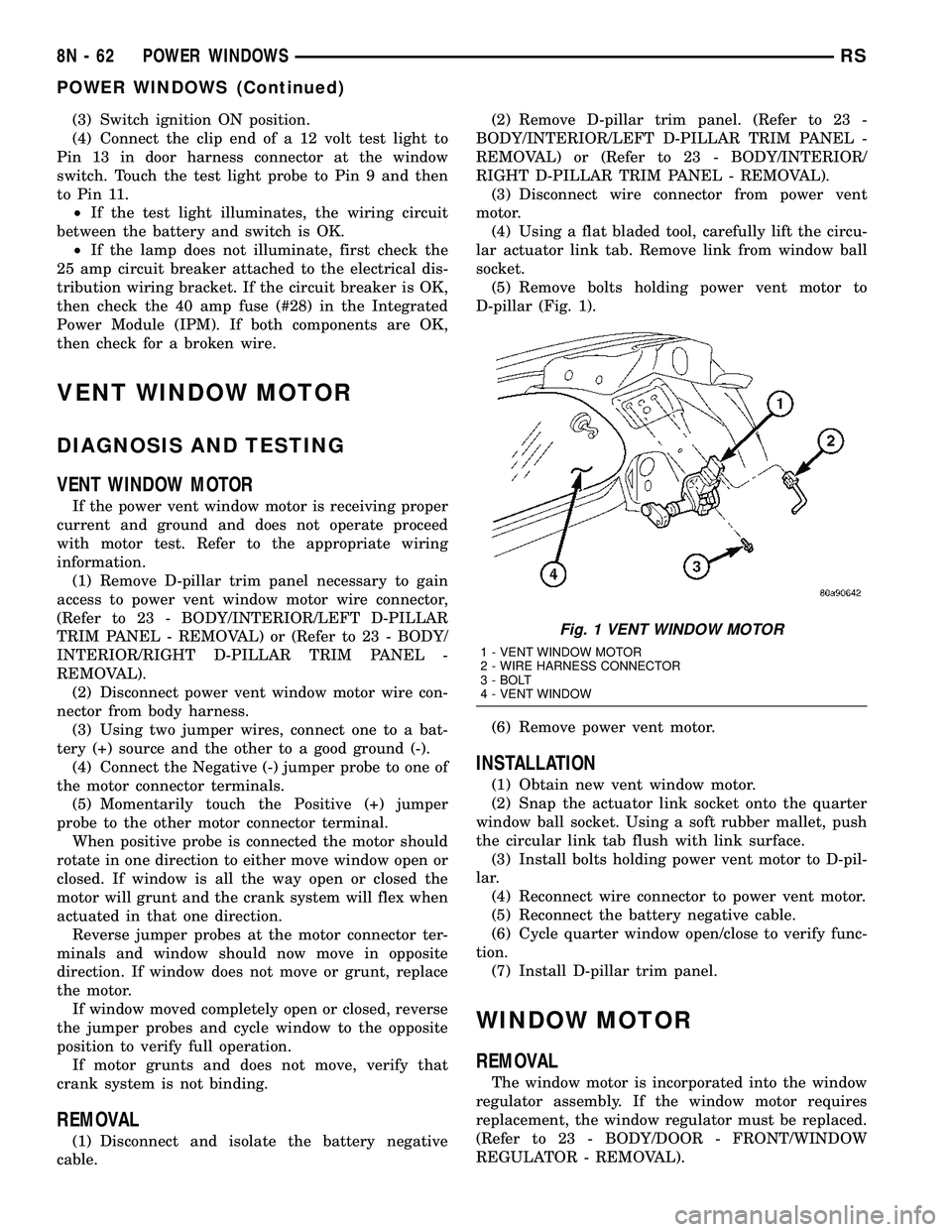
D-pillar (Fig. 1).
(6) Remove power vent motor.
INSTALLATION
(1) Obtain new vent window motor.
(2) Snap the actuator link socket onto the quarter
window ball socket. Using a soft rubber mallet, push
the circular link tab flush with link surface.
(3) Install bolts holding power vent motor to D-pil-
lar.
(4) Reconnect wire connector to power vent motor.
(5) Reconnect the battery negative cable.
(6) Cycle quarter window open/close to verify func-
tion.
(7) Install D-pillar trim panel.
WINDOW MOTOR
REMOVAL
The window motor is incorporated into the window
regulator assembly. If the window motor requires
replacement, the window regulator must be replaced.
(Refer to 23 - BODY/DOOR - FRONT/WINDOW
REGULATOR - REMOVAL).
Fig. 1 VENT WINDOW MOTOR
1 - VENT WINDOW MOTOR
2 - WIRE HARNESS CONNECTOR
3 - BOLT
4 - VENT WINDOW
8N - 62 POWER WINDOWSRS
POWER WINDOWS (Continued)
Page 509 of 2339

WARNING: Do not connect the battery negative
cable (Refer to 8 - ELECTRICAL/RESTRAINTS -
DIAGNOSIS AND TESTING - AIRBAG SYSTEM). Per-
sonal injury or death may result if the system test
is not performed first.
(5) Verify vehicle and system operation.
(6) Close hood.
SLIDING DOOR OPENING MOUNTED
(1) Connect electrical connector (Fig. 27).
(2) Position sensor in vehicle (Fig. 27).
(3) Install the two retaining screws to the impact
sensor (Fig. 27). Torque screws to 7 N´m (62 in. lbs.).
WARNING: Do not connect the battery negative
cable (Refer to 8 - ELECTRICAL/RESTRAINTS -
DIAGNOSIS AND TESTING - AIRBAG SYSTEM). Per-
sonal injury or death may result if the system test
is not performed first.
(4) Verify vehicle and system operation.
(5) Close hood.
QUARTER PANEL MOUNTED
(1) Position sensor in vehicle (Fig. 28).
(2) Connect electrical connector (Fig. 28).
(3) Install the two retaining screws to the impact
sensor (Fig. 28). Torque screws to 7 N´m (62 in. lbs.).
(4) Install the quarter trim panel for the side of
the vehicle that you are replacing the side impact
sensor (Refer to 23 - BODY/INTERIOR/QUARTER
TRIM PANEL - INSTALLATION).
WARNING: Do not connect the battery negative
cable (Refer to 8 - ELECTRICAL/RESTRAINTS -
DIAGNOSIS AND TESTING - AIRBAG SYSTEM). Per-
sonal injury or death may result if the system test
is not performed first.
(5) Verify vehicle and system operation.
(6) Close hood.
KNEE BLOCKER AIRBAG
DESCRIPTION
The Knee Blocker Airbag (Fig. 29) is located on the
driver side of the vehicle beneath the instrument
panel under steering column cover (Fig. 30).
The knee blocker airbag includes one reaction plate
and one load plate, within which the cushion and
inflator are mounted and sealed. Following a knee
blocker airbag deployment, the knee blocker airbag
and instrument panel assembly must be replaced.
Refer to the proper diagnostic information for diagno-
sis and testing.
OPERATION
The knee blocker airbag is equipped with a single
inflator. When the Occupant Restraint Controller
(ORC) sends the proper electrical signals to the initi-
ator, the electrical energy generates enough heat to
initiate a small pyrotechnic charge which, in turn
ignites chemical pellets within the inflator. Once
ignited, these chemical pellets burn rapidly and pro-
duce a large quantity of inert gas. The inflator is
sealed to the back of the airbag housing and a dif-
fuser in the inflator directs all of the inert gas into
the airbag cushion, causing the cushion to inflate. As
the cushion inflates, the knee blocker airbag trim
deploy. Following an airbag deployment, the airbag
cushion quickly deflates by venting the inert gas
towards the instrument panel through vent holes
within the fabric used to construct the back panel of
the airbag cushion.
Some of the chemicals used to create the inert gas
may be considered hazardous while in their solid
state before they are burned, but they are securely
sealed within the airbag inflator. Typically, the poten-
tially hazardous chemicals are burned during an air-
bag deployment event.
WARNING: The inert gas that is produced when the
chemicals are burned is harmless. However, a small
amount of residue from the burned chemicals may
cause some temporary discomfort if it contacts the
skin, eyes, or breathing passages. If skin or eye irri-
tation is noted, rinse the affected area with plenty
of cool, clean water. If breathing passages are irri-
tated, move to another area where there is plenty of
clean, fresh air to breath. If the irritation is not alle-
viated by these actions, contact a physician.
Fig. 29 KNEE BLOCKER AIRBAG
8O - 22 RESTRAINTSRS
IMPACT SENSOR (Continued)
Page 515 of 2339

The ORC is secured with screws to a stamped steel
mounting bracket welded onto the top of the floor
panel transmission tunnel just behind and under-
neath the instrument panel center stack in the pas-
senger compartment of the vehicle (Fig. 38).
Concealed within a hollow in the center of the die
cast aluminum ORC housing is the electronic cir-
cuitry of the ORC which includes a microprocessor,
an electronic impact sensor, an electronic safing sen-
sor, and an energy storage capacitor. A stamped
metal cover plate is secured to the bottom of the
ORC housing with four screws to enclose and protect
the internal electronic circuitry and components.
An arrow printed on the label on the top of the
ORC housing provides a visual verification of the
proper orientation of the unit, and should always be
pointed toward the front of the vehicle. The ORC
housing has integral mounting flanges. the ORC has
two molded plastic electrical connectors that exits the
right facing side of the ORC housing. These terminal
pins connect the ORC to the vehicle electrical system.
The impact sensor and safing sensor internal to
the ORC are calibrated for the specific vehicle, and
are only serviced as a unit with the ORC. In addi-
tion, there are unique versions of the ORC for vehi-
cles with or without curtain airbags. The ORC cannot
be repaired or adjusted and, if damaged or faulty, it
must be replaced.
OPERATION
The microprocessor in the Occupant Restraint Con-
troller (ORC) contains the supplemental restraint
system logic circuits and controls all of the supple-
mental restraint system components. The ORC uses
On-Board Diagnostics (OBD) and can communicatewith other electronic modules in the vehicle as well
as with the diagnostic scan tool using the Program-
mable Communication Interface (PCI) data bus. This
method of communication is used for control of the
airbag indicator in the ElectroMechanical Instrument
Cluster (EMIC) and for supplemental restraint sys-
tem diagnosis and testing through the 16-way Data
Link Connector (DLC) located on the driver side
lower edge of the instrument panel.
The ORC microprocessor continuously monitors all
of the supplemental restraint system electrical cir-
cuits to determine the system readiness. If the ORC
detects a monitored system fault, it sets an active
and stored Diagnostic Trouble Code (DTC) and sends
electronic messages to the EMIC over the PCI data
bus to turn on the airbag indicator. An active fault
only remains for the duration of the fault, or in some
cases for the duration of the current ignition switch
cycle, while a stored fault causes a DTC to be stored
in memory by the ORC. For some DTC's, if a fault
does not recur for a number of ignition cycles, the
ORC will automatically erase the stored DTC. For
other internal faults, the stored DTC is latched for-
ever.
On models equipped with the Occupant Classifica-
tion System (OCS), the ORC communicates with the
Occupant Classification Module (OCM) over the PCI
data bus. The ORC will internally disable the pas-
senger airbag and seat belt tensioner deployment cir-
cuits if the OCM detects that the passenger side
front seat is unoccupied or that it is occupied by a
load that is inappropriate for an airbag deployment.
The ORC also provides a control output to the Pas-
senger Airbag Disabled (PAD) indicator through the
passenger airbag indicator driver circuit. The OCM
notifies the ORC when it has detected a monitored
system fault and stored a DTC in its memory for any
faulty OCS component or circuit, then the ORC sets
a DTC and controls the airbag indicator operation
accordingly.
The ORC receives battery current through two cir-
cuits; a fused ignition switch output (RUN) circuit
through a fuse in the Junction Block (JB), and a
fused ignition switch output (RUN/START) circuit
through a second fuse in the JB. The ORC receives
ground through a ground circuit of the instrument
panel wire harness. These connections allow the ORC
to be operational whenever the ignition switch is in
the START or ON positions.
The ORC also contains an energy-storage capacitor.
When the ignition switch is in the START or ON
positions, this capacitor is continually being charged
with enough electrical energy to deploy the front sup-
plemental restraint components for up to one second
following a battery disconnect or failure. The purpose
of the capacitor is to provide backup supplemental
Fig. 38 ORC LOCATION
1 - ORC ELECTRICAL CONNECTORS
2 - ORC
3 - ORC MOUNTING SCREWS
8O - 28 RESTRAINTSRS
OCCUPANT RESTRAINT CONTROLLER (Continued)
Page 520 of 2339

(28) Install two right side nuts at instrument
panel center stack support to floor.
(29) Install two left side nuts at instrument panel
center stack support to floor.
(30) Connect the two wiring connectors to lower
instrument panel cubby bin at bottom of center stack
and install six screws.
(31) Align left side upper A-pillar trim over retain-
ing slots and firmly snap into place.
(32) Install four nuts at brake pedal support
bracket to instrument panel.
(33) Align left A-pillar lower extension trim over
retaining slots and firmly snap into place.
(34) Install knee blocker and retaining screws.
(35) Install Data Link Connector (DLC) into bot-
tom of knee blocker.
(36) Align parking brake lever and snap into place
on knee blocker reinforcement.
(37) Install lower steering column cover and four
retaining screws
(38) Align left cowl panel over retaining slots and
firmly snap into place.
(39) Align left front door sill plate over retaining
slots and firmly snap into place.
(40) Install center console bin between front seats.
WARNING: Do not connect the battery negative
cable (Refer to 8 - ELECTRICAL/RESTRAINTS -
DIAGNOSIS AND TESTING - AIRBAG SYSTEM). Per-
sonal injury or death may result if the system test
is not performed first.
(41) Close hood.
(42) Verify system and vehicle operation.
PASSENGER AIRBAG
DISABLED INDICATOR
DESCRIPTION
Vehicles equipped with the Occupant Classification
System (OCS) include a Passenger Airbag Disabled
(PAD) indicator (Fig. 40) which is located in the
instrument panel center stack, above the radio. The
PAD indicator is present only in vehicles equipped
with the OCS.The PAD indicator consists of a molded plastic
housing with an integral connector at the back. An
amber Light Emitting Diode (LED) behind the lens
causes the ªPASS AIR BAG OFFº text and icon to
appear silhouetted against an amber field through
the translucent lens when the indicator is illumi-
nated from behind by the LED. The PAD indicator is
available for separate service replacement.
OPERATION
In vehicles equipped with the Occupant Classifica-
tion System (OCS), the Passenger Airbag Disabled
(PAD) indicator gives an indication when the passen-
ger airbag and seat belt tensioner deployment cir-
cuits are disabled by the Occupant Restraint
Controller (ORC). The PAD indicator is controlled by
a transistor within the ORC through a hard wired
output based upon ORC programming and electronic
occupant classification messages received by the ORC
over the Programmable Communications Interface
(PCI) data bus from the Occupant Classification
Module (OCM). The PAD indicator Light Emitting
Diode (LED) is completely controlled by the ORC.
The LED receives a battery current input on the
fused ignition switch output (RUN/START) circuit.
Therefore, the LED will always be OFF when the
ignition switch is in any position except ON or
START. The LED only illuminates when it is pro-
vided a path to ground by the ORC transistor. The
ORC will turn on the PAD indicator for the following
reasons:
²Bulb Test- Each time the ignition switch is
turned to the ON position the PAD indicator is illu-
minated for about six seconds.
²Child Seat Detected Occupant Classifica-
tion Message- Each time the ORC receives a mes-
sage from the OCM indicating a child seat has been
detected in the passenger front seat, the passenger
airbag and seat belt tensioner deployment circuits
are deactivated and the PAD indicator will be illumi-
nated. The indicator remains illuminated until the
ORC receives an occupant classification message
indicating that:
²The passenger front seat is empty.
²The seat is occupied by a load equal to or
greater than a fifth percentile female.
²OR,Until the ignition switch is turned to the
OFF position, whichever of these three occurs first.
²Load Less Than Fifth Percentile Female
Occupant Classification Message- Each time the
ORC receives a message from the OCM indicating
that a load less than a fifth percentile female has
been detected in the passenger front seat, the pas-
senger airbag and seat belt tensioner deployment cir-
cuits are deactivated and the PAD indicator will be
illuminated. The indicator remains illuminated until:
Fig. 40 PASSENGER AIRBAG DISABLED (PAD)
INDICATOR
RSRESTRAINTS8O-33
PASSENGER AIRBAG (Continued)
Page 540 of 2339

The SKREES can be diagnosed and any stored DTC's
can be retrieved using a DRBllltscan tool as
described in the appropriate Body Diagnostic Proce-
dures information.
DIAGNOSIS AND TESTING
DIAGNOSIS AND TESTING - SENTRY KEY
REMOTE ENTRY SYSTEM
WARNING: On vehicles equipped with airbags, refer
to electrical, restraints, warnings, before attempting
component diagnosis or service. Failure to take the
proper precautions could result in accidental airbag
deployment and possible personal injury or death.
NOTE: The following tests may not prove conclu-
sive in the diagnosis of this system. The most reli-
able, efficient, and accurate means to diagnose the
Sentry Key Remote Entry System (SKREES)
involves the use of a DRBIIITscan tool. Refer to the
proper Body Diagnostic Procedures information.
The Sentry Key Remote Entry System (SKREES)
and the Programmable Communication Interface
(PCI) bus network should be diagnosed using a scan
tool. The scan tool will allow confirmation that the
PCI bus is functional, that the Sentry Key Remote
Entry Module (SKREEM) is placing the proper mes-
sages on the PCI bus, and that the Powertrain Con-
trol Module (PCM) is receiving the PCI bus
messages. Refer to the proper Body Diagnostic Proce-
dures information, and Wiring Diagrams for complete
circuit descriptions and diagrams.
(1) Check the fuses in the Integrated Power Mod-
ule (IPM). If OK, go to Step 2. If not OK, repair the
shorted circuit or component as required and replace
the faulty fuse.
(2) Disconnect and isolate the battery negative
remote cable from the remote terminal. Unplug the
wire harness connector at the SKREEM. Check for
continuity between the ground circuit cavity of the
SKREEM wire harness connector and a good ground.
There should be continuity. If OK, go to Step 3. If not
OK, repair the open circuit to ground as required.
(3) Connect the battery negative cable. Check for
battery voltage at the fused B(+) circuit cavity of the
SKREEM wire harness connector. If OK, go to Step
4. If not OK, repair the open circuit to the fuse in the
IPM as required.
(4) Turn the ignition switch to the ON position.
Check for battery voltage at the fused ignition switch
output (run/start) circuit cavity of the SKREEM wire
harness connector. If OK, use a scan tool and the
proper Body Diagnostic Procedures information tocomplete the diagnosis of the SKREES. If not OK,
repair the open circuit to the fuse in the IPM as
required.
DIAGNOSIS AND TESTING - VEHICLE THEFT
SECURITY SYSTEM
Refer to the appropriate wiring information. The
wiring information includes wiring diagrams, proper
wire and connector repair procedures, further details
on wire harness routing and retention, as well as
pin-out and location views for the various wire har-
ness connectors, splices and grounds. Using a
DRBIIItscan tool. Refer to the proper Body Diagnos-
tic Procedures information for test procedures.
HOOD AJAR SWITCH -
EXPORT
REMOVAL
(1) Disconnect and isolate the battery negative
cable.
(2) Using a small flat blade screwdriver, pry trig-
ger switch from the bracket on the left fender well.
(3) Disconnect the hood ajar switch from the wire
connector and remove from vehicle.
INSTALLATION
(1) Connect the hood ajar switch to the wire conec-
tor.
(2) Press the hood ajar switch into position on the
bracket located on the left inner fender well.
(3) Reconnect the battery negative cable.
(4) Close the hood and check for proper operation.
SENTRY KEY REMOTE ENTRY
MODULE
DESCRIPTION
The Sentry Key Remote Entry Module (SKREEM)
performs the functions of the Sentry Key Immobilizer
Module (SKIM), Remote Keyless Entry (RKE) Mod-
ule, and the Tire Pressure Monitoring (TPM) System
(previously part of the Electronic Vehicle Information
Center (EVIC).
The SKREEM is located in the same location as
the SKIM was and is mounted the same way. It looks
identical, but has added capabilities.
SENTRY KEY IMMOBILIZER
The Sentry Key Immobilizer System (SKIS)
authenticates an electronically coded Transponder
Key placed into the ignition and sends a valid/invalid
key message to the Powertrain Control Module
RSVEHICLE THEFT SECURITY8Q-3
VEHICLE THEFT SECURITY (Continued)
Page 551 of 2339

CONDITION POSSIBLE CAUSES CORRECTION
WASHER SYSTEM WILL
NOT FLOW WASHER
FLUID.1. NO WASHER FLUID IN
RESERVOIR.1. FILL WASHER RESERVOIR.
2. IPM FUSE #33 BLOWN. 2. SHORT OR DEFECTIVE CIRCUIT
BETWEEN IPM PIN 11 AND WASHER
PUMP MOTOR CONNECTOR POSITIVE
TERMINAL 2. INTERNAL SHORT IN IPM. IF
NOT OK, REPAIR CIRCUIT OR REFER TO
IPM DIAGNOSTIC PROCEDURES IN
WIRING DIAGRAMS.
3. WASHER HOSE NOT
FLOWING WASHER FLUID.3. ASSURE WASHER HOSE IS NOT
PINCHED, LOOSE, BROKEN OR
DISCONNECTED. IF NOT OK, PROPERLY
ROUTE OR REPAIR WASHER HOSE.
4. MOTOR CONNECTOR
LOOSE.4. PROPERLY SEAT AND LOCK
CONNECTOR TO MOTOR.
5. MOTOR CONNECTOR
TERMINALS BENT.5. REPAIR TERMINALS AND PROPERLY
SEAT CONNECTOR TO MOTOR.
6. OPEN CIRCUIT TO OR
FROM WASHER SELECT
SWITCH (EXPORT AND ATC
EQUIPPED VEHICLES ONLY).6. OPEN OR DEFECTIVE CIRCUIT
BETWEEN IPM BODY CONTROLLER PIN
27 AND WASHER SELECT SWITCH PIN 4,
OR OPEN OR DEFECTIVE CIRCUIT
BETWEEN IPM BODY CONTROLLER PIN
22 AND WASHER SELECT SWITCH PIN 2.
IF NOT OK, REPAIR CIRCUIT.
7. OPEN OR DEFECTIVE
WASHER SELECT SWITCH.7. REFERO TO THE PROPER BODY
DIAGNOSTIC PROCEDURES
INFORMATION ON MANUAL
TEMPERATURE CONTROLS.
8. OPEN POWER CIRCUIT TO
MOTOR.8. OPEN OR DEFECTIVE CIRCUIT
BETWEEN IPM CONNECTOR TERMINAL 11
AND WASHER MOTOR CONNECTOR
POSITIVE TERMINAL 2. INTERNAL OPEN
IN IPM. IF NOT OK, REPAIR CIRCUIT OR
REFER TO IPM DIAGNOSTIC
PROCEDURES IN WIRING DIAGRAMS.
9. OPEN OR DEFECTIVE
MOTOR GROUND CIRCUIT.9. OPEN OR DEFECTIVE CIRCUIT
BETWEEN IPM CONNECTOR TERMINAL
20 AND WASHER MOTOR CONNECTOR
NEGATIVE TERMINAL 1. INTERNAL OPEN
IN IPM. IF NOT OK, REPAIR CIRCUIT OR
REFER TO IPM DIAGNOSTIC
PROCEDURES IN WIRING DIAGRAMS.
10. OPEN CIRCUIT IN MOTOR. 10. CHECK FOR OPEN CIRCUIT IN MOTOR
BETWEEN POSITIVE TERMINAL 2 AND
NEGATIVE TERMINAL 1. IF NOT OK,
REPLACE WASHER MOTOR.
11. SEIZED MOTOR BEARINGS. 11. APPLY DIRECT BATTERY VOLTAGE TO
MOTOR TERMINALS. IF MOTOR DOES
NOT RUN, REPLACE MOTOR.
8R - 6 WIPERS/WASHERSRS
WIPERS/WASHERS (Continued)