Page 102 of 292

SALES CODE RAZ—AM/ FM STEREO RADIO
WITH CASSETTE TAPE PLAYER, CD PLAYER
AND CD CHANGER CONTROLS
Operating Instructions—Radio
NOTE:
Power to operate the radio is controlled by the
ignition switch. It must be in the ON or ACC position to
operate the radio.
Power Switch, Volume Control
Press the ON/VOL control to turn the radio on. Turn the
volume control clockwise to increase the volume. The
volume will be displayed and continuously updated
while the button is pressed.
Seek Button (Radio Mode)
Press and release the Seek button to search for the next
station in either the AM or FM mode. Press the top of the
button to seek up and the bottom to seek down. Holding
the button will by pass stations until you release the
button.
Tuning
Press the TUNE control up or down to increase or
decrease the frequency. If you press and hold the button,
the radio will continue to tune until you release the
button. The frequency will be displayed and continu-
ously updated while the button is pressed.
Radio Data System (RDS)
The Radio Data System allows radio broadcasting sta-
tions to send data signals on a subcarrier frequency
which is added to the stereo signal. RDS was developed
to give FM receivers user-friendly features, such as
Program Service name (PS) and Program Type (PTY).
Program Service name is typically used by the broad-
caster to display the station’s name or call letters, for
example�WNIC�. Typically these are 8 characters in
length and are displayed by the radio for those stations
RAZ Radio
102 UNDERSTANDING YOUR INSTRUMENT PANEL
Page 105 of 292

Pressing the AM/FM button continues the search in the
alternate frequency band.
To stop the search, press SCAN a second time.
To Set The Radio Push-button Memory
When you are receiving a station that you wish to
commit to push-button memory, press the SET button.
SET 1 will show in the display window. Select the
push-button you wish to lock onto this station and press
and release that button. If a station is not selected within
5 seconds after pressing the SET button, the station will
continue to play but will not be locked into push-button
memory.
You may add a second station to each push-button by
repeating the above procedure with this exception: Press
the SET button twice and SET 2 will show in the display
window. Each button can be set for SET 1 and SET 2 in
both AM and FM. This allows a total of 10 AM and 10 FM
stations to be locked into memory. You can recall the
stations stored in SET 2 memory by pressing the push-
button twice.
To Change From Clock To Radio Mode
Press the Time button to change the display between
radio frequency and time.
Operating Instructions—Tape Player
Insert the cassette with the exposed tape side toward the
right and the mechanical action of the player will gently
pull the cassette into the play position.
NOTE:When subjected to extremely cold temperatures,
the tape mechanism may require a few minutes to warm
up for proper operation. Sometimes poor playback may
be experienced due to a defective cassette tape. Clean and
demagnetize the tape heads at least twice a year.
Seek Button
Press the SEEK button up for the next selection on the
tape and down to return to the beginning of the current
selection.
Press the SEEK button up or down to move the track
number to skip forward or backward 1 to 6 selections.
Press the SEEK button once to move 1 selection, twice to
move 2 selections, etc.
UNDERSTANDING YOUR INSTRUMENT PANEL 105
4
Page 110 of 292
CD Diagnostic Indicators
When driving over a very rough road, the CD player may
skip momentarily. Skipping will not damage the disc or
the player, and play will resume automatically.
As a safeguard and to protect your CD player, one of the
following warning symbols may appear on your display.
A CD HOT symbol indicates the player is too hot.
CD HOT will pause the operation. Play can be resumed
when the operating temperature is corrected or another
MODE is selected.
An ERR symbol will appear on the display if the laser is
unable to read the Disc data for the following reasons:
•Excessive vibration
•Disc inserted upside down
•Damaged disc
•Water condensation on optics
SALES CODE RBB—AM/FM STEREO RADIO
WITH CASSETTE TAPE PLAYER AND CD
CHANGER CAPABILITY
Radio Operation
Power/Volume Control
Press the ON/VOL control to turn the radio on. Turn the
volume control clockwise to increase the volume.
RBB Radio
110 UNDERSTANDING YOUR INSTRUMENT PANEL
Page 115 of 292

Operating Instructions - Satellite Radio Mode (If
Equipped)
Refer to the Satellite Radio section of the Owner’s Manual.
CD Diagnostic Indicators
When driving over a very rough road, the CD player may
skip momentarily. Skipping will not damage the disc or
the player, and play will resume automatically.
As a safeguard and to protect your CD player, one of the
following warning symbols may appear on your display.
A CD HOT symbol indicates the player is too hot.
CD HOT will pause the operation. Play can be resumed
when the operating temperature is corrected or another
MODE is selected.
An ERR symbol will appear on the display if the laser is
unable to read the Disc data for the following reasons:
•Excessive vibration
•Disc inserted upside down
•Damaged disc
•Water condensation on optics
SALES CODE RBK—AM/ FM STEREO RADIO
WITH CD PLAYER AND CD CHANGER
CONTROLS
Radio Operation
Power/Volume Control
Press the ON/VOL control to turn the radio on. Turn the
volume control clockwise to increase the volume.
RBK Radio
UNDERSTANDING YOUR INSTRUMENT PANEL 115
4
Page 129 of 292

Fan Control
Use this control to regulate the amount of air forced
through the system in any mode you select. Turn the
control clockwise to increase fan speed.
In ambient temperatures below 21°C (70°F), fan opera-
tion is delayed when the engine is first started. The fan
will automatically start when the engine coolant is warm
enough to heat the air. This feature can be defeated by
turning the fan control.
AUTO Control
Press the top of the button to turn the ATC system On.
Press the lower portion of the button to turn the entire
system Off.
Comfort Control
Use this control to regulate the comfort inside the pas-
senger compartment. Press the top of the switch to raise
the temperature selection and the bottom of the switch to
lower it. The comfort setting range is from Low, 60,
61,....to 89,90, Hi, for automatic temperature control. You
can select a very hot or cold comfort setting by holding
the comfort control until it reaches its highest or lowest
levels.The system adjusts to bring the interior temperature to
the desired comfort level. All comfort settings are auto-
matic; even Hi and Low.
NOTE:You can change the display from U.S. to metric
units by pressing the Mix and Panel mode buttons
simultaneously or by pressing the English/Metric button
on the overhead console.
Air Conditioning Button
Press this button to turn on the air conditioning
compressor. A snow flake symbol in the display
shows that the compressor is on. Compressor
operation is automatic when you press the Auto button.
The compressor can operate at any temperature above
32°F(0°C).
With the compressor off and the temperature set at Lo, air
entering the vehicle will be slightly warmer than the air
outside the vehicle.
NOTE:The compressor will not engage until the engine
has been running for several seconds. Slight changes in
UNDERSTANDING YOUR INSTRUMENT PANEL 129
4
Page 134 of 292

NOTE:If the system is in the AUTO mode and the fan
control is already rotated fully clockwise or fully coun-
terclockwise, the control may have to be rotated to the
middle and then to the desired fan setting for manual
adjustment of fan speed.
Manual Air Conditioning/Heater Control—If
Equipped
The Air Conditioning System allows you to balance the
temperature, amount, and direction of air circulating
throughout the vehicle.The air conditioning system of your vehicle contains
R-134a, a refrigerant that does not deplete the ozone layer
in the upper atmosphere.
The controls are as follows:
Fan and Air Conditioning Control
Use this control to regulate the
amount of air forced through the sys-
tem in any mode you select. The 0
Setting represents OFF and the 4 Set-
ting is the greatest amount of air flow.
Air Conditioning Operation
To turn on the Air Conditioning,
choose the direction of the air through
the outlets by selecting between the
Air Conditioning Recirculation, Panel-
Air Conditioning, or Bi-Level Air Con-
ditioning modes on the Mode Control.
Air Conditioning modes are indicated
by the snowflake symbol shown above in illustration.
Adjust the Temperature and Fan Controls.
Manual Air Conditioning and Heating Controls
134 UNDERSTANDING YOUR INSTRUMENT PANEL
Page 190 of 292
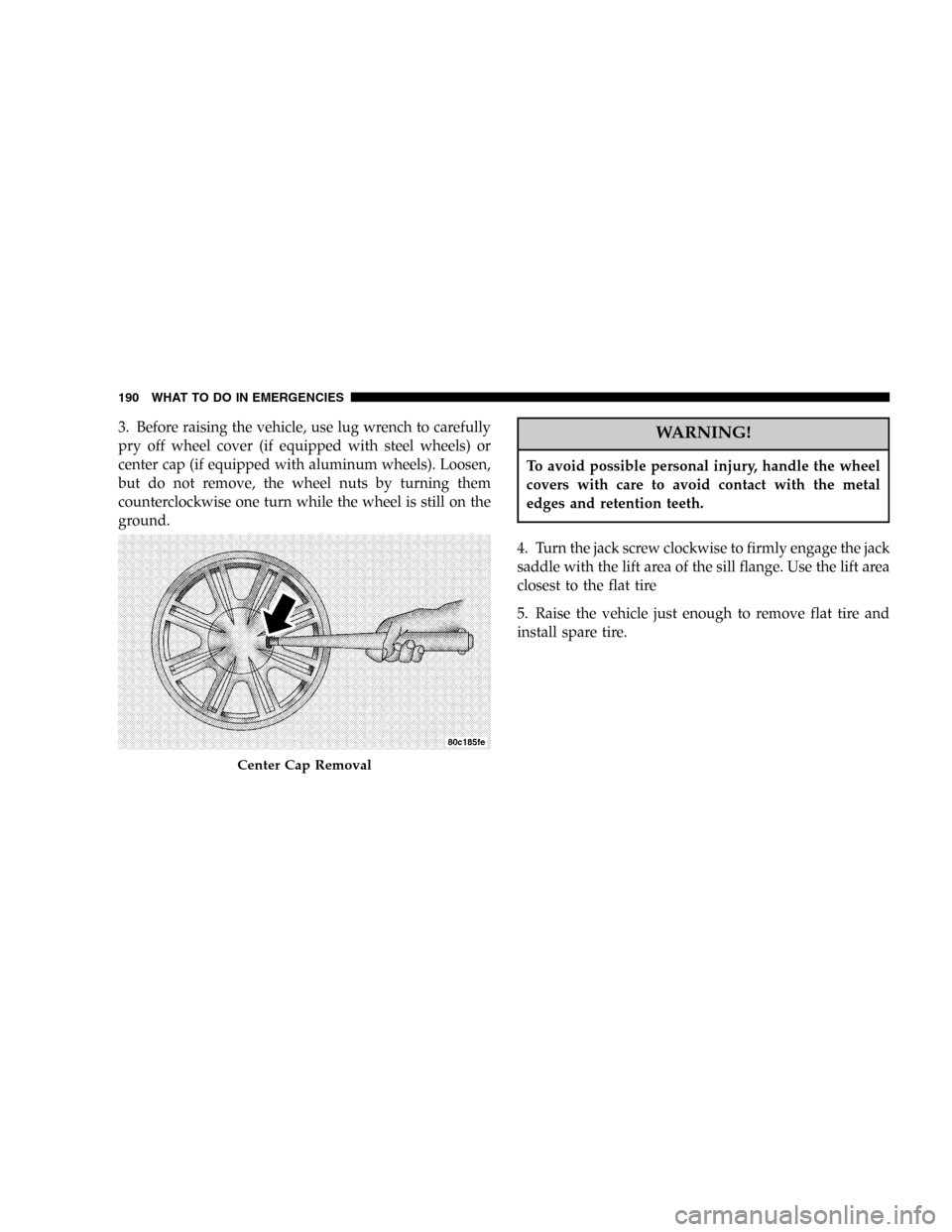
3. Before raising the vehicle, use lug wrench to carefully
pry off wheel cover (if equipped with steel wheels) or
center cap (if equipped with aluminum wheels). Loosen,
but do not remove, the wheel nuts by turning them
counterclockwise one turn while the wheel is still on the
ground.WARNING!
To avoid possible personal injury, handle the wheel
covers with care to avoid contact with the metal
edges and retention teeth.
4. Turn the jack screw clockwise to firmly engage the jack
saddle with the lift area of the sill flange. Use the lift area
closest to the flat tire
5. Raise the vehicle just enough to remove flat tire and
install spare tire.
Center Cap Removal
190 WHAT TO DO IN EMERGENCIES
Page 192 of 292
WARNING!
Raising the vehicle higher than necessary can make
the vehicle less stable. It could slip off the jack and
hurt someone near it. Raise the vehicle only enough
to remove the tire.
6. Remove lug nuts and tire.
7. Mount spare tire.
8. Tighten all lug nuts on mounting studs.
9. Lower the vehicle to the ground by turning the jack
handle counterclockwise.
10. Fully tighten the lug nuts. Torque wheel lug nuts to
100 ft. lbs. (135 N·m).
11. Store the flat tire, jack, and tools.
WARNING!
A loose tire or jack thrown forward in a collision or
hard stop could endanger the occupants of the ve-
hicle. Always stow the jack parts and the spare tire in
the places provided.
12. Wheel cover installation (if required). Do not attempt
to install a wheel cover on a compact spare. align valve
notch in wheel cover with valve stem on wheel. Snap
cover into place.
NOTE:When reinstalling the center cap it is necessary
to align the center cap notch with the first spoke, just
right of the valve stem.
13. Adjust the tire pressure as soon as possible. Correct
pressure is on the label located on the driver’s door.
192 WHAT TO DO IN EMERGENCIES