2005 CHEVROLET VENTURE lock
[x] Cancel search: lockPage 150 of 470
Replacing the Convenience Center
1. Make sure the stowable seat is properly installed in
the vehicle. SeeStowable Seat on page 1-25for
more information. If the stowable seat is not in the
vehicle with the convenience center, the
convenience center will not be locked into the
correct position in the vehicle.
2. Make sure that the convenience center is closed.
3. Lift the convenience center up and into the rear
of the vehicle.
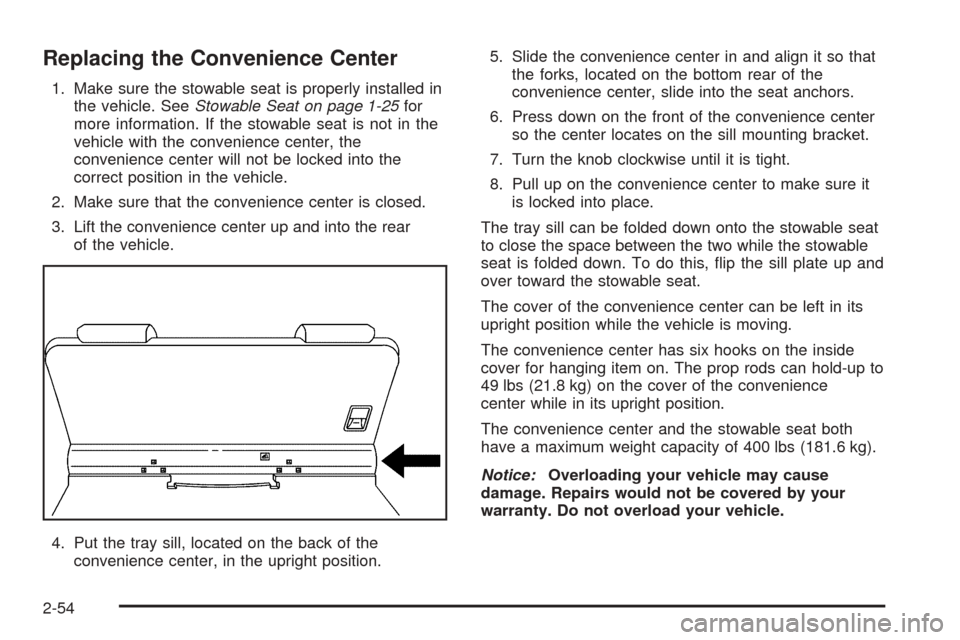
4. Put the tray sill, located on the back of the
convenience center, in the upright position.5. Slide the convenience center in and align it so that
the forks, located on the bottom rear of the
convenience center, slide into the seat anchors.
6. Press down on the front of the convenience center
so the center locates on the sill mounting bracket.
7. Turn the knob clockwise until it is tight.
8. Pull up on the convenience center to make sure it
is locked into place.
The tray sill can be folded down onto the stowable seat
to close the space between the two while the stowable
seat is folded down. To do this, ip the sill plate up and
over toward the stowable seat.
The cover of the convenience center can be left in its
upright position while the vehicle is moving.
The convenience center has six hooks on the inside
cover for hanging item on. The prop rods can hold-up to
49 lbs (21.8 kg) on the cover of the convenience
center while in its upright position.
The convenience center and the stowable seat both
have a maximum weight capacity of 400 lbs (181.6 kg).
Notice:Overloading your vehicle may cause
damage. Repairs would not be covered by your
warranty. Do not overload your vehicle.
2-54
Page 151 of 470

Vehicle Personalization
Your vehicle’s locks and lighting systems can be programmed with several different features. The features you can
program depend on the options that came with your vehicle. The following chart shows the features that can be
programmed. To determine which features your vehicle is equipped with, follow the steps listed for entering
the programming mode.
Feature
Number of
chimes
soundedDelayed
Illumination/
Exit
LightingAutomatic
Door LocksLast Door
Closed
Locking/
Lockout
DeterrentRemote
Driver’s
Door
Unlock
ControlRemote
Lock/Unlock
ConrmationContent
TheftContent
Theft
Arming/
Disarming
2 X X X ————
3XXXX———
4XXXXXXX
Entering Programming Mode
To program features, your vehicle must be in the
programming mode. Follow these steps:
1. The content theft-deterrent system must be
disarmed. SeeContent Theft-Deterrent on
page 2-25.
2. Remove the BCM PRGRM fuse from the instrument
panel fuse block, located to the right of the glove
box. SeeFuses and Circuit Breakers on page 5-92.3. Close the driver’s door.
4. Turn the ignition key to ACCESSORY.
5. Count the number of chimes you hear. You will
hear two to four chimes depending on the features
your vehicle is equipped with. Refer to the chart
shown previously.
You can now program your choices.
To exit the programming mode, follow the steps listed
underExiting Programming Mode on page 2-64.
2-55
Page 152 of 470
Delayed Illumination and Exit
Lighting
This feature allows you to customize the interior lamps
when entering and exiting the vehicle.
Programmable Modes
Mode 1:Both Features Off. The interior lamps will turn
on or off at the same instant that a door is opened or
closed.
Mode 2:Delayed Illumination Only. The interior lamps
will stay on for about 25 seconds after all the doors
and liftgate are closed, or until you lock the doors.
Mode 3:Exit Lighting Only. The interior lamps will come
on whenever you remove the key from the ignition
and stay on for about 25 seconds, or until you lock the
doors.
Mode 4:Both Features On. This combines
Modes 2 and 3.Your vehicle was originally programmed to Mode 4.
The mode may have been changed since then.
To determine the current mode, or to change the mode,
do the following:
1. Follow the instructions for “Entering Programming
Mode” earlier in this section.
2. Turn the interior lamps on by turning the instrument
panel brightness control all the way up.
3. Count the number of chimes you hear. The number
of chimes indicates the vehicle’s current
programmed mode. If you do not wish to change
the current mode, you can either exit the
programming mode by following the instructions
later in this section or program the next feature
available on your vehicle.
4. Turn the interior lamps off to change the
current mode.
5. Turn the interior lamps from on to off until you hear
the number of chimes corresponding to the mode
selection you want.
The mode you selected is now set. You can either exit
the programming mode by following the instructions
later in this section or program the next feature available
on your vehicle.
2-56
Page 153 of 470
Automatic Door Locks
This feature allows you to customize the automatic
locking and unlocking of the doors when using the
shift lever.
Programmable Modes
Mode 1:Both Features Off. Automatic door locking and
unlocking is disabled. You will always need to lock
your doors manually before driving to increase
occupant safety.
Mode 2:Automatic Door Locking Only
The automatic door unlock feature is turned off.
Shift out of PARK (P) with the ignition on and the
driver’s door closed; all doors will lock automatically.
Mode 3:Automatic Unlocking with the Ignition Off
Turn off the ignition with the transaxle in PARK (P);
all doors will unlock automatically.
Shift out of PARK (P) with the ignition on and the
driver’s door closed; all doors will lock automatically.Mode 4:Automatic Unlocking with Transaxle in
PARK (P)
Shift into PARK (P) with the ignition on; all doors
will unlock automatically.
Shift out of PARK (P) with the ignition on and the
driver’s door closed; all doors will lock automatically.
Your vehicle was originally programmed to Mode 3.
The mode may have been changed since then.
To determine the current mode, or to change the mode,
do the following:
1. Follow the instructions forEntering Programming
Mode on page 2-55.
2. Press LOCK on the power door lock switch.
3. Count the number of chimes you hear. The number
of chimes indicates the vehicle’s current
programmed mode. If you do not wish to change
the current mode, you can either exit the
programming mode by following the instructions
later in this section or program the next feature
available on your vehicle.
4. Press LOCK to change the current mode.
5. Press LOCK until you hear the number of chimes
corresponding to the mode selection you want.
The mode you selected is now set. You can either exit
the programming mode by following the instructions
later in this section or program the next feature available
on your vehicle.
2-57
Page 154 of 470
Last Door Locking and Lockout
Deterrent
This feature allows you to customize the automatic
locking of the doors when exiting the vehicle.
Programmable Modes
Mode 1:Both Features Off. Doors will always lock
immediately when you press LOCK on the power door
lock switch or the remote keyless entry transmitter.
Mode 2:Lockout Deterrent Only. If you leave your key
in the ignition with the driver’s door open, you will
not be able to lock the doors with the power door locks.
Mode 3:Last Door Closed Locking Only. If the
power door lock switch or the remote keyless entry
transmitter is used to lock the vehicle while any door or
the liftgate is open, you will hear three chimes. The
doors will not lock. Five seconds after the last door is
closed, all doors and the liftgate will lock.
Mode 4:Both Features On. This combines
Modes 2 and 3.Your vehicle was originally programmed to Mode 4.
The mode may have been changed since then.
To determine the current mode, or to change the mode,
do the following:
1. Follow the instructions forEntering Programming
Mode on page 2-55.
2. Press UNLOCK on the power door lock switch.
3. Count the number of chimes you hear. The number
of chimes indicates the vehicle’s current
programmed mode. If you do not wish to change
the current mode, you can either exit the
programming mode by following the instructions
later in this section or program the next feature
available on your vehicle.
4. Press UNLOCK to change the current mode.
5. Press UNLOCK until you hear the number of chimes
corresponding to the mode selection you want.
The mode you selected is now set. You can either exit
the programming mode by following the instructions
later in this section or program the next feature available
on your vehicle.
2-58
Page 155 of 470

Remote Driver Unlock Control
This feature allows you to customize the UNLOCK
button on the remote keyless entry transmitter.
Programmable Modes
Mode 1:Remote All Doors Unlock. When you press
UNLOCK on your remote keyless entry transmitter,
all doors and the liftgate will unlock.
Mode 2:Remote Driver’s Door Unlock Only. When you
press UNLOCK on your remote keyless entry
transmitter once, the driver’s door will unlock. When you
press UNLOCK on your remote keyless entry
transmitter again within ve seconds, all doors and the
liftgate will unlock.
Your vehicle was originally programmed to Mode 2.
The mode may have been changed since then.
To determine the current mode, or to change the mode,
do the following:
1. Follow the instructions forEntering Programming
Mode on page 2-55.
2. Press UNLOCK on the remote keyless entry
transmitter.3. Count the number of chimes you hear. The number
of chimes indicates the vehicle’s current
programmed mode. If you do not wish to change
the current mode, you can either exit the
programming mode by following the instructions
later in this section or program the next feature
available on your vehicle.
4. Press UNLOCK to change the current mode.
5. Press UNLOCK until you hear the number of chimes
corresponding to the mode selection you want.
The mode you selected is now set. You can either exit
the programming mode by following the instructions
later in this section or program the next feature available
on your vehicle.
2-59
Page 156 of 470
Remote Lock and Unlock
Conrmation
If your vehicle has this feature, it allows you to
customize the feedback received when locking or
unlocking your vehicle with the remote keyless entry
transmitter.
Programmable Modes
Mode 1:Both Features Off. Remote lock and unlock
conrmation are disabled.
Mode 2:Exterior Lamps Flash Only
When you use the remote keyless entry transmitter
to lock your vehicle, your parking lamps will ash to
let you know the command has been received.
When you use the remote keyless entry transmitter
to unlock your vehicle or operate your optional
power sliding door(s), your parking lamps will ash
to let you know the command has been received.Mode 3:Exterior Lamps Flash and Horn Sounds
When you use the remote keyless entry transmitter
to lock your vehicle, the horn will sound and your
parking lamps will ash to let you know the
command has been received.
When you use the remote keyless entry transmitter
to unlock your vehicle or operate your optional
power sliding door(s), your parking lamps will ash
to let you know the command has been received.
Mode 4:Exterior Lamps Flash and Horn Sounds on
second LOCK press
When you use the remote keyless entry transmitter
to lock your vehicle, your parking lamps will ash to
let you know the command has been received.
The horn will sound and your parking lamps
will ash if you press the LOCK button again within
ve seconds.
When you use the remote keyless entry transmitter
to unlock your vehicle or operate your optional
power sliding door(s), your parking lamps will ash
to let you know the command has been received.
2-60
Page 157 of 470
Your vehicle was originally programmed to Mode 4.
The mode may have been changed since then.
To determine the current mode, or to change the mode,
do the following:
1. Follow the instructions forEntering Programming
Mode on page 2-55.
2. Press LOCK on the remote keyless entry
transmitter.
3. Count the number of chimes you hear. The number
of chimes indicates the vehicle’s current
programmed mode. If you do not wish to change
the current mode, you can either exit the
programming mode by following the instructions
later in this section or program the next feature
available on your vehicle.
4. Press LOCK to change the current mode.
5. Press LOCK until you hear the number of chimes
corresponding to the mode selection you want.
The mode you selected is now set. You can either exit
the programming mode by following the instructions
later in this section or program the next feature available
on your vehicle.Content Theft-Deterrent System
This feature allows you to turn the content theft deterrent
on and off.
Programmable Modes
Mode 1, Mode 2 and Mode 4:Feature On. If anyone
opens a door or the liftgate while your content
theft-deterrent system is armed, an alarm will sound and
your parking lamps will ash for up to two minutes.
Mode 3:Feature Off. Your content theft-deterrent
system is always disarmed.
Your vehicle was originally programmed to Mode 4.
The mode may have been changed since then.
To determine the current mode, or to change the mode,
do the following:
1. Follow the instructions forEntering Programming
Mode on page 2-55.
2. Turn the parking lamps on, then off.
2-61