2005 CHEVROLET UPLANDER seats
[x] Cancel search: seatsPage 148 of 460
Replacing the Center Console
{CAUTION:
A second row center console that is not locked
into place properly can move around in a
crash or sudden stop. People in the vehicle
could be injured. Be sure to lock the console
into place properly when installing it.
1. Position the second row center console above the
forward oor attachments between the second row
bucket seats.
For information on installing the seats, seeRear
Seat Operation on page 1-7.
2. Place the console’s front hooks onto the forward
oor attachments.
3. Locate the attachment lever at the rear of the
console and pull up.
4. Rock the rear attachment bracket onto the oor
attachment and release the lever.
5. Pull up on the console to ensure the rear
attachment hook is latched.
Luggage Carrier
{CAUTION:
If you try to carry something on top of your
vehicle that is longer or wider than the luggage
carrier — like paneling, plywood, a mattress
and so forth — the wind can catch it as you
drive along. This can cause you to lose
control. What you are carrying could be
violently torn off, and this could cause you or
other drivers to have a collision, and of course
damage your vehicle. You may be able to carry
something like this inside. But, never carry
something longer or wider than the luggage
carrier on top of your vehicle.
If you have the luggage carrier, you can load things on
top of your vehicle. Crossrails are not standard on
this vehicle and must be purchased at your dealer.
2-54
Page 157 of 460
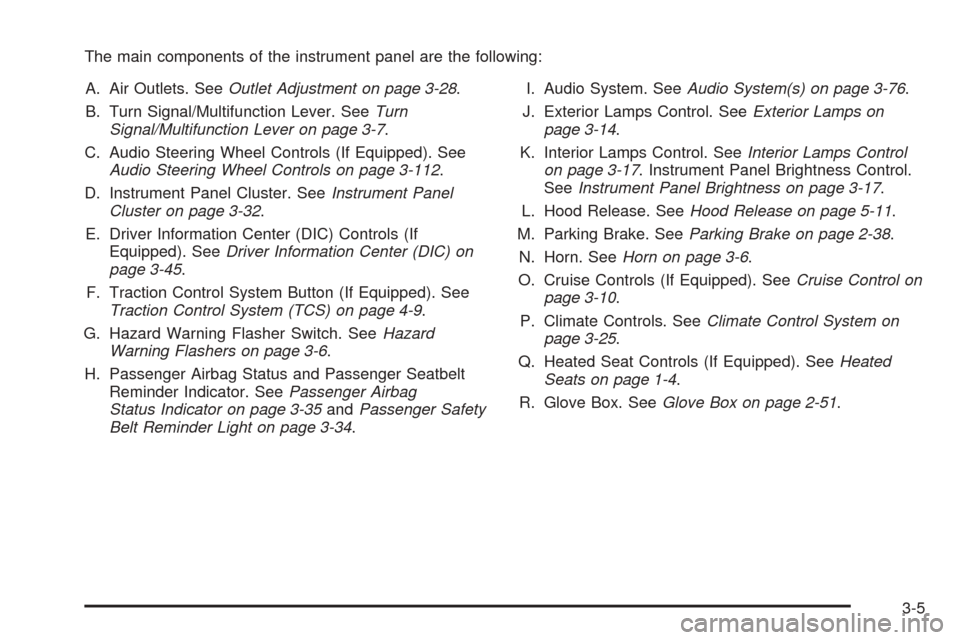
The main components of the instrument panel are the following:
A. Air Outlets. SeeOutlet Adjustment on page 3-28.
B. Turn Signal/Multifunction Lever. SeeTurn
Signal/Multifunction Lever on page 3-7.
C. Audio Steering Wheel Controls (If Equipped). See
Audio Steering Wheel Controls on page 3-112.
D. Instrument Panel Cluster. SeeInstrument Panel
Cluster on page 3-32.
E. Driver Information Center (DIC) Controls (If
Equipped). SeeDriver Information Center (DIC) on
page 3-45.
F. Traction Control System Button (If Equipped). See
Traction Control System (TCS) on page 4-9.
G. Hazard Warning Flasher Switch. SeeHazard
Warning Flashers on page 3-6.
H. Passenger Airbag Status and Passenger Seatbelt
Reminder Indicator. SeePassenger Airbag
Status Indicator on page 3-35andPassenger Safety
Belt Reminder Light on page 3-34.I. Audio System. SeeAudio System(s) on page 3-76.
J. Exterior Lamps Control. SeeExterior Lamps on
page 3-14.
K. Interior Lamps Control. SeeInterior Lamps Control
on page 3-17. Instrument Panel Brightness Control.
SeeInstrument Panel Brightness on page 3-17.
L. Hood Release. SeeHood Release on page 5-11.
M. Parking Brake. SeeParking Brake on page 2-38.
N. Horn. SeeHorn on page 3-6.
O. Cruise Controls (If Equipped). SeeCruise Control on
page 3-10.
P. Climate Controls. SeeClimate Control System on
page 3-25.
Q. Heated Seat Controls (If Equipped). SeeHeated
Seats on page 1-4.
R. Glove Box. SeeGlove Box on page 2-51.
3-5
Page 176 of 460

When adding electrical equipment, be sure to follow the
proper installation instructions included with the
equipment.
Notice:Improper use of the power outlet can cause
damage not covered by your warranty. Do not
hang any type of accessory or accessory bracket
from the plug because the power outlets are
designed for accessory power plugs only.
Power Outlet 115 Volt Alternating
Current
Your vehicle may have a power outlet that can be used
to plug in auxiliary electrical equipment with a
maximum limit of 150 watts. If you try to use equipment
that requires more than the limit, a protection circuit
will cut the power supply. To reset the outlet, unplug the
item and plug it back in or turn the ignition key to
OFF or ACC and then back on. The power will
automatically restart when equipment that operates
within the limit is plugged in.The power outlet is located
behind the third row seats
on the passenger’s
side rear quarter trim
panel.
The power outlet is not designed for the following
electrical equipment and may not work properly if these
items are plugged into the power outlet:
Equipment with high initial peak wattage such as:
compressor-driven refrigerators and electric
power tools.
Other equipment requiring an extremely stable
power supply such as: microcomputer-controlled
electric blankets, touch sensor lamps, etc.
3-24
Page 177 of 460
Climate Controls
Climate Control System
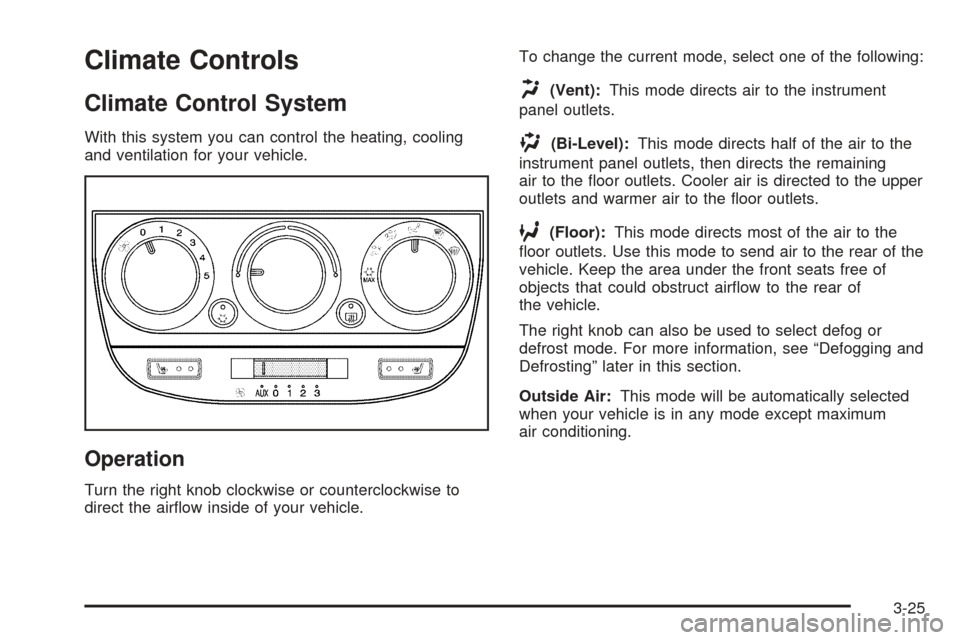
With this system you can control the heating, cooling
and ventilation for your vehicle.
Operation
Turn the right knob clockwise or counterclockwise to
direct the airow inside of your vehicle.To change the current mode, select one of the following:
H(Vent):This mode directs air to the instrument
panel outlets.
)(Bi-Level):This mode directs half of the air to the
instrument panel outlets, then directs the remaining
air to the oor outlets. Cooler air is directed to the upper
outlets and warmer air to the oor outlets.
6(Floor):This mode directs most of the air to the
oor outlets. Use this mode to send air to the rear of the
vehicle. Keep the area under the front seats free of
objects that could obstruct airow to the rear of
the vehicle.
The right knob can also be used to select defog or
defrost mode. For more information, see “Defogging and
Defrosting” later in this section.
Outside Air:This mode will be automatically selected
when your vehicle is in any mode except maximum
air conditioning.
3-25
Page 178 of 460
9(Fan):Turn the left knob clockwise or
counterclockwise to increase or decrease the fan speed.
Turn the knob to 0 to turn off the fan. The fan must
be turned on for the air conditioning compressor
to operate.
Temperature Control:Turn the center knob clockwise
or counterclockwise to increase or decrease the air
temperature inside your vehicle.
#(Air Conditioning):Press this button to turn the
air-conditioning system on or off. When it is pressed, an
indicator light in the button will come on to let you
know that air conditioning is activated.
You may notice a slight change in engine performance
when the air conditioning compressor shuts off and
turns on again. This is normal. The system is designed
to make adjustments to help with fuel economy while
still maintaining the selected temperature.
On hot days, open the windows to let hot inside air
escape; then close them. This helps to reduce the time
it takes for your vehicle to cool down. It also helps
the system to operate more efficiently.The air conditioning system removes moisture from the
air, so you may sometimes notice a small amount of
water dripping underneath your vehicle while idling
or after turning off the engine. This is normal.
#MAX (Maximum Air Conditioning):Turn the right
knob to this position for maximum air conditioning.
This will select air conditioning and recirculation
for maximum cooling of your vehicle. This mode directs
air to the instrument panel outlets.
Recirculation:This mode keeps outside air from
coming in the vehicle. It can be used to prevent outside
air and odors from entering your vehicle or help heat
or cool the air inside your vehicle more quickly.
This mode will automatically be selected when you
select maximum air conditioning.
((Heated Seats):Press this button to turn on the
heated seats. The button on the left controls the driver’s
seat and the button on the right controls the passenger’s
seat. SeeHeated Seats on page 1-4for additional
information.
3-26
Page 180 of 460
Outlet Adjustment
k(Open):Turn the thumbwheel to this position to
open the air outlets.
l(Closed):Turn the thumbwheel to this position to
close the air outlets.
Use the louvers located on the air outlets to change the
direction of the airow.
Operation Tips
Clear away any ice, snow, or leaves from the air
inlets at the base of the vehicle that may block
the ow of air into your vehicle.
Use of non-GM approved hood deectors may
adversely affect the performance of the system.
Keep the path under the front seats clear of objects
to help circulate the air inside of your vehicle more
effectively.
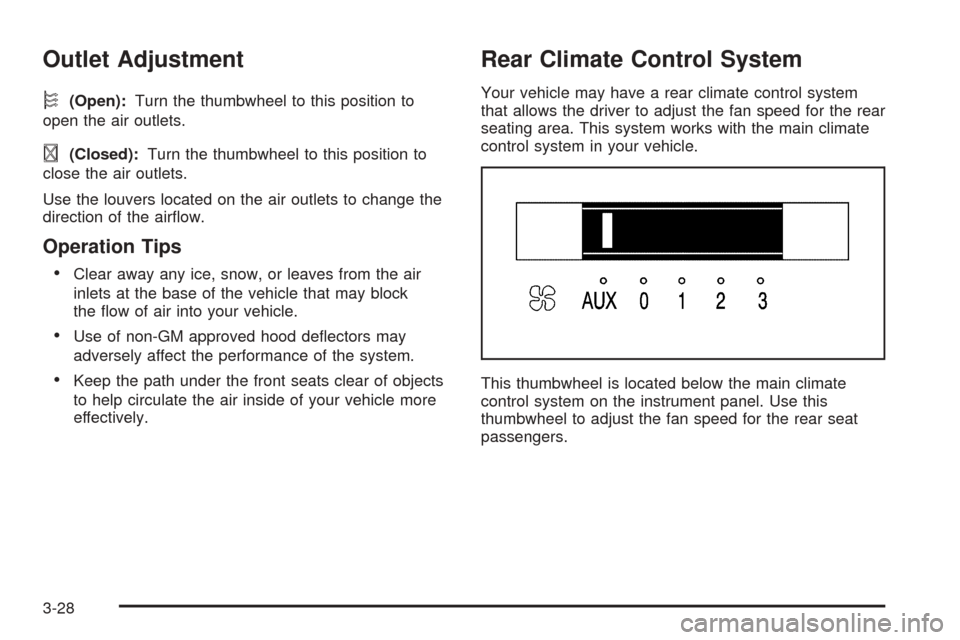
Rear Climate Control System
Your vehicle may have a rear climate control system
that allows the driver to adjust the fan speed for the rear
seating area. This system works with the main climate
control system in your vehicle.
This thumbwheel is located below the main climate
control system on the instrument panel. Use this
thumbwheel to adjust the fan speed for the rear seat
passengers.
3-28
Page 182 of 460
tr(Decrease Setting):Press this button to
decrease the fan or temperature setting when arrows
are active in the display.
[u(Increase Setting):Press this button to
increase the fan or temperature setting when arrows are
active in display.
9(Fan):Press this button to increase or decrease
fan speed. After pressing this button, arrows and a fan
will appear in the display. The arrows indicate that to
increase or decrease fan speed, you need to press
either the left or right arrow button. The displayed arrows
and fan will disappear after a few seconds.
b(Temperature):Press this button to increase or
decrease temperature. After pressing this button, arrows
and a temperature scale will appear in the display.
The arrows indicate that to increase or decrease
temperature, you need to press either the left or right
arrow button. The displayed arrows and temperature
scale will disappear after a few seconds.
Rear Air Outlets
The outlet behind the left rear seat is the cold air return
outlet. Be sure to keep it free from obstructions.
Also, keep the area around the base of the center
instrument panel console, between and under the front
seats, free of objects that could also obstruct airow
to the rear seating area.
For more information on how to use the main climate
control system, seeClimate Control System on
page 3-25. For information on ventilation, seeOutlet
Adjustment on page 3-28.
3-30
Page 304 of 460
Never exceed the GVWR for your vehicle or the GAWR
for either the front or rear axle.
{CAUTION:
Do not load your vehicle any heavier than the
Gross Vehicle Weight Rating (GVWR), or either
the maximum front or rear Gross Axle Weight
Rating (GAWR). If you do, parts on your
vehicle can break, and it can change the way
your vehicle handles. These could cause you
to lose control and crash. Also, overloading
can shorten the life of your vehicle.
Notice:Overloading your vehicle may cause
damage. Repairs would not be covered by your
warranty. Do not overload your vehicle.
If you put things inside your vehicle — like suitcases,
tools, packages, or anything else, they will go as fast as
the vehicle goes. If you have to stop or turn quickly,
or if there is a crash, they will keep going.
{CAUTION:
Things you put inside your vehicle can strike
and injure people in a sudden stop or turn, or
in a crash.
Put things in the cargo area of your
vehicle. Try to spread the weight evenly.
Never stack heavier things, like suitcases,
inside the vehicle so that some of them
are above the tops of the seats.
Do not leave an unsecured child restraint
in your vehicle.
When you carry something inside the
vehicle, secure it whenever you can.
Do not leave a seat folded down unless
you need to.
4-38