2005 CHEVROLET UPLANDER ECO mode
[x] Cancel search: ECO modePage 255 of 460
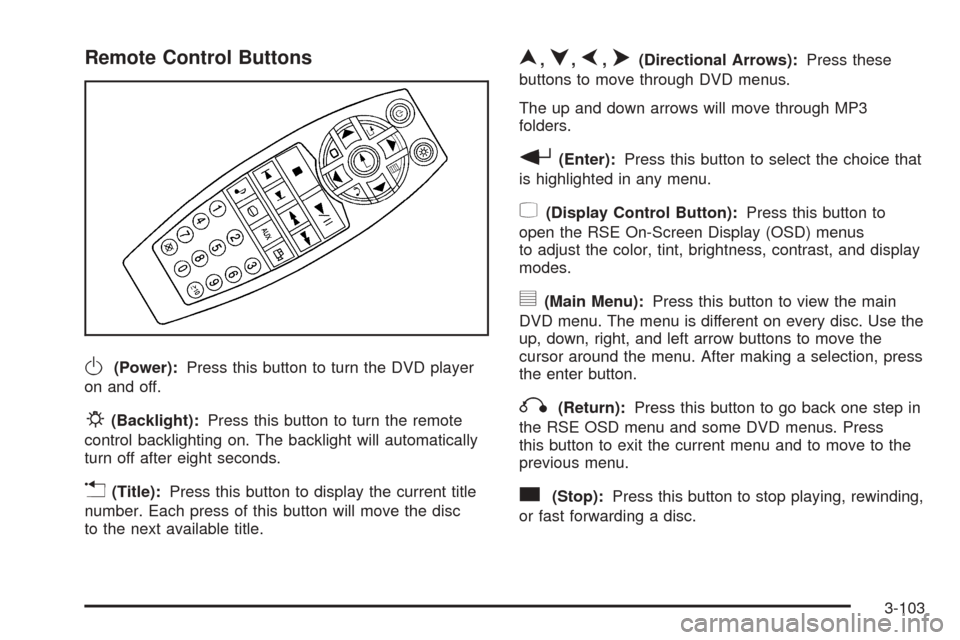
Remote Control Buttons
O(Power):Press this button to turn the DVD player
on and off.
P(Backlight):Press this button to turn the remote
control backlighting on. The backlight will automatically
turn off after eight seconds.
v(Title):Press this button to display the current title
number. Each press of this button will move the disc
to the next available title.
n,q,p,o(Directional Arrows):Press these
buttons to move through DVD menus.
The up and down arrows will move through MP3
folders.
r(Enter):Press this button to select the choice that
is highlighted in any menu.
z(Display Control Button):Press this button to
open the RSE On-Screen Display (OSD) menus
to adjust the color, tint, brightness, contrast, and display
modes.
y(Main Menu):Press this button to view the main
DVD menu. The menu is different on every disc. Use the
up, down, right, and left arrow buttons to move the
cursor around the menu. After making a selection, press
the enter button.
q(Return):Press this button to go back one step in
the RSE OSD menu and some DVD menus. Press
this button to exit the current menu and to move to the
previous menu.
c(Stop):Press this button to stop playing, rewinding,
or fast forwarding a disc.
3-103
Page 258 of 460
Tips and Troubleshooting Chart
Problem Recommended Action
No power. The ignition may not be in
ACCESSORY, RUN,
or RAP.
Disc will not play. The system might be off.
The parental control button
might have been pressed.
The power indicator lights
will ash. The system might
be in auxiliary source mode.
Press the AUX button to
switch between the DVD
player and the auxiliary
source. The disc is upside
down or is not compatible.
No sound — Wireless
HeadphonesTurn the headphones on.
Make sure the correct
channel is selected on the
wireless headphones.
Check the batteries. The
volume on the headphones
could be too low, adjust the
volume.
Problem Recommended Action
No sound — Wired
HeadphonesMake sure the wired
headphones are plugged in.
Adjust the volume. If RSA is
on, DVD audio will not be
heard.
No sound — Vehicle
SpeakersIf the DVD system is being
heard through the vehicle
speakers, adjust the volume
on the radio. Press the CD
AUX button on the radio to
make sure that RSE is
enabled. The rear speakers
will mute when RSA is on.
The picture is distorted
during fast forward or
reverse.This is normal for this
operation.
The picture does not ll
the screen. There are
black borders on the top
and bottom or on both
sides or it looks
stretched out.Video mode may not be
correctly set. See “RSE
OSD” earlier in this section.
I ejected the disc and
tried to take it out, but it
was pulled back into
the slot.Press the eject
button once.
3-106
Page 260 of 460
Problem Recommended Action
Sometimes the wireless
headphone audio cuts
out or buzzes for a
moment, then it
comes back.This could be caused by
interference from cell
towers or by using the
cellular telephone or other
radio transmitter devices in
the vehicle.
DVD System inoperable. In severe or extreme
temperatures the DVD
system might not be
operable. Temperatures
below−4°F (−20°C) or
above 140°F (60°C) could
damage the DVD system.
Operate the DVD system
under normal or
comfortable cabin
temperature ranges. See
your GM dealer if the
problem persists.Problem Recommended Action
The wireless
headphones have audio
distortion.Verify that the headphones
are facing to the front of the
vehicle, left and right sides
are indicated on the
headphones to ensure that
the signal is received
properly.
Verify that there is no
obstruction between the
headphone(s) and the
transmitter.
Verify that the batteries
have a full charge.
In auxiliary mode, the
picture moves or
scrolls.Check the signal coming
from the auxiliary device
and make sure that the
connection and the signal
is good.
3-108
Page 343 of 460
Overheated Engine Protection
Operating Mode
This emergency operating mode allows your vehicle to
be driven to a safe place in an emergency situation.
If an overheated engine condition exists, an overheat
protection mode which alternates ring groups of
cylinders helps prevent engine damage. In this mode,
you will notice a signicant loss in power and engine
performance. The temperature gage will indicate
an overheat condition exists. Driving extended
miles (km) and/or towing a trailer in the overheat
protection mode should be avoided.
Notice:After driving in the overheated engine
protection operating mode, to avoid engine damage,
allow the engine to cool before attempting any
repair. The engine oil will be severely degraded.
Repair the cause of coolant loss, change the oil and
reset the oil life system. SeeEngine Oil on
page 5-13.
Cooling System
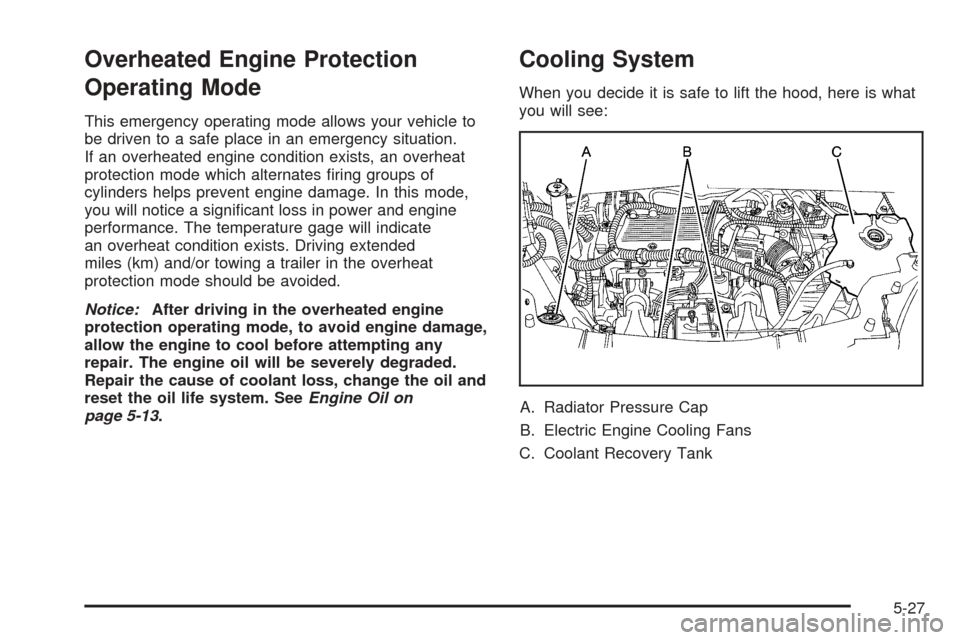
When you decide it is safe to lift the hood, here is what
you will see:
A. Radiator Pressure Cap
B. Electric Engine Cooling Fans
C. Coolant Recovery Tank
5-27
Page 345 of 460
Notice:Engine damage from running your engine
without coolant is not covered by your warranty. See
Overheated Engine Protection Operating Mode on
page 5-27for information on driving to a safe place
in an emergency.
Notice:Using coolant other than DEX-COOL
®may
cause premature engine, heater core or radiator
corrosion. In addition, the engine coolant may
require changing sooner, at 30,000 miles (50 000 km)
or 24 months, whichever occurs rst. Any repairs
would not be covered by your warranty. Always use
DEX-COOL
®(silicate-free) coolant in your vehicle.
How to Add Coolant to the Coolant
Recovery Tank
If you have not found a problem yet, but the coolant
level is not at or above the full cold mark, add a
50/50 mixture of clean, drinkable water and DEX-COOL
®
engine coolant at the coolant recovery tank. See
Engine Coolant on page 5-22for more information.
{CAUTION:
Adding only plain water to your cooling
system can be dangerous. Plain water, or
some other liquid such as alcohol, can boil
before the proper coolant mixture will. Your
vehicle’s coolant warning system is set for the
proper coolant mixture. With plain water or the
wrong mixture, your engine could get too hot
but you would not get the overheat warning.
Your engine could catch re and you or others
could be burned. Use a 50/50 mixture of clean,
drinkable water and DEX-COOL
®coolant.
5-29
Page 372 of 460
Load Index:An assigned number ranging from
1 to 279 that corresponds to the load carrying capacity
of a tire.
Maximum Ination Pressure:The maximum air
pressure to which a cold tire may be inated. The
maximum air pressure is molded onto the sidewall.
Maximum Load Rating:The load rating for a tire at the
maximum permissible ination pressure for that tire.
Maximum Loaded Vehicle Weight:The sum of curb
weight; accessory weight; vehicle capacity weight;
and production options weight.
Normal Occupant Weight:The number of occupants a
vehicle is designed to seat multiplied by 150 lbs (68 kg).
SeeLoading Your Vehicle on page 4-33.
Occupant Distribution:Designated seating positions.
Outward Facing Sidewall:The side of an
asymmetrical tire that has a particular side that faces
outward when mounted on a vehicle. The side of the tire
that contains a whitewall, bears white lettering or
bears manufacturer, brand, and/or model name molding
that is higher or deeper than the same moldings on
the other sidewall of the tire.
Passenger (P-Metric) Tire:A tire used on passenger
cars and some light duty trucks and multipurpose
vehicles.Recommended Ination Pressure:Vehicle
manufacturer’s recommended tire ination pressure and
shown on the tire placard. SeeInation - Tire Pressure
on page 5-57andLoading Your Vehicle on page 4-33.
Radial Ply Tire:A pneumatic tire in which the ply cords
that extend to the beads are laid at 90 degrees to the
centerline of the tread.
Rim:A metal support for a tire and upon which the tire
beads are seated.
Sidewall:The portion of a tire between the tread and
the bead.
Speed Rating:An alphanumeric code assigned to a
tire indicating the maximum speed at which a tire
can operate.
Traction:The friction between the tire and the road
surface. The amount of grip provided.
Tread:The portion of a tire that comes into contact
with the road.
Treadwear Indicators:Narrow bands, sometimes
called “wear bars,” that show across the tread of a tire
when only 1/16 inch (1.6 mm) of tread remains. See
When It Is Time for New Tires on page 5-60.
5-56
Page 443 of 460
Additional Program Information
Courtesy Transportation is available during the
Bumper-to-Bumper warranty coverage period, but it is
not part of the New Vehicle Limited Warranty. A
separate booklet entitledWarranty and Owner
Assistance Informationfurnished with each new vehicle
provides detailed warranty coverage information.
Courtesy Transportation is available only at participating
dealers and all program options, such as shuttle
service, may not be available at every dealer. Please
contact your dealer for specic information about
availability. All Courtesy Transportation arrangements
will be administered by appropriate dealer personnel.
Canadian Vehicles:For warranty repairs during
the Complete Vehicle Coverage period of the General
Motors of Canada New Vehicle Limited Warranty,
alternative transportation may be available under the
Courtesy Transportation Program. Please consult
your dealer for details.
General Motors reserves the right to unilaterally modify,
change or discontinue Courtesy Transportation at
any time and to resolve all questions of claim eligibility
pursuant to the terms and conditions described
herein at its sole discretion.
Vehicle Data Collection and Event
Data Recorders
Your vehicle, like other modern motor vehicles, has a
number of sophisticated computer systems that monitor
and control several aspects of the vehicle’s performance.
Your vehicle uses on-board vehicle computers to monitor
emission control components to optimize fuel economy,
to monitor conditions for airbag deployment and, if so
equipped, to provide anti-lock braking and to help the
driver control the vehicle in difficult driving situations.
Some information may be stored during regular
operations to facilitate repair of detected malfunctions;
other information is stored only in a crash event by
computer systems, such as those commonly called event
data recorders (EDR).
In a crash event, computer systems, such as the Airbag
Sensing and Diagnostic Module (SDM) in your vehicle
may record information about the condition of the vehicle
and how it was operated, such as data related to
engine speed, brake application, throttle position, vehicle
speed, safety belt usage, airbag readiness, airbag
performance, and the severity of a collision. This
information has been used to improve vehicle crash
performance and may be used to improve crash
performance of future vehicles and driving safety. Unlike
the data recorders on many airplanes, these on-board
systems do not record sounds, such as conversation of
vehicle occupants.
7-9
Page 451 of 460

E
Electrical System
Add-On Equipment......................................5-95
Fuses and Circuit Breakers...........................5-96
Headlamp Wiring.........................................5-95
Instrument Panel Fuse Block.........................5-96
Power Windows and Other Power Options......5-95
Underhood Fuse Block.................................5-98
Windshield Wiper Fuses...............................5-95
Engine
Air Cleaner/Filter.........................................5-18
Battery.......................................................5-39
Check and Service Engine Soon Light............3-40
Coolant......................................................5-22
Coolant Heater............................................2-34
Coolant Temperature Gage...........................3-39
Engine Compartment Overview......................5-12
Exhaust.....................................................2-41
Oil .............................................................5-13
Oil Life System...........................................5-16
Overheated Protection Operating Mode...........5-27
Overheating................................................5-25
Starting......................................................2-33
Entry Lighting.................................................3-18
Event Data Recorders (EDR)............................. 7-9
Exit Lighting...................................................3-19
Extender, Safety Belt.......................................1-42
Exterior Lamps...............................................3-14
F
Filter
Engine Air Cleaner......................................5-18
Finish Damage...............................................5-92
Fixed Mast Antenna.......................................3-114
Flash-to-Pass................................................... 3-8
Flat Tire........................................................5-67
Flat Tire, Changing.........................................5-68
Flat Tire, Storing.............................................5-80
Flip and Fold Rear Seats.................................. 1-8
Fluid
Automatic Transaxle.....................................5-19
Power Steering...........................................5-34
Windshield Washer......................................5-35
Folding Tray...................................................2-53
Front Console Storage Area.............................2-53
Front Reading Lamps......................................3-19
Fuel............................................................... 5-5
Additives...................................................... 5-6
California Fuel.............................................. 5-6
Filling a Portable Fuel Container....................5-10
Filling Your Tank........................................... 5-8
Fuels in Foreign Countries.............................. 5-7
Gage.........................................................3-44
Gasoline Octane........................................... 5-5
Gasoline Specications.................................. 5-5
Low Warning Light.......................................3-44
5