2005 CHEVROLET UPLANDER display
[x] Cancel search: displayPage 197 of 460

Driver Information Center (DIC)
Your vehicle has a Driver Information Center (DIC).
All messages will appear in the DIC display located in
the instrument panel cluster, below the tachometer. The
DIC buttons are located on the center of the instrument
panel, below the center outlets.
The DIC comes on when the ignition is on. After a short
delay, the DIC will display WELCOME DRIVER (1 or 2)
if a personalized key 1 or 2 is used, and then the
information that was last displayed before the engine
was turned off.
The DIC displays the odometer, trip odometers, fuel
economy, trip computer, vehicle system information, and
compass display, if equipped. It also displays warning
messages if a system problem is detected. In addition,
the DIC displays phone numbers that are called
using the OnStar
®system, if equipped. SeeOnStar®
System on page 2-44.If equipped, the outside air temperature automatically
appears in the bottom right corner of the DIC display
when viewing all of the information screens, except for
the oil life screens. If the outside air temperature is
at or below 37°F (3°C), the temperature reading
will toggle between displaying the outside temperature
and the word ICE for two minutes. If there is a problem
with the system that controls the temperature display,
the letters OC (open circuit) or SC (short circuit)
will appear on the display. If this occurs, have the
vehicle serviced by your GM dealer.
The DIC also allows some features to be customized or
personalized, if equipped. SeeDIC Vehicle
Personalization (Uplevel Only) on page 3-68for more
information.
DIC Operation and Displays
The DIC has different modes which can be accessed by
pressing the DIC buttons located on the center of the
instrument panel. The buttons are the information,
set/reset, and menu buttons.
The button functions are detailed in the following pages.
3-45
Page 198 of 460
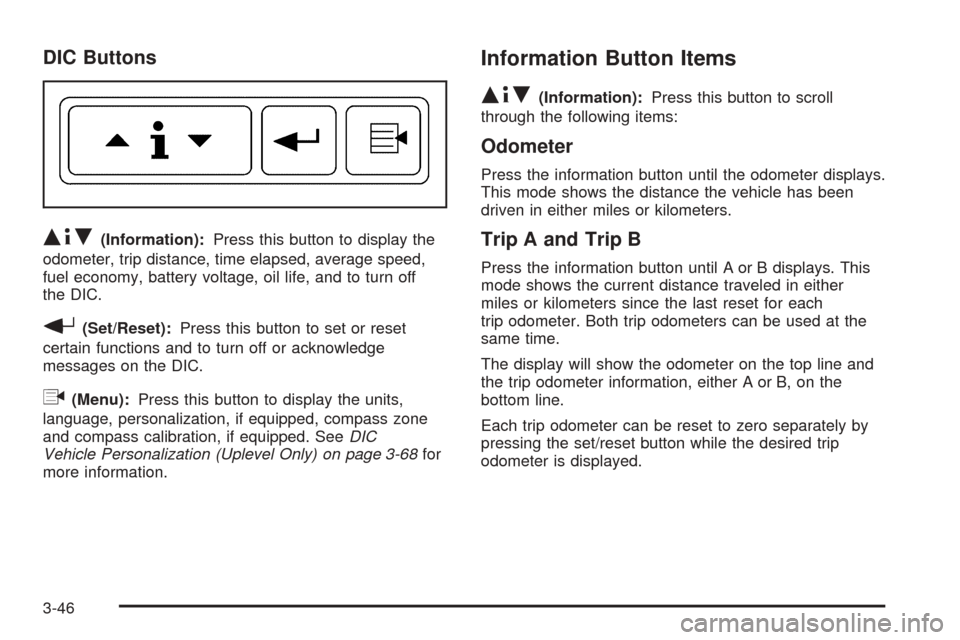
DIC Buttons
Q4R(Information):Press this button to display the
odometer, trip distance, time elapsed, average speed,
fuel economy, battery voltage, oil life, and to turn off
the DIC.
r(Set/Reset):Press this button to set or reset
certain functions and to turn off or acknowledge
messages on the DIC.
q(Menu):Press this button to display the units,
language, personalization, if equipped, compass zone
and compass calibration, if equipped. SeeDIC
Vehicle Personalization (Uplevel Only) on page 3-68for
more information.
Information Button Items
Q4R
(Information):Press this button to scroll
through the following items:
Odometer
Press the information button until the odometer displays.
This mode shows the distance the vehicle has been
driven in either miles or kilometers.
Trip A and Trip B
Press the information button until A or B displays. This
mode shows the current distance traveled in either
miles or kilometers since the last reset for each
trip odometer. Both trip odometers can be used at the
same time.
The display will show the odometer on the top line and
the trip odometer information, either A or B, on the
bottom line.
Each trip odometer can be reset to zero separately by
pressing the set/reset button while the desired trip
odometer is displayed.
3-46
Page 199 of 460

There is also a retroactive trip odometer function that
performs the following for each trip odometer:
If the vehicle’s speed has exceeded 3 mph (5 km/h)
during the current ignition cycle, this function will
set the trip odometer to the distance driven
during the current ignition cycle.
If the vehicle’s speed has not exceeded 3 mph
(5 km/h), this function will set the trip odometer
to the distance driven during the previous ignition
cycle plus the distance driven during the current
ignition cycle.
Press and hold the set/reset button for three seconds,
then release the button. The retroactive trip odometer
value will be set into the currently displayed trip
odometer.
Time Elapsed
Press the information button until TIME ELAPSED :00
displays. This mode is like a stopwatch, in that you can
clock the time it takes to get from one point to another.
Each of the elds for the hours, minutes, and seconds
are two numeric digits.Once TIME ELAPSED :00 is displayed, press the
set/reset button to start the timing feature. Press the
set/reset button again to stop it. If you will be starting
and stopping your vehicle, during a trip for instance, the
TIME ELAPSED feature will automatically start timing
where it left off when you last stopped. To reset it, press
and hold the set/reset button for approximately
1.5 seconds. The display will return to zero.
Average Speed
Press the information button until AVERAGE SPEED
displays. This mode shows the average speed of the
vehicle in miles per hour (mph) or kilometers per hour
(km/h). This average is calculated based on the various
vehicle speed recorded since the last reset of this value.
To reset the value, press the information button to display
AVERAGE SPEED, then press and hold the set/reset
button. The display will return to zero.
3-47
Page 200 of 460
Fuel Range
Press the information button until FUEL RANGE
displays. This mode shows the approximate number of
remaining miles or kilometers the vehicle can be
driven without refueling.
Fuel range is based on several factors, including
distance travelled, fuel used, fuel capacity, etc. This
estimate will change if driving conditions change.
For example, if driving in traffic and making frequent
stops, this mode may read one number, but if the vehicle
is driven on a freeway, the number may change even
though the same amount of fuel is in the fuel tank. This
is because different driving conditions produce
different fuel economies. Generally, freeway driving
produces better fuel economy than city driving.
Fuel range cannot be reset.
If your vehicle is low on fuel, FUEL RANGE LOW will
display followed by the LOW FUEL message. See “LOW
FUEL” underDIC Warnings and Messages on
page 3-51for more information.
Average Fuel Economy
Press the information button until AVG ECONOMY
displays. This mode shows the approximate average
miles per gallon (mpg) or liters per 100 kilometers
(L/100 km). This number is calculated based on the
number of mpg (L/100 km) recorded since the last time
this menu item was reset. To reset AVG ECONOMY,
press and hold the set/reset button. The display
will return to zero.
Instantaneous Fuel Economy
Press the information button until INST ECONOMY
displays. This mode shows the current fuel economy at
a particular moment and will change frequently as
driving conditions change. This mode shows the
instantaneous fuel economy in miles per gallon (mpg) or
liters per 100 kilometers (L/100 km). Unlike average
fuel economy, this screen cannot be reset.
Battery
Press the information button until BATTERY displays.
This mode shows the current battery voltage.
If there is a problem with the battery charging system, a
DIC message will display. SeeDIC Warnings and
Messages on page 3-51for more information.
3-48
Page 201 of 460

Your vehicle’s charging system regulates voltage based
on the state of the battery. The battery voltage may
uctuate when viewing this information on the DIC. This
is normal.
Oil Life
Press the information button until OIL LIFE displays.
This mode shows an estimate of the oil’s remaining
useful life. If you see OIL LIFE 99% on the display, that
means 99% of the current oil life remains. The engine
oil life system will alert you to change your oil on a
schedule consistent with your driving conditions.
When the remaining oil life is low, the LOW OIL
PRESSURE message will appear on the display. You
should change your oil as soon as possible. SeeEngine
Oil on page 5-13. In addition to the engine oil life
system monitoring the oil life, additional maintenance is
recommended in the Maintenance Schedule in this
manual. SeeScheduled Maintenance on page 6-4for
more information.
Remember, you must reset the OIL LIFE yourself after
each oil change. It will not reset itself. Also, be
careful not to reset the OIL LIFE accidentally at any
time other than when the oil has just been changed. It
cannot be reset accurately until the next oil change.
To reset the engine oil life system, seeEngine Oil Life
System on page 5-16. The display will show 100%
when the system is reset.
Menu Button Items
q
(Menu):Press this button to scroll through the
following items:
Units
Press the menu button until UNITS displays. This mode
allows you to select between English or Metric units
of measurement. Once in this mode, press the set/reset
button to select between ENGLISH or METRIC.
Language
Press the menu button until the language screen
displays. This mode allows you to select the language
in which the DIC messages will appear. Once in
this mode, press the set/reset button to select among
the following choices:
English
Francais (French)
Espanol (Spanish)
3-49
Page 202 of 460
Personalization (Uplevel Only)
Press the menu button until PERSONAL PROGRAM
displays. Your vehicle may have personalization
capabilities that allow you to program certain features to
a preferred setting for up to two drivers.
Your vehicle may also have customization capabilities
that allow you to program certain features to one
preferred setting. Customization features can only be
programmed to one setting on the vehicle and cannot be
programmed to a preferred setting for up to two
drivers. SeeDIC Vehicle Personalization (Uplevel Only)
on page 3-68for additional information on personal
programming.
Compass Zone (Uplevel Only)
Press the menu button until COMPASS ZONE displays.
Press the set/reset button to change the compass
zone. Zones 1 through 15 are available. The direction
the vehicle is moving will be displayed in the top
right corner of the DIC display.
Compass Calibration (Uplevel Only)
Under certain circumstances, such as during a long
distance cross-country trip, it will be necessary to
compensate for compass variance and reset the zone
through the DIC.
Compass variance is the difference between the earth’s
magnetic north and true geographic north. If not
adjusted to account for compass variance, the compass
in the vehicle could give false readings.
In order to do this, the compass must be set or
calibrated to the variance zone in which the vehicle is
travelling.
To adjust for compass variance, use the following
procedure:
1. Press the menu button until COMPASS ZONE
displays.
3-50
Page 203 of 460
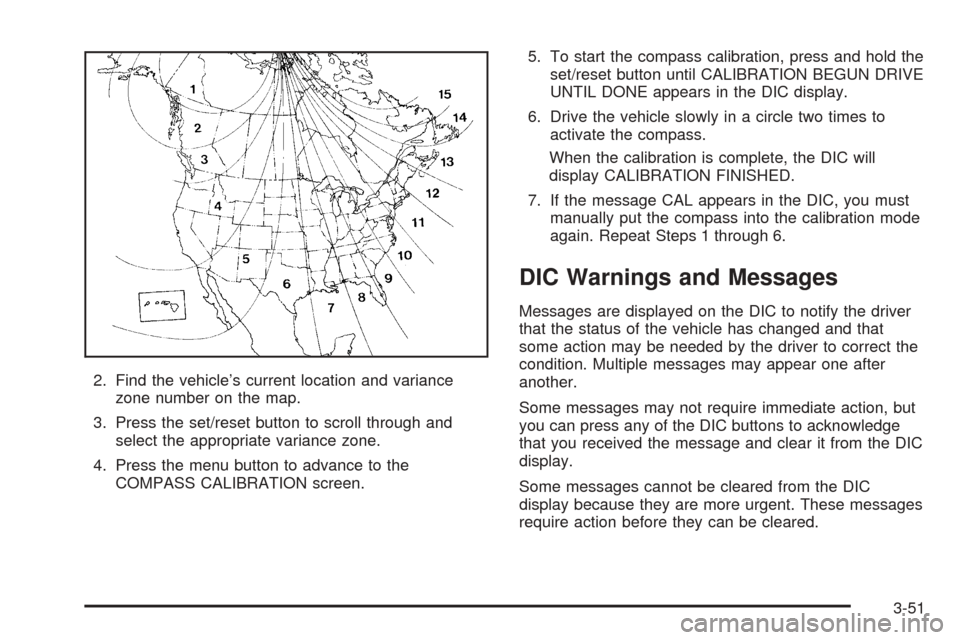
2. Find the vehicle’s current location and variance
zone number on the map.
3. Press the set/reset button to scroll through and
select the appropriate variance zone.
4. Press the menu button to advance to the
COMPASS CALIBRATION screen.5. To start the compass calibration, press and hold the
set/reset button until CALIBRATION BEGUN DRIVE
UNTIL DONE appears in the DIC display.
6. Drive the vehicle slowly in a circle two times to
activate the compass.
When the calibration is complete, the DIC will
display CALIBRATION FINISHED.
7. If the message CAL appears in the DIC, you must
manually put the compass into the calibration mode
again. Repeat Steps 1 through 6.
DIC Warnings and Messages
Messages are displayed on the DIC to notify the driver
that the status of the vehicle has changed and that
some action may be needed by the driver to correct the
condition. Multiple messages may appear one after
another.
Some messages may not require immediate action, but
you can press any of the DIC buttons to acknowledge
that you received the message and clear it from the DIC
display.
Some messages cannot be cleared from the DIC
display because they are more urgent. These messages
require action before they can be cleared.
3-51
Page 204 of 460
If there are any active warning messages when the
vehicle is turned off, two chimes will sound and the DIC
will go into a reminder mode. The reminder mode
displays any active message. If there are multiple
messages, the DIC will display each message for
ve seconds. After each active message is displayed
once, the reminder mode will turn off.
You should take any messages that appear on the
display seriously and remember that clearing the
messages will only make the messages disappear, not
correct the problem.
The following are the possible messages that can be
displayed and some information about them.
A/C OFF FOR ENGINE PROTECTION
This message will display when the engine coolant
becomes hotter than the normal operating temperature.
SeeEngine Coolant Temperature Gage on page 3-39.
To avoid added strain on a hot engine, the air
conditioning compressor is automatically turned off.
When the coolant temperature returns to normal, the air
conditioning compressor will turn back on. You can
continue to drive your vehicle.
This message will come on while the ignition is in RUN.
Press any of the DIC buttons to acknowledge this
warning message and to clear it from the screen.This message will continue to display for two seconds if
it has not been acknowledged when the engine is
turned off. It will also re-display for two seconds if the
message has been acknowledged, but the condition still
exists when the engine is turned off.
If the condition still exists, the message will re-appear
when the engine is turned on. If this message continues
to appear, have the system repaired by your GM dealer
as soon as possible to avoid damage to your engine.
ALL WHEEL DRIVE DISABLED
If your vehicle has the all-wheel drive system, this
message will display when there is a spare tire on the
vehicle, or when the anti-lock brake system warning light
comes on, or when the rear differential uid is
overheating. This message will turn off when the
differential uid cools.
The all-wheel drive system will be disabled until the
compact spare tire is replaced by a full-size tire. If the
warning message is still on after putting on the full-size
tire, you need to reset the warning message. To
reset the warning message, turn the ignition off and
then back on again. If the message stays on, see your
GM dealer right away. SeeAll-Wheel Drive (AWD)
System on page 4-12for more information.
3-52