2005 CHEVROLET MALIBU audio
[x] Cancel search: audioPage 246 of 434
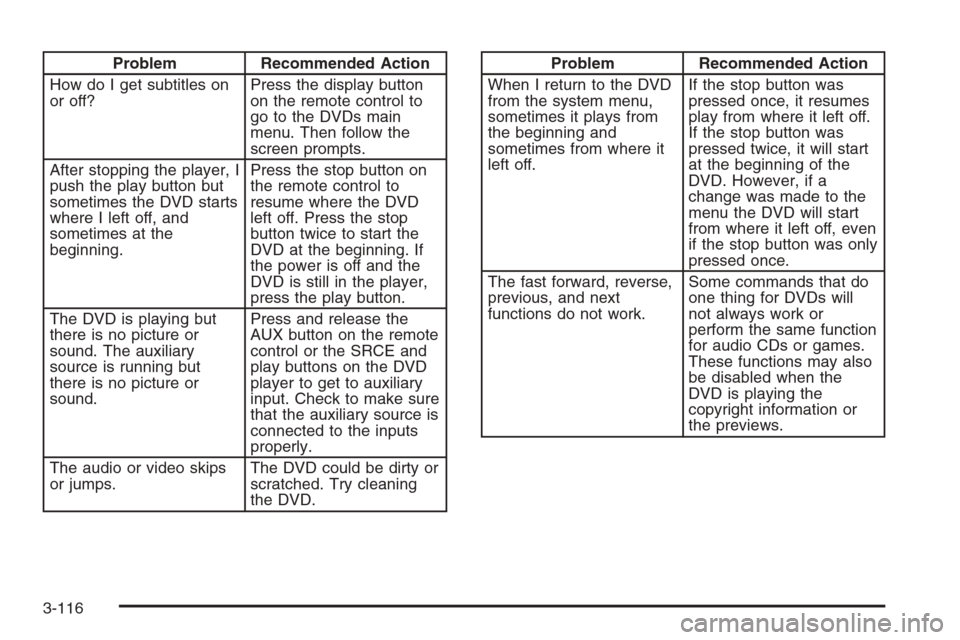
Problem Recommended Action
How do I get subtitles on
or off?Press the display button
on the remote control to
go to the DVDs main
menu. Then follow the
screen prompts.
After stopping the player, I
push the play button but
sometimes the DVD starts
where I left off, and
sometimes at the
beginning.Press the stop button on
the remote control to
resume where the DVD
left off. Press the stop
button twice to start the
DVD at the beginning. If
the power is off and the
DVD is still in the player,
press the play button.
The DVD is playing but
there is no picture or
sound. The auxiliary
source is running but
there is no picture or
sound.Press and release the
AUX button on the remote
control or the SRCE and
play buttons on the DVD
player to get to auxiliary
input. Check to make sure
that the auxiliary source is
connected to the inputs
properly.
The audio or video skips
or jumps.The DVD could be dirty or
scratched. Try cleaning
the DVD.Problem Recommended Action
When I return to the DVD
from the system menu,
sometimes it plays from
the beginning and
sometimes from where it
left off.If the stop button was
pressed once, it resumes
play from where it left off.
If the stop button was
pressed twice, it will start
at the beginning of the
DVD. However, if a
change was made to the
menu the DVD will start
from where it left off, even
if the stop button was only
pressed once.
The fast forward, reverse,
previous, and next
functions do not work.Some commands that do
one thing for DVDs will
not always work or
perform the same function
for audio CDs or games.
These functions may also
be disabled when the
DVD is playing the
copyright information or
the previews.
3-116
Page 247 of 434
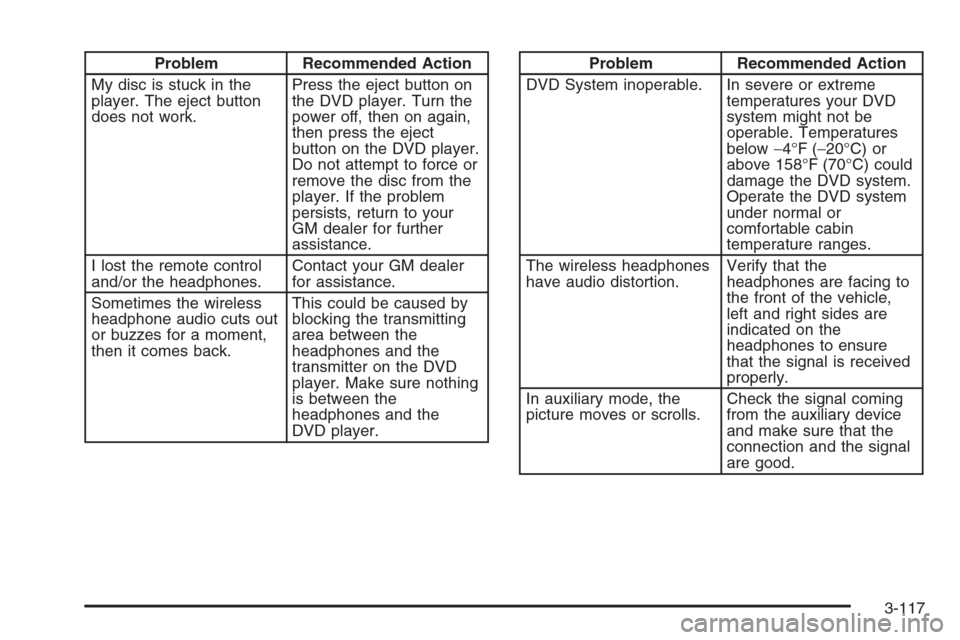
Problem Recommended Action
My disc is stuck in the
player. The eject button
does not work.Press the eject button on
the DVD player. Turn the
power off, then on again,
then press the eject
button on the DVD player.
Do not attempt to force or
remove the disc from the
player. If the problem
persists, return to your
GM dealer for further
assistance.
I lost the remote control
and/or the headphones.Contact your GM dealer
for assistance.
Sometimes the wireless
headphone audio cuts out
or buzzes for a moment,
then it comes back.This could be caused by
blocking the transmitting
area between the
headphones and the
transmitter on the DVD
player. Make sure nothing
is between the
headphones and the
DVD player.Problem Recommended Action
DVD System inoperable. In severe or extreme
temperatures your DVD
system might not be
operable. Temperatures
below−4°F (−20°C) or
above 158°F (70°C) could
damage the DVD system.
Operate the DVD system
under normal or
comfortable cabin
temperature ranges.
The wireless headphones
have audio distortion.Verify that the
headphones are facing to
the front of the vehicle,
left and right sides are
indicated on the
headphones to ensure
that the signal is received
properly.
In auxiliary mode, the
picture moves or scrolls.Check the signal coming
from the auxiliary device
and make sure that the
connection and the signal
are good.
3-117
Page 249 of 434
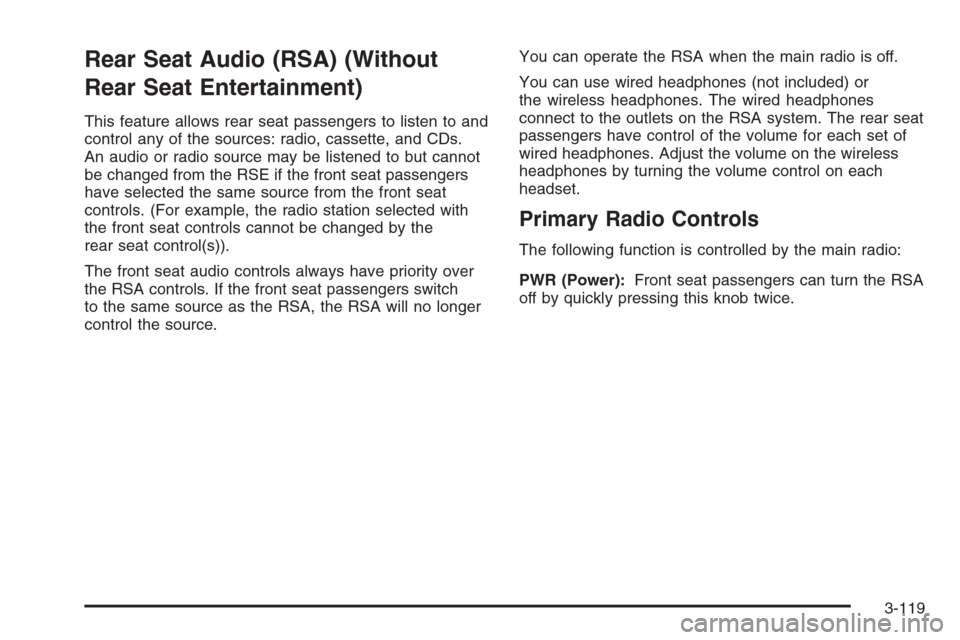
Rear Seat Audio (RSA) (Without
Rear Seat Entertainment)
This feature allows rear seat passengers to listen to and
control any of the sources: radio, cassette, and CDs.
An audio or radio source may be listened to but cannot
be changed from the RSE if the front seat passengers
have selected the same source from the front seat
controls. (For example, the radio station selected with
the front seat controls cannot be changed by the
rear seat control(s)).
The front seat audio controls always have priority over
the RSA controls. If the front seat passengers switch
to the same source as the RSA, the RSA will no longer
control the source.You can operate the RSA when the main radio is off.
You can use wired headphones (not included) or
the wireless headphones. The wired headphones
connect to the outlets on the RSA system. The rear seat
passengers have control of the volume for each set of
wired headphones. Adjust the volume on the wireless
headphones by turning the volume control on each
headset.
Primary Radio Controls
The following function is controlled by the main radio:
PWR (Power):Front seat passengers can turn the RSA
off by quickly pressing this knob twice.
3-119
Page 251 of 434
Rear Seat Audio (RSA) (With
Entertainment System)
This feature allows rear seat passengers to listen to and
control any of the sources: radio and CDs. An audio
or radio source may be listened to but cannot be
changed from the RSE if the front seat passengers
have selected the same source from the front seat
controls. (For example, the radio station selected with
the front seat controls cannot be changed by the
rear seat control(s).
The front seat audio controls always have priority over
the RSA controls. If the front seat passengers switch
to the same source as the RSA, the RSA will no longer
control the source.
You can operate the RSA when the main radio is off.
The rear seat passengers have control of the volume for
each set of headphones.
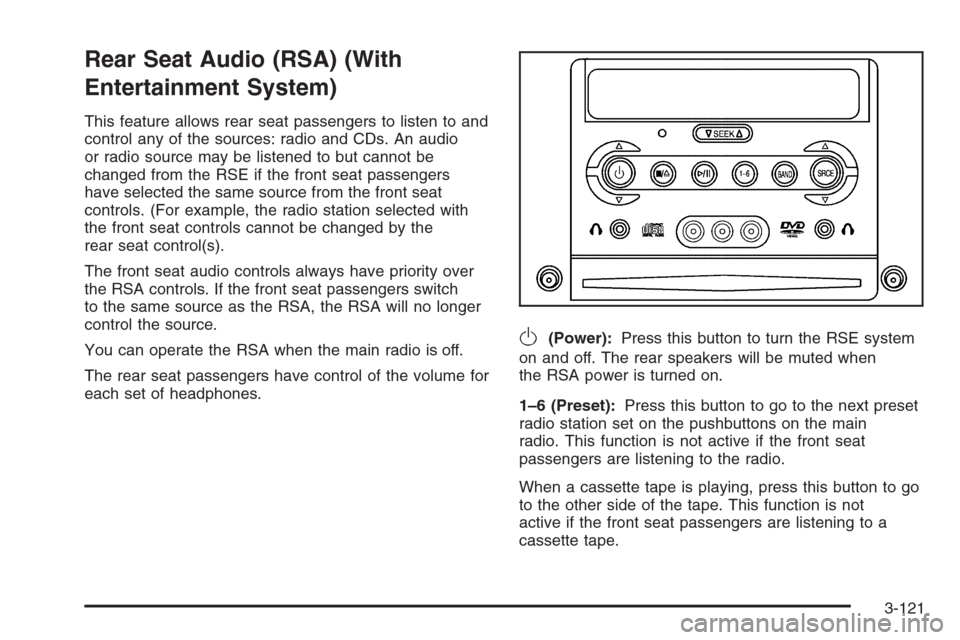
O(Power):Press this button to turn the RSE system
on and off. The rear speakers will be muted when
the RSA power is turned on.
1–6 (Preset):Press this button to go to the next preset
radio station set on the pushbuttons on the main
radio. This function is not active if the front seat
passengers are listening to the radio.
When a cassette tape is playing, press this button to go
to the other side of the tape. This function is not
active if the front seat passengers are listening to a
cassette tape.
3-121
Page 253 of 434
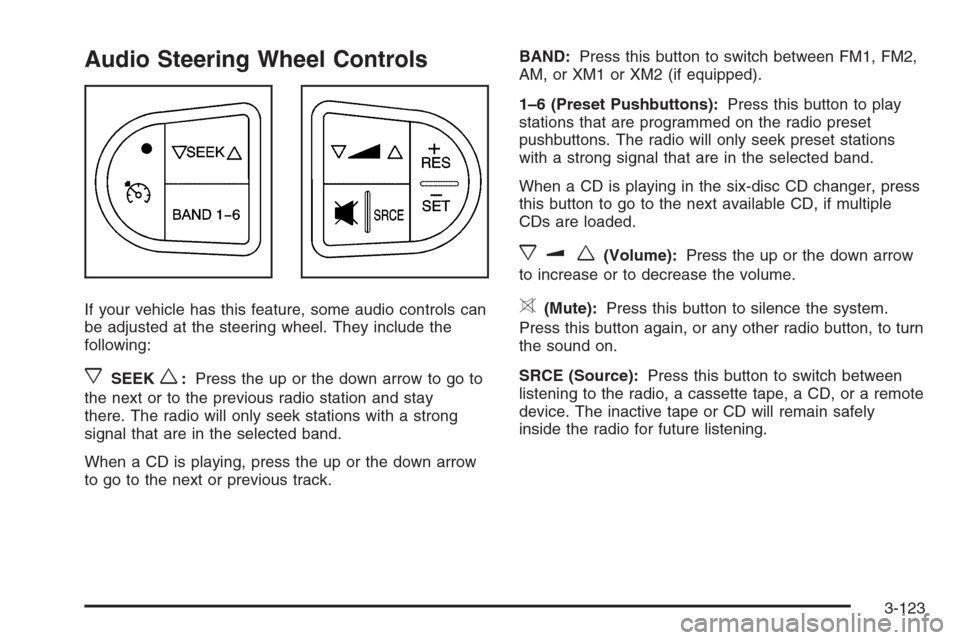
Audio Steering Wheel Controls
If your vehicle has this feature, some audio controls can
be adjusted at the steering wheel. They include the
following:
xSEEKw:Press the up or the down arrow to go to
the next or to the previous radio station and stay
there. The radio will only seek stations with a strong
signal that are in the selected band.
When a CD is playing, press the up or the down arrow
to go to the next or previous track.BAND:Press this button to switch between FM1, FM2,
AM, or XM1 or XM2 (if equipped).
1–6 (Preset Pushbuttons):Press this button to play
stations that are programmed on the radio preset
pushbuttons. The radio will only seek preset stations
with a strong signal that are in the selected band.
When a CD is playing in the six-disc CD changer, press
this button to go to the next available CD, if multiple
CDs are loaded.
xuw(Volume):Press the up or the down arrow
to increase or to decrease the volume.
>(Mute):Press this button to silence the system.
Press this button again, or any other radio button, to turn
the sound on.
SRCE (Source):Press this button to switch between
listening to the radio, a cassette tape, a CD, or a remote
device. The inactive tape or CD will remain safely
inside the radio for future listening.
3-123
Page 385 of 434
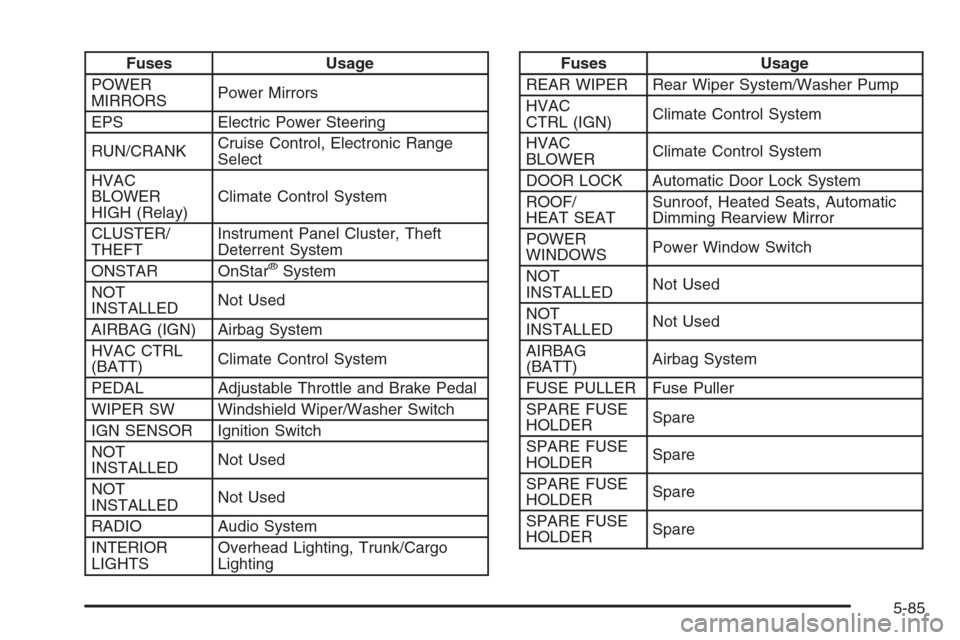
Fuses Usage
POWER
MIRRORSPower Mirrors
EPS Electric Power Steering
RUN/CRANKCruise Control, Electronic Range
Select
HVAC
BLOWER
HIGH (Relay)Climate Control System
CLUSTER/
THEFTInstrument Panel Cluster, Theft
Deterrent System
ONSTAR OnStar
®System
NOT
INSTALLEDNot Used
AIRBAG (IGN) Airbag System
HVAC CTRL
(BATT)Climate Control System
PEDAL Adjustable Throttle and Brake Pedal
WIPER SW Windshield Wiper/Washer Switch
IGN SENSOR Ignition Switch
NOT
INSTALLEDNot Used
NOT
INSTALLEDNot Used
RADIO Audio System
INTERIOR
LIGHTSOverhead Lighting, Trunk/Cargo
Lighting
Fuses Usage
REAR WIPER Rear Wiper System/Washer Pump
HVAC
CTRL (IGN)Climate Control System
HVAC
BLOWERClimate Control System
DOOR LOCK Automatic Door Lock System
ROOF/
HEAT SEATSunroof, Heated Seats, Automatic
Dimming Rearview Mirror
POWER
WINDOWSPower Window Switch
NOT
INSTALLEDNot Used
NOT
INSTALLEDNot Used
AIRBAG
(BATT)Airbag System
FUSE PULLER Fuse Puller
SPARE FUSE
HOLDERSpare
SPARE FUSE
HOLDERSpare
SPARE FUSE
HOLDERSpare
SPARE FUSE
HOLDERSpare
5-85
Page 422 of 434
Audio System(s).............................................3-54
Audio Steering Wheel Controls....................3-119
Backglass Antenna.....................................3-122
Care of Your Cassette Tape Player...............3-120
Care of Your CD and DVD Player................3-121
Care of Your CDs and DVDs .......................3-121
Fixed Mast Antenna...................................3-122
Radio with Cassette and CD.........................3-71
Radio with CD....................................3-55, 3-60
Radio with Six-Disc CD................................3-84
Rear Seat Audio (RSA).....................3-115, 3-117
Setting the Time for Radios with Radio Data
Systems (RDS)........................................3-55
Setting the Time for Radios without Radio
Data Systems (RDS)................................3-54
Theft-Deterrent Feature...............................3-118
Understanding Radio Reception...................3-120
XM™ Satellite Radio Antenna System...........3-122
Automatic Climate Control System.....................3-25
Automatic Headlamp System............................3-17
Automatic Transaxle
Fluid..........................................................5-21
Operation...................................................2-26B
Backglass Antenna........................................3-122
Battery..........................................................5-35
Run-Down Protection...................................3-20
Before Leaving on a Long Trip.........................4-21
Brake
Anti-Lock Brake System (ABS)........................ 4-6
Emergencies................................................ 4-8
Parking......................................................2-29
System Warning Light..................................3-37
Brake Pedal, Throttle.......................................2-24
Brakes..........................................................5-32
Braking........................................................... 4-5
Braking in Emergencies..................................... 4-8
Break-In, New Vehicle.....................................2-21
Bulb Replacement...........................................5-41
Halogen Bulbs............................................5-41
Headlamps.................................................5-41
Replacement Bulbs......................................5-45
Taillamps, Turn Signal, Stoplamps and
Back-up Lamps........................................5-43
Buying New Tires...........................................5-56
2
Page 430 of 434
Q
Questions and Answers About Safety Belts.........1-15
R
Radios..........................................................3-54
Care of Your Cassette Tape Player...............3-120
Care of Your CD and DVD Player................3-121
Care of Your CDs and DVDs .......................3-121
Radio with Cassette and CD.........................3-71
Radio with CD....................................3-55, 3-60
Radio with Six-Disc CD................................3-84
Rear Seat Audio..............................3-115, 3-117
Setting the Time for Radios with Radio Data
Systems (RDS)........................................3-55
Setting the Time for Radios without Radio
Data Systems (RDS)................................3-54
Theft-Deterrent..........................................3-118
Understanding Reception............................3-120
Rear Compartment Storage Panel/Cover............2-45
Rear Reading Lamps......................................3-19
Rear Safety Belt Comfort Guides......................1-28
Rear Seat Audio (RSA)........................3-115, 3-117
Rear Seat Entertainment System.......................3-99
Rear Seat Operation......................................... 1-8
Rear Seat Passengers, Safety Belts..................1-25Rearview Mirror, Automatic Dimming with
Compass....................................................2-35
Rearview Mirror, Automatic Dimming with
OnStar
®and Compass.................................2-34
Rearview Mirror with OnStar®...........................2-33
Rearview Mirrors.............................................2-33
Reclining Seatbacks.......................................... 1-4
Recommended Fluids and Lubricants.................6-12
Recreational Vehicle Towing.............................4-35
Remote Keyless Entry System............................ 2-4
Remote Keyless Entry System, Operation............ 2-5
Removing the Flat Tire and Installing the
Spare Tire..................................................5-65
Removing the Spare Tire and Tools...................5-63
Replacement Bulbs.........................................5-45
Reporting Safety Defects
Canadian Government..................................7-11
General Motors...........................................7-11
United States Government............................7-10
Restraint System Check
Checking the Restraint Systems....................1-75
Replacing Restraint System Parts After
a Crash..................................................1-76
Retained Accessory Power (RAP)......................2-22
Right Front Passenger Position, Safety Belts......1-24
Roadside
Assistance Program....................................... 7-6
Rocking Your Vehicle to Get it Out....................4-29
Running the Engine While Parked.....................2-32
10