2005 CHEVROLET KODIAK air condition
[x] Cancel search: air conditionPage 134 of 374

Ashtrays and Cigarette Lighter
Your vehicle may have an ashtray and a cigarette
lighter located in the center floor console. See
Instrument Panel Overview on page 3-4. To open the
removable ashtray, flip open the top.
Notice:If you put papers, pins, or other ammable
items in the ashtray, hot cigarettes or other
smoking materials could ignite them and possibly
damage your vehicle. Never put ammable items in
the ashtray.
To use the cigarette lighter, push it in all the way and let
it go. When it’s ready, it will pop back out by itself.
Notice:Holding a cigarette lighter in while it
is heating will not allow the lighter to back away
from the heating element when it is hot. Damage
from overheating may occur to the lighter or heating
element, or a fuse could be blown. Do not hold a
cigarette lighter in while it is heating.
Climate Controls
Climate Control System
With these systems, you can control the heating,
cooling and ventilation for your vehicle.
If your vehicle does not have air conditioning, the
controls will look like this:
Turn the mode knob on the far right clockwise
or counterclockwise to direct the airflow inside of
your vehicle.
To change the current mode, select one of the following:
9(Off):This setting turns the system off.
H(Vent):This mode directs air to the instrument
panel vents.Vehicles Without Air Conditioning
3-20
Page 135 of 374

)(Bi-Level):This mode directs half of the air to the
instrument panel vents, then directs the remaining
air to the floor vents. Cooler air is directed to the upper
vents and warmer air to the floor vents.
6(Floor):This mode directs most of the air to the
floor vents. Use this mode to send air to the rear of the
vehicle. Keep the area under the front seats free of
objects that could obstruct airflow to the rear of
the vehicle.
The mode knob can also be used to select the defrost
mode. For more information, see “Defogging and
Defrosting” later in this section.
9(Fan):Turn the left knob clockwise or
counterclockwise to increase or decrease the fan speed.
To increase airflow, turn the knob clockwise. To
decrease airflow, turn it counterclockwise. To turn the
fan off, turn the mode knob on the far right
counterclockwise to the off position.
Temperature Knob:Turn the middle knob located
clockwise or counterclockwise to increase or decrease
the temperature inside of your vehicle. Turn the
knob toward the red area for warmer air. Turn the knob
toward the blue area for cooler air.If your vehicle has air conditioning, the controls will look
like this:
On hot days, open the windows to let hot inside air
escape; then close them. This helps to reduce the time
it takes for your vehicle to cool down. It also helps
the system to operate more efficiently.
<(Maximum Air Conditioning):Turn the right knob
to this setting for maximum cooling. This setting puts
the system in recirculation mode and helps to maximize
your air conditioner’s performance and your vehicle’s
fuel economy. This setting also cools the air the fastest.
Y(Air Conditioning):This setting is used for
normal cooling on hot days. It cools outside air and
directs it through the instrument panel vents.
)(Bi-Level Air Conditioning):This setting divides
airflow between the floor vents and instrument panel
vents. The air conditioning compressor will cycle
continuously in this setting as long as the outside
temperature is warm enough to activate the compressor.Vehicles With Air Conditioning
3-21
Page 136 of 374

Defogging and Defrosting
Fog on the inside of windows is a result of high humidity
(moisture) condensing on the cool window glass. This
can be minimized if the climate control is used properly.
There are two modes to clear fog or frost from your
windshield and side windows.
Use the defog mode to clear the windows of fog or
moisture and warm the passengers. Use the defrost
mode to remove fog or frost from the windshield more
quickly. For best results, clear all snow and ice from the
windshield before defrosting.
Turn the mode knob on the right of the climate control
panel to select the defog or defrost mode.
-(Defog):With this setting, the outside air comes out
of both the floor and defroster outlets. Adjust the
temperature knob for warmer or cooler air. The air
conditioning compressor may operate in this setting to
dehumidify the air.
0(Defrost):This setting operates the defroster. Most
of the air comes out near the windshield, with some
going to the floor outlets and front side windows. The air
conditioning compressor may operate in this setting to
dehumidify the air.The defog setting is useful for cold weather with a large
number of passengers or very humid conditions to
help keep the windshield clear. Use defrost to remove
fog or ice from the windshield quickly in extremely
cold conditions. The temperature knob should be in the
red area and the fan control toward high. Do not
drive the vehicle until all the windows are clear.
Rear Window Defogger
The rear window defogger uses a warming grid to
remove fog or frost from the rear window.
Be sure to clear as much snow from the rear window as
possible.
Press this button which is
located near the fan
control to turn the rear
window defogger on or off.
An indicator light in the
button will come on when
the rear window defogger
is working.
The rear window defogger will only work when the
ignition is in RUN.
3-22
Page 137 of 374

The rear window defogger will turn off several minutes
after the button is pressed. The defogger can also
be turned off by pressing the button again or by turning
off the engine.
Notice:Do not use anything sharp on the inside of
the rear window. If you do, you could cut or
damage the warming grid, and the repairs would not
be covered by your warranty. Do not attach a
temporary vehicle license, tape, a decal or anything
similar to the defogger grid.
Outlet Adjustment
Your vehicle has air outlets on the instrument panel that
allow you to adjust the direction and amount of airflow
inside the vehicle.
Move the lever on the outlet up or down to direct the
airflow. Increase or reduce the amount of airflow
by opening and closing the louvers. The outlets can be
moved side-to-side to direct the airflow.
Operation Tips
•
Keep the hood and front air inlets free of ice, snow,
or any other obstruction (such as leaves). The
heater and defroster will work far better, reducing
the chance of fogging the inside of your windows.
•Keep the air path under the front seats clear
of objects. This helps air to circulate throughout your
vehicle.
•Adding outside equipment to the front of your
vehicle, such as hood-air deflectors, may affect the
performance of the heating and air conditioning
system. Check with your dealer before adding
equipment to the outside of your vehicle.
3-23
Page 214 of 374

Other Service Items........................................5-66
Fuel Filter....................................................5-66
Primary Fuel Filter and Water Separator..........5-67
Secondary Fuel Filter and Water Separator/
Heater (Caterpillar
®Diesel)..........................5-68
Automatic Ether Injection System
(Caterpillar
®Diesel)....................................5-68
Front Wheel Bearings with Oil-Filled Hubs........5-69
Air Conditioning System.................................5-70
Tires..............................................................5-70
Inflation - Tire Pressure.................................5-71
Wheel Loading.............................................5-71
Dual Tire Operation.......................................5-72
When It Is Time for New Tires.......................5-72
Wheel Alignment and Tire Balance..................5-73
Tightening the Wheel Nuts.............................5-73
Wheel Replacement......................................5-77
If a Tire Goes Flat........................................5-78
Appearance Care............................................5-79
Cleaning the Inside of Your Vehicle.................5-80
Fabric/Carpet...............................................5-81
Instrument Panel, Vinyl, and Other
Plastic Surfaces........................................5-82
Care of Safety Belts......................................5-82
Weatherstrips...............................................5-82Washing Your Vehicle...................................5-83
Cleaning Exterior Lamps/Lenses.....................5-83
Finish Care..................................................5-83
Windshield and Wiper Blades.........................5-84
Aluminum or Chrome-Plated Wheels................5-84
Tires...........................................................5-85
Sheet Metal Damage.....................................5-85
Finish Damage.............................................5-85
Underbody Maintenance................................5-85
Chemical Paint Spotting.................................5-85
Vehicle Identication......................................5-87
Vehicle Identification Number (VIN).................5-87
Service Statement.........................................5-87
Service Parts Identification Label.....................5-88
Electrical System............................................5-88
Add-On Electrical Equipment..........................5-88
Headlamp Wiring..........................................5-88
Windshield Wiper Fuses................................5-88
Fusible Links................................................5-89
Power Windows and Other Power Options.......5-89
Fuses and Circuit Breakers............................5-89
Instrument Panel Fuse Block..........................5-89
Underhood Fuse Block..................................5-92
Capacities and Specications..........................5-95
Normal Maintenance Replacement Parts.........5-100
Section 5 Service and Appearance Care
5-2
Page 257 of 374

Engine Fan Noise
Your vehicle has a clutched engine cooling fan. When
the clutch is engaged, the fan spins faster to provide
more air to cool the engine. In most everyday driving
conditions, the clutch is not fully engaged. This improves
fuel economy and reduces fan noise. Under heavy
vehicle loading, trailer towing and/or high outside
temperatures, the fan speed increases when the clutch
engages. So you may hear an increase in fan noise.
This is normal and should not be mistaken as the
transmission slipping or making extra shifts. It is merely
the cooling system functioning properly. The fan will
slow down when additional cooling is not required and
the clutch disengages.
You may also hear this fan noise when you start the
engine. It will go away as the fan clutch disengages.
Power Steering Fluid
SeeScheduled Maintenance on page 6-5to determine
when to check your power steering fluid.
How To Check Power Steering Fluid
Check your power steering fluid only when the engine is
warm. If the engine is not warm, you probably will not
get an accurate reading.
If the fluid level is between the MIN (Minimum) and
MAX (Maximum) marks, you have enough. If you need
fluid, add only enough of the proper fluid to bring it
in between the MIN and MAX marks.
If your power steering fluid level is low, this can cause
the brake or service brakes soon warning lights to come
on. In addition, the steering effort and emergency
brake distance could increase.
If either light remains on after you have added power
steering fluid to the proper level, then shut off the engine
for 10 seconds. This should reset the brake warning
lights. If one or both lights stay on, see “Hydraulic Brake
System Warning Lights” underBrake System Warning
Light on page 3-31for more information.
What to Use
To determine what kind of fluid to use, seePart C:
Recommended Fluids and Lubricants on page 6-32.
Notice:When adding power steering uid or
making a complete uid change, always use the
proper uid. Failure to use the proper uid can
cause leaks and damage hoses and seals.
5-45
Page 261 of 374

Four-Wheel Disc Brakes
(Hydraulic Only)
Your vehicle has four-wheel disc brakes.
Some driving conditions or climates may cause a brake
squeal when the brakes are first applied or lightly
applied. This does not mean something is wrong with
your brakes.
Brake linings should always be replaced as complete
axle sets.
Four-Wheel and Six-Wheel Drum
Brakes (Air Only)
The brake drums should be removed and inspected
each time the tires are removed for rotation or changing.
When you have the front brakes replaced, have the
rear brakes inspected, too.
Brake linings should always be replaced as complete
axle sets.
Brake Pedal Travel
See your dealer if the brake pedal does not return to
normal height, or if there is a rapid increase in
pedal travel. This could be a sign of brake trouble.
Brake Adjustment
Every time you make a brake stop, your brakes adjust
for wear.
Replacing Brake System Parts
The braking system on a vehicle is complex. Its many
parts have to be of top quality and work well together if
the vehicle is to have really good braking. Your
vehicle was designed and tested with top-quality
GM brake parts. When you replace parts of your braking
system — for example, when your brake linings wear
down and you need new ones put in — be sure you get
new approved GM replacement parts. If you do not,
your brakes may no longer work properly. For example,
if someone puts in brake linings that are wrong for
your vehicle, the balance between your front and rear
brakes can change — for the worse. The braking
performance you have come to expect can change in
many other ways if someone puts in the wrong
replacement brake parts.
5-49
Page 275 of 374
When to Change Lubricant
Refer to the Maintenance Schedule to determine how
often to change the lubricant. SeeScheduled
Maintenance on page 6-5.
What to Use
Refer to the Maintenance Schedule to determine what
kind of lubricant to use. SeePart C: Recommended
Fluids and Lubricants on page 6-32.
Front Axle
When to Check Lubricant
It is not necessary to regularly check front axle fluid
unless you suspect there is a leak or you hear an
unusual noise. A fluid loss could indicate a problem.
Have it inspected and repaired.
Notice:If you drive your vehicle through deep
water that is higher than the front or rear axle, water
may enter the axle housing and cause the axle
lubricant to break down. This could damage the
gears inside. Avoid driving your vehicle through
deep water.
You should avoid driving your vehicle through deep
puddles or standing water. If you must drive through
water that is higher than the front or rear axle, see your
dealer immediately afterward to have the condition of
the axle lubricant checked.
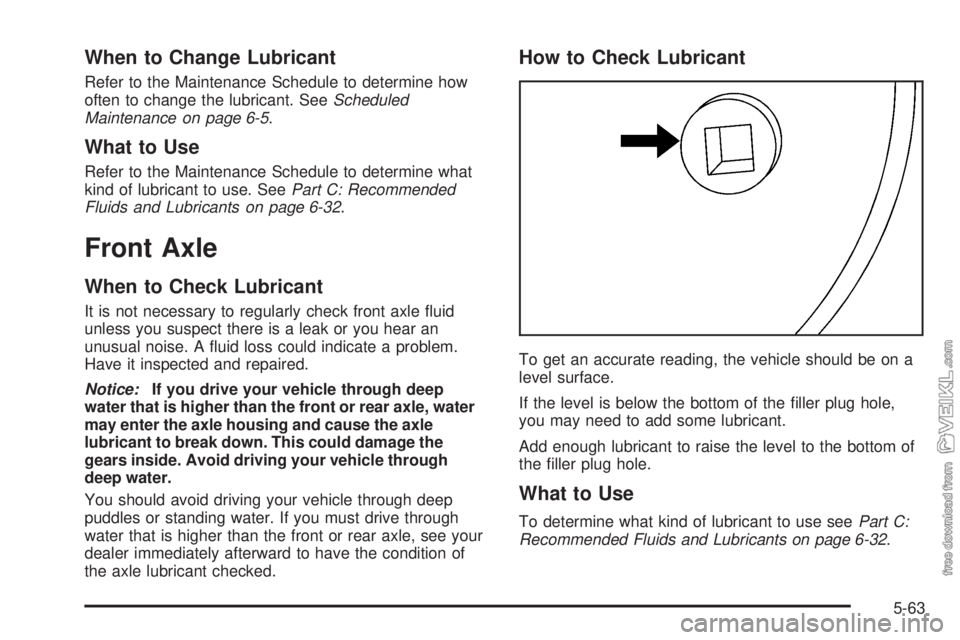
How to Check Lubricant
To get an accurate reading, the vehicle should be on a
level surface.
If the level is below the bottom of the filler plug hole,
you may need to add some lubricant.
Add enough lubricant to raise the level to the bottom of
the filler plug hole.
What to Use
To determine what kind of lubricant to use seePart C:
Recommended Fluids and Lubricants on page 6-32.
5-63