2005 CHEVROLET EPICA audio
[x] Cancel search: audioPage 154 of 340
Playing a CD
Insert a CD partway into the slot, label side up. The
player will pull it in and the CD should begin playing.
You can insert a CD with the ignition off.
When the CD is inserted, CDP will appear on the
display. As the CD is loading Filecheck will appear on
the display. As each new track starts to play, Track and
the track number will appear on the display.
If the ignition or radio is turned off with a CD in the
player, it will stay in the player. When the ignition
or radio is turned on, the CD will start playing where it
stopped, if it was the last selected audio source.
The CD player can play the smaller 3 inch (8 cm) single
CDs with an adapter ring. Full-size CDs and the
smaller CDs are loaded in the same manner.
If playing a CD-R the sound quality may be reduced
due to CD-R quality, the method of recording, the quality
of the music that has been recorded, and the way the
CD-R has been handled. You may experience an
increase in skipping, difficulty in finding tracks, and/or
difficulty in loading and ejecting. If these problems occur
try a known good CD.
Do not add paper labels to CDs, they could get caught
in the CD player.
If an error appears on the display, see “CD Messages”
later in this section.2 RPT (Repeat):Press this pushbutton to repeat the
current track. RPT will appear on the display. Press this
pushbutton again to turn off repeat play.
3 INT (SCAN):Press this button to listen to the first few
seconds of each track on each CD inserted. INTRO
will appear on the display. To stop scanning press this
button again. The current track will begin to play.
4 RDM (Random):Press this pushbutton to hear the
tracks in random, rather than sequential, order. RDM will
appear on the display. Press this pushbutton again to
turn off random play.
TRACK (Previous/Next Track):Turn this knob one
notch to go to the start of the current track or to go to the
next track. The track number will appear on the
display. The player will continue moving backward or
forward through the CD with each turn of the knob.
TUN (Forward/Reverse):Push and hold this knob to
fast forward or to reverse through the current track.
AM/FM:Press this button to listen to the radio when a
CD is playing. The inactive CD will remain safely
inside the radio for future listening.
CD:Press this button to play a CD when listening to
the radio. CDP will appear on the display when the CD
player has been selected.
Press this button while a CD is playing to pause the
CD. Track and the track number will flash on the display.
Press this button again to start playing the CD.
3-50
Page 157 of 340
Adjusting the Speakers (Balance/Fade)
SOUND (Balance/Fade):To adjust the balance
between the right and the left speakers, press this button
until BAL appears on the display. Turn the volume
knob to increase or to decrease. The display will show
the balance level. When finished making the selection,
press this button to select the balance level.
To adjust the fade between the front and the rear
speakers, press this button until FAD appears on the
display. Turn the volume knob to increase or to
decrease the fade between the front and the rear
speakers. The display will show the fade level. When
finished making the selection, press this button to select
the fade level.
Playing a CD
Insert a CD partway into the slot, label side up. The
player will pull it in and the CD should begin playing.
You can insert a CD with the ignition off.
When the CD is inserted, CDP will appear on the
display. As the CD is loading Filecheck will appear on
the display. As each new track starts to play, Track and
the track number will appear on the display.
If the ignition or radio is turned off with a CD in the
player, it will stay in the player. When the ignition
or radio is turned on, the CD will start playing where it
stopped, if it was the last selected audio source.The CD player can play the smaller 3 inch (8 cm) single
CDs with an adapter ring. Full-size CDs and the
smaller CDs are loaded in the same manner.
If playing a CD-R the sound quality may be reduced
due to CD-R quality, the method of recording, the quality
of the music that has been recorded, and the way the
CD-R has been handled. There may be an increase
in skipping, difficulty in finding tracks, and/or difficulty in
loading and ejecting. If these problems occur try a
known good CD.
Do not add paper labels to CDs, they could get caught
in the CD player.
If an error appears on the display, see “CD Messages”
later in this section.
2 RPT (Repeat):Press this pushbutton to repeat the
current track. RPT will appear on the display. Press this
pushbutton again to turn off repeat play.
3 INT (Scan):Press this button to listen to the first few
seconds of each track on each loaded CD. INTRO
will appear on the display. To stop scanning press this
button again. The current track will begin to play.
4 RDM (Random):Press this pushbutton to hear the
tracks in random, rather than sequential, order. RDM will
appear on the display. Press this pushbutton again to
turn off random play.
3-53
Page 159 of 340
Root Directory
The root directory will be treated as a folder. If the root
directory has compressed audio files, the directory
will be displayed as F1 ROOT. All files contained directly
under the root directory will be accessed prior to any
root directory folders. However, playlists (Px) will always
be accessed before root folders or files.
Empty Directory or Folder
If a root directory or a folder exists somewhere in the
file structure that contains only folders/subfolders and no
compressed files directly beneath them, the player will
advance to the next folder in the file structure that
contains compressed audio files and the empty folder
will not be displayed or numbered.
No Folder
When the CD contains only compressed files, the files
will be located under the root folder. The next and
previous folder functions will have no function on a
CD that was recorded without folders or playlists.
When displaying the name of the folder the radio will
display ROOT.When the CD contains only playlists and compressed
audio files, but no folders, all files will be located under
the root folder. The folder down and the folder up
buttons will search playlists (Px) first and then go to the
root folder. When the radio displays the name of the
folder the radio will display ROOT.
Order of Play
Tracks will be played in the following order:
•Play will begin from the first track in the first playlist
and will continue sequentially through all tracks in
each playlist. When the last track of the last playlist
has been played, play will continue from the first
track of the first playlist.
•If the CD does not contain any playlists, then play
will begin from the first track under the root
directory. When all tracks from the root directory
have been played, play will continue from files
according to their numerical listing. After playing the
last track from the last folder, play will begin
again at the first track of the first folder or root
directory.
3-55
Page 160 of 340
File System and Naming
The song name that will be displayed will be the
song name that is contained in the ID3 tag. If the
song name is not present in the ID3 tag, then the
radio will display the file name without the extension
(such as .mp3) as the track name.
Track names longer than 32 characters or 4 pages will
be shortened. The display will not show parts of
words on the last page of text and the extension of the
filename will not be displayed.
Preprogrammed Playlists
You can access preprogrammed playlists which were
created by WinAmp™, MusicMatch™, or Real
Jukebox™ software, however, you will not have editing
capability. These playlists will be treated as special
folders containing compressed audio song files.
Playing an MP3
With the ignition on, insert a CD partway into the slot,
label side up. The player will pull it in, Loading, then
Filecheck, then MP3 will appear on the display. The CD
should begin playing. You can insert a CD with the
ignition off.As each new track starts to play, F001, the track
number, and the song name will appear on the display.
If you turn off the ignition or radio with a CD in the
player, it will stay in the player. When you turn on the
ignition or radio, the CD will start playing where it
stopped, if it was the last selected audio source.
The CD player can play the smaller 3 inch (8 cm) single
CDs with an adapter ring. Full-size CDs and the
smaller CDs are loaded in the same manner.
If playing a CD-R the sound quality may be reduced
due to CD-R quality, the method of recording, the quality
of the music that has been recorded, and the way the
CD-R has been handled. There may be an increase
in skipping, difficulty in finding tracks, and/or difficulty in
loading and ejecting. If these problems occur try a
known good CD.
Do not add paper labels to CDs, they could get caught
in the CD player.
If an error appears on the display, see “CD Messages”
later in this section.
All of the CD functions work the same while playing an
MP3, except for those listed here. See “Playing a
CD” earlier for more information.
3-56
Page 165 of 340
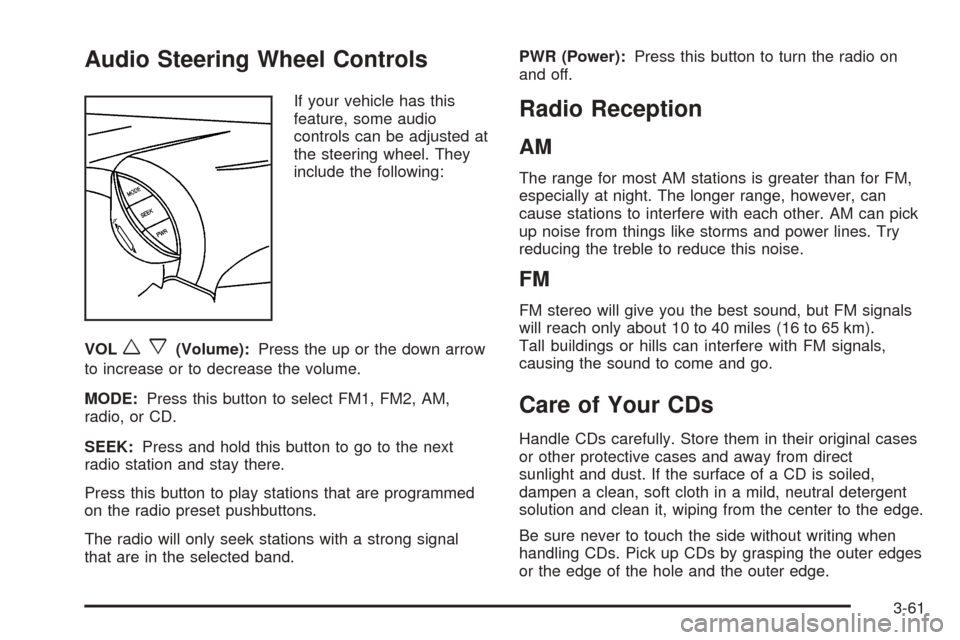
Audio Steering Wheel Controls
If your vehicle has this
feature, some audio
controls can be adjusted at
the steering wheel. They
include the following:
VOL
wx(Volume):Press the up or the down arrow
to increase or to decrease the volume.
MODE:Press this button to select FM1, FM2, AM,
radio, or CD.
SEEK:Press and hold this button to go to the next
radio station and stay there.
Press this button to play stations that are programmed
on the radio preset pushbuttons.
The radio will only seek stations with a strong signal
that are in the selected band.PWR (Power):Press this button to turn the radio on
and off.
Radio Reception
AM
The range for most AM stations is greater than for FM,
especially at night. The longer range, however, can
cause stations to interfere with each other. AM can pick
up noise from things like storms and power lines. Try
reducing the treble to reduce this noise.
FM
FM stereo will give you the best sound, but FM signals
will reach only about 10 to 40 miles (16 to 65 km).
Tall buildings or hills can interfere with FM signals,
causing the sound to come and go.
Care of Your CDs
Handle CDs carefully. Store them in their original cases
or other protective cases and away from direct
sunlight and dust. If the surface of a CD is soiled,
dampen a clean, soft cloth in a mild, neutral detergent
solution and clean it, wiping from the center to the edge.
Be sure never to touch the side without writing when
handling CDs. Pick up CDs by grasping the outer edges
or the edge of the hole and the outer edge.
3-61
Page 329 of 340
A
Accessory Power Outlets.................................3-17
Adding Equipment to Your Airbag-Equipped
Vehicle.......................................................1-63
Additives, Fuel................................................. 5-7
Add-On Electrical Equipment............................5-76
Air Cleaner/Filter, Engine.................................5-17
Air Conditioning......................................3-19, 3-22
Airbag
Passenger Status Indicator...........................3-34
Readiness Light..........................................3-33
Airbag Sensing and Diagnostic Module (SDM)...... 7-9
Airbag System................................................1-49
Adding Equipment to Your Airbag-Equipped
Vehicle...................................................1-63
How Does an Airbag Restrain?......................1-56
Passenger Sensing System...........................1-58
Servicing Your Airbag-Equipped Vehicle..........1-62
What Makes an Airbag Inflate?......................1-55
What Will You See After an Airbag Inflates?.....1-56
When Should an Airbag Inflate?....................1-54
Where Are the Airbags?...............................1-52
Antenna, Backglass.........................................3-62
Anti-Lock Brake System (ABS)........................... 4-6
Anti-Lock Brake, System Warning Light..............3-37
Appearance Care............................................5-68
Aluminum Wheels........................................5-72
Chemical Paint Spotting...............................5-74
Cleaning Exterior Lamps/Lenses....................5-71Appearance Care (cont.)
Fabric/Carpet..............................................5-68
Finish Care.................................................5-71
Finish Damage............................................5-73
Glass Surfaces............................................5-70
Instrument Panel.........................................5-70
Interior Plastic Components...........................5-70
Leather......................................................5-70
Sheet Metal Damage...................................5-73
Tires..........................................................5-73
Underbody Maintenance...............................5-73
Vehicle Care/Appearance Materials................5-74
Vinyl..........................................................5-70
Washing Your Vehicle...................................5-71
Weatherstrips..............................................5-71
Windshield and Wiper Blades........................5-72
Ashtrays........................................................3-18
Audio System(s).............................................3-47
Audio Steering Wheel Controls......................3-61
Backglass Antenna......................................3-62
Care of Your CD Player...............................3-62
Care of Your CDs........................................3-61
Radio with CD....................................3-48, 3-51
Trunk-Mounted CD Changer..........................3-58
Understanding Radio Reception.....................3-61
Automatic Climate Control System.....................3-22
Automatic Transaxle
Fluid..........................................................5-19
Operation...................................................2-20
1
Page 338 of 340
SSafety Belt
Pretensioners..............................................1-27
Reminder Light............................................3-32
Reminder Tone............................................3-33
Safety Belts
Driver Position............................................1-16
How to Wear Safety Belts Properly................1-15
Questions and Answers About Safety Belts.....1-14
Rear Seat Passengers.................................1-24
Right Front Passenger Position......................1-23
Safety Belt Extender....................................1-27
Safety Belt Use During Pregnancy.................1-23
Safety Belts Are for Everyone.......................1-10
Shoulder Belt Height Adjuster........................1-22
Safety Warnings and Symbols.............................. iii
Seats
Driver Seat Tilt Adjuster................................. 1-3
Head Restraints............................................ 1-7
Heated Seats............................................... 1-5
Manual........................................................ 1-2
Manual Lumbar............................................. 1-4
Power Seat.................................................. 1-3
Rear Seat Operation...................................... 1-8
Reclining Seatbacks...................................... 1-5
Securing a Child Restraint
Designed for the LATCH System...................1-42
Rear Seat Position......................................1-42
Right Front Seat Position..............................1-44
Selecting the Right Schedule, Maintenance.......... 6-5Service........................................................... 5-3
Adding Equipment to the Outside
of Your Vehicle.......................................... 5-5
Doing Your Own Work................................... 5-4
Engine Soon Light.......................................3-41
Publications Ordering Information...................7-11
Servicing Your Airbag-Equipped Vehicle..............1-62
Sheet Metal Damage.......................................5-73
Shifting Into Park (P).......................................2-25
Shifting Out of Park (P)...................................2-26
Short Trip/City Scheduled Maintenance................ 6-7
Shoulder Belt Height Adjuster...........................1-22
Signals, Turn and Lane-Change.......................... 3-7
Spare Tire
Installing....................................................5-63
Removing...................................................5-62
Storing.......................................................5-67
Specifications, Capacities.................................5-83
Speed Sensitive Power Steering (SSPS)
Warning Light.............................................3-37
Speedometer..................................................3-32
Starting Your Engine.......................................2-18
Steering.......................................................... 4-9
Steering, Suspension and Front Drive Axle
Boot and Seal Inspection..............................6-23
Steering Wheel Controls, Audio.........................3-61
Steering Wheel, Tilt Wheel................................. 3-6
Storage Areas
Center Console Storage Area........................2-32
Coinholder(s)..............................................2-31
Cupholder(s)...............................................2-31
10