Page 414 of 496
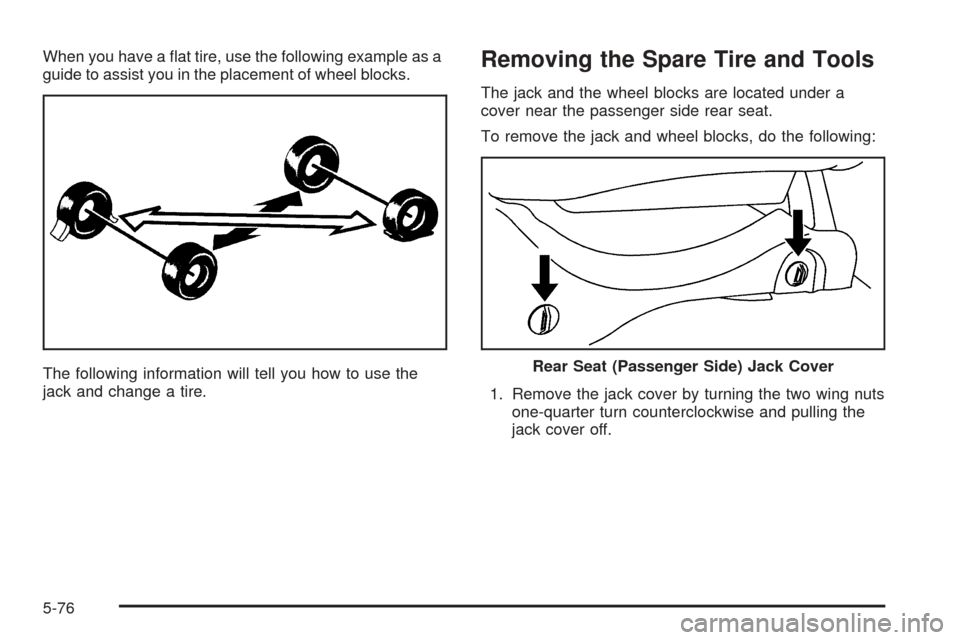
When you have a at tire, use the following example as a
guide to assist you in the placement of wheel blocks.
The following information will tell you how to use the
jack and change a tire.Removing the Spare Tire and Tools
The jack and the wheel blocks are located under a
cover near the passenger side rear seat.
To remove the jack and wheel blocks, do the following:
1. Remove the jack cover by turning the two wing nuts
one-quarter turn counterclockwise and pulling the
jack cover off.
Rear Seat (Passenger Side) Jack Cover
5-76
Page 415 of 496
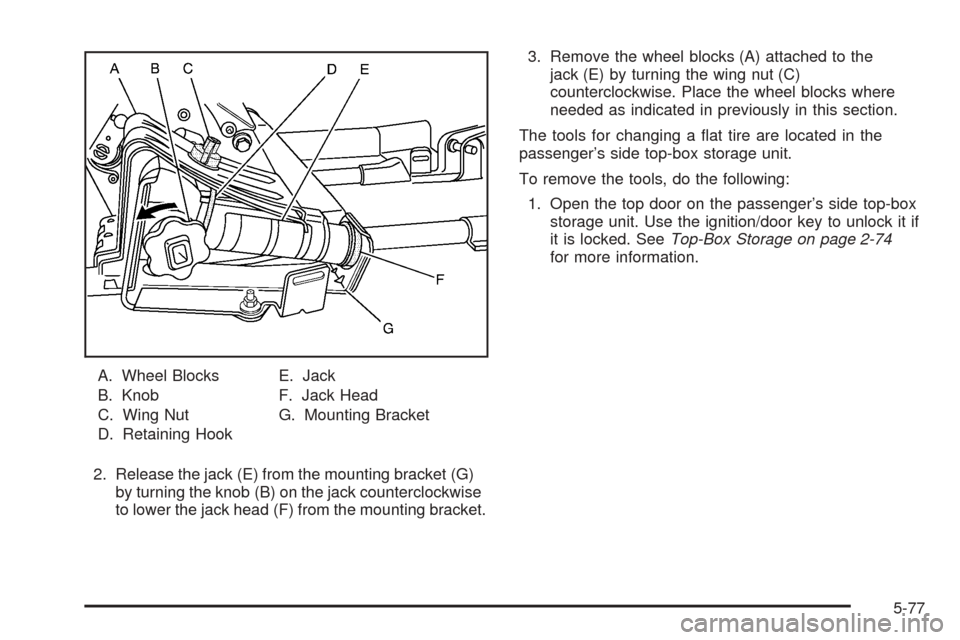
A. Wheel Blocks
B. Knob
C. Wing Nut
D. Retaining HookE. Jack
F. Jack Head
G. Mounting Bracket
2. Release the jack (E) from the mounting bracket (G)
by turning the knob (B) on the jack counterclockwise
to lower the jack head (F) from the mounting bracket.3. Remove the wheel blocks (A) attached to the
jack (E) by turning the wing nut (C)
counterclockwise. Place the wheel blocks where
needed as indicated in previously in this section.
The tools for changing a at tire are located in the
passenger’s side top-box storage unit.
To remove the tools, do the following:
1. Open the top door on the passenger’s side top-box
storage unit. Use the ignition/door key to unlock it if
it is locked. SeeTop-Box Storage on page 2-74
for more information.
5-77
Page 417 of 496
Follow these instructions to lower the spare tire:
1. Your vehicle may be equipped with a hoist lock (J).
Open the spare tire lock cover on the bumper and
use the ignition key to remove the lock.
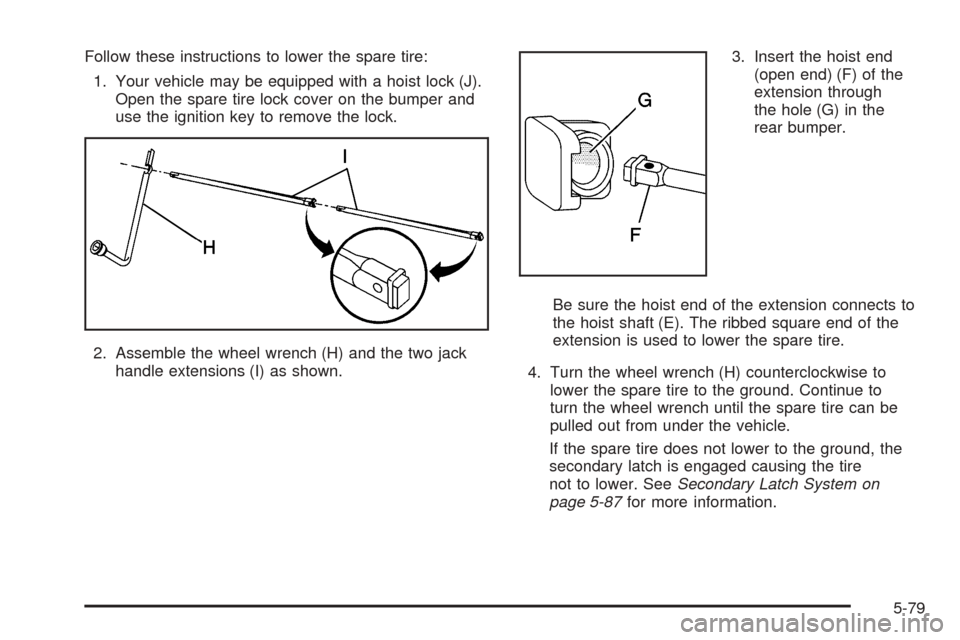
2. Assemble the wheel wrench (H) and the two jack
handle extensions (I) as shown.3. Insert the hoist end
(open end) (F) of the
extension through
the hole (G) in the
rear bumper.
Be sure the hoist end of the extension connects to
the hoist shaft (E). The ribbed square end of the
extension is used to lower the spare tire.
4. Turn the wheel wrench (H) counterclockwise to
lower the spare tire to the ground. Continue to
turn the wheel wrench until the spare tire can be
pulled out from under the vehicle.
If the spare tire does not lower to the ground, the
secondary latch is engaged causing the tire
not to lower. SeeSecondary Latch System on
page 5-87for more information.
5-79
Page 419 of 496
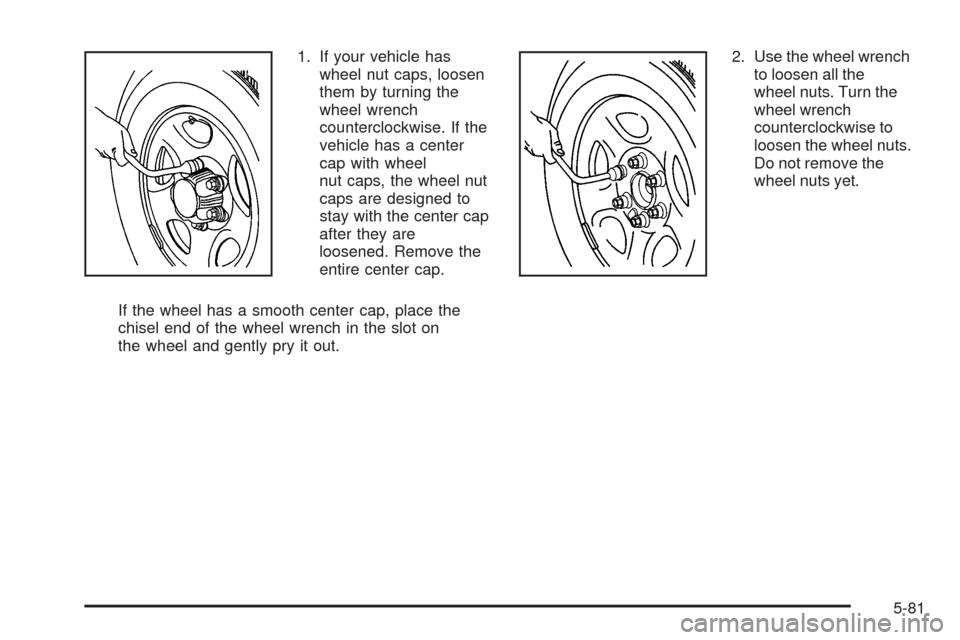
1. If your vehicle has
wheel nut caps, loosen
them by turning the
wheel wrench
counterclockwise. If the
vehicle has a center
cap with wheel
nut caps, the wheel nut
caps are designed to
stay with the center cap
after they are
loosened. Remove the
entire center cap.
If the wheel has a smooth center cap, place the
chisel end of the wheel wrench in the slot on
the wheel and gently pry it out.2. Use the wheel wrench
to loosen all the
wheel nuts. Turn the
wheel wrench
counterclockwise to
loosen the wheel nuts.
Do not remove the
wheel nuts yet.
5-81
Page 421 of 496

Front Tire Flat:If the at tire is on a front tire of
the vehicle, you will need to use the jack handle and
only one jack handle extension. Attach the wheel
wrench to the jack handle extension. Attach the jack
handle to the jack. Position the jack on the frame
behind the at tire where the frame sections overlap.
Turn the wheel wrench clockwise to raise the
vehicle. Raise the vehicle far enough off the ground
so there is enough room for the spare tire to
clear the vehicle.Rear Tire Flat:If the at tire is on a rear tire of the
vehicle, you will need to use the jack handle and
both jack handle extensions. Attach the wheel
wrench to the jack handle extensions. Attach the
jack handle to the jack. On all 1500 Series vehicles,
use the jacking pad provided on the rear axle.
On 2500 series vehicles, use the axle between the
spring and shock bracket. Turn the wheel wrench
clockwise to raise the vehicle. Raise the vehicle far
enough off the ground so there is enough room
for the spare tire to clear the ground. Front Position
Rear Position — 1500
SeriesRear Position — 2500
Series
5-83
Page 424 of 496
9. Turn the wheel wrench counterclockwise to lower
the vehicle. Lower the jack completely.
{CAUTION:
Incorrect wheel nuts or improperly tightened
wheel nuts can cause the wheel to come loose
and even come off. This could lead to an
accident. Be sure to use the correct wheel
nuts. If you have to replace them, be sure to
get new GM original equipment wheel nuts.
Stop somewhere as soon as you can and have
the nuts tightened with a torque wrench to the
proper torque specication. SeeCapacities
and Specifications on page 5-112for wheel nut
torque specication.
Notice:Improperly tightened wheel nuts can lead
to brake pulsation and rotor damage. To avoid
expensive brake repairs, evenly tighten the wheel
nuts in the proper sequence and to the proper
torque specication. SeeCapacities and
Specifications on page 5-112for the wheel nut
torque specication. Rear Position — 1500
Series
Rear Position — 2500
Series
5-86
Page 425 of 496
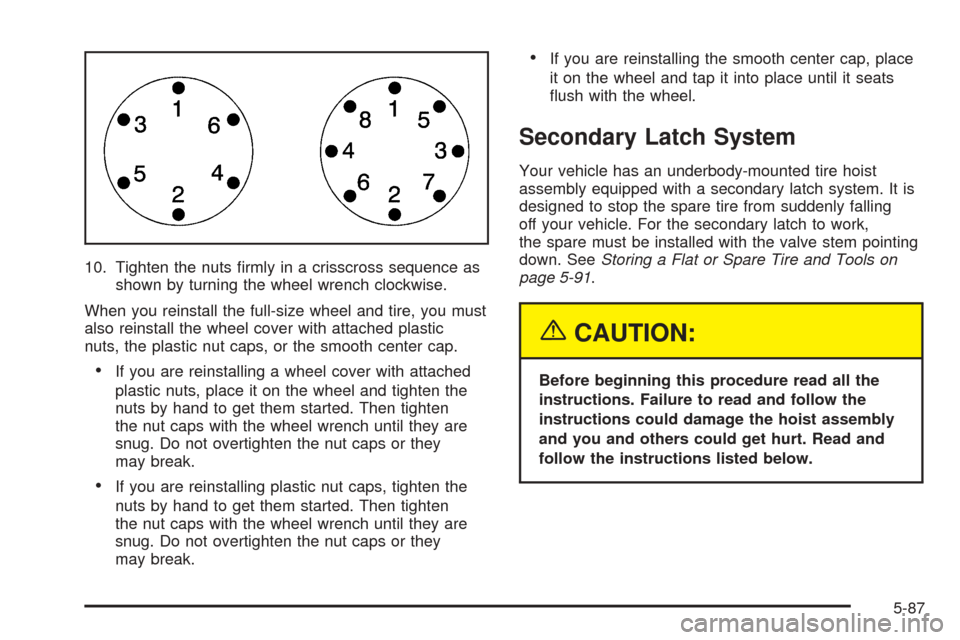
10. Tighten the nuts rmly in a crisscross sequence as
shown by turning the wheel wrench clockwise.
When you reinstall the full-size wheel and tire, you must
also reinstall the wheel cover with attached plastic
nuts, the plastic nut caps, or the smooth center cap.
If you are reinstalling a wheel cover with attached
plastic nuts, place it on the wheel and tighten the
nuts by hand to get them started. Then tighten
the nut caps with the wheel wrench until they are
snug. Do not overtighten the nut caps or they
may break.
If you are reinstalling plastic nut caps, tighten the
nuts by hand to get them started. Then tighten
the nut caps with the wheel wrench until they are
snug. Do not overtighten the nut caps or they
may break.
If you are reinstalling the smooth center cap, place
it on the wheel and tap it into place until it seats
ush with the wheel.
Secondary Latch System
Your vehicle has an underbody-mounted tire hoist
assembly equipped with a secondary latch system. It is
designed to stop the spare tire from suddenly falling
off your vehicle. For the secondary latch to work,
the spare must be installed with the valve stem pointing
down. SeeStoring a Flat or Spare Tire and Tools on
page 5-91.
{CAUTION:
Before beginning this procedure read all the
instructions. Failure to read and follow the
instructions could damage the hoist assembly
and you and others could get hurt. Read and
follow the instructions listed below.
5-87
Page 426 of 496
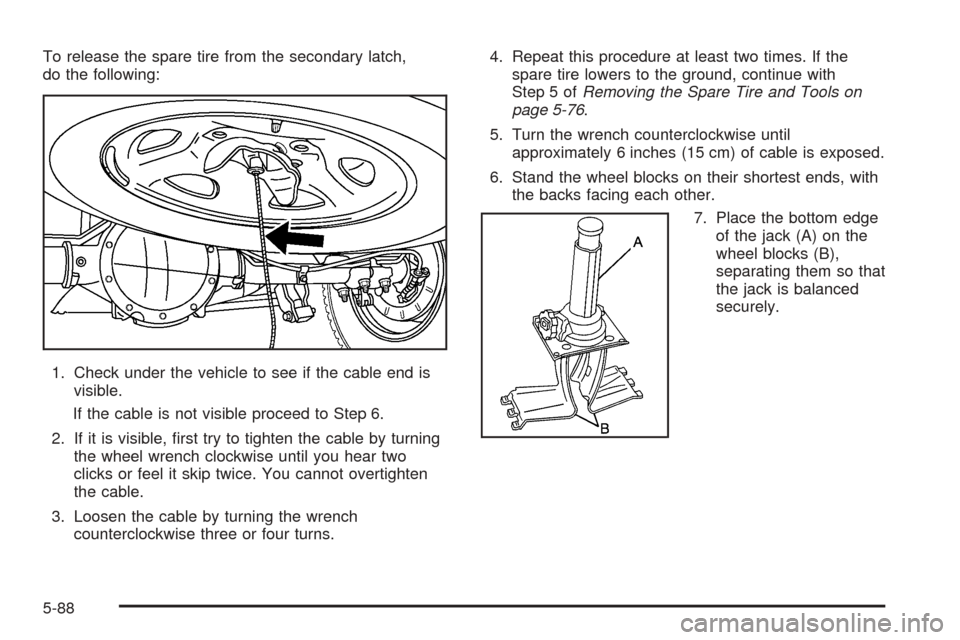
To release the spare tire from the secondary latch,
do the following:
1. Check under the vehicle to see if the cable end is
visible.
If the cable is not visible proceed to Step 6.
2. If it is visible, rst try to tighten the cable by turning
the wheel wrench clockwise until you hear two
clicks or feel it skip twice. You cannot overtighten
the cable.
3. Loosen the cable by turning the wrench
counterclockwise three or four turns.4. Repeat this procedure at least two times. If the
spare tire lowers to the ground, continue with
Step 5 ofRemoving the Spare Tire and Tools on
page 5-76.
5. Turn the wrench counterclockwise until
approximately 6 inches (15 cm) of cable is exposed.
6. Stand the wheel blocks on their shortest ends, with
the backs facing each other.
7. Place the bottom edge
of the jack (A) on the
wheel blocks (B),
separating them so that
the jack is balanced
securely.
5-88