Page 353 of 496

A. Engine Air Cleaner/Filter. SeeEngine Air
Cleaner/Filter on page 5-20.
B. Coolant Surge Tank and Pressure Cap. SeeCooling
System on page 5-30andCoolant Surge Tank
Pressure Cap on page 5-28.
C. Air Filter Restriction Indicator (If Equipped). See
Engine Air Cleaner/Filter on page 5-20.
D. Engine Oil Dipstick. See “Checking Engine Oil”
underEngine Oil on page 5-15.
E. Automatic Transmission Fluid Dipstick. See
“Checking the Fluid Level” underAutomatic
Transmission Fluid on page 5-22.
F. Engine Oil Fill Cap. See “When to Add Engine Oil”
underEngine Oil on page 5-15.
G. Engine Cooling Fan. SeeCooling System on
page 5-30.
H. Remote Negative (−) Terminal (GND). SeeJump
Starting on page 5-42.
I. Remote Positive (+) Terminal. SeeJump Starting on
page 5-42.
J. Power Steering Fluid Reservoir. SeePower Steering
Fluid on page 5-36.
K. Brake Fluid Reservoir. See “Brake Fluid” under
Brakes on page 5-38.
L. Underhood Fuse Block. SeeUnderhood Fuse Block
on page 5-107.M. Battery. SeeBattery on page 5-41.
N. Windshield Washer Fluid Reservoir. See “Adding
Washer Fluid” underWindshield Washer Fluid
on page 5-36.
Engine Oil
If the CHECK OIL LEVEL message appears on the
instrument cluster, it means you need to check
your engine oil level right away.
For more information, see CHECK OIL LEVEL under
DIC Warnings and Messages on page 3-49.
You should check your engine oil level regularly; this is
an added reminder.
Checking Engine Oil
It is a good idea to check your engine oil every time you
get fuel. In order to get an accurate reading, the oil
must be warm and the vehicle must be on level ground.
The engine oil dipstick handle is a yellow loop. See
Engine Compartment Overview on page 5-12for
the location of the engine oil dipstick.
1. Turn off the engine and give the oil several minutes
to drain back into the oil pan. If you do not do this,
the oil dipstick might not show the actual level.
5-15
Page 381 of 496
4. Open the hood and locate the positive (+) and
negative (−) terminal locations on the other
vehicle.
Your vehicle has a remote positive (+) jump starting
terminal and a remote negative (−) jump starting
terminal. You should always use these remote
terminals instead of the terminals on the battery.
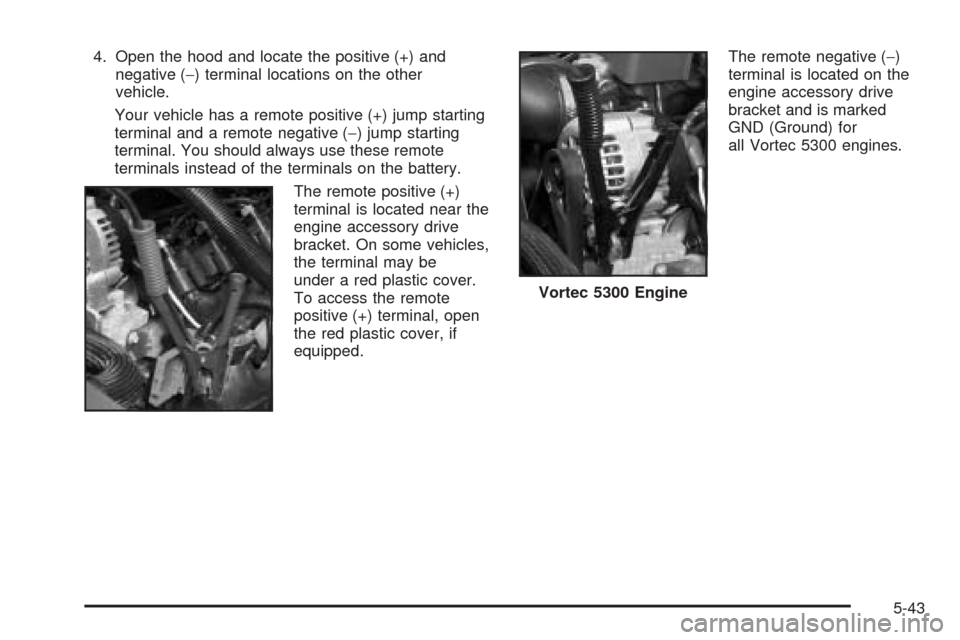
The remote positive (+)
terminal is located near the
engine accessory drive
bracket. On some vehicles,
the terminal may be
under a red plastic cover.
To access the remote
positive (+) terminal, open
the red plastic cover, if
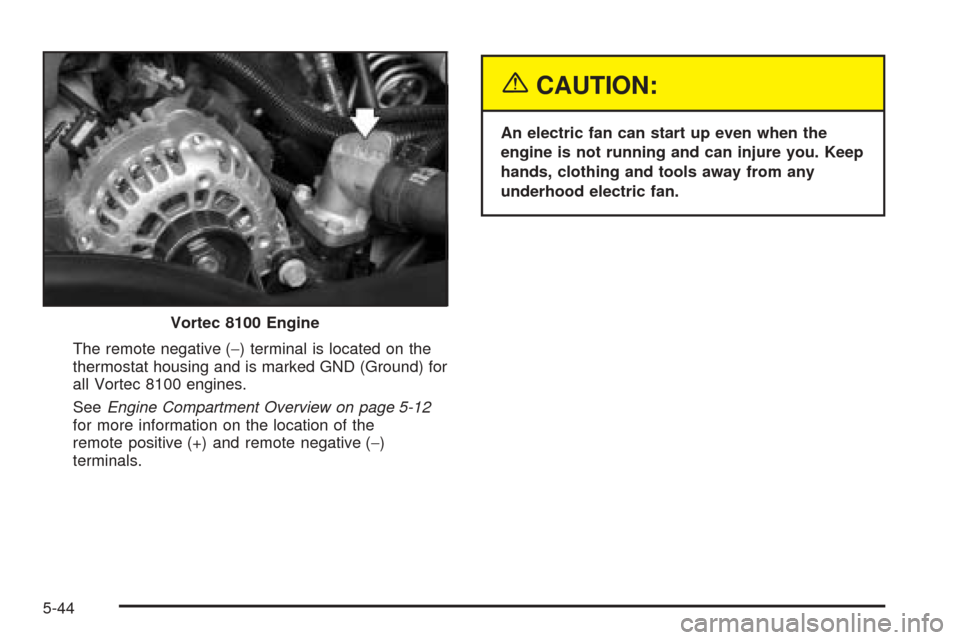
equipped.The remote negative (−)
terminal is located on the
engine accessory drive
bracket and is marked
GND (Ground) for
all Vortec 5300 engines.
Vortec 5300 Engine
5-43
Page 382 of 496
The remote negative (−) terminal is located on the
thermostat housing and is marked GND (Ground) for
all Vortec 8100 engines.
SeeEngine Compartment Overview on page 5-12
for more information on the location of the
remote positive (+) and remote negative (−)
terminals.
{CAUTION:
An electric fan can start up even when the
engine is not running and can injure you. Keep
hands, clothing and tools away from any
underhood electric fan.
Vortec 8100 Engine
5-44
Page 384 of 496
8. Now connect the black negative (−) cable to the
negative (−) terminal of the good battery. Use a
remote negative (−) terminal if the vehicle has one.
Your vehicle’s remote negative (−) terminal is
marked GND.
Do not let the other end touch anything until the
next step. The other end of the negative (−) cable
does not go to the dead battery. It goes to a
heavy, unpainted metal engine part or to a remote
negative (−) terminal on the vehicle with the
dead battery.
9. Connect the other end of the negative (−) cable at
least 18 inches (45 cm) away from the dead battery,
but not near engine parts that move.
The electrical connection is just as good there, and
the chance of sparks getting back to the battery
is much less.
10. Now start the vehicle with the good battery and
run the engine for awhile.
11. Try to start the vehicle that had the dead battery.
If it will not start after a few tries, it probably needs
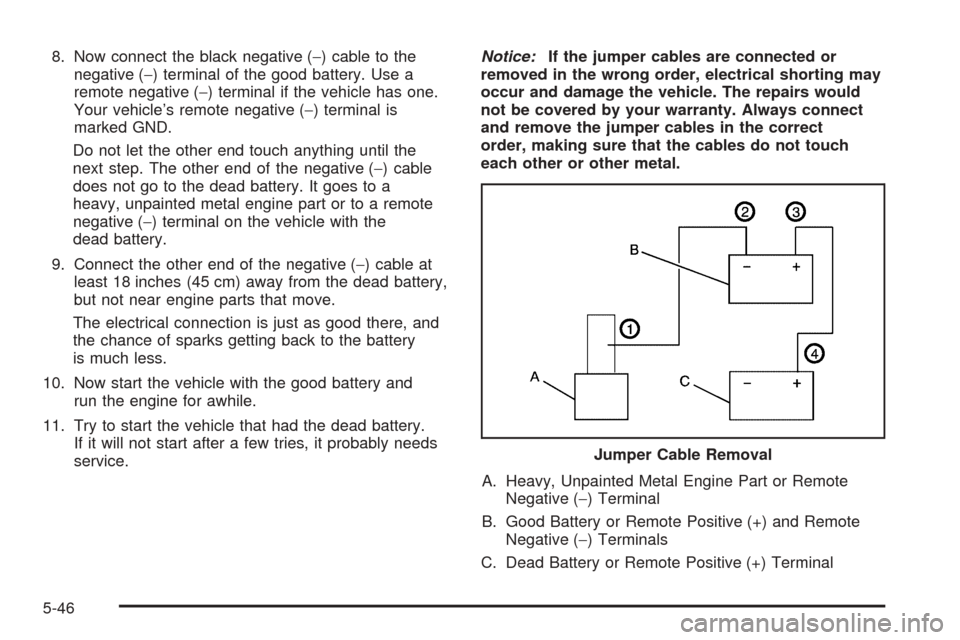
service.Notice:If the jumper cables are connected or
removed in the wrong order, electrical shorting may
occur and damage the vehicle. The repairs would
not be covered by your warranty. Always connect
and remove the jumper cables in the correct
order, making sure that the cables do not touch
each other or other metal.
A. Heavy, Unpainted Metal Engine Part or Remote
Negative (−) Terminal
B. Good Battery or Remote Positive (+) and Remote
Negative (−) Terminals
C. Dead Battery or Remote Positive (+) TerminalJumper Cable Removal
5-46